
1. Introduction
This manual provides detailed instructions for the installation, operation, and maintenance of your Allesin Motorized Roller Blinds. These blackout automatic smart shades are designed for convenience and energy efficiency, offering UV protection, thermal insulation, and enhanced privacy. Please read this manual thoroughly before installation and use to ensure proper functionality and safety.

A white Allesin motorized roller blind, fully extended, covering a window.
2. Product Features
- Eco-Friendly Fabric: 100% blackout triple-layer fabric providing UV protection, thermal insulation, and increased privacy.
- Remote Control: Includes a single-channel remote for easy control of travel limits and motor speed. An optional 15-channel remote is available for multiple shades.
- App & Voice Control: Optional Smart Hub accessories (USB Converter or Smart Bridge) enable control via Tuya app, Alexa, or Google Assistant.
- Energy-Saving & Quiet Motor: Operates below 30dB with ultra-long battery life (3-6 months on 6 AA batteries, included).
3. Package Contents
Verify that all components are present before beginning installation:
- Motorized Roller Blind Unit
- Single-Channel Remote Control
- Mounting Brackets
- Screws for Installation
- 6 AA Batteries (pre-installed or included separately)

An overhead view of the Allesin motorized roller blind, its remote control, and the necessary mounting brackets and screws.
4. Installation
4.1. How to Measure for the Perfect Fit
Accurate measurements are crucial for proper fit and function. Refer to the diagram below for detailed instructions on measuring for both inside and outside mounts.

Detailed diagrams explaining how to accurately measure window width and height for both inside and outside mounting options.
4.2. Recommended Order Width (Inside Mount)
Use the following table to determine the recommended order width for inside mount installations based on your window's width range.

A table providing guidelines for selecting the correct order width for inside-mount blinds, based on the measured window width.
4.3. Mounting Types: Inside vs. Outside
Consider the desired blackout effect when choosing your mounting type. Outside mount is recommended for optimal light blockage.
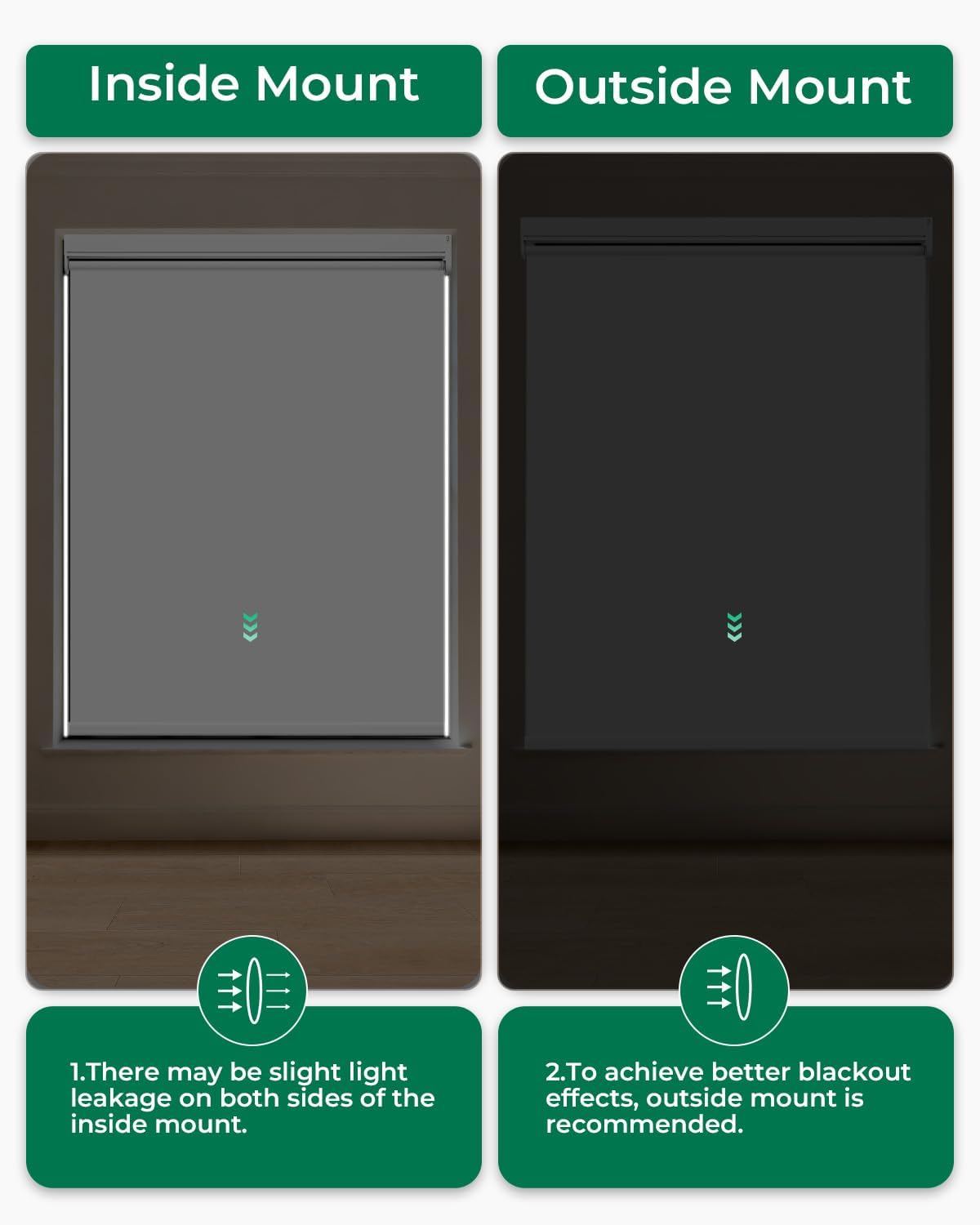
Two images comparing the light-blocking effectiveness of inside-mount (slight light leakage) and outside-mount (better blackout) installations.
4.4. 3-Step Secure Installation
Follow these three steps for a secure installation:
- Secure brackets with screws.
- Align and snap the blind into place.
- Pull down the shade to complete installation.

A visual guide showing the three steps for secure installation: securing brackets, aligning and snapping the blind, and pulling down the shade.
4.5. Installation Video Guide
A short video tutorial on the drilling installation method for Allesin motorized roller blinds, showing how to secure the brackets.
5. Operation
5.1. Remote Control Operation
Use the included single-channel remote to control your blinds. The remote allows you to raise, lower, and stop the blinds, as well as customize travel limits and adjust motor speed.

A hand holding the single-channel remote control, demonstrating its use to adjust the roller blind.
5.2. App & Voice Control (Optional)
For smart functionality, you can integrate your blinds with a Smart Hub (USB Converter or Smart Bridge, sold separately). This enables control via the Tuya app, Alexa, or Google Assistant, allowing for custom schedules, precise opening control, and smart scene automations.

A living room scene showing a woman using a smartphone to control two Allesin motorized roller blinds, illustrating app control functionality.
5.3. Operation Video Guide
This video demonstrates the remote control operation of the Allesin Blackout Smart Roller Blind, showing it raising and lowering smoothly.
6. Maintenance
6.1. Battery Replacement
The motorized blinds are powered by 6 AA dry batteries (included), which typically last 3-6 months with regular use. When the batteries are depleted, they need to be replaced. To replace the batteries:
- Roll up the blinds and lay them flat.
- Unscrew the screw on the left side of the motor with a screwdriver and carefully pull out the battery box. Be careful not to pull hard to prevent loosening the power cord connector.
- Install 6 new AA dry batteries according to the battery box tips, ensuring correct polarity.
- Install the battery box back into the upbeam and reinstall the blinds.
6.2. Battery Replacement Video Guide
This video provides a step-by-step guide on how to safely replace the batteries in your Allesin motorized roller blinds.
6.3. Cleaning
For cleaning, spot clean only. Do not immerse the fabric in water or use harsh chemicals.
7. Troubleshooting
- Blinds not responding to remote: Check if batteries in the remote and the blind motor are correctly installed and have sufficient power. Ensure the remote is within the 20-meter operating range.
- Inconsistent movement: Verify that the blinds are installed level and that there are no obstructions in the window frame.
- App/Voice control issues: Ensure your Smart Hub (if used) is properly connected and configured with your smart home system (Tuya, Alexa, Google Assistant). Check network connectivity.
8. Specifications
| Specification | Detail |
|---|---|
| Material | Polyester |
| Product Dimensions | 72"L x 39"W |
| Brand | Allesin |
| Color | White |
| Opacity | Blackout |
| Operation Mode | Automatic |
| Special Feature | Blackout, Cordless |
| Included Components | Remote Control |
| Product Care Instructions | Spot Clean Only |
| Closure Type | Motorized |
| Size | 39"W x 72"H |
| Mounting Type | Inside Mount |
| Control Type | Remote |
| Item Weight | 4.79 pounds |
| Item Model Number | 10b8091e-4e15-4ea2-9168-d11b224021de |
| Batteries | 6 AA batteries required (included) |
9. Warranty and Support
For warranty information or technical support, please refer to the product packaging or contact Allesin customer service directly. Keep your purchase receipt for any warranty claims.
