
1. Introduction
The SUNPIE 12 Pods High Power RGBW Rock Lights are designed to provide vibrant and customizable lighting for various off-road vehicles, including trucks, SUVs, ATVs, UTVs, and boats. Featuring IP67 waterproof construction, phone app control, and multiple lighting modes, these lights enhance both visibility and aesthetic appeal.
2. Package Contents
Please verify that all items listed below are included in your package:
- 12 x RGBW Rock Light Pods
- 1 x Bluetooth Control Box
- 1 x 24-Key Remote Control
- Mounting Hardware (screws, nuts, 2 different rubber mounting pads)
- 1 x Extra Switch Wire (8.2ft)
- Installation Instructions
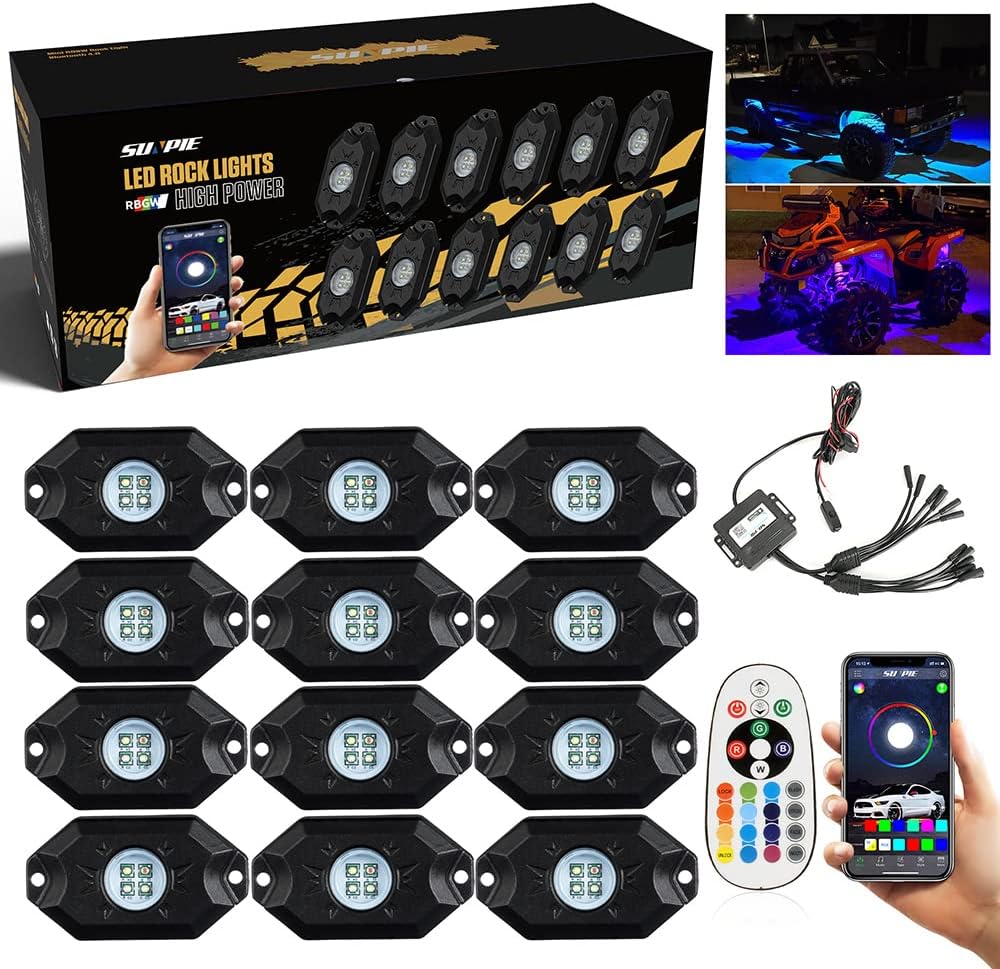
Image: Complete package contents of the SUNPIE 12 Pods RGBW Rock Lights.
3. Features
- High Power 12 Pods RGBW Rock Lights: Compatible with 9V-32V wide range working voltage, suitable for sedans, trucks, SUVs, UTVs, ATVs, boats, and motorcycles. Includes a pure true white color option, distinct from RGB mixed white. Each light comes with 11.5 feet of wire.
- App and Remote Control: Control colors, music mode, over 20 strobe modes, and voice mode via a dedicated phone application or the included 24-key remote control. Multiple sets can be controlled separately by pressing the "lock" button on one pad for 3 seconds.
- IP67 Waterproof and High Temperature Resistant: Designed to withstand water immersion and high temperatures, featuring a durable metal base for better heat dissipation and extended service life.
- Easy Installation: Includes an extra switch wire for complete power cut-off and two different flat and rounded rubber mounting pads for versatile installation on various surfaces.
4. Setup and Installation
Follow these steps for proper installation of your SUNPIE Rock Lights:
- Plan Mounting Locations: Determine the optimal placement for each of the 12 rock light pods on your vehicle. Consider areas like wheel wells, undercarriage, or other accent locations. The provided rubber mounting pads can assist with installation on different surfaces.
- Secure the Pods: Use the included mounting hardware (screws and nuts) to securely attach each rock light pod to the chosen location. Ensure the wires are routed safely and away from moving parts or heat sources.
- Connect Wiring: Connect the wires from each light pod to the Bluetooth control box. Pay attention to the connectors to ensure a secure and waterproof connection. The control box has multiple outputs for the light pods.
- Power Connection: Connect the main power wires from the Bluetooth control box to your vehicle's 9V-32V power source (typically the battery). Ensure proper polarity (red to positive, black to negative). The extra switch wire can be integrated to provide a manual on/off control for the entire system.
- Secure Control Box: Mount the Bluetooth control box in a safe, dry location, preferably near the battery or fuse box, ensuring it is protected from extreme elements.

Image: Detailed view of rock light pods and wiring connections.
Installation Video Guide:
Video: Official SUNPIE installation guide for High Power RGBW LED Rock Lights. This video demonstrates the process of connecting the lights and control box, and mounting the pods on a vehicle.
5. Operating Instructions
Your SUNPIE Rock Lights can be controlled using the included 24-key remote or the dedicated smartphone application.
Using the Smartphone App:
- Download the App: Scan the QR code on the Bluetooth control box or refer to the installation instructions to download the "SUNPIE LED" app from your device's app store (App Store or Google Play).
- Enable Bluetooth: Ensure Bluetooth is enabled on your smartphone.
- Connect to Lights: Open the SUNPIE LED app. The app should automatically detect and connect to your rock lights' Bluetooth control box. If not, select "My Device" and connect to the listed device.
- Control Functions:
- Color Mode: Use the color wheel or preset color options to select any desired color.
- Music Mode: Synchronize the lights with music playing from your phone.
- Voice Mode: Lights react to voice commands or ambient sounds.
- Strobe Modes: Choose from over 20 different strobe and dynamic lighting effects.
- Brightness Adjustment: Adjust the intensity of the lights.
- Multi-Set Control: If you have multiple SUNPIE rock light sets, you can control each set separately by pressing the "lock" button on one of the control pads for 3 seconds.

Image: SUNPIE LED app interface for controlling rock light functions.
Using the 24-Key Remote Control:
The remote control provides quick access to basic functions:
- On/Off: Power the lights on or off.
- Color Selection: Directly select various static colors.
- Brightness: Adjust light intensity.
- Mode Selection: Cycle through different dynamic modes (e.g., flash, fade, strobe).
6. Maintenance
To ensure the longevity and optimal performance of your SUNPIE Rock Lights, consider the following maintenance tips:
- Regular Cleaning: Periodically clean the light pods to remove dirt, mud, and debris, especially after off-road use. Use a soft cloth and mild soap if necessary.
- Inspect Connections: Regularly check all wiring connections for tightness and signs of wear or corrosion. Ensure the waterproof seals are intact.
- Protect Wiring: Ensure all wiring is properly secured and protected from abrasion, excessive heat, and sharp edges.
- Control Box Placement: Verify the control box remains in a dry and protected location to prevent water damage.
7. Troubleshooting
If you encounter issues with your SUNPIE Rock Lights, refer to the following common problems and solutions:
| Problem | Possible Cause | Solution |
|---|---|---|
| Lights do not turn on. | No power, loose connection, blown fuse, faulty control box. | Check power connections to the battery. Ensure all wires are securely connected. Inspect the fuse on the power line and replace if blown. Verify the extra switch wire is in the ON position. |
| Lights are not responding to app/remote. | Bluetooth not connected, remote battery low, interference. | Ensure Bluetooth is enabled on your phone and the app is connected. Replace remote batteries. Reduce distance between phone/remote and control box. |
| Incorrect colors or inconsistent lighting. | Loose connection to individual pods, internal fault. | Check connections for affected pods. If a single pod is faulty, contact customer support for assistance. |
| Lights remain on when vehicle is off. | Improper wiring, control box issue. | Ensure the extra switch wire is used to completely cut power, or verify the main power connection is to a switched power source if desired. |
8. Specifications
- Brand: SUNPIE
- Model: 2021090611
- Color: Black (housing)
- Material: Plastic, Metal
- Power: High Power RGBW LEDs
- Working Voltage: 9V-32V
- Water Resistance Level: IP67 Waterproof
- Connectivity: Bluetooth 4.0 (App Control), RF Remote Control
- Wire Length (per light): 11.5 feet
- Item Weight: 6.14 pounds
- Package Dimensions: 14.57 x 5.55 x 5.31 inches
9. Warranty and Support
SUNPIE provides a 1-year warranty for this product. If you have any questions, concerns, or require assistance, please do not hesitate to contact SUNPIE customer support. They are committed to responding within 24 hours to help resolve any issues.
For further information or to explore other products, visit the official SUNPIE Store: SUNPIE Brand Store
