
1. Introduction
Thank you for choosing the Aigostar USB Rechargeable Book Reading Light. This manual provides essential information for the safe and efficient use of your new device. Please read it thoroughly before operation and retain it for future reference.
2. Product Overview
The Aigostar Book Reading Light is a versatile, portable LED lamp designed for various lighting needs. It features adjustable brightness, eye-care technology, and a flexible design for optimal positioning.
Key Features:
- 3 Adjustable Brightness Levels: Low, Medium, and High settings to suit different environments.
- Eye-Care Technology: Designed to be flicker-free and reduce eye strain.
- USB Rechargeable: Built-in micro-USB port for convenient charging.
- Flexible Gooseneck: 360° bendable neck allows for precise light positioning.
- Clip-on Design: Strong, non-slip clamp with rubber pads protects surfaces and allows attachment to various objects up to 2.36 inches (6 cm) thick.
- Portable and Lightweight: Easy to carry and use in multiple locations.
Product Components:

Image 2.1: The Aigostar USB Rechargeable Book Reading Light with its included USB charging cable.

Image 2.2: Detailed view of the light's features including the USB charging port, 1800mAh battery, sturdy clip, and flexible gooseneck.
3. Setup
Unboxing:
Carefully remove the reading light and USB charging cable from the packaging. Inspect for any damage.
Positioning the Light:
The light can be used in two primary ways:
- Clip-on: Use the sturdy clamp to attach the light to a surface such as a book, desk, headboard, or shelf. The clamp opens up to 2.36 inches (6 cm) and features rubber pads to prevent scratches.
- Stand: Place the light on a flat surface, using the base of the clamp as a stable stand.

Image 3.1: Demonstrates the light's versatility as both a clamp-on and a freestanding unit.
Adjust the flexible gooseneck to direct the light precisely where needed.

Image 3.2: The non-slip clip features protective rubber pads to secure the light without damaging surfaces.
4. Operation
Power On/Off and Brightness Adjustment:
The light features a touch-sensitive switch on its base.
- To Turn On/Off: Press the touch switch once.
- To Adjust Brightness: With the light on, repeatedly press the touch switch to cycle through the three brightness levels: Low (30%), Medium (50%), and High (100%).

Image 4.1: Illustration of the touch-sensitive switch and the three available brightness settings.
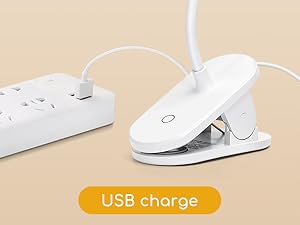
Image 4.2: The touch switch allows for easy control of the light.
Charging the Battery:
The light is powered by a built-in rechargeable battery. To charge:
- Locate the micro-USB charging port on the side of the light's base.
- Connect the provided USB cable to the light's micro-USB port.
- Connect the other end of the USB cable to a compatible USB power source (e.g., laptop, power bank, USB wall adapter).
- An indicator light will illuminate during charging.

Image 4.3: The light can be charged via various USB power sources, including laptops, power banks, and USB wall sockets.

Image 4.4: The light is easily charged using a standard USB connection.
Battery Life:
- Dim Light: Approximately 30 hours
- Medium Light: Approximately 7 hours
- Bright Light: Approximately 3 hours
Product Video:
Video 4.1: This video demonstrates the features of the Aigostar LED Clip-on/Stand USB Cable Light, including its smart touch switch, extensive battery life, eye protection features (no blue light, no flicker), scratch-resistant clamp, 360° flexible gooseneck, and lightweight, portable design.
5. Maintenance
Cleaning:
Wipe the light with a soft, dry cloth. Do not use abrasive cleaners or solvents, as these may damage the finish.
Battery Care:
To prolong battery life, unplug the device once it is fully charged. Overcharging can potentially harm the battery.
6. Troubleshooting
If you encounter issues with your Aigostar Book Reading Light, please refer to the following common solutions:
- Light not turning on: Ensure the battery is charged. Connect the light to a USB power source and try again.
- Light flickering: This product is designed to be flicker-free. If flickering occurs, ensure the light is fully charged. If the issue persists, contact customer support.
- Charging issues: Verify that the USB cable is securely connected to both the light and the power source. Try a different USB cable or power source to rule out external factors.
7. Specifications
| Brand | Aigostar |
| Model | B09VRXB336 |
| Product Dimensions | 1"D x 1.95"W x 7.33"H |
| Item Weight | 4.8 ounces |
| Lamp Type | Desk Lamp / Clip Light |
| Light Source Type | LED |
| Brightness | 210 Lumens (Max) |
| Color Temperature | 4000 Kelvin |
| Color Rendering Index (CRI) | 80.00 |
| Power Source | Battery Powered (USB Rechargeable) |
| Battery Capacity | 1800mAh (implied from images) |
| Switch Type | Touch |
| Material | Acrylonitrile Butadiene Styrene, Aluminum, Silicone |
| Voltage | 5 Volts (DC) |
| Special Features | Clip-on or Stand, Dimmable Brightness, Rechargeable Battery, Touch Switch, USB Cable |

Image 7.1: Detailed dimensions of the Aigostar Book Reading Light.
8. Warranty and Support
Warranty information for this product is not explicitly provided in the available data. For specific warranty details or technical support, please contact Aigostar customer service directly through their official channels or the retailer where the product was purchased.