Introduction
Thank you for purchasing the Dolphin SP-2600RBT Portable Bluetooth Speaker. This manual provides essential information for the safe and efficient operation of your new speaker. Please read this manual thoroughly before using the product and retain it for future reference.

Image: The Dolphin SP-2600RBT speaker, showcasing its dual woofers with LED lights and a top-mounted control panel with a phone dock.
Safety Information
To ensure safe operation and prevent damage, please observe the following precautions:
- Do not expose the speaker to water, moisture, or extreme temperatures.
- Do not attempt to disassemble or modify the speaker. This will void the warranty.
- Keep the speaker away from heat sources such as radiators, heat registers, stoves, or other apparatus (including amplifiers) that produce heat.
- Use only the power adapter supplied with the unit.
- Ensure proper ventilation around the speaker. Do not block any ventilation openings.
- Clean only with a dry cloth.
- Avoid placing heavy objects on the speaker.
- Keep out of reach of children.
Package Contents
Please check that all items are present in the package:
- Dolphin SP-2600RBT Portable Bluetooth Speaker
- Wired Microphone
- Remote Control
- AC Adaptor
- Shoulder Strap
- User Manual (this document)
Product Overview
Familiarize yourself with the various parts and controls of your Dolphin SP-2600RBT speaker.
Control Panel and Inputs
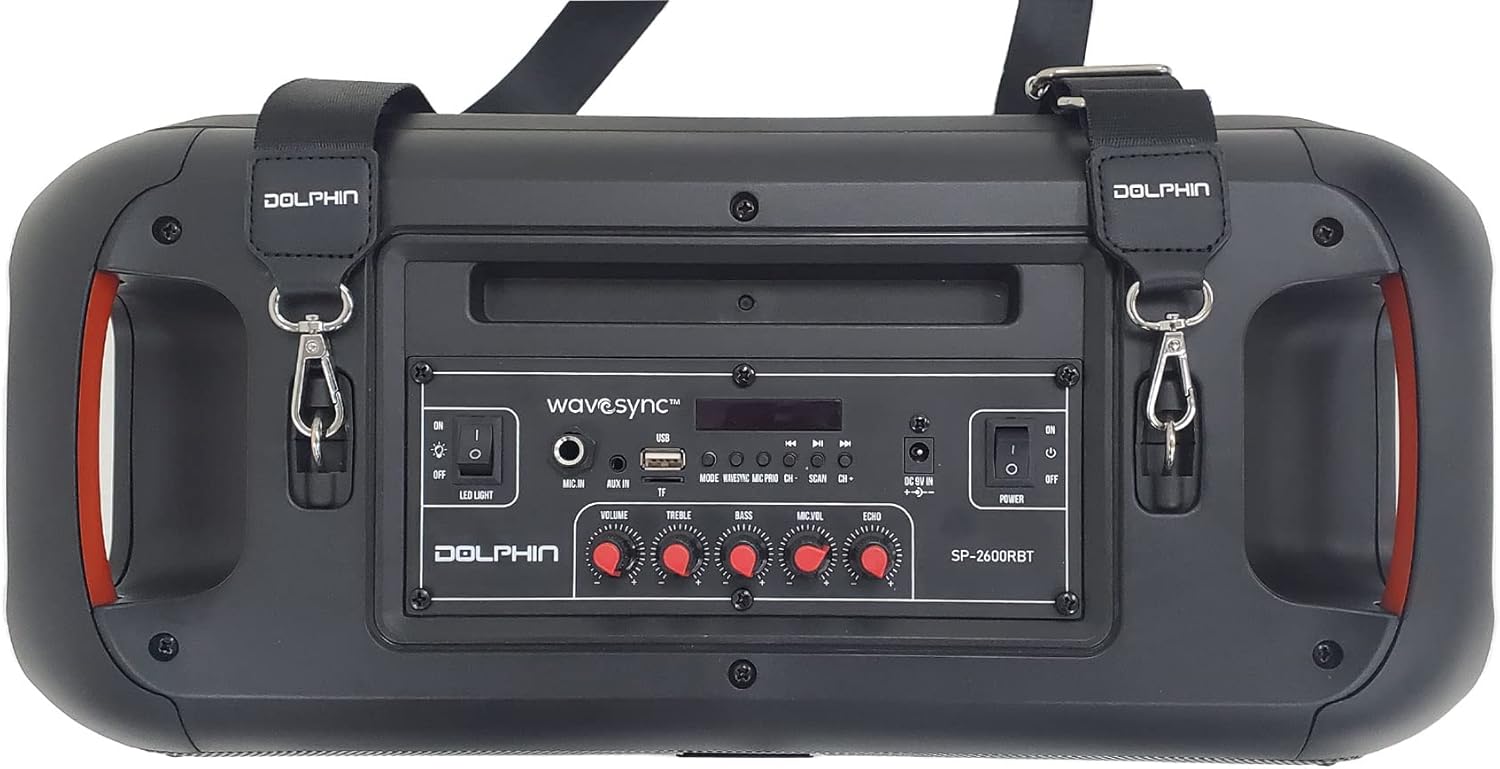
Image: Top view of the speaker showing the control panel, various ports, and attachment points for the shoulder strap.
The top panel of the speaker houses all the main controls and input ports for easy access.
- LED Light Switch: Toggles the rhythmic LED lights on/off.
- Mic In: 6.35mm jack for connecting the wired microphone.
- Volume Knob: Adjusts the overall master volume.
- Treble Knob: Adjusts the high-frequency sound output.
- Bass Knob: Adjusts the low-frequency sound output.
- Mic Vol Knob: Adjusts the microphone volume.
- Echo Knob: Adjusts the echo effect for the microphone.
- Mode Button: Switches between input modes (Bluetooth, USB, MP3, Micro SD, FM Radio, AUX).
- Previous/Next Buttons: Navigates tracks or FM radio stations.
- Play/Pause Button: Controls media playback.
- USB Port: For USB flash drives.
- Micro SD Card Slot: For Micro SD memory cards.
- AUX In: 3.5mm auxiliary input jack.
- DC 9V In: Power input for the AC adaptor.
- Power Switch: Turns the speaker on or off.
- WaveSync™ Button: Initiates pairing with another SP-2600RBT speaker.

Image: Detailed view of the control panel highlighting the various media input options available on the speaker.
Speaker Design and Features

Image: The speaker emphasizing its dual 6.5-inch woofers and 2000W PMPO power output, with vibrant LED lighting.
The SP-2600RBT features dual 6.5-inch woofers and a 1-inch tweeter for powerful and clear audio. It also includes integrated handles for portability and a shoulder strap for easy transport.

Image: Front view of the speaker with the shoulder strap attached, demonstrating its portability and active blue LED lights.
Setup
Charging the Speaker
Before first use, it is recommended to fully charge the speaker's internal battery. The speaker is equipped with a 3600 mAh Li-ion battery providing up to 5 hours of music playback.
- Connect the supplied AC Adaptor to the "DC 9V In" port on the speaker's control panel.
- Plug the AC Adaptor into a standard wall outlet.
- The charging indicator light (if present) will illuminate. The speaker is fully charged when the indicator changes color or turns off (refer to specific indicator behavior on the device).
- Disconnect the adaptor once charging is complete.

Image: Visual representation of the speaker's long battery life, indicating over 5 hours of playtime on a single charge.
Attaching the Shoulder Strap
For enhanced portability, attach the included shoulder strap to the designated loops on the speaker.
- Locate the metal rings on both sides of the speaker's top panel.
- Attach the clips of the shoulder strap to these rings.
- Ensure the clips are securely fastened before carrying the speaker.
Operating Instructions
Power On/Off
- To turn on the speaker, slide the Power Switch to the "ON" position.
- To turn off the speaker, slide the Power Switch to the "OFF" position.
Bluetooth Pairing
- Turn on the speaker. It will automatically enter Bluetooth pairing mode, indicated by a flashing Bluetooth indicator.
- On your mobile device (smartphone, tablet, etc.), enable Bluetooth and search for available devices.
- Select "Dolphin SP-2600RBT" from the list of devices.
- Once paired, the speaker will emit a confirmation sound, and the Bluetooth indicator will stop flashing.
- You can now play audio from your device through the speaker.
USB/Micro SD Card Playback
- Insert a USB flash drive or Micro SD card into the respective port/slot on the control panel.
- The speaker will automatically switch to USB/SD mode and begin playing audio files. If not, press the Mode Button to select the correct input.
- Use the Previous/Next Buttons to skip tracks and the Play/Pause Button to control playback.
Auxiliary Input (AUX)
- Connect an external audio device (e.g., MP3 player, laptop) to the AUX In port using a 3.5mm audio cable (not included).
- Press the Mode Button until "AUX" mode is selected.
- Control playback from your connected audio device.
FM Radio
- Press the Mode Button until "FM" mode is selected.
- Press and hold the Play/Pause Button to initiate an automatic scan for FM radio stations. The speaker will save all found stations.
- Use the Previous/Next Buttons to navigate between saved stations.
Microphone Usage
- Connect the wired microphone to the Mic In port.
- Adjust the microphone volume using the Mic Vol Knob.
- Adjust the echo effect for the microphone using the Echo Knob.
WaveSync™ Technology (Pairing Two Speakers)
The WaveSync™ technology allows you to wirelessly connect two Dolphin SP-2600RBT speakers for a true stereo sound experience.
- Ensure both SP-2600RBT speakers are powered on and in Bluetooth mode (not connected to any device yet).
- On one of the speakers, press the WaveSync™ Button. The speaker will emit a sound indicating it's searching for another speaker.
- The two speakers will automatically connect to each other. A confirmation sound will indicate successful pairing.
- Once connected via WaveSync™, pair your mobile device to one of the speakers via Bluetooth as described above. Audio will now play through both speakers in stereo.

Image: Illustration of the WaveSync™ feature, showing how two SP-2600RBT speakers can be wirelessly paired for enhanced audio output.
LED Lights Control
The speaker features rhythmic LED lights that can be controlled independently.
- To turn the LED lights on or off, use the dedicated LED Light Switch on the control panel.

Image: The speaker showcasing its sound-activated rhythmic spinning LED lights, emphasizing the dedicated switch for control.
Sound Controls (Treble, Bass, Echo)
Adjust the audio output to your preference using the dedicated knobs:
- Rotate the Treble Knob to increase or decrease the high-frequency sounds.
- Rotate the Bass Knob to increase or decrease the low-frequency sounds.
- Rotate the Echo Knob to adjust the echo effect, primarily for microphone use.
Maintenance
Proper maintenance ensures the longevity of your speaker:
- Cleaning: Use a soft, dry cloth to wipe the exterior of the speaker. Do not use liquid cleaners, aerosols, or abrasive chemicals.
- Storage: When not in use for extended periods, store the speaker in a cool, dry place, away from direct sunlight and extreme temperatures.
- Battery Care: To maintain battery health, avoid fully discharging the battery frequently. If storing for a long time, charge the battery to about 50% every few months.
Troubleshooting
If you encounter issues with your Dolphin SP-2600RBT speaker, refer to the following common problems and solutions:
| Problem | Possible Cause | Solution |
|---|---|---|
| No power | Battery is drained; Power switch is off; AC adaptor not connected properly. | Charge the speaker; Ensure power switch is ON; Check AC adaptor connection. |
| No sound | Volume is too low; Incorrect input mode selected; Device not paired (Bluetooth); Cable not connected (AUX). | Increase volume; Press Mode button to select correct input; Re-pair Bluetooth device; Check AUX cable connection. |
| Bluetooth not connecting | Speaker not in pairing mode; Device Bluetooth is off; Speaker too far from device; Interference. | Ensure speaker is in pairing mode; Turn on device Bluetooth; Move device closer to speaker (within 10m); Avoid strong interference sources. |
| Microphone not working | Microphone not plugged in; Mic Vol knob is too low. | Ensure microphone is securely plugged into "Mic In"; Increase Mic Vol knob. |
| WaveSync™ pairing fails | Speakers are too far apart; One speaker already connected to a Bluetooth device. | Ensure speakers are within close proximity; Disconnect any Bluetooth devices from both speakers before initiating WaveSync™. |
Specifications
| Feature | Detail |
|---|---|
| Model Number | SP-2600RBT |
| Brand | Dolphin |
| Speaker Maximum Output Power | 2000 Watts |
| Connectivity Technology | Bluetooth, Auxiliary, USB |
| Audio Output Mode | Stereo |
| Mounting Type | Tabletop Mount, Freestanding Plug Mount |
| Product Dimensions | 22.86 x 46.99 x 24.13 cm |
| Item Weight | 3.06 kg (6.75 lbs) |
| Battery | 3600 mAh Li-ion (up to 5 hours playtime) |
Warranty and Support
This Dolphin SP-2600RBT speaker comes with a manufacturer's warranty. Please refer to the warranty card included in your package for specific terms and conditions, including warranty period and coverage.
For technical support, service, or warranty claims, please contact the retailer where you purchased the product or visit the official Dolphin brand website for contact information. Keep your proof of purchase for warranty validation.
Manufacturer: General Sound Co




