
1. Introduction
This manual provides essential information for the safe and efficient operation, installation, and maintenance of your Summit SINC4B301B 30-inch Induction Cooktop. Please read all instructions carefully before using the appliance and retain this manual for future reference.
2. Safety Information
Your safety and the safety of others are paramount. Always follow basic safety precautions when using this appliance to reduce the risk of fire, electric shock, or injury.
- Ensure proper installation by a qualified electrician.
- Use only induction-compatible cookware.
- Do not touch hot surfaces. Use handles or knobs.
- Never leave the cooktop unattended during operation.
- Keep children away from the cooktop during and after use.
- Disconnect power before servicing or cleaning.
- Refer to the 'Hot Surface Indicator' for residual heat.
3. Setup and Installation
Proper installation is crucial for the performance and safety of your induction cooktop. It is recommended that a qualified professional perform the installation.
3.1. Unboxing
Carefully remove the cooktop from its packaging. Inspect for any damage during transit. Keep all packaging materials until you are satisfied with the product.
3.2. Dimensions and Cutout
The cooktop is designed for installation in cutouts sized at 29 1/2 inches W x 19 5/8 inches D. The overall product dimensions are 2.0 inches H x 30.25 inches W x 20.5 inches D.

Figure 1: Top view of the Summit SINC4B301B 30-inch Induction Cooktop.
3.3. Electrical Connection
This cooktop requires a 208-240V electrical supply. A cord is not included, and hardwiring by a qualified electrician is necessary to ensure compliance with local electrical codes and safety standards.
4. Operating Instructions
Your Summit SINC4B301B induction cooktop offers precise control and efficient cooking.
4.1. Induction Technology
Induction cooking generates heat directly within your cookware, leading to faster heating, less energy waste, and a safer cooking surface. The cooktop surface itself does not heat up directly, only from residual heat transferred from the cookware.
4.2. Cookware Compatibility
Only induction-compatible cookware will work on this cooktop. This includes cast iron, enameled cast iron, and many types of stainless steel. To check compatibility, place a magnet on the bottom of your pot or pan; if it sticks, the cookware is compatible.
4.3. Cooking Zones and Controls
The cooktop features four cooking zones:
- Two large 8 1/4-inch elements (2000W)
- Two 6 1/4-inch elements (1500W)
All cooking zones include a "boost" function for higher power settings, ideal for rapidly boiling water.

Figure 2: Close-up of the touch controls on the Summit SINC4B301B cooktop.
4.4. Touch Controls and Digital Display
The cooktop is operated via intuitive touch controls. The digital display shows the element's usage and power setting. A child lock feature is included to prevent accidental operation.
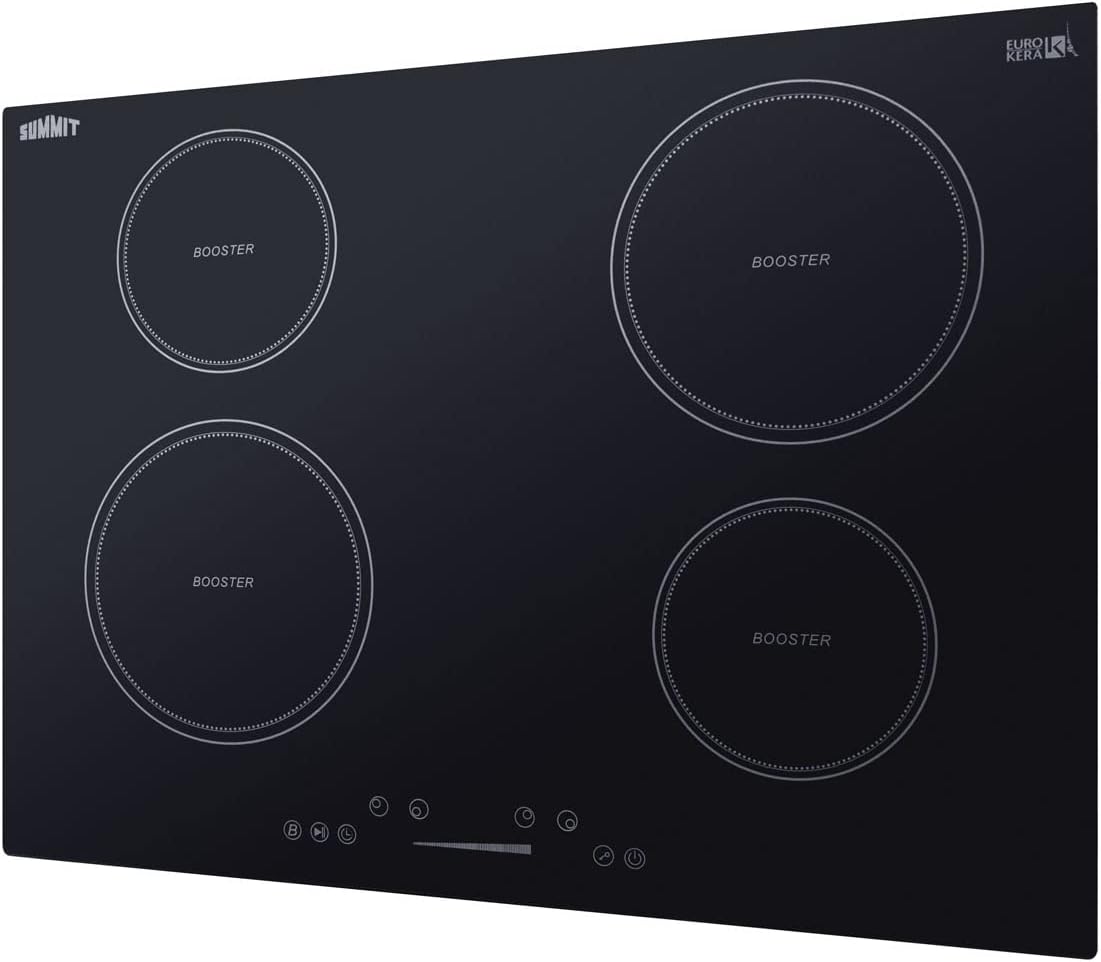
Figure 3: Detailed view of the digital display and touch controls.
4.5. Safety Features
The cooktop incorporates several safety features:
- Automatic Shutdown: The cooktop will automatically shut down after a period of inactivity.
- Overheat Protection: Prevents damage from excessive temperatures.
- Overflow Protection: Temporarily disables power if boiling liquid touches the control panel.
- Hot Surface Indicator: A visual indicator alerts you when a cooking zone retains residual heat.
5. Maintenance and Cleaning
Regular cleaning and maintenance will ensure the longevity and optimal performance of your cooktop.
5.1. Cleaning the Ceramic Glass Surface
The smooth ceramic glass surface is easy to clean. For best results:
- Allow the cooktop to cool completely before cleaning.
- Wipe spills immediately with a damp cloth.
- For stubborn stains, use a ceramic cooktop cleaner and a non-abrasive pad.
- Avoid using abrasive cleaners, scouring pads, or harsh chemicals that can scratch the surface.
6. Troubleshooting
If you encounter issues with your cooktop, refer to the following common problems and solutions:
- Cooktop not turning on: Check the electrical connection and ensure the circuit breaker has not tripped.
- Element not heating: Verify that induction-compatible cookware is being used and properly centered on the cooking zone.
- Error Code "F1": This code typically indicates a malfunction with a cooking zone. Contact customer support for assistance.
- Controls unresponsive: Ensure the child lock is not activated. Clean the control panel to remove any moisture or debris.
For persistent issues, contact Summit Appliance customer support.
7. Specifications
| Feature | Specification |
|---|---|
| Brand | Summit Appliance |
| Model Number | SINC4B301B |
| Color | Black |
| Material | Ceramic Glass |
| Product Dimensions (H x W x D) | 2.0 x 30.25 x 20.5 inches |
| Cutout Dimensions (W x D) | 29 1/2 x 19 5/8 inches |
| Item Weight | 35 Pounds |
| Installation Type | Drop-In |
| Burner Type | Induction |
| Heating Elements | 4 |
| Voltage | 208-240 Volts |
| Wattage | 3000 watts |
| Special Features | Automatic Shut-Off, Digital Display, Safety Lock, Hot Surface Indicator |
| UPC | 761101077611 |
8. Warranty and Support
This product is covered by a manufacturer's warranty. For specific warranty details, please refer to the documentation included with your purchase or visit the official Summit Appliance website. For technical support, parts, or service inquiries, please contact Summit Appliance customer service.
Contact Information: Refer to your product registration card or the manufacturer's website for the most current contact details.


