
1. Product Overview
The WonVon Battery Monitor with Shunt is a high-precision instrument designed to provide comprehensive monitoring of battery systems. It is compatible with a wide range of battery types, including Lead Acid, Lithium Iron Phosphate, Lithium-ion, and Nickel-metal Hybrid, making it suitable for various applications such as RVs, cars, electric motorcycles, golf carts, and boats.
This monitor features a 2.4-inch high-definition color LCD screen for clear display of critical battery parameters, including capacity percentage, time remaining, power, voltage, and current. Its optimized interface and silicone buttons ensure ease of use and a comfortable tactile experience. A key feature is its mobile phone Bluetooth monitoring capability, allowing users to view real-time data and adjust settings wirelessly.

Figure 1.1: The WonVon Battery Monitor display unit and its accompanying shunt module.
Key Features:
- Wide Compatibility: Supports 0-120V batteries, including Lead Acid, LiFePO4, Lithium-ion, and Ni-MH.
- High-Definition LCD Screen: 2.4-inch color display with clear text and optimized interface.
- Bluetooth Monitoring: Wireless connection to mobile phones for real-time data and parameter settings.
- Low Power Consumption: Utilizes high-quality pure copper shunts for efficient operation.
- Easy Installation: Designed for straightforward setup with a stable shunt holder and tab-fixed display.

Figure 1.2: Overview of the comprehensive parameters monitored by the device.
2. Setup and Installation
Proper installation is crucial for accurate operation of your WonVon Battery Monitor. The system consists of the display unit, the current measuring module (shunt), and connecting cables. Please follow these instructions carefully.
2.1 Package Contents
Before beginning installation, verify that all components are present in your package:
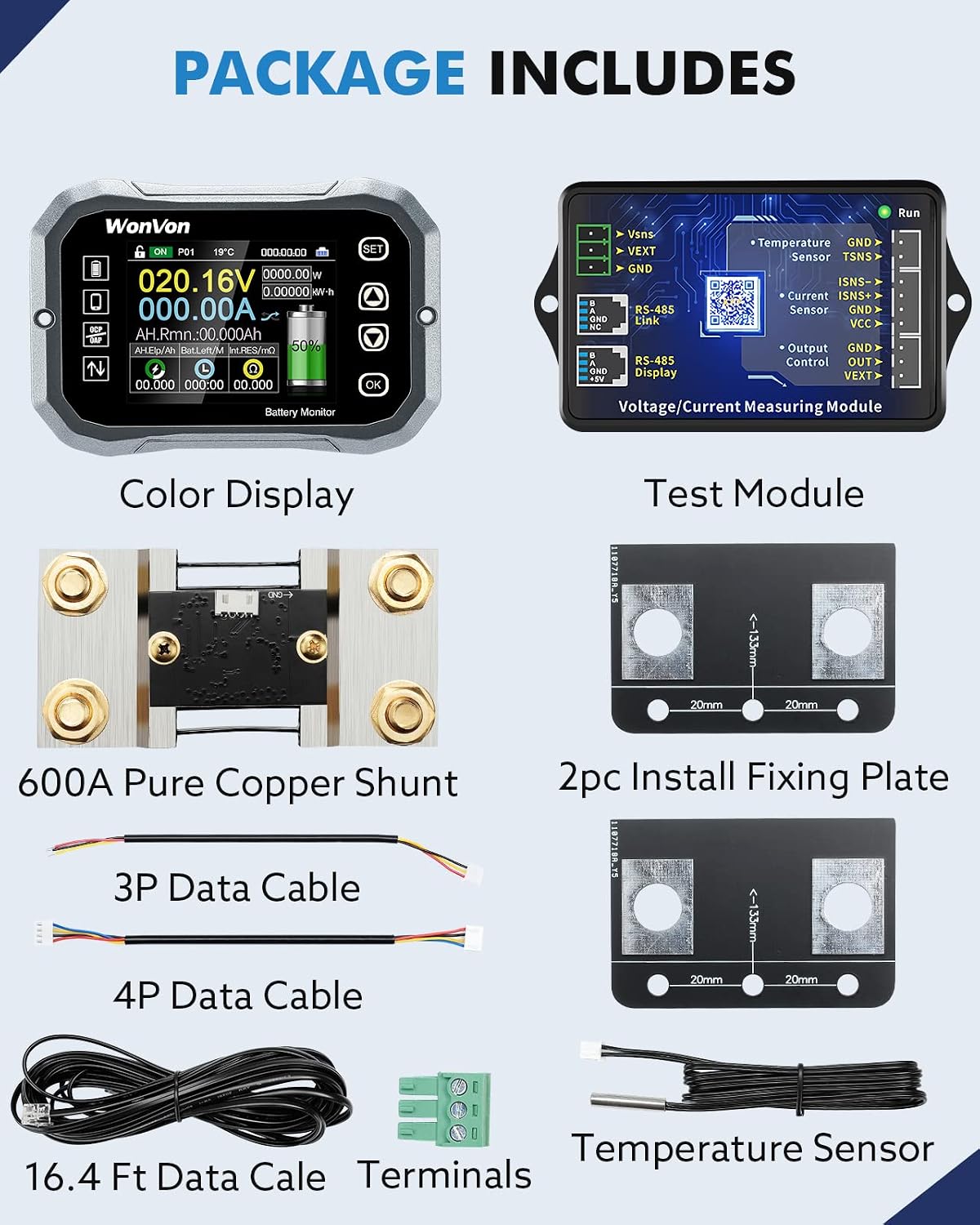
Figure 2.1: Included components in the WonVon Battery Monitor package.
- Color Display Unit
- Voltage/Current Measuring Module (Shunt)
- 600A Pure Copper Shunt
- 2x Install Fixing Plates
- 3P Data Cable
- 4P Data Cable
- 16.4 Ft Data Cable (for display connection)
- Terminals
- Temperature Sensor
2.2 Wiring Instructions
The monitor supports both internal and external power supply configurations. Choose the appropriate wiring diagram for your setup.

Figure 2.2: Detailed wiring diagrams for internal and external power supply.
- Shunt Placement: The shunt should be installed on the negative side of the battery bank. All loads and charging sources must pass through the shunt for accurate current measurement.
- Display Unit Installation: The display unit can be fixed using the provided tabs. Ensure it is mounted in a location that is easily visible and accessible.
- Connecting the Shunt to the Display: Use the 16.4 ft data cable to connect the shunt module to the display unit. This cable transmits data for voltage, current, and temperature.
- Powering the Shunt Module:
- Internal Power Supply (2W Switch): Connect the shunt module's power input directly to the battery's positive terminal. This configuration is suitable for systems where the battery voltage is within the operating range of the shunt module.
- External Power Supply (3W Switch): For systems where the battery voltage might be outside the module's direct operating range or for enhanced stability, connect an external DC 10-80V power source to the shunt module's external power input.
- Temperature Sensor: Connect the temperature sensor to the designated port on the shunt module and place the sensor near the battery for accurate temperature readings.

Figure 2.3: The pure copper shunt and its connection to the display unit.
3. Operating Instructions
Once installed, the WonVon Battery Monitor provides real-time data and allows for configuration via its display or a mobile application.
3.1 Display Interface
The 2.4-inch LCD screen displays various parameters simultaneously. Use the physical buttons on the display unit to navigate menus and adjust settings.
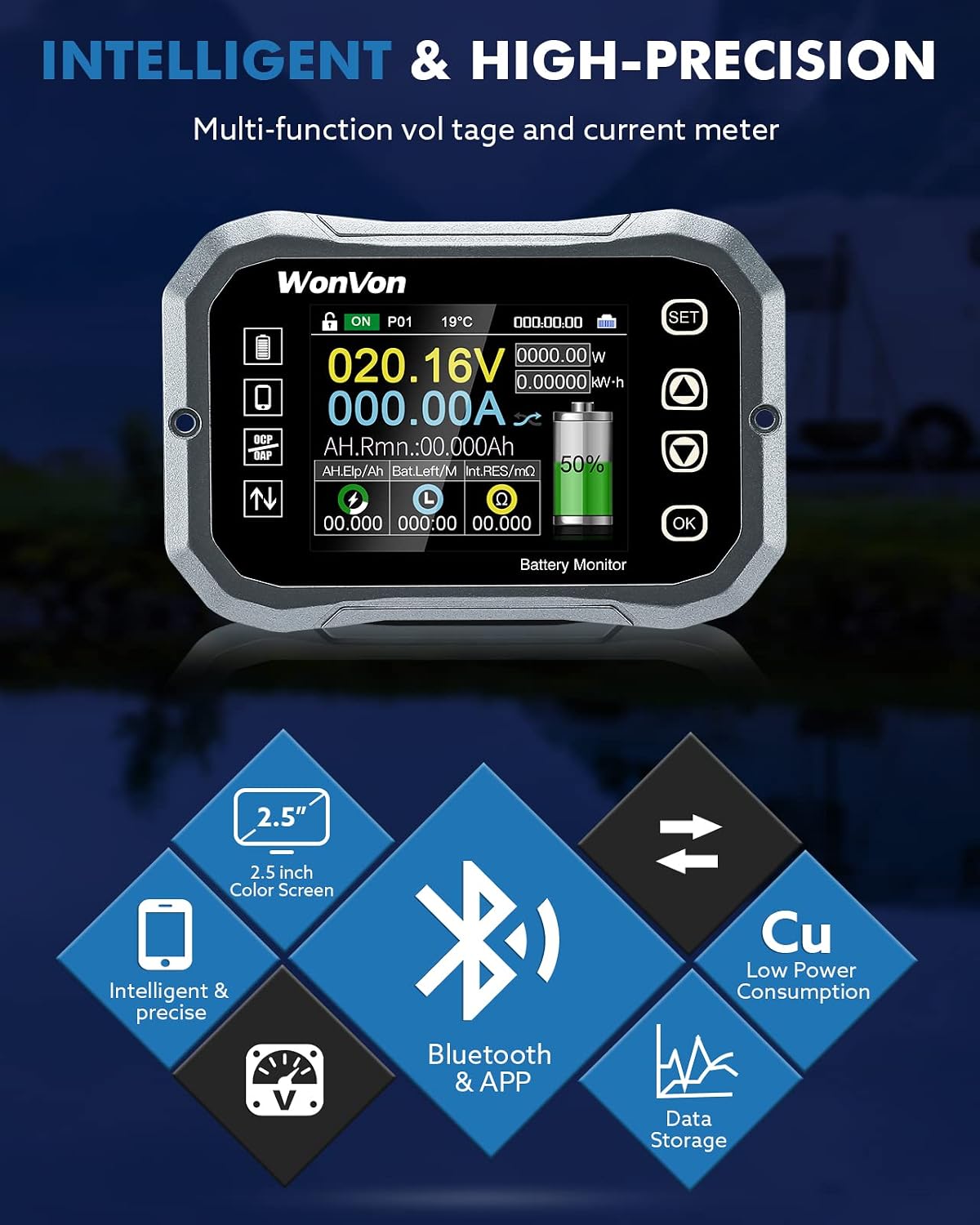
Figure 3.1: The intelligent and high-precision display interface.
- Voltage (V): Displays the current battery voltage.
- Current (A): Shows the real-time charging or discharging current.
- Capacity (Ah): Indicates the remaining battery capacity in Ampere-hours.
- Percentage (%): Displays the battery's state of charge as a percentage.
- Power (W): Shows the instantaneous power consumption or generation.
- Time Remaining: Estimates the time until the battery is fully discharged or charged based on current usage.
- Temperature (°C): Displays the temperature measured by the external sensor.
3.2 Bluetooth App Monitoring
The monitor can connect to your mobile phone via Bluetooth for convenient remote monitoring and control. This feature allows you to view detailed data, historical curves, and adjust parameters from your smartphone.

Figure 3.2: Bluetooth wireless app control interface.
- App Download: Scan the QR code provided in the product packaging or search for the official WonVon battery monitor app in your mobile app store.
- Pairing: Enable Bluetooth on your mobile device. Open the app and follow the on-screen instructions to pair with your battery monitor. Ensure you are within 32.8 feet (10 meters) for optimal connection.
- Data View: Once connected, the app will display real-time data, including voltage, current, power, capacity, and temperature. You can also view historical data and trend curves.
- Parameter Settings: The app allows you to configure various parameters, such as battery capacity, high/low voltage alarms, and other operational settings.
4. Maintenance
To ensure the longevity and accurate performance of your WonVon Battery Monitor, follow these simple maintenance guidelines:
- Cleaning: Gently wipe the display screen and module with a soft, dry cloth. Avoid using abrasive cleaners or solvents that could damage the surfaces.
- Connection Check: Periodically inspect all wiring connections to ensure they are secure and free from corrosion. Loose connections can lead to inaccurate readings or intermittent operation.
- Environmental Conditions: While designed for various environments, avoid exposing the unit to extreme temperatures, direct prolonged sunlight, or excessive moisture.
- Firmware Updates: Check the official WonVon website or app for any available firmware updates that may improve performance or add new features.
- Low Power Consumption: The monitor is designed for very low power consumption due to its high-quality pure copper shunts, minimizing its impact on your battery's overall discharge.
5. Troubleshooting
If you encounter issues with your WonVon Battery Monitor, refer to the following common problems and solutions:
| Problem | Possible Cause | Solution |
|---|---|---|
| Display is blank or not powering on. | No power supply to the shunt module or display. Loose wiring. | Check all power connections to the shunt module and ensure the correct power supply method (internal/external) is used. Verify the 16.4 ft data cable is securely connected. |
| Inaccurate current or voltage readings. | Shunt incorrectly wired (not all loads/charges pass through it). Loose connections at the shunt or module. Incorrect battery capacity setting. | Ensure all negative loads and charging sources are connected to the "Load" side of the shunt. Re-check all wiring according to the diagrams in Section 2.2. Verify the battery capacity setting in the monitor's settings or app. |
| Bluetooth connection issues (drops frequently, limited range). | Interference from other devices. Distance from monitor. App issues. | Ensure no major obstructions between your phone and the monitor. Try moving closer to the monitor (within 32.8 feet). Restart the app and your phone's Bluetooth. Ensure the app is updated to the latest version. |
| Temperature sensor not reading or showing incorrect values. | Sensor not connected or damaged. | Verify the temperature sensor is securely plugged into the shunt module. Inspect the sensor cable for any visible damage. |
If the problem persists after attempting these solutions, please contact WonVon customer support for further assistance.
6. Specifications
Detailed technical specifications for the WonVon Battery Monitor (Model: WU1151WU1049):
| Parameter | Value |
|---|---|
| Brand | WonVon |
| Model Number | WU1151WU1049 |
| Power Source | Electricity, Battery Powered |
| Style | 600A-120V |
| Color | 600A-120V |
| Item Weight | 1.3 Pounds (0.59 kg) |
| Lower Temperature Rating | -20 Degrees Celsius |
| Upper Temperature Rating | 120 Degrees Celsius |
| Measurement Type | Voltmeter, Ammeter, Power Meter, Temperature Sensor, Energy Meter |
| Package Dimensions | 9.8 x 7.32 x 2.17 inches |
| First Available Date | June 1, 2022 |
7. Warranty and Support
WonVon is committed to providing quality products and customer satisfaction.
- Warranty: For specific warranty terms and conditions, please refer to the product documentation included with your purchase or contact WonVon customer service.
- Customer Support: If you encounter any problems during installation or operation, WonVon offers 24-hour online support to answer your questions.
- Official User Manual: A detailed PDF user manual is available for download here.
- Contact Information: For support inquiries, please visit the official WonVon store on Amazon: WonVon Store.

