
ARCTIC ACFRE00145A
ARCTIC Liquid Freezer III 420 A-RGB CPU AIO Water Cooler
Model: ACFRE00145A | Brand: ARCTIC
Introduction
The ARCTIC Liquid Freezer III 420 A-RGB is an all-in-one (AIO) liquid CPU cooler designed for high-performance cooling of Intel and AMD processors. It features a large 420mm radiator, three A-RGB fans, and an efficient PWM-controlled pump with an integrated VRM fan for enhanced motherboard component cooling. This manual provides essential information for the proper installation, operation, and maintenance of your Liquid Freezer III 420 A-RGB.

Image: The ARCTIC Liquid Freezer III 420 A-RGB cooler, showcasing its radiator, three A-RGB fans, and pump unit.
What's in the Box
Upon opening the product packaging, please verify that all components are present and undamaged:
- ARCTIC Liquid Freezer III 420 A-RGB (Black)
- Mounting hardware for Intel (LGA1851, LGA1700) and AMD (AM5, AM4) sockets
- Thermal paste (ARCTIC MX-6 included)
- User Manual and documentation

Image: The retail packaging for the ARCTIC Liquid Freezer III 420 A-RGB, indicating included components and compatibility.
Setup and Installation
Careful installation is crucial for optimal performance. Please follow these general steps. Refer to the detailed user manual (link provided in Warranty & Support section) for specific, step-by-step instructions for your CPU socket type.
Unboxing and Component Overview
Video: An unboxing of the ARCTIC Liquid Freezer III 420 A-RGB, showing the contents and initial presentation.
CPU Socket Preparation
Ensure your CPU socket is clean and free of any debris. For Intel LGA1851 and LGA1700 sockets, utilize the included contact frame to improve pressure distribution and heat transfer.

Image: Illustration of the Intel LGA1851 and LGA1700 Contact Frame, designed for improved CPU contact and heat transfer.
For AMD Ryzen processors, the cooler supports native offset mounting to optimize coverage of the CPU hotspot, enhancing heat transfer efficiency.

Image: Diagram illustrating the native AMD offset mounting, showing how the cold plate aligns with the CPU hotspot for optimal cooling.
Radiator and Fan Installation
Mount the radiator and fans in your PC case. The Liquid Freezer III 420 A-RGB features a 38mm thick radiator. Ensure your case has adequate clearance for this size. The PWM cables of the radiator fans are integrated into the hose jacket for simplified cable management.

Image: Diagram showing the integrated cable management system, where fan cables are routed through the hose jacket for a cleaner build.
Connect the pump, VRM fan, and radiator fans to your motherboard. The cooler offers options for complete control via split connectors or simple regulation with an all-in-one PWM connector.

Image: Illustration detailing the split connector option for individual control of pump, VRM fan, and radiator fans, versus a single all-in-one PWM connector.
Operating Your Cooler
Once installed, the ARCTIC Liquid Freezer III 420 A-RGB operates automatically based on your motherboard's fan control settings. The PWM-controlled pump and fans adjust their speed according to CPU temperature, ensuring efficient cooling while minimizing noise.
Active VRM Cooling
A unique feature of this cooler is the PWM-controlled VRM fan located on the pump block. This fan actively cools the voltage regulator modules (VRMs) on your motherboard, contributing to system stability and longevity.
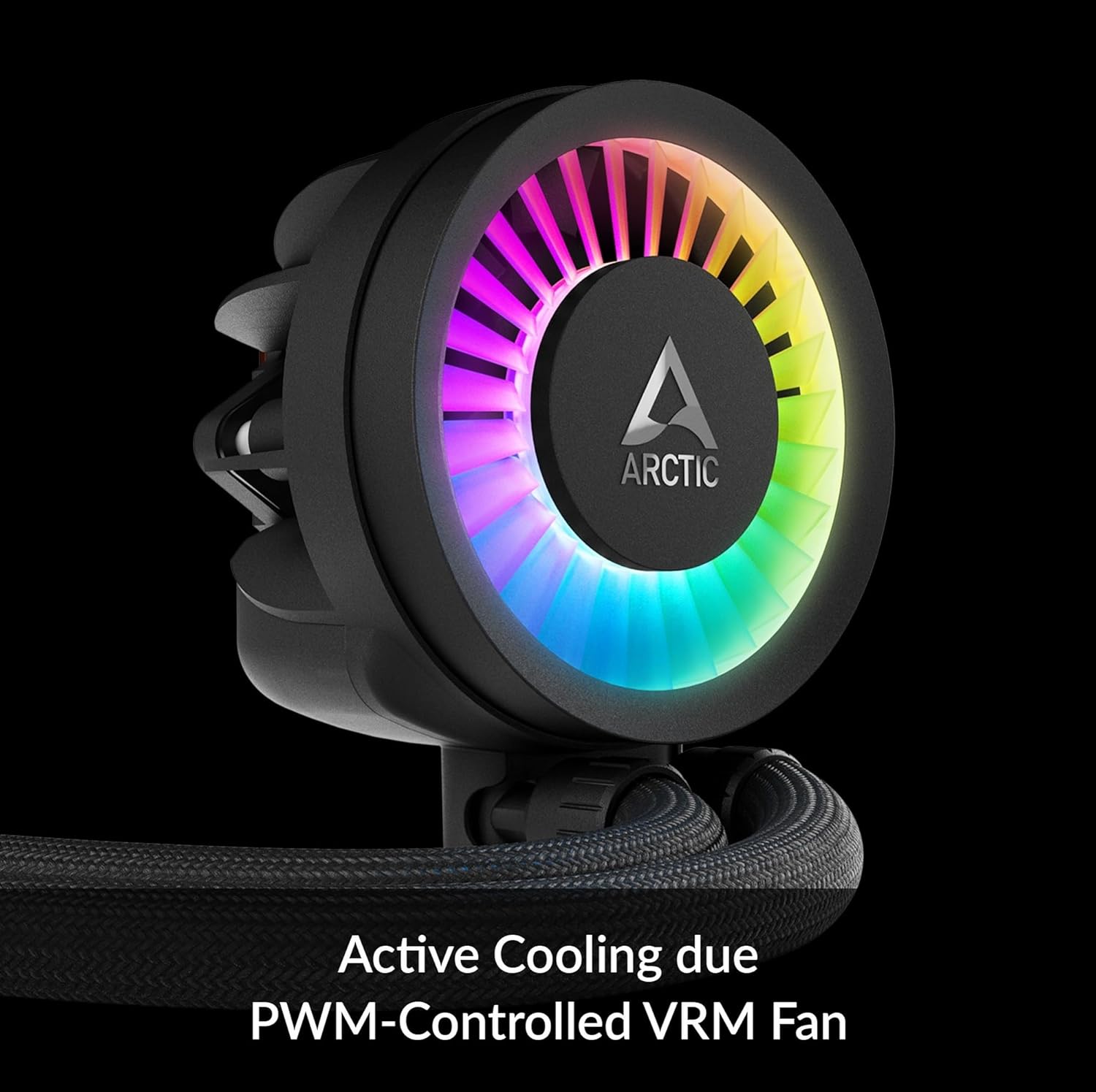
Image: Close-up view of the pump head, highlighting the integrated PWM-controlled VRM fan for active cooling of motherboard components.
A-RGB Lighting Control
The A-RGB fans and pump head feature individually addressable LEDs, allowing for customizable lighting effects. Connect the A-RGB cable to a compatible motherboard header (e.g., ARGB Gen2, MSI Mystic Light Sync, ASRock Polychrome Sync, Gigabyte RGB Fusion 2.0) and use the motherboard's software to synchronize and control the lighting.

Image: The ARCTIC Liquid Freezer III 420 A-RGB installed inside a computer case, showcasing its vibrant individually addressable RGB lighting.
Maintenance
To ensure the longevity and optimal performance of your ARCTIC Liquid Freezer III 420 A-RGB, periodic maintenance is recommended:
- Dust Removal: Regularly clean the radiator fins and fan blades to prevent dust buildup, which can impede airflow and reduce cooling efficiency. Use compressed air or a soft brush.
- Hose Inspection: Periodically check the hoses for any signs of kinks, leaks, or damage. Ensure they are not pinched or excessively bent.
- Pump Check: Listen for any unusual noises from the pump. A properly functioning pump should operate quietly.
- Thermal Paste: While the included thermal paste is high-quality and long-lasting, if you ever need to remount the cooler, ensure to clean off old thermal paste and apply new paste according to the instructions.
Troubleshooting
If you encounter issues with your ARCTIC Liquid Freezer III 420 A-RGB, consider the following common solutions:
- High CPU Temperatures:
- Ensure the pump is running and properly connected to the motherboard's CPU_FAN or AIO_PUMP header.
- Verify that fans are spinning and oriented correctly for optimal airflow (intake or exhaust, depending on your case configuration).
- Check for proper contact between the cold plate and the CPU. Re-apply thermal paste if necessary.
- Confirm that your PC case provides adequate airflow and is not restricting the radiator.
- No RGB Lighting:
- Ensure the A-RGB cable is securely connected to a compatible 3-pin 5V A-RGB header on your motherboard.
- Check your motherboard's RGB software settings to ensure lighting is enabled and configured.
- Compatibility Issues (M.2_1 Slot):
- Oversized coolers on the M.2_1 slot can lead to compatibility problems. Refer to the technical data, the full manual, or the manufacturer's website for an overview and potential solutions. Use the compatibility check tool if available.
For further assistance, please contact ARCTIC customer support.
Specifications
| Feature | Detail |
|---|---|
| Product Dimensions | 18.03"L x 5.51"W x 2.56"H (45.7 x 13.9 x 6.5 cm) |
| Item Model Number | ACFRE00145A |
| Manufacturer | ARCTIC |
| Cooling Method | Water |
| Compatible Devices | Intel: LGA1851, LGA1700; AMD: AM5, AM4 |
| Material | Aluminum |
| Maximum Rotational Speed | 1900 RPM (Fans) |
| Air Flow Capacity | 69.9 Cubic Feet Per Minute (CFM) |
| Power Connector Type | 4-Pin |
| Voltage | 12 Volts |
| Wattage | 4.5 watts |

Image: Technical diagram showing the 38mm radiator thickness and overall dimensions, important for PC case compatibility.
Warranty and Support
The ARCTIC Liquid Freezer III 420 A-RGB comes with a 6-year manufacturer's warranty, ensuring peace of mind regarding its quality and durability. For detailed warranty terms and conditions, please refer to the official ARCTIC website.
For comprehensive installation guides, troubleshooting tips, and further product information, please consult the official User Manual:
You can also visit the ARCTIC Store on Amazon for additional products and support resources.
Related documentsACFRE00145A


Ask a question about this manual
Ask about setup, troubleshooting, compatibility, parts, safety, or missing instructions. Manuals+ will review the question and use this page’s manual context to help answer it.