
1. Introduction
Thank you for choosing the WOWLUMEN UFO Floor Lamp. This 71-inch LED Torchiere Floor Lamp is designed to provide versatile lighting for various environments, including living rooms, bedrooms, and offices. It features a powerful 42W main light with adjustable brightness and color temperature, as well as an RGB ambient light ring with multiple preset modes. Control is convenient via both touch buttons on the lamp pole and an included remote control. This manual will guide you through the assembly, operation, and maintenance of your new floor lamp.
2. What's in the Box
Please ensure all components are present before beginning assembly:
- Lamp (Main Light Head and Pole Sections)
- Lamp Base
- Remote Control
- Power Adapter
- User Manual (this document)
3. Assembly Instructions
Follow these steps to assemble your WOWLUMEN UFO Floor Lamp:
- Unpack Components: Carefully remove all parts from the packaging. Place them on a clean, flat surface.
- Assemble the Pole: The lamp pole consists of several sections. Gently twist each section clockwise to connect them, ensuring the wires inside are not pinched. Continue until all pole sections are securely joined.
- Attach to Base: Thread the assembled pole onto the heavy lamp base. Turn clockwise until it is firmly tightened. Ensure the power cord exits through the designated opening in the base.
- Connect Lamp Head: Connect the lamp head to the top of the assembled pole. Ensure the electrical connector is securely plugged in and then twist the lamp head to secure it.
- Position the Lamp: Place the assembled lamp in your desired location.
- Connect Power: Plug the power adapter into the lamp's power port, then plug the adapter into a standard wall outlet.

Image: Visual guide for assembling the lamp pole and head to the base.
4. Operating Instructions
4.1. Controls
Your lamp can be controlled using the touch buttons located on the lamp pole or the included remote control. The remote control is pre-paired at the factory.
- Power Button: Turns the lamp on/off.
- Main Light Button (Up Lights CW): Controls the main upward-facing light. Short touch changes color temperature (Warm White to Cool White). Long touch adjusts brightness (10%-100%).
- Ring Lights Button (RGB): Controls the ambient RGB light ring. Short touch cycles through light modes (static, dynamic). Long touch adjusts brightness/speed of dynamic modes.
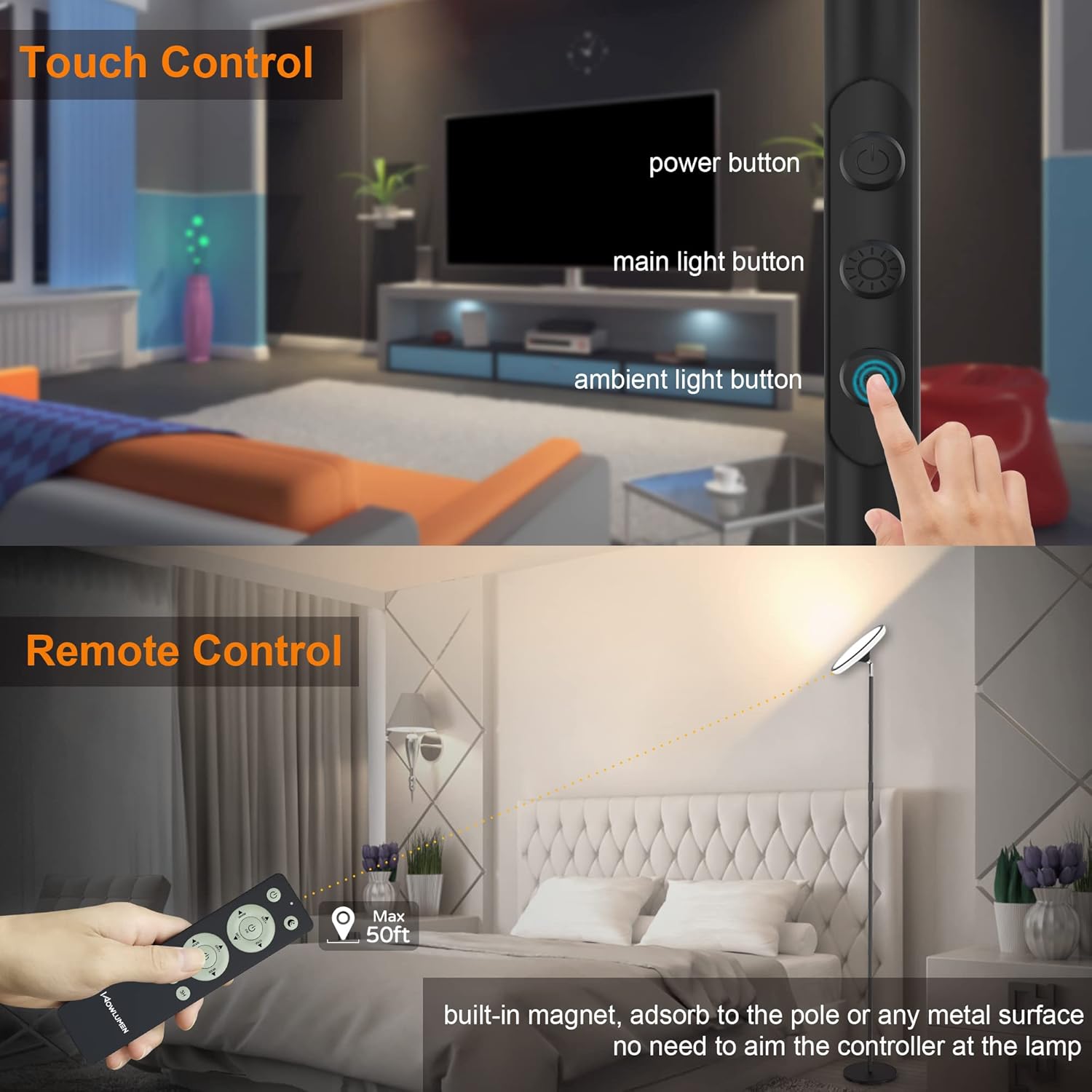
Image: Overview of the touch control panel on the lamp pole and the remote control layout.
4.2. Main Light Operation
The main light provides bright, adjustable illumination for your space.
- Brightness Adjustment: The main light offers stepless dimming from 10% to 100% brightness. Use the dedicated buttons on the remote or long-press the Main Light button on the pole.
- Color Temperature: Adjust the color temperature from 2700K (warm white) to 6500K (cool white) to suit your activity or mood. Short-press the Main Light button on the pole or use the remote.

Image: The main light displaying various color temperatures, from warm to cool white.

Image: The main light illustrating its stepless dimming capability from 10% to 100% brightness.
4.3. RGB Ambient Light Operation
The RGB light ring offers dynamic and colorful ambient lighting.
- Preset Modes: Choose from 12 preset colorful modes, including static colors, rainbow, magic, whirl, aura, breath, and party effects. Cycle through these modes using the Ring Lights button on the pole or remote.
- Brightness/Speed Adjustment: In static RGB mode, adjust brightness from 10% to 100%. In dynamic RGB modes, adjust the speed of the effects from 10% to 100%. Use the dedicated buttons on the remote or long-press the Ring Lights button on the pole.

Image: The RGB light ring showcasing its 12 preset colorful modes for ambient lighting.
4.4. Timer Function
Set the lamp to automatically turn off after a specified duration:
- Use the 1H, 2H, or 3H buttons on the remote control to activate the timer. The lamp will turn off after the selected time.
4.5. Memory Function
The lamp remembers your last settings (brightness, color temperature, RGB mode) even after being turned off or during power outages, eliminating the need for frequent readjustments.
5. Maintenance
- Cleaning: Disconnect the power before cleaning. Use a soft, dry cloth to wipe the lamp. Avoid abrasive cleaners or solvents.
- Bulb Replacement: The LED light source is integrated and not user-replaceable. The lamp has an impressive lifespan of over 50,000 hours.
- Storage: If storing the lamp for an extended period, disassemble it and store it in its original packaging in a dry, cool place.
6. Troubleshooting
| Problem | Possible Cause | Solution |
|---|---|---|
| Lamp does not turn on. | Power cord not properly connected; outlet not working. | Ensure the power cord is securely plugged into the lamp and the wall outlet. Test the outlet with another device. |
| Remote control not working. | Remote batteries are dead; remote is out of range. | Replace the AAA batteries in the remote control. Ensure you are within the 50ft/15m maximum remote distance. |
| Light flickers or is unstable. | Loose connection; power fluctuation. | Check all physical connections of the lamp pole and power adapter. Try plugging into a different outlet. |
| Cannot change light modes/colors. | Incorrect button pressed; remote signal interference. | Refer to Section 4.1 for correct button functions. Ensure no obstructions between remote and lamp. |
7. Specifications
- Model Name: WOWFL-BLACK
- Product Dimensions: 10"D x 10"W x 70"H (180cm Height, 25cm Base Diameter)
- Item Weight: 6 Pounds
- Material: Metal, Plastic
- Light Source Type: LED
- Wattage: 42W
- Brightness: 3700 Lumens
- Color Temperature: 2700K (Warm White) to 6500K (Cool White)
- Color Rendering Index (CRI): >80
- Control Method: Remote, Touch
- Special Features: Dimmable, RGB Ambient Light, Timer (1H/2H/3H), Memory Function, Adjustable Head (350° Rotatable, 180° Up/Down)
- Power Source: Corded Electric (120 Volts AC)
- Indoor/Outdoor Usage: Indoor Only
- Average Life: 50,000 Hours
8. Warranty and Support
WOWLUMEN provides a 24-month product service for this UFO Floor Lamp. If you encounter any issues or have questions regarding your product, please contact WOWLUMEN customer support for assistance. Please refer to your purchase documentation for specific contact details.
