
Introduction
This instruction manual provides essential information for the safe and efficient operation of your ANDONT 2-Stack LED Andon Tower Signal Light. Designed for industrial workstations and production lines, this signal light offers clear visual status signaling to enhance operational efficiency. Please read this manual thoroughly before installation and use, and retain it for future reference.
Safety Information
- Ensure the power adapter is disconnected before any installation, maintenance, or cleaning procedures.
- Do not expose the unit to extreme temperatures or direct sunlight for prolonged periods.
- This product is rated IP65, indicating protection against dust and low-pressure water jets. It is suitable for indoor industrial use. Avoid submerging the unit in water.
- Only use the provided Mean Well industrial power adapter. Using an incorrect power supply may damage the unit or pose a safety risk.
- Keep out of reach of children.
Package Contents
Verify that all items listed below are present in your package:
- Assembled Andon Tower Signal Light (2-Stack, Red/Green)
- Industrial Power Adapter (Mean Well, 6ft cord)
- Mounting Bracket
- Instruction Manual
Product Overview
The ANDONT 2-Stack LED Andon Tower Signal Light features a robust design for industrial environments. It includes two high-brightness LED light stacks (Red and Green) and an integrated control box with ABB selector switches for manual operation.

Figure 1: Complete ANDONT 2-Stack LED Andon Tower Signal Light assembly.

Figure 2: Detail of the Red and Green LED light stacks. Each stack contains 6 high-brightness LEDs.

Figure 3: The control box features two ABB industrial selector switches for independent control of each light stack.
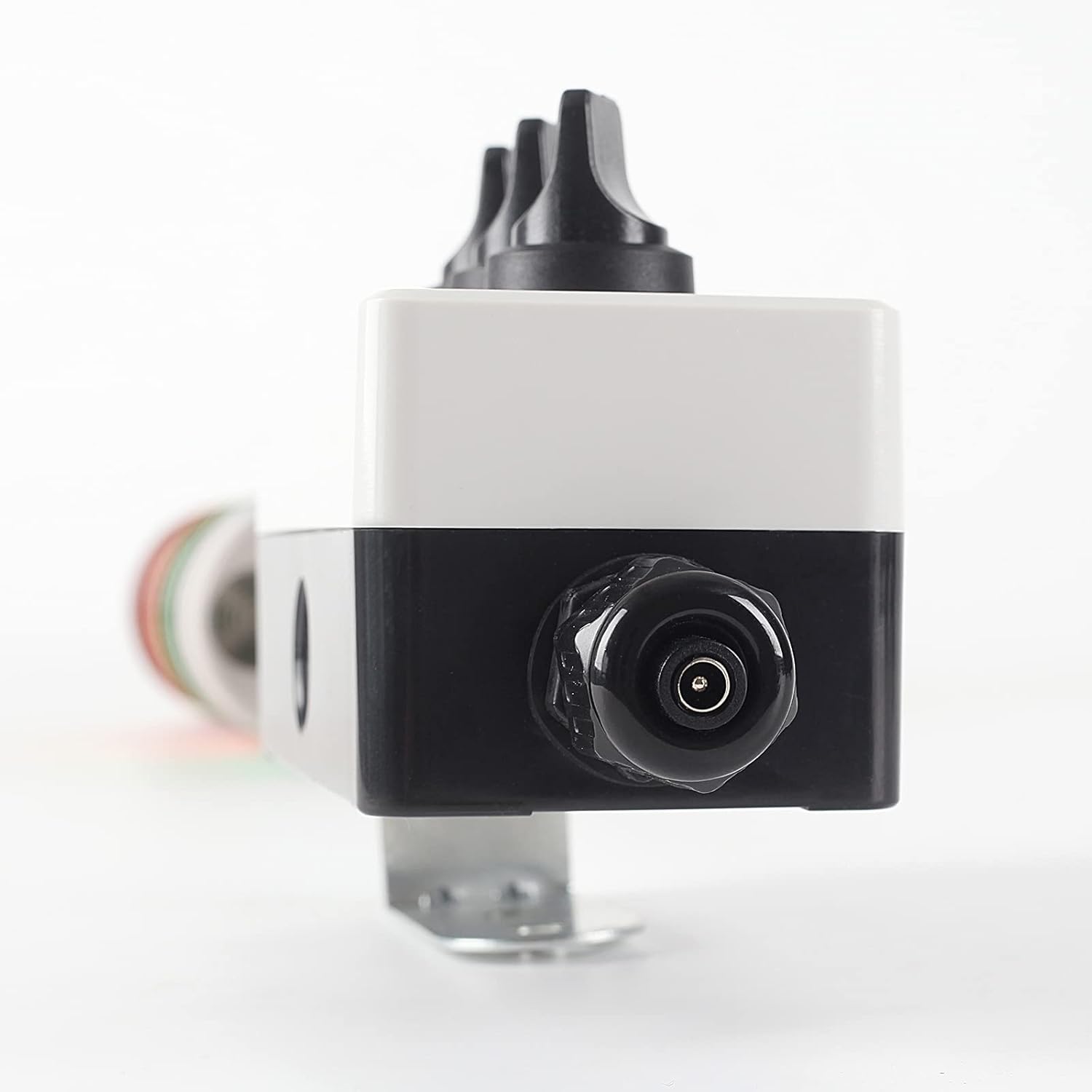
Figure 4: Bottom view of the control box, illustrating the power input connection point.
Setup
1. Unboxing and Inspection
Carefully remove all components from the packaging. Inspect the unit for any signs of damage during transit. If any damage is found, do not proceed with installation and contact customer support.
Video 1: Unboxing and initial setup of the ANDONT 2-Stack LED Andon Tower Signal Light. This video demonstrates how to unpack the product and connect the power adapter.
2. Mounting the Unit
The signal light is designed for pole mounting. Use the included mounting bracket to securely attach the unit to a suitable surface or pole. Ensure the mounting location is stable and provides clear visibility of the signal light.

Figure 5: Dimensional drawing providing measurements for the signal light and its mounting bracket for precise installation.
3. Power Connection
Connect the provided Mean Well industrial-grade AC-DC power adapter to the power input port on the control box. Then, plug the power adapter into a standard 85–264VAC electrical outlet. The unit is designed for plug-and-play installation without complex wiring.
Operating Instructions
The ANDONT 2-Stack LED Andon Tower Signal Light is controlled via two independent ABB selector switches located on the control box. Each switch corresponds to a specific light stack (Red or Green).
- To turn on a light: Rotate the corresponding selector switch from the 'OFF' position to the 'ON' position. The light will illuminate steadily.
- To turn off a light: Rotate the corresponding selector switch from the 'ON' position back to the 'OFF' position.
You can operate the Red and Green lights independently to signal different statuses on your production line or workstation.
Video 2: Demonstration of the ANDONT 2-Stack LED Andon Tower Light in operation, showing the independent control of the Red and Green lights using the selector switches.
Maintenance
- Cleaning: Disconnect power before cleaning. Wipe the exterior surfaces with a soft, damp cloth. Do not use abrasive cleaners or solvents.
- Inspection: Periodically check the power cord and connections for any signs of wear or damage. Ensure the mounting bracket remains secure.
- No user-serviceable parts are inside the light stacks or control box. Do not attempt to open or repair the unit.
Troubleshooting
| Problem | Possible Cause | Solution |
|---|---|---|
| Light does not illuminate | No power supply; Power adapter not connected; Switch in 'OFF' position | Ensure power adapter is plugged into a live outlet; Verify adapter is securely connected to the control box; Turn the selector switch to 'ON' |
| Intermittent light operation | Loose power connection; Damaged power cord/adapter | Check all power connections; Inspect power cord for damage. If damaged, replace the adapter. |
Specifications
| Feature | Detail |
|---|---|
| Model Number | TCH-024-2-1 |
| Color | Red, Green |
| Light Source Type | LED |
| Number of Light Sources | 12 (6 per stack) |
| Voltage | 110 Volts (via adapter) |
| Power Source | Corded Electric |
| Wattage | 18 Watts (Max Compatible), 3 Watt-hours (Typical) |
| Average Life | 50,000 Hours |
| Material | Acrylonitrile Butadiene Styrene (ABS), Aluminum, Polycarbonate (PC) |
| Finish Type | Aluminum |
| Mounting Type | Pole Mount |
| Product Dimensions | 5"L x 3"W x 20"H |
| Item Weight | 2 Pounds |
| Ingress Protection (IP) Rating | IP65 |
| Certifications | CE, RoHS |
Wiring Diagram
For advanced integration or custom applications, refer to the wiring diagram below. This diagram illustrates the internal connections for the light stacks.
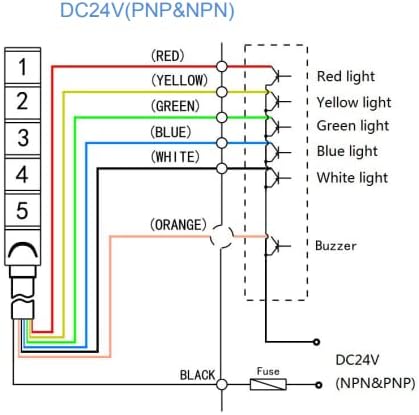
Figure 6: DC24V wiring diagram for the Andon Tower Signal Light, showing connections for Red, Yellow, Green, Blue, White lights, and optional Buzzer (not included in this model).
Typical Applications
The ANDONT 2-Stack LED Andon Tower Signal Light is suitable for various indoor industrial environments to provide clear visual status indications:
- Factories and Manufacturing Plants
- Warehouses and Logistics Centers
- Workshops and Maintenance Areas
- Laboratories and Testing Facilities
- Office environments requiring visual status alerts

Figure 7: Example of the Andon Tower Light in a manufacturing facility, indicating operational status.

Figure 8: Example of the Andon Tower Light used in a warehouse for visual signaling.
Warranty and Support
ANDONT products are manufactured to high-quality standards. For warranty information, technical support, or service inquiries, please refer to the contact information provided with your purchase documentation or visit the official ANDONT website.


