
Introduction
Thank you for choosing the Senicare Digital LED Alarm Clock. This manual provides detailed instructions for setting up, operating, and maintaining your new alarm clock. Please read this manual thoroughly before use to ensure proper functionality and to maximize your experience with its features, including dual alarms, a 7-color night light, a dimmable display, and a convenient USB charging port.
Safety Information
- Ensure the power adapter is compatible with your local power supply (100-240V AC).
- Do not expose the device to water or excessive humidity.
- Avoid placing the clock in direct sunlight or near heat sources.
- Use only the provided power adapter.
- Keep out of reach of small children.
- Do not attempt to disassemble or repair the device yourself. Contact customer support if issues arise.
- Insert batteries correctly, observing polarity (+/-).
Package Contents
- Senicare Digital LED Alarm Clock (Model KT279)
- Power Adapter
- USB Charging Cable
- User Manual (this document)

Figure 1: Senicare Digital LED Alarm Clock and included accessories.
Product Overview
Front View
The front of the clock features a large LED display for time, and indicators for PM, Alarm 1, and Alarm 2.
Top View (Controls)
The top panel houses the main control buttons and the integrated night light bar.
- ALT SET: Alarm 1 Set button.
- AL2 SET: Alarm 2 Set button.
- TIME: Time setting button.
- COLOR: Night light color selection button.
- SNOOZE / LIGHT: Snooze function and night light on/off.
- HOUR +: Adjusts hour, increases alarm volume.
- MIN -: Adjusts minute, decreases alarm volume.
Side View (Ports & Dimmer)
The side of the clock includes the power input, USB charging port, and display dimmer slider.
- DC 5V Power Port: Connects to the power adapter.
- USB Charging Port (5V-1A): For charging external devices.
- DISPLAY DIMMER: Slider to adjust the brightness of the time display (0-100%).
Bottom View (Battery Compartment)
The bottom of the clock contains the battery compartment for backup power.

Figure 2: Rear view highlighting the USB charging port and power input.

Figure 3: Battery compartment for backup power.
Setup
1. Power Connection
- Connect the provided power adapter to the DC 5V Power Port on the back of the clock.
- Plug the power adapter into a standard 100-240V AC wall outlet.
- The LED display will light up, indicating the clock is powered on.
2. Battery Backup (Optional)
For power outage protection, install 2 x AAA batteries (not included) into the battery compartment on the bottom of the clock. This will preserve time and alarm settings during a power interruption, though the display will go black.

Figure 4: The clock retains settings during power outages with battery backup.
Operating Instructions
1. Setting the Time
- Press and hold the TIME button until the hour digits begin to flash.
- Press the HOUR + button to adjust the hour.
- Press the MIN - button to adjust the minute.
- Press the TIME button again to confirm and exit time setting mode.
2. Setting Dual Alarms (Alarm 1 & Alarm 2)
The clock features two independent alarms for different schedules.

Figure 5: Example of dual alarm functionality.
- To Set Alarm 1: Press and hold the ALT SET button until the hour digits for Alarm 1 flash.
- Use the HOUR + and MIN - buttons to set the desired alarm time.
- Press ALT SET again to confirm and activate Alarm 1. The Alarm 1 indicator will appear on the display.
- To Set Alarm 2: Follow the same steps using the AL2 SET button.
- To turn an alarm on or off, briefly press the corresponding ALT SET or AL2 SET button. The alarm indicator will appear/disappear.
3. Snooze Function
When an alarm sounds, press the large SNOOZE / LIGHT button on top of the clock to activate the 9-minute snooze function. The alarm will sound again after 9 minutes.

Figure 6: The SNOOZE / LIGHT button for snooze functionality.
4. Adjusting Display Brightness
The clock features a 0-100% full-range dimmer for the LED time display. Use the DISPLAY DIMMER slider located on the side of the clock to adjust the brightness to your preference.

Figure 7: Adjusting display brightness with the dimmer slider.
5. Night Light Features
The integrated night light offers 7 different colors and adjustable brightness.

Figure 8: The 7-color night light feature.
- Changing Colors: Briefly tap the COLOR button to cycle through the 7 available colors.
- Color Loop Mode: Press and hold the COLOR button for 2 seconds to enter a continuous color-changing loop.
- Turning Off Night Light: Press the SNOOZE / LIGHT button to turn the night light off.
- Adjusting Night Light Brightness: The night light brightness can also be adjusted from 0-100% using the DISPLAY DIMMER slider, similar to the main display.
6. Adjusting Alarm Volume
The alarm volume has 5 adjustable levels, ranging from 45dB to 85dB.
- While an alarm is sounding, or when setting an alarm, press the HOUR + button to increase the volume.
- Press the MIN - button to decrease the volume.

Figure 9: Volume adjustment using HOUR + and MIN - buttons.
7. USB Charging Port
The clock includes a 5V-1A USB charging port on its side, allowing you to charge small electronic devices like smartphones or tablets while the clock is plugged into power.
Maintenance
- Clean the clock with a soft, dry cloth. Do not use abrasive cleaners or solvents.
- Keep the clock away from dust and moisture.
- If not in use for an extended period, remove the backup batteries to prevent leakage.
Troubleshooting
| Problem | Possible Cause | Solution |
|---|---|---|
| Clock display is off. | No power, or display dimmer set to 0%. | Check power connection. Adjust DISPLAY DIMMER slider. |
| Alarm does not sound. | Alarm not set, alarm volume too low, or alarm turned off. | Ensure alarm is set and activated (indicator visible). Increase alarm volume. |
| Time/settings lost after power outage. | No backup batteries installed, or batteries are dead. | Install fresh 2 x AAA batteries for backup. |
| USB charging not working. | Clock not powered by AC, or device requires more than 1A. | Ensure clock is plugged into AC power. Check device's charging requirements. |
Specifications
| Feature | Detail |
|---|---|
| Model | KT279 |
| Display Type | LED |
| Power Source | Corded Electric (100-240V AC) |
| Battery Backup | 2 x AAA batteries (not included) |
| USB Charging Port | 5V-1A |
| Night Light Colors | 7 colors |
| Display Dimmer | 0-100% adjustable |
| Alarm Volume | 5 levels (45dB to 85dB) |
| Snooze Duration | 9 minutes |
| Product Dimensions | 5.91"W x 3.15"H (approx. 150mm x 80mm) |
| Item Weight | 11.7 ounces |
| Material | Plastic |
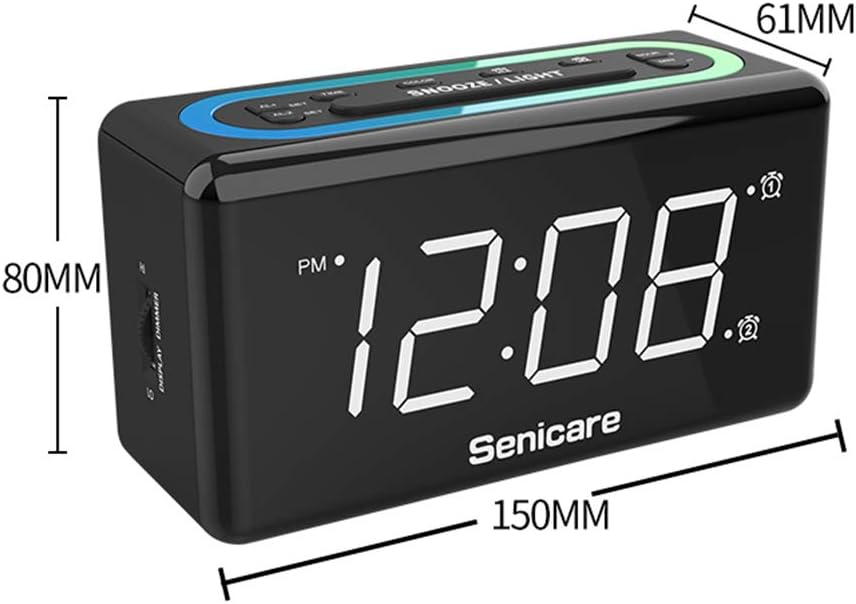
Figure 10: Product dimensions.
Warranty and Support
The Senicare Digital LED Alarm Clock comes with a one-year warranty. We also offer a 30-day money-back guarantee. For any questions or assistance, please contact our customer service team, available 24 hours a day. Your satisfaction is our priority.