
1. Introduction
This manual provides essential instructions for the safe and effective use of your Kastar NP-F990EXP Lithium-Ion Battery 2-Pack. These high-capacity batteries are designed for compatibility with various professional video equipment, including Atomos Shogun Flame, Atomos Shogun Inferno, Atomos Ninja Inferno Recording Monitors, and Z Cam E2-F8 Full-Frame 8K Cinema Cameras.
Please read this manual thoroughly before using the product to ensure optimal performance and longevity.

Image 1.1: Two Kastar NP-F990EXP Lithium-Ion Batteries. These batteries are black, rectangular, and feature LED indicators for charge status.
2. Product Overview
The Kastar NP-F990EXP batteries are designed for high performance and versatility. Key features include:
- High Capacity: 11600mAh (85.8Wh) for extended operation.
- Type-C Charging: Supports direct charging via a Type-C port with a 5V 2A~3A adapter.
- USB Output: Functions as a power bank with a 5V 2.1A USB output for charging external devices.
- LED Indicators: Four LED lights display the current battery charge status.
- Safety Protections: Built-in circuits protect against over-charge, over-discharge, over-voltage, over-current, and over-heating.
Package Contents:
- 2 x Kastar NP-F990EXP Lithium-Ion Batteries

Image 2.1: Product packaging for the Kastar NP-F990EXP Battery. The white box features the Kastar logo and an illustration of a camera.
3. Safety Information
Adhere to the following safety guidelines to prevent damage to the battery and ensure user safety:
- Do Not Incinerate: Never dispose of batteries in fire.
- Do Not Disassemble: Attempting to disassemble the battery can lead to hazards.
- Do Not Short-Circuit: Avoid contact between metal objects and the battery terminals.
- Proper Disposal: Dispose of batteries according to local regulations. Do not discard with general waste.
- Temperature Exposure: Do not expose the battery to high temperatures exceeding 140°F (60°C).
- Water Exposure: Keep the battery dry and away from water or moisture.
- Children: Keep batteries out of reach of children.
Kastar lithium-ion battery cells meet UL1642 & CE safety standards, incorporating built-in over-charge, over-discharge, over-voltage, over-current, and over-heating protection circuits for enhanced safety.
Proposition 65 Warning: This product may contain chemicals known to the State of California to cause cancer and birth defects or other reproductive harm.

Image 3.1: Rear view of the Kastar NP-F990EXP battery, displaying technical specifications and critical safety warnings.
4. Setup and Charging
4.1 Initial Charging
Before first use, fully charge the battery. The NP-F990EXP battery features a Type-C input for convenient charging.
- Connect a Type-C charging cable to the battery's Type-C port.
- Connect the other end of the cable to a 5V 2A~3A USB power adapter (not included).
- The LED indicators on the battery will illuminate to show the charging progress. All four LEDs will be solid when fully charged.

Image 4.1: A Kastar NP-F990EXP battery connected to a Type-C charging cable, indicating the charging process.
4.2 Installation
Insert the battery into your compatible device (e.g., Atomos Shogun Flame, Atomos Shogun Inferno, Atomos Ninja Inferno Recording Monitor, Z Cam E2-F8 Full-Frame 8K Cinema Camera) according to the device's specific instructions. Ensure the battery is securely seated.
5. Operating Instructions
5.1 Checking Battery Status
The battery features four LED indicators to display the remaining charge level. Press the "CHECK" button on the battery to activate the indicators:
- 1 LED: 0-25% charge remaining
- 2 LEDs: 25-50% charge remaining
- 3 LEDs: 50-75% charge remaining
- 4 LEDs: 75-100% charge remaining (fully charged)
5.2 Using as a Power Bank (USB Output)
The NP-F990EXP battery can also function as a portable power bank to charge other USB-powered devices.
- Locate the USB-A output port on the battery.
- Connect your device's USB charging cable to the battery's USB-A output port.
- The battery will provide a 5V 2.1A output to charge your connected device.
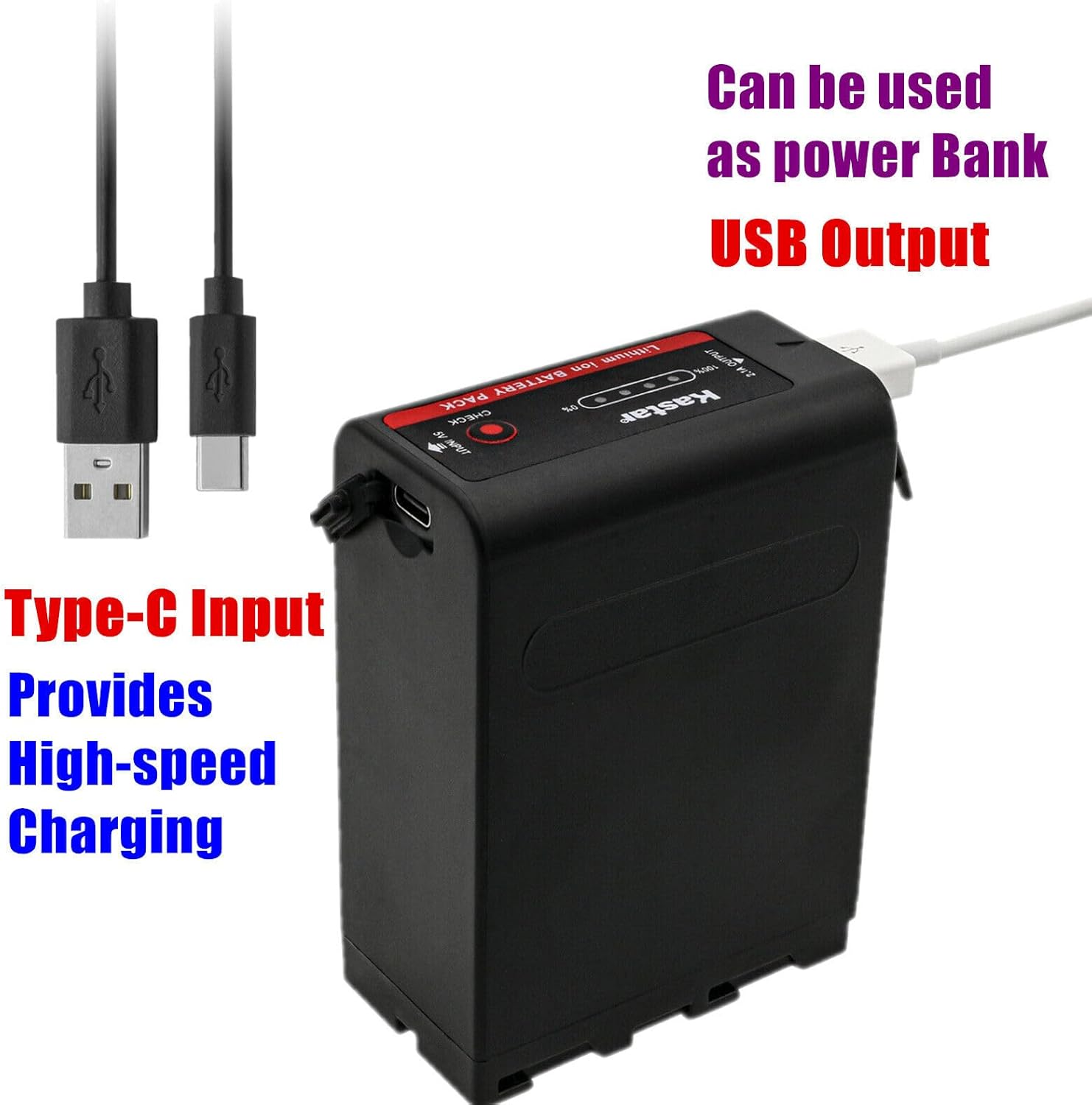
Image 5.1: A Kastar NP-F990EXP battery highlighting its Type-C input and USB output ports, with corresponding cables.

Image 5.2: The Kastar NP-F990EXP battery actively charging an external device using its USB output port.
6. Maintenance
- Cleaning: Use a soft, dry cloth to clean the battery. Do not use harsh chemicals or abrasive materials.
- Storage: Store the battery in a cool, dry place away from direct sunlight and extreme temperatures. For long-term storage, charge the battery to approximately 50-70% capacity.
- Avoid Deep Discharge: Do not allow the battery to completely discharge for extended periods, as this can reduce its lifespan.
- Regular Use: If storing for a long time, it is recommended to fully charge and discharge the battery at least once every six months to maintain battery health.
7. Troubleshooting
| Problem | Possible Cause | Solution |
|---|---|---|
| Battery not charging | Incorrect charger/cable; loose connection; faulty battery. | Ensure Type-C cable is securely connected to a 5V 2A~3A adapter. Try a different cable or adapter. If problem persists, contact support. |
| Battery not powering device | Battery discharged; incorrect installation; device incompatibility. | Check battery charge level using LED indicators. Reinstall battery correctly. Verify device compatibility. |
| LED indicators not working | Battery completely discharged; button malfunction. | Attempt to charge the battery. If no LEDs illuminate after charging, contact support. |
If you encounter issues not listed here or if solutions do not resolve the problem, please contact Kastar customer support.
8. Specifications
| Feature | Detail |
|---|---|
| Model | NP-F990EXP |
| Battery Type | Lithium-Ion |
| Battery Voltage | 7.4V |
| Battery Capacity | 11600mAh (85.8Wh) |
| Charging Input | Type-C, 5V 2A~3A |
| USB Output | 5V 2.1A |
| Product Dimensions | 1.52 x 3.39 x 2.8 inches |
| Item Weight (per battery) | Approximately 7.5 ounces (15 ounces for 2-pack) |
| Safety Standards | UL1642 & CE compliant |
| Built-in Protections | Over-charge, over-discharge, over-voltage, over-current, over-heating |
9. Warranty and Support
Kastar products are manufactured to high-quality standards. For warranty information or technical support, please refer to the official Kastar website or contact their customer service department.
You can find more information and contact details on the Kastar Store on Amazon.