
Introduction
Welcome to your new CANMEIJIA LED Wall Light. This manual provides essential information for the safe installation, operation, and maintenance of your product. Please read these instructions carefully before installation and retain them for future reference.

Image: The CANMEIJIA LED Wall Light is designed for both indoor and outdoor environments, featuring an IP65 waterproof rating.
Safety Instructions
- Always disconnect the power supply at the main circuit breaker before attempting any installation, maintenance, or cleaning.
- Installation should be performed by a qualified electrician or a competent person if you are unsure about electrical wiring.
- Do not modify the product in any way. Unauthorized modifications may void the warranty and pose safety risks.
- Ensure the power supply voltage (AC 85-265V) matches the product specifications to prevent damage.
- Keep the product and its components out of reach of children.
- Do not look directly into the LED light source when it is illuminated, as it may cause eye strain.
Package Contents
- CANMEIJIA LED Wall Light (Model 1)
- Mounting hardware (screws, wall anchors)
- Wrench (for back plate removal)
- Instruction Manual (this document)
Specifications
| Feature | Value |
|---|---|
| Brand | CANMEIJIA |
| Model Number | 1 |
| Product Dimensions (L x W x H) | 27 x 8 x 5 cm (10.63 x 3.15 x 1.97 inches) |
| Weight | 470 grams |
| Power | 10 Watts |
| Voltage | AC 85-265V |
| Color Temperature | 3000K (Warm White) |
| Waterproof Rating | IP65 |
| Material | Aluminum |
| Number of LEDs | 10 LEDs |
| Luminous Flux | 1100 lumens |
| Color Rendering Index (CRI) | 75 |
| Usage Environment | Indoor and Outdoor |

Image: Key technical specifications of the LED wall light.
Installation Guide
Follow these steps for proper installation. Ensure power is disconnected at the main circuit breaker before starting any work.
Step 1: Unscrew the back plate.
Use the provided wrench to detach the back plate from the lamp body. This will expose the internal wiring and mounting points.

Image: Unscrewing the back plate.
Step 2: Mark and drill holes.
Mark the desired mounting position on the wall. Drill holes at the marked points and secure the back plate to the wall using appropriate screws and wall anchors (included).

Image: Marking and fixing the base plate to the wall.
Step 3: Perform wiring test.
Connect the electrical wires from your power supply to the lamp's internal wiring. Briefly test the lamp by restoring power to ensure it functions correctly before final assembly. Disconnect power again after testing.

Image: Wiring connections and testing the lamp.
Step 4: Align and fix the lamp body.
Align the main lamp body with the secured back plate on the wall. Fasten it securely using the provided hexagon screws.

Image: Aligning and fixing the lamp body.
Important: Ensure all electrical connections are secure, properly insulated, and comply with local electrical codes.
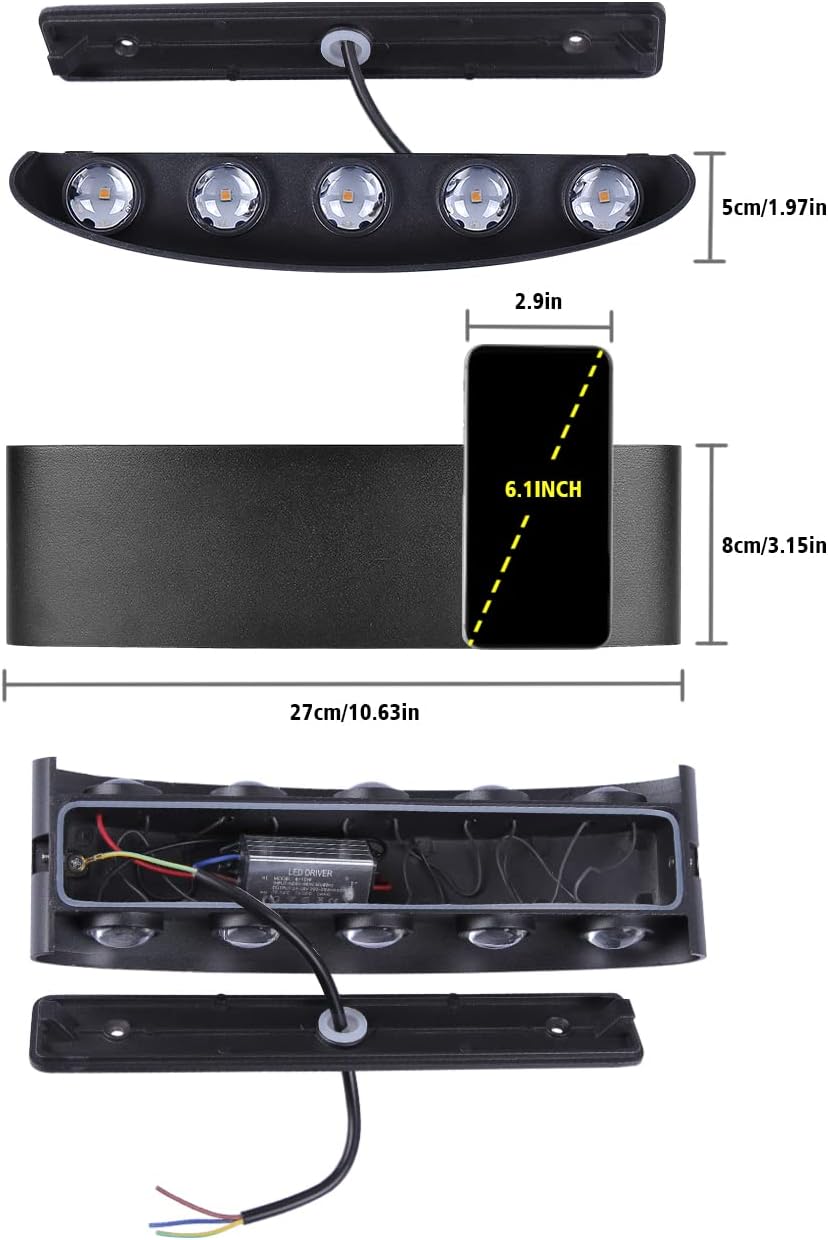
Image: Product dimensions and internal wiring overview.
Operation
Once the CANMEIJIA LED Wall Light is correctly installed and connected to a power source, it operates via a standard wall switch (not included). Simply toggle the wall switch to the 'ON' position to illuminate the light and to the 'OFF' position to turn it off.

Image: Examples of the LED wall light in various indoor settings.
Maintenance
- Cleaning: Always disconnect power before cleaning. Use a soft, dry, or slightly damp cloth to wipe the lamp body. Do not use abrasive cleaners, chemical solvents, or harsh detergents, as these can damage the finish.
- Inspection: Periodically inspect the lamp for any signs of damage, loose connections, or wear. If any issues are found, disconnect power and address them promptly.
- LEDs: The integrated LED light source is designed for long-term use and is not user-replaceable. Do not attempt to open the sealed LED module.

Image: The LED wall light providing illumination in a bathroom.
Troubleshooting
| Problem | Possible Cause | Solution |
|---|---|---|
| Light does not turn on | No power supply Loose wiring connection Faulty wall switch | Check the wall switch and ensure it is in the 'ON' position. Verify the circuit breaker for the light fixture has not tripped. Inspect all wiring connections for tightness. If issues persist, consult a qualified electrician. |
| Light flickers or dims | Loose wiring connection Unstable power supply Incompatible dimmer switch (if applicable) | Ensure all wiring connections are secure. If using a dimmer, confirm it is compatible with LED fixtures. If the problem continues, contact an electrician to check the power supply. |
| Water inside lamp (for outdoor use) | Improper sealing during installation Damage to the lamp housing | Immediately disconnect power. Inspect the lamp for any cracks or gaps in the sealing. Ensure all screws are tightened and the back plate is flush against the mounting surface. If damage is present, the unit may need replacement. |
Warranty and Support
This product comes with a standard manufacturer's warranty. For warranty claims, technical support, or any questions not covered in this manual, please contact your retailer or the manufacturer directly. Please retain your purchase receipt as proof of purchase for warranty purposes.
For additional product information, you may refer to the official EPREL Product Information Sheet: EPREL Product Information Sheet

Image: EU Energy Label for the product.


