
1. Introduction
Welcome to the user manual for your High Tech Pet Power PET® PX2-WIFI Automatic WiFi Dog Door. This advanced electronic pet door provides secure and convenient access for your pet while maintaining home insulation and security. It features a motorized, vertically sliding panel, an ultrasonic pet collar for activation, and WiFi connectivity for app-based control and monitoring.
Please read this manual thoroughly before installation and operation to ensure proper setup and optimal performance.
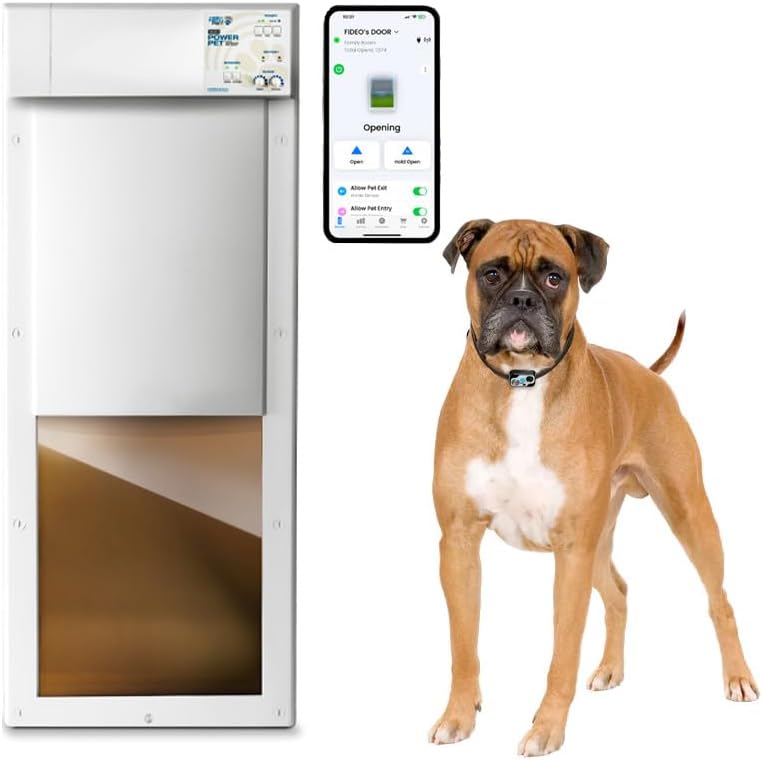
Image 1.1: The High Tech Pet Power PET PX2-WIFI Automatic WiFi Dog Door, showing the main unit, a smartphone with the control app interface, and a Boxer dog wearing the ultrasonic collar.
2. Safety Information
- Read all instructions: Before installing and using the pet door, read and understand all instructions in this manual.
- Supervision: Initially, supervise your pet's use of the door to ensure safe and proper operation.
- Obstruction detection: The door features an automatic safety retract system. However, ensure the path of the sliding panel is clear of obstructions, especially small children or objects, during operation.
- Power source: Use only the provided power adapter. Do not use damaged cords or plugs.
- Water exposure: The pet door unit is designed for indoor installation or protected outdoor areas. Avoid direct exposure to heavy rain or water. The MS-5 collar is waterproof.
- Maintenance: Perform regular checks for wear and tear, especially on the sliding panel and sealing components.
- Intruder security: The steel deadbolt lock provides enhanced security against intruders and stray animals. Ensure it is engaged when maximum security is desired.
3. Package Contents
Verify that all components are present in your package:
- Power PET® PX2-WIFI Automatic Pet Door Unit
- MS-5 Ultrasonic Pet Collar Transmitter
- Power Adapter
- Mounting Hardware (screws, anchors)
- Installation Template
- User Manual (this document)
4. Installation and Setup
4.1. Site Selection and Preparation
Choose a suitable location for your pet door, typically a wall or a door. Ensure there is sufficient clear space for the pet door unit and for your pet to comfortably pass through.
4.2. Dimensions and Cut-Out
Accurate measurements are crucial for proper installation. Refer to the diagram below for the pet door dimensions and the required wall/door cut-out size.

Image 4.1: PX-2 Large Power Pet Door dimensions and recommended cut-out size. The door unit measures approximately 12.38 inches wide by 40.6 inches high. The required cut-out is approximately 12.88 inches wide by 17.25 inches high.
The maximum pet size for this large model is for dogs up to 100 pounds, with a shoulder height of approximately 14 inches and a body width of 10 3/8 inches.

Image 4.2: Maximum pet dimensions for the PX-2 Large model.
4.3. Mounting the Pet Door
- Use the provided template to mark the cut-out area on your wall or door.
- Carefully cut the opening according to the marked lines.
- Position the pet door unit in the opening and secure it using the provided mounting hardware. Ensure it is level and flush.
- Connect the power adapter to the pet door unit and plug it into a standard electrical outlet.
4.4. Initial Power-Up and Calibration
Upon first power-up, the door will perform a self-test. Observe the panel's movement to ensure it opens and closes smoothly without obstruction.
5. Operation
5.1. Manual Control Panel
The pet door features a manual control panel located on the top of the unit. This panel allows for basic control and status monitoring.
- ON/OFF Switch: Powers the unit on or off.
- OPEN/CLOSE Buttons: Manually opens or closes the pet door panel.
- TIMERS Button: Activates or deactivates scheduled operations (configured via the app).
- Battery Indicator: Shows the status of the optional backup battery (OK/LOW).
- Sensors: Indicators for inside and outside sensor activation.
- Range Controls: Knobs to adjust the activation range for inside and outside sensors.

Image 5.1: The control panel and visual representation of the four access control modes.
5.2. Access Control Modes
The pet door supports four access control modes, configurable via the manual control panel or the smartphone app:
- Enter Only: Allows pets to enter but not exit.
- Exit Only: Allows pets to exit but not enter.
- Enter & Exit (Full Access): Allows pets to enter and exit freely.
- Closed & Locked: The door remains closed and the steel deadbolt is engaged for maximum security.
5.3. Ultrasonic Pet Collar (MS-5)
The MS-5 collar transmits a unique, patented ultrasonic signal that activates the pet door.
- Directional Sensing: The door is designed to open only when your pet approaches directly, preventing accidental openings when your pet is merely wandering nearby or sleeping.
- Range Adjustment: Use the "RANGE" knobs on the control panel to adjust the activation distance for both inside and outside sensors. Turn clockwise to increase range, counter-clockwise to decrease.

Image 5.2: Dual range controls for inside and outside activation.

Image 5.3: Directional sensing ensures the door opens only on a direct approach.
6. App Control and Features
6.1. Connecting to WiFi and App Download
- Download the "High Tech Pet" app from your smartphone's app store (iOS or Android).
- Follow the in-app instructions to connect your PX2-WIFI pet door to your home WiFi network. Ensure your WiFi network is compatible (some specific internet types may not be supported, refer to app for details).
- Create an account and register your pet door.
6.2. App Interface and Functions
The app provides comprehensive control and monitoring capabilities from anywhere with a WiFi connection.

Image 6.1: Smartphone app interface for controlling the pet door.
- Remote Control: Open, Close, and Hold Open the pet door panel remotely.
- Access Permissions: Control "Allow Pet Exit" and "Allow Pet Entry" settings.
- Scheduling: Set an unlimited number of individual entry and exit timers for your pet's schedule.
- Real-Time Notifications: Receive alerts when your pet enters or exits, reports potential problems, and low battery alerts.
- Multi-Door Control: The app can manage an unlimited number of High Tech Pet doors.
- Sharing: Share control of the door with family members or pet caregivers.

Image 6.2: Detailed views of the app's main control, scheduling, and notification features.
7. Maintenance
- Cleaning: Regularly wipe down the pet door panel and frame with a damp cloth. Avoid abrasive cleaners.
- Track Inspection: Periodically check the vertical tracks for any debris or obstructions that could hinder the panel's smooth operation.
- Collar Battery: Monitor the battery level of the MS-5 collar. Replace or recharge as needed to ensure continuous operation. Low battery alerts are available via the app.
- Power Adapter: Inspect the power adapter and cord for any signs of damage. Replace if necessary.
8. Troubleshooting
| Problem | Possible Cause | Solution |
|---|---|---|
| Door does not open for pet. |
|
|
| Door opens unexpectedly. |
|
|
| App cannot connect to the pet door. |
|
|
| Door panel does not move smoothly. |
|
|
9. Specifications
| Model Number | PX2-WIFI |
| UPC | 856812007016 |
| Product Dimensions | 12 x 2 x 28.7 inches (Door Unit) |
| Item Weight | 40 pounds |
| Maximum Pet Weight | 100 Pounds |
| Frame Material | Plastic |
| Color | White |
| Power Source | AC Adapter (included) |
| Collar Type | MS-5 Ultrasonic Transmitter (Waterproof) |
| Connectivity | WiFi (2.4 GHz) |
10. Warranty and Support
High Tech Pet Products, Inc. is a US-based company committed to providing quality products and customer service.
- Customer Service: For assistance with installation, operation, troubleshooting, or warranty inquiries, please contact our US-based customer service team. Contact information can typically be found on the manufacturer's website or product packaging.
- Warranty: Specific warranty details are provided with your product documentation. Please retain your proof of purchase for warranty claims.

Image 10.1: High Tech Pet company logo.


