
AENO RC2S
AENO RC2S Robot Vacuum Cleaner User Manual
Model: RC2S
1. Introduction
Thank you for choosing the AENO RC2S Robot Vacuum Cleaner. This intelligent device is designed to provide efficient and convenient cleaning for your home, combining vacuuming and mopping functionalities. Equipped with advanced laser scanning technology, it maps your living space for thorough and systematic cleaning. Please read this manual carefully before using the product to ensure proper operation and maintenance.
2. Safety Information
To reduce the risk of injury or damage, read these safety instructions carefully and keep them for future reference.
- This appliance can be used by children aged 8 years and above and persons with reduced physical, sensory or mental capabilities or lack of experience and knowledge if they have been given supervision or instruction concerning use of the appliance in a safe way and understand the hazards involved.
- Cleaning and user maintenance shall not be made by children without supervision.
- Do not use the robot in environments with high humidity or near heat sources.
- Ensure the charging station is placed on a flat surface against a wall, with adequate clear space around it.
- Do not allow the robot to pick up large objects, liquids, or burning/smoking materials.
- Regularly clean the brushes and sensors to maintain optimal performance.
- Use only the original power adapter and charging station provided with the robot.
3. Package Contents
Verify that all components are present in the package:
- AENO RC2S Robot Vacuum Cleaner
- Charging Station
- Power Adapter
- Dustbin
- Water Tank (with mop pad)
- Side Brushes (x2)
- Cleaning Tool
- User Manual
4. Product Overview
Familiarize yourself with the main components of your AENO RC2S robot vacuum cleaner.
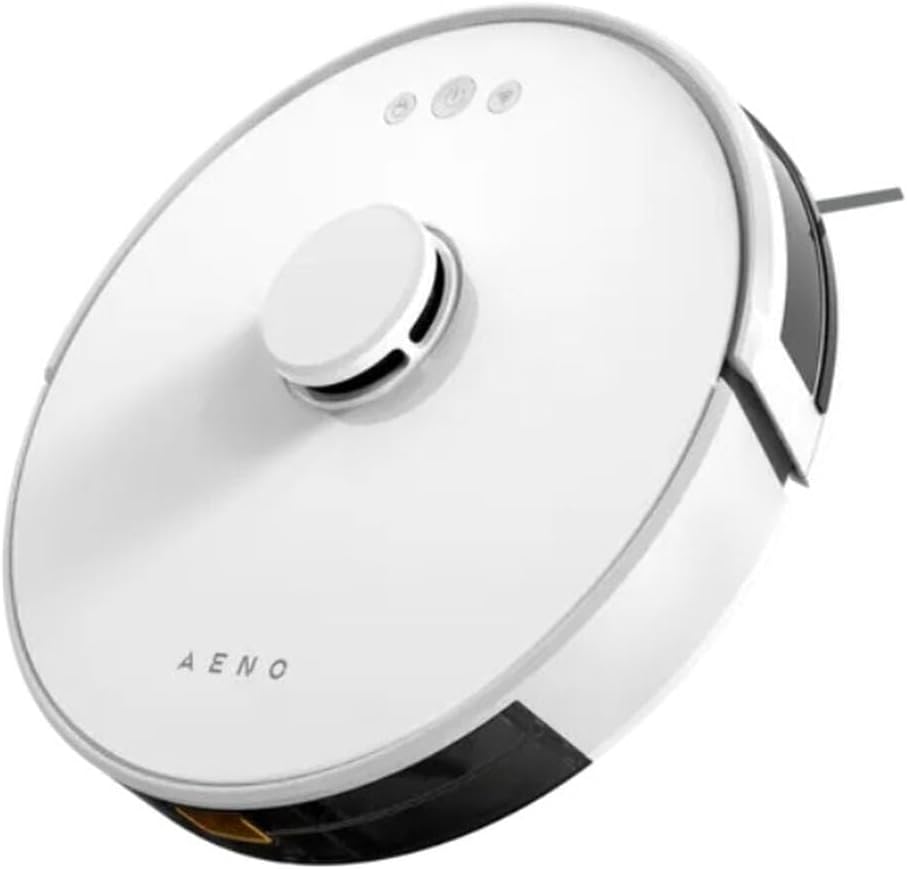
Figure 4.1: Top view of the AENO RC2S Robot Vacuum Cleaner. The image displays the sleek white circular design of the robot, featuring a central raised laser navigation turret and three control buttons on the top surface. The AENO logo is visible towards the front.
Top View:
- Laser Navigation Turret: Houses the LDS (Laser Distance Sensor) for precise mapping and navigation.
- Control Buttons: Power/Clean, Home/Recharge, Spot Clean.
- Dustbin Release Button: For removing the dustbin.
Bottom View:
- Main Brush: For deep cleaning carpets and hard floors.
- Side Brushes: Sweep debris from edges and corners into the main brush path.
- Driving Wheels: Allow the robot to move across various surfaces.
- Charging Contacts: Connect with the charging station.
- Cliff Sensors: Prevent the robot from falling down stairs.
- Universal Wheel: Provides 360-degree movement.
5. Setup
5.1 Charging Station Placement
Place the charging station on a hard, level surface against a wall. Ensure there is at least 0.5 meters (1.6 feet) of clear space on both sides and 1.5 meters (4.9 feet) in front of the charging station. Connect the power adapter to the charging station and plug it into a power outlet. Ensure the indicator light on the charging station is on.
5.2 Initial Charging
Place the robot on the charging station, ensuring the charging contacts align. The robot will automatically begin charging. For first-time use, fully charge the robot for approximately 5 hours. The battery capacity is 3000 mAh, providing up to 130 minutes of runtime.
5.3 App Installation and Connection
Download the "AENO" app from your mobile device's app store (iOS or Android). Follow the in-app instructions to connect your robot vacuum cleaner to your home Wi-Fi network. The app allows for advanced control, scheduling, and mapping features.
6. Operating
6.1 Starting a Cleaning Cycle
- Auto Clean: Press the Power/Clean button on the robot or in the app. The robot will automatically clean your home using its laser navigation system.
- Spot Clean: Place the robot in a specific dirty area and press the Spot Clean button. The robot will clean a concentrated area.
- Edge Clean: Select Edge Clean mode in the app. The robot will clean along the walls and edges of your rooms.
6.2 Mopping Function
The AENO RC2S features a 0.35 L water tank for wet cleaning. Fill the water tank with clean water and attach the mop pad. Insert the water tank into the robot. You can control the water flow electronically via the app (low, medium, high) to suit different floor types and cleaning needs. The robot can clean up to 150 square meters at once.
6.3 Smart Room Mapping and Restricted Zones
The robot uses LiDAR technology to create detailed maps of your home. Through the AENO app, you can:
- View and Edit Maps: See the generated map of your home.
- Set No-Go Zones: Draw virtual boundaries on the map to prevent the robot from entering specific areas.
- Set No-Mop Zones: Define areas where the robot should vacuum but not mop (e.g., carpeted areas).
- Select Specific Room Cleaning: Choose which rooms to clean.
If the battery is low during a cleaning cycle, the robot will automatically return to the charging station, recharge, and then resume cleaning from where it left off.
7. Maintenance
Regular maintenance ensures optimal performance and extends the lifespan of your robot vacuum cleaner.
7.1 Dustbin and Filter Cleaning
- Empty Dustbin: Press the dustbin release button and remove the dustbin. Empty its contents after each cleaning cycle.
- Clean Filter: Remove the filter from the dustbin. Tap it gently to remove dust. The filter can be rinsed with water, but ensure it is completely dry before reinserting.
7.2 Main Brush and Side Brushes
- Main Brush: Remove the main brush cover and lift out the brush. Use the cleaning tool to remove hair and debris tangled around the brush.
- Side Brushes: Check side brushes for tangled hair or debris. If damaged, replace them.
7.3 Sensors and Charging Contacts
Wipe all sensors (cliff sensors, wall sensor) and charging contacts on both the robot and the charging station with a clean, dry cloth regularly to ensure proper functionality.
7.4 Water Tank and Mop Pad
After each mopping session, empty any remaining water from the tank. Remove and clean the mop pad. The mop pad can be hand-washed or machine-washed. Allow it to air dry completely before reattaching.
8. Troubleshooting
If you encounter issues with your AENO RC2S, refer to the following common problems and solutions:
| Problem | Possible Cause | Solution |
|---|---|---|
| Robot does not turn on. | Low battery; Power switch off. | Charge the robot; Ensure the main power switch is on. |
| Robot cannot find charging station. | Charging station obstructed; Robot too far. | Clear obstacles around the station; Manually place robot closer. |
| Cleaning performance is poor. | Full dustbin; Clogged filter; Tangled brushes. | Empty dustbin; Clean/replace filter; Clean main and side brushes. |
| Robot gets stuck frequently. | Obstacles; Dirty sensors. | Remove cables/small objects; Clean cliff sensors. |
| App connection issues. | Incorrect Wi-Fi password; Router issues. | Verify Wi-Fi password; Restart router and robot; Ensure 2.4GHz Wi-Fi. |
9. Specifications
| Model Name | RC2S |
| Brand | AENO |
| Color | White |
| Dimensions (Diameter x Height) | 33 cm x 9.6 cm |
| Weight | 2.7 kg |
| Dust Container Capacity | 0.6 L |
| Water Tank Capacity | 0.35 L |
| Noise Level | 65 dB |
| Battery Capacity | 3000 mAh (Lithium-ion) |
| Runtime | Up to 130 minutes |
| Charging Time | Approx. 5 hours |
| Rated Power | 28 Watts |
| Max Cleaning Area | 150 m² |
| Special Features | Laser Navigation (LiDAR), App Control, Smart Room Mapping, Virtual Walls, Auto-resume cleaning |
10. Warranty and Support
AENO products are manufactured to the highest quality standards. For warranty information and technical support, please refer to the warranty card included in your package or visit the official AENO website. Keep your purchase receipt as proof of purchase.
For further assistance, please contact AENO customer service.
Related documentsRC2S


Ask a question about this manual
Ask about setup, troubleshooting, compatibility, parts, safety, or missing instructions. Manuals+ will review the question and use this page’s manual context to help answer it.