
1. Introduction
The HANDA HK8 Pro Smart Watch is a versatile device designed to assist with daily activities, fitness tracking, and communication. It features an AMOLED display, Bluetooth calling, health monitoring, and various smart functions. This manual provides detailed instructions for setting up, operating, and maintaining your smart watch.
Package Contents:
- HANDA HK8 Pro Smart Watch (1)
- Interchangeable Strap (1) - Note: Package includes two straps, one stainless steel and one silicone.
- Magnetic Charging Cable (1)
- User Manual (1)
2. Safety Information
- Do not expose the watch to extreme temperatures or direct sunlight for prolonged periods.
- Avoid using abrasive cleaners or chemicals on the watch.
- The watch is IP68 waterproof, suitable for hand washing, rain, and swimming. However, it is not recommended for hot showers, saunas, or diving, as steam and hot water can compromise the seal.
- Keep the magnetic charging cable away from metal objects to prevent short circuits.
- Consult a medical professional before starting any new exercise regimen or if you have pre-existing health conditions. The health monitoring features are for reference only and should not be used for medical diagnosis.
3. Setup
3.1 Charging the Smart Watch
Before first use, fully charge the watch. Connect the magnetic charging cable to the charging points on the back of the watch and plug the USB end into a standard USB power adapter (not included). The watch display will indicate charging status. A full charge typically takes approximately 2 hours.
3.2 App Installation
To access all features and synchronize data, download the FitCloudPro app on your smartphone. Scan the QR code in the manual or search for "FitCloudPro" in your device's app store (compatible with Android 4.4 / iOS 9.0 and above).
3.3 Device Pairing
- Ensure your watch is charged and powered on.
- Enable Bluetooth on your smartphone.
- Open the FitCloudPro app and follow the on-screen instructions to add a new device.
- Select "HK8 Pro" from the list of available devices to establish a connection.
- Confirm the pairing request on both your watch and smartphone.
3.4 Strap Installation/Replacement
The HK8 Pro Smart Watch comes with interchangeable straps. To attach or remove a strap, locate the quick-release pins on the underside of the strap. Slide the pin inwards to detach or attach the strap to the watch body. Ensure the pin is securely seated in the lug holes.

Image: The HK8 Pro Smart Watch displayed with different strap materials and colors, illustrating the interchangeable design. A comparison highlights the clarity of the AMOLED screen.
4. Operating Instructions
4.1 Basic Navigation
- Touch Screen: Swipe left/right, up/down to navigate through menus and features. Tap to select.
- Side Buttons: Typically, one button serves as a power/back button, while others may provide quick access to specific functions or sports modes. Refer to the watch interface for specific button assignments.
4.2 Power On/Off
- Power On: Press and hold the power button until the screen lights up.
- Power Off: Press and hold the power button, then select the 'Power Off' option on the screen.
4.3 Display Settings and Watch Faces
The HK8 Pro features an AMOLED display with an always-on function. You can customize watch faces directly on the watch or through the FitCloudPro app. The app offers a wide selection of dials and allows you to upload custom photos.
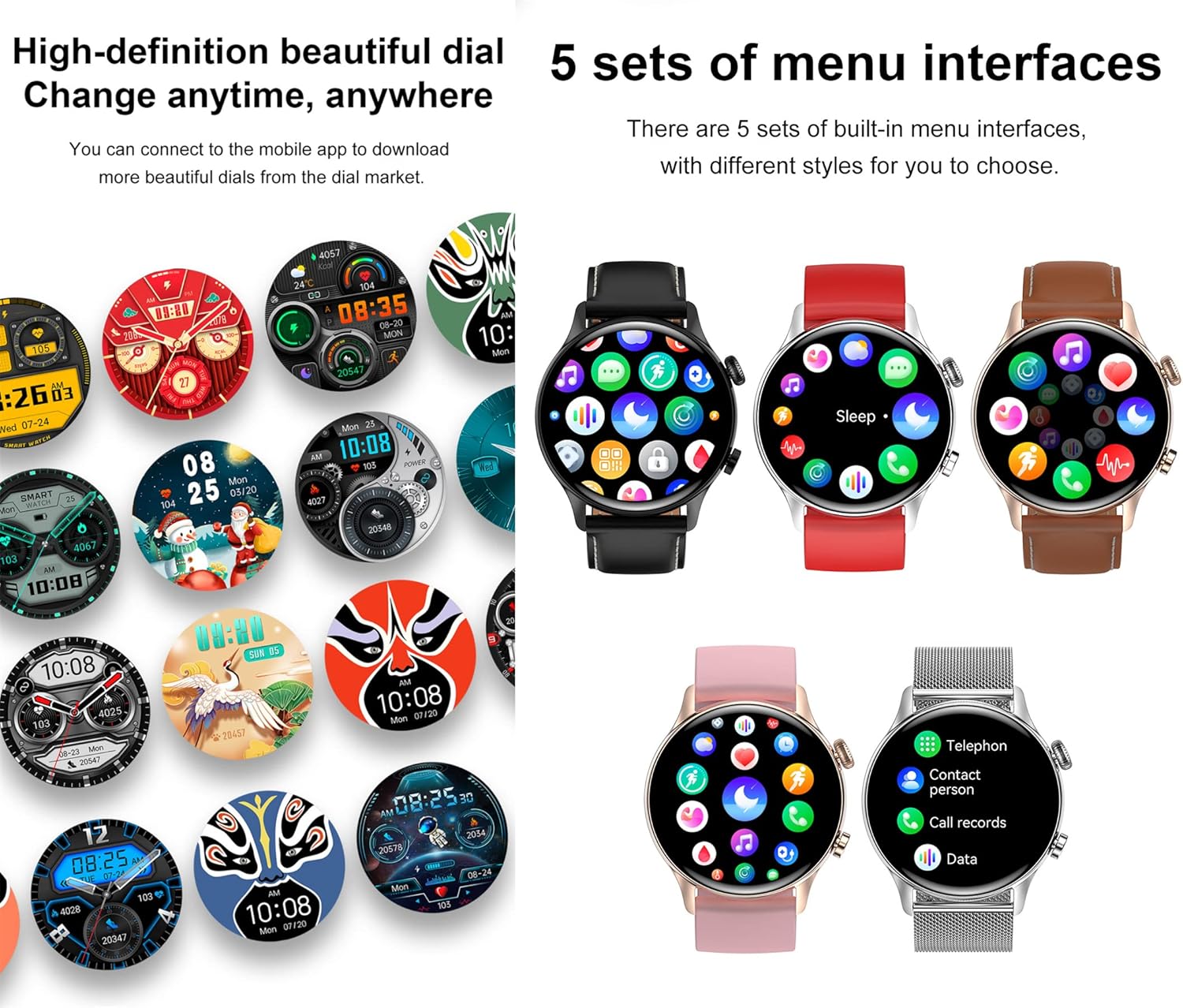
Image: Multiple watch faces and five distinct menu interface styles are shown, demonstrating customization options for the HK8 Pro Smart Watch.
4.4 Bluetooth Calls and Notifications
Once paired with your smartphone, the watch supports Bluetooth calls. You can dial numbers, answer incoming calls, view call records, and access contacts directly from your wrist. The watch also synchronizes with your mobile phone to display SMS, social media (e.g., Facebook, Twitter, WhatsApp), and other app notifications.

Image: Illustrations of the watch receiving messages and displaying options for dialing, answering, rejecting calls, and syncing contacts and call logs.
4.5 Health Monitoring
The HK8 Pro Smart Watch monitors several key health indicators:
- Heart Rate: Continuous monitoring throughout the day.
- Blood Oxygen (SpO2): Measures blood oxygen saturation levels.
- Blood Pressure: Provides estimated blood pressure readings.
- Sleep Monitoring: Tracks sleep stages (deep sleep, light sleep, wake-up time) and provides analysis in the app.
Access these features from the watch menu or view detailed historical data in the FitCloudPro app.
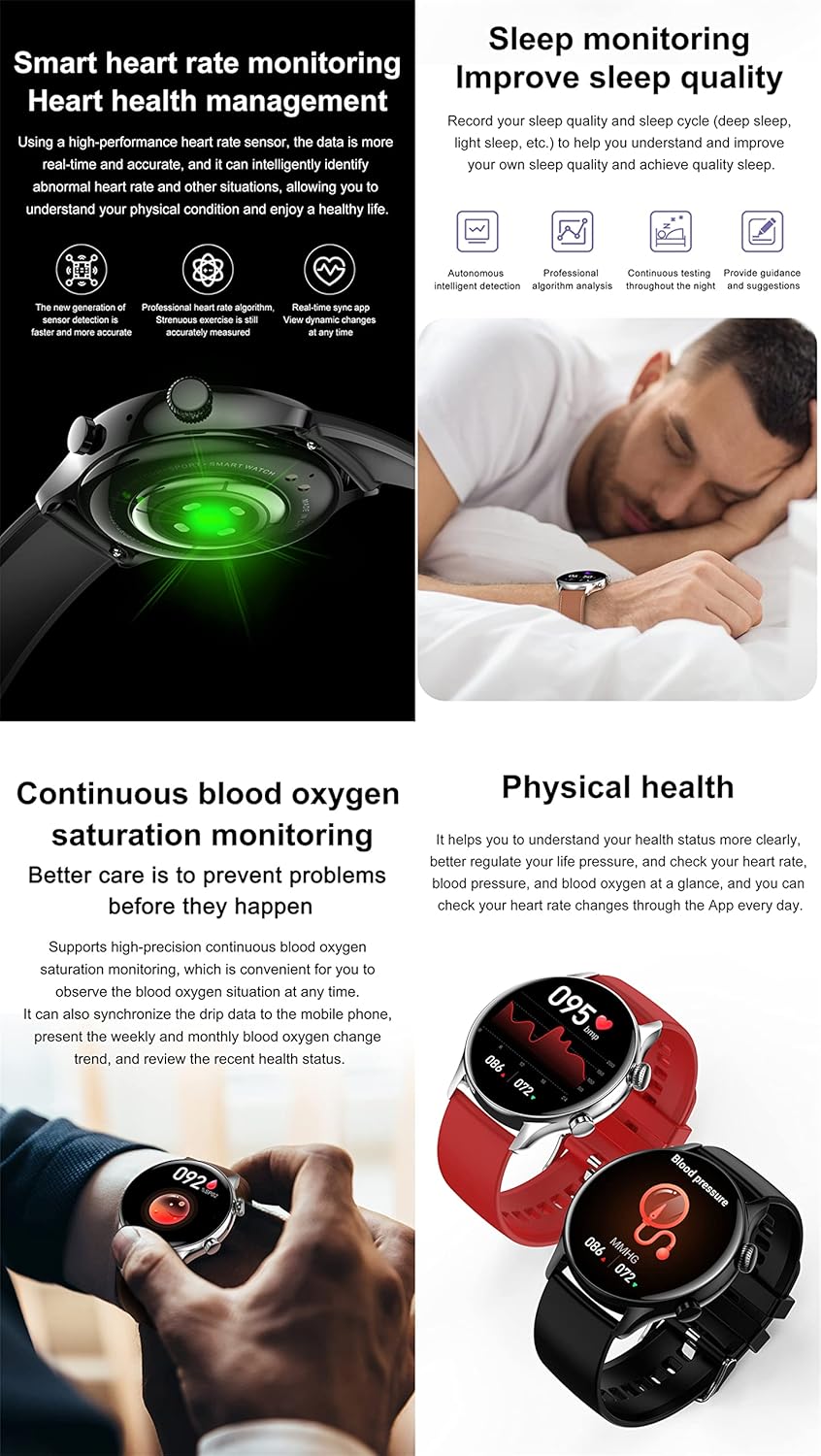
Image: Visuals demonstrating the watch's capabilities in monitoring heart rate, analyzing sleep quality, and measuring blood oxygen and blood pressure levels.
4.6 Activity Tracking and Sports Modes
The watch accurately records daily activities such as steps, calories burned, and distance. It includes multiple sports modes (e.g., Elliptical, Basketball, Running, Walking, Football, Cycling) to track specific workouts. During exercise, the watch can monitor your movement time, distance, and calories consumed, providing data to optimize your training.

Image: The watch interface displaying routine exercise data and icons representing different sports modes like walking, running, and cycling.
4.7 Multifunctional NFC
The HK8 Pro supports NFC for convenient access control and offline payments (e.g., Alipay). To use NFC, ensure it is enabled and configured through the FitCloudPro app. You can simulate access cards for compatible systems by touching the watch to the reader.

Image: A user interacting with an NFC access control panel using the HK8 Pro Smart Watch, illustrating the swipe access feature.
4.8 Other Smart Functions
- Voice Control: Interact with your watch using voice commands.
- Music Control: Control music playback on your paired smartphone.
- Weather Forecast: Get real-time weather updates.
- Female Physiological Cycle: Track and predict menstrual cycles.
- Sedentary Reminder: Alerts you to move after periods of inactivity.
- Find Phone: Locate your paired smartphone.
5. Maintenance
5.1 Cleaning the Watch
Wipe the watch screen and body with a soft, lint-free cloth. For stubborn dirt, dampen the cloth slightly with water. Avoid using harsh chemicals or abrasive materials that could damage the finish.
5.2 Water Resistance
The HK8 Pro is IP68 waterproof. This means it is resistant to dust and can withstand immersion in water up to 1.5 meters for 30 minutes. It is suitable for daily use, such as hand washing, rain, and shallow swimming. However, it is not designed for diving, high-pressure water activities, or exposure to hot water/steam, which can compromise its water resistance.

Image: The HK8 Pro Smart Watch shown submerged in water, illustrating its IP68 waterproof rating. Battery life estimates for typical use and standby are also displayed.
5.3 Battery Care
To prolong battery life, avoid fully discharging the watch frequently. Charge the watch regularly, ideally before the battery level drops below 20%. Store the watch in a cool, dry place when not in use for extended periods.
6. Troubleshooting
- Watch not turning on: Ensure the watch is fully charged. Connect it to the charger and wait a few minutes before attempting to power on again.
- Unable to pair with phone: Make sure Bluetooth is enabled on your phone and the watch. Restart both devices and try pairing again. Ensure the FitCloudPro app has necessary permissions.
- Inaccurate health data: Ensure the watch is worn snugly on your wrist, not too tight or too loose. Clean the sensor on the back of the watch. Readings can be affected by movement, skin tone, and environmental factors.
- Notifications not appearing: Check app permissions on your phone for FitCloudPro. Ensure notifications are enabled within the app and on your phone's system settings for the relevant applications.
- Short battery life: Reduce screen brightness, disable always-on display if not needed, limit frequent heart rate monitoring, and close unused background apps on the watch.
7. Specifications
| Feature | Specification |
|---|---|
| Display | 1.36" AMOLED, 390*390 Resolution |
| CPU | Realtek 8762DT |
| Sensor | SC7A20 |
| Waterproof Level | IP68 |
| Memory | 128M Flash |
| Bluetooth | BT5.0 |
| Battery | 300mAh Lithium Polymer |
| Charging Method | Magnetic charging wire |
| Compatible System | Android 4.4 / iOS 9.0 and above |
| Dimensions | 44.8 x 44.8 x 11 mm (1.76 x 1.76 x 0.43 inches) |
| Weight | 48.3g (1.7 ounces) |
| Wristband Size | Total length 220mm, adjustable length 145-190mm |
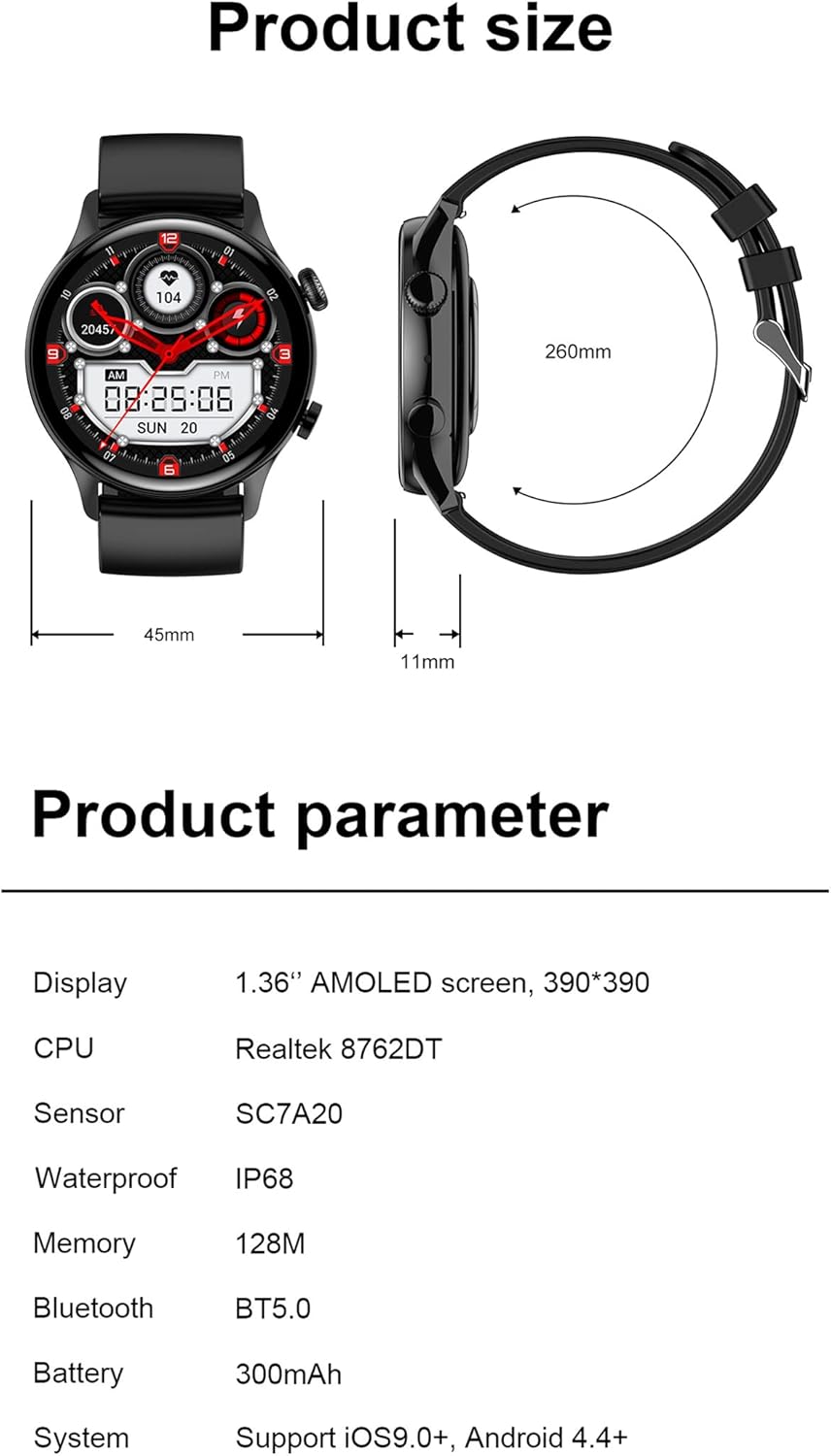
Image: A diagram illustrating the physical dimensions of the HK8 Pro Smart Watch, alongside a table detailing its product parameters such as display type, CPU, and battery capacity.
8. Warranty and Support
The HANDA HK8 Pro Smart Watch comes with a standard manufacturer's warranty. For specific warranty terms, conditions, and support inquiries, please refer to the warranty card included in your package or contact the manufacturer directly through their official website or customer service channels. Please retain your proof of purchase for warranty claims.