1. Introduction
The Xetron LMG-10X Digital Manifold Gauge is an advanced tool designed for HVAC and refrigeration systems. It provides precise measurements for pressure, temperature, vacuum, and automatically calculates superheat and subcooling. This manual will guide you through the setup, operation, and maintenance of your device.

Figure 1: Xetron LMG-10X Digital Manifold Gauge with included accessories.
2. Safety Information
Always read and understand all safety warnings and instructions before using the device. Failure to follow these instructions may result in electric shock, fire, or serious injury.
- Ensure all connections are secure before operating.
- Do not expose the device to extreme temperatures or direct sunlight for prolonged periods.
- Use only specified accessories and probes.
- Keep the device away from water and other liquids.
- Refer servicing to qualified personnel only.
3. Package Contents
Verify that all items listed below are present in your package:
- 1 x Xetron Digital Manifold Gauge (LMG-10X)
- 2 x Clamp Temperature Probes
- 1 x Carrying Case
- 1 x User Manual (this document)

Figure 2: What's in the box - Xetron Digital Manifold and Clamp Temperature Probes.
4. Setup
4.1. Initial Power On
- Insert batteries into the compartment on the back of the unit (if not pre-installed).
- Press and hold the power button (⏻) to turn on the device.
- The LCD screen will illuminate and display the initial measurement interface.
4.2. Connecting Probes and Hoses
Connect the clamp temperature probes to the designated ports on the manifold. Ensure a secure connection. Refrigerant hoses (not included) can be connected to the 1/4" SAE threaded connectors at the bottom of the unit.
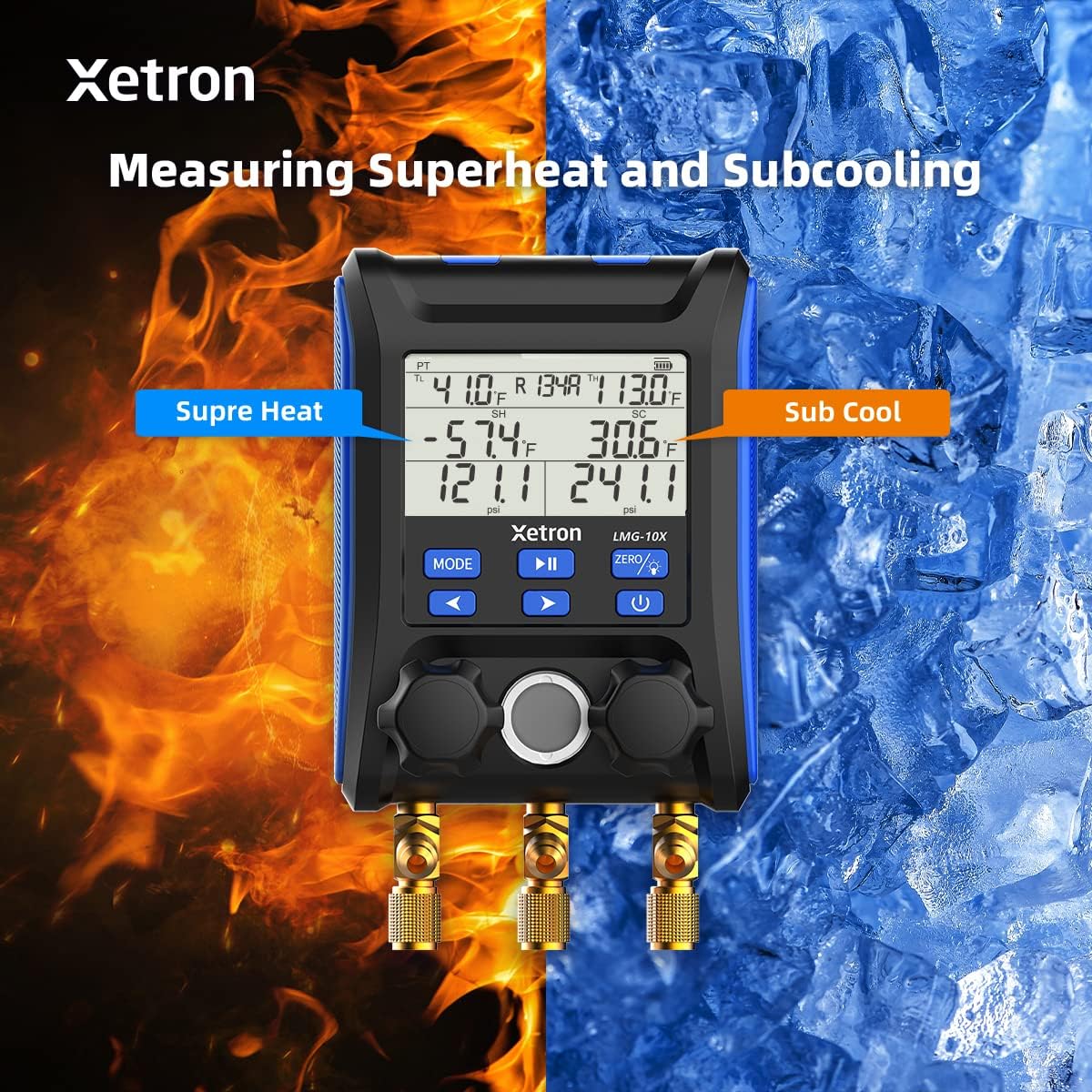
Figure 3: Connecting the Xetron LMG-10X to an HVAC system.
5. Operating Instructions
5.1. Pressure and Temperature Measurement Mode
This mode displays real-time pressure and temperature readings, along with calculated saturation temperatures (VSAT, LSAT).

Figure 4: Interface for Pressure and Temperature Measurement Mode.
5.2. Superheat and Subcooling Measurement
The device automatically calculates superheat (SH) and subcooling (SC) values based on the selected refrigerant and measured parameters.

Figure 5: Display showing Superheat and Subcooling measurements.
5.3. Pressure Hold Test Mode
To enter Pressure Hold Test mode, briefly press the MODE button followed by the PLAY/PAUSE button from VAC mode. This mode allows you to monitor pressure changes over time.

Figure 6: Interface for Pressure Hold Test Mode.
5.4. Unit Settings and Auto Shutdown
The device allows for conversion of various measurement units and configuration of automatic shutdown settings.

Figure 7: Temperature Unit Setting.
Figure 8: Pressure Unit Setting.
Figure 9: Auto Shutdown OFF.
Figure 10: Auto Shutdown ON.
6. Built-in Refrigerant Database
The Xetron LMG-10X comes with a comprehensive database of 88 types of refrigerants, allowing for accurate calculations and measurements across various systems.

Figure 11: Partial list of supported refrigerants.
7. Maintenance
7.1. Cleaning
Wipe the device with a soft, damp cloth. Do not use abrasive cleaners or solvents. Ensure the device is dry before storage.
7.2. Storage
Store the device in its carrying case in a cool, dry place when not in use. Remove batteries if storing for extended periods to prevent leakage.
8. Troubleshooting
| Problem | Possible Cause | Solution |
|---|---|---|
| Device does not power on. | Low or dead batteries; incorrectly inserted batteries. | Replace batteries; ensure correct polarity. |
| Inaccurate readings. | Probes not properly connected; incorrect refrigerant selected. | Check probe connections; verify selected refrigerant matches system. |
| Display is dim or flickering. | Low battery power. | Replace batteries. |
9. Specifications
- Model: XT-LMG-10X-EU
- Dimensions (L x W x H): 37 x 30 x 10 cm (14.57 x 11.81 x 3.94 inches)
- Item Weight: 1.2 kg (2.65 lbs)
- Material: Acrylonitrile Butadiene Styrene (ABS)
- Refrigerant Database: 88 types
- Functions: Pressure & Temperature Measurement, Vacuum Measurement, Pressure Hold Test, Automatic Shutdown, Temperature Compensation
10. Warranty and Support
Xetron offers a one-year warranty for the LMG-10X Digital Manifold Gauge. For any questions or support needs, please contact Xetron customer service. We are committed to providing lifetime customer service.
For further assistance, please visit the official Xetron website or contact their support channels.


