
1. Important Safety Instructions
Please read all instructions carefully before assembly and use. Retain this manual for future reference.
- Ensure the power supply matches the lamp's requirements.
- Do not disassemble the lamp. Contact qualified personnel for repairs.
- Keep the lamp away from water and high humidity environments.
- Avoid direct eye exposure to the LED light for prolonged periods.
- Ensure the lamp is placed on a stable, level surface to prevent tipping.
- Keep out of reach of children and pets.
2. Package Contents
Verify all components are present before assembly:
- Main Lamp Head (1)
- Reading Lamp Head (1)
- Lamp Pole Sections (multiple, pre-wired)
- Lamp Base (1)
- Remote Control (1)
- User Manual (1)
3. Setup and Assembly
Assembly is tool-free. Follow these steps:
- Carefully unbox all components.
- Thread the power cord through the lamp pole sections.
- Screw the lamp pole sections together clockwise, ensuring they are securely tightened.
- Attach the assembled lamp pole to the lamp base by screwing it clockwise until firm.
- Ensure all connections are secure before plugging into a power outlet.

Image: Easy Assembly steps. No extra tools are needed. Please make sure all parts are tightened before use.
4. Operating Instructions
The lamp can be controlled via touch buttons on the pole or the included remote control.
4.1 Touch Control
- Power Button: Short press to turn the main lamp ON/OFF. Long press to turn the reading lamp ON/OFF.
- Main Lamp Button: Short press to cycle through color temperatures (2700K-6500K). Long press for stepless dimming (5%-100%).
- Reading Lamp Button: Short press to cycle through color temperatures (2700K-6500K). Long press for stepless dimming (5%-100%).
4.2 Remote Control
The remote control has a range of approximately 49 feet and features a magnetic design for convenient storage on the lamp pole.
- Separate ON/OFF buttons for main and reading lamps.
- Dedicated buttons for color temperature adjustment (CCT).
- Brightness adjustment buttons (BRT+/-).
- Pre-set modes: Night Mode, Reading Mode, Working Mode, Breastfeeding Mode.
- 1-Hour Timer function.
- Smart Memory Function: The lamp remembers your last brightness and color temperature settings when turned on again.

Image: Remote and Touch Control features. The remote has magnets for easy storage on the lamp.

Image: Operational Use. Remote is pre-paired before delivery. Requires two AAA batteries (not included). No need to aim at the floor lamp when in use.

Image: Stepless Dimming and 4 Color Temperatures. Adjust brightness from 5% to 100% and color temperature from 2700K to 6500K.
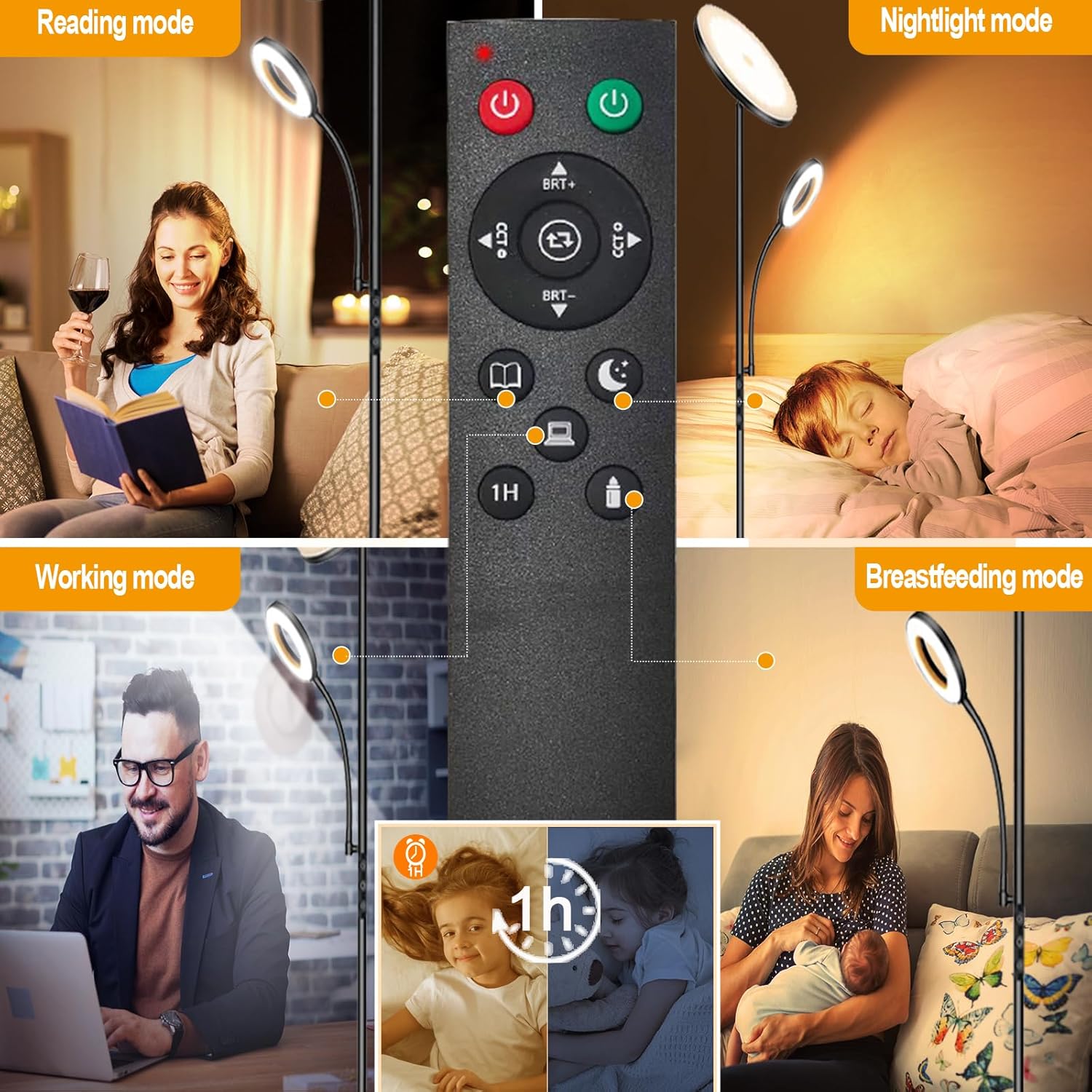
Image: Make your life smarter with various modes and a 1-hour timer.
5. Adjustable Features
The lamp offers flexible adjustment for optimal lighting angles:
- Main Lamp Head: Can be rotated up to 350° horizontally and adjusted 180° up and down vertically.
- Reading Lamp Head: Can be bent and rotated 360° to direct light precisely where needed.

Image: Dimensions and Adjustability. The main lamp head rotates 350° and adjusts 180° up/down. The reading lamp bends 360°.
6. Maintenance
To ensure the longevity and optimal performance of your lamp:
- Always unplug the lamp before cleaning.
- Wipe the lamp with a soft, dry cloth. Do not use abrasive cleaners or solvents.
- Avoid touching the LED beads directly.
- Regularly check the power cord for any signs of damage.
7. Troubleshooting
If you encounter issues, try these solutions:
| Problem | Possible Cause | Solution |
|---|---|---|
| Lamp does not turn on. | Not plugged in; power outlet issue; remote battery low. | Check power connection; test outlet with another device; replace remote batteries (2x AAA, not included). |
| Remote control not working. | Remote batteries low/dead; remote not paired. | Replace remote batteries. If still not working, refer to pairing instructions (usually involves holding a button on the remote near the lamp). |
| Light flickers or dims unexpectedly. | Unstable power supply; loose connection. | Ensure stable power source. Check all screwed connections on the lamp pole. |
| Lamp turns on automatically. | Interference from other RF devices. | Unplug and replug the lamp. If issue persists, contact support. |
8. Specifications
| Feature | Detail |
|---|---|
| Model Number | RM02 |
| Main Lamp Wattage | 42W |
| Main Lamp Brightness | 4000LM |
| Reading Lamp Wattage | 7W |
| Reading Lamp Brightness | 500LM |
| LED Beads | 132 (main) + 28 (reading) |
| Color Temperature | 2700K-6500K (4 levels, stepless dimming) |
| Brightness Levels | 5%-100% (stepless dimming) |
| Control Method | Remote Control & Touch Control |
| Remote Range | Approx. 49 ft |
| Material | Acrylic |
| Product Dimensions | 9.5"D x 9.5"W x 69.9"H |
| Item Weight | 9.55 pounds |
| Cable Length | 588 Inches |
| Certifications | FCC, CE, RoHS, UL (plug) |
9. Warranty and Support
Marctronic products are designed for quality and reliability. For warranty information or technical support, please refer to the product packaging or contact Marctronic customer service directly.
We are committed to providing excellent customer satisfaction.