
1. Introduction
The Aeolus MC-220 is a lightweight, rechargeable pet grooming trimmer designed for precise trimming of delicate areas such as ears, faces, paws, and sanitary regions. It features a 2-speed motor and a long-lasting battery for efficient and comfortable grooming. This manual provides essential information for the safe and effective use, maintenance, and care of your trimmer.
2. Safety Instructions
Please read all safety instructions carefully before using the Aeolus MC-220 trimmer to prevent injury or damage to the device. Keep this manual for future reference.
- Water Exposure: Do not use the trimmer near water or in wet environments. Avoid submerging the device in water.
- Disassembly: Do not attempt to disassemble, repair, or modify the trimmer yourself. Contact qualified service personnel for any repairs.
- Children and Pets: Keep the trimmer out of reach of children and ensure pets are calm and restrained during grooming to prevent accidents.
- Charger: Use only the charger provided with the device. Using an incompatible charger may damage the battery or trimmer.
- Blade Inspection: Before each use, inspect the blades for any damage, dullness, or foreign objects. Replace damaged blades immediately.
- Ventilation: Ensure the charging area is well-ventilated. Do not cover the trimmer or charger during charging.
- Storage: Store the trimmer in a dry, cool place away from direct sunlight and extreme temperatures.
3. Package Contents
Verify that all items are present in the package:
- Clipper with T-type blade
- 2 Attachment Combs (for various cut lengths)
- Blade Oil
- Blade Cleaning Brush
- Universal Voltage Charger (USB cable and adapter)

Image: All components included in the Aeolus MC-220 trimmer package.
4. Product Overview
Familiarize yourself with the components of your Aeolus MC-220 trimmer:

Image: Labeled diagram of the Aeolus MC-220 trimmer components.
- Ceramic Blade with Acute Angle: Designed for precise and smooth cutting.
- Turbo Button: Activates higher motor speed for thicker hair.
- Power Switch: Turns the trimmer on and off.
- Lubrication Reminder: LED indicator to remind you when to oil the blades.
- High Speed Indicator: LED light indicating high motor speed (7000 rpm).
- Low Speed Indicator: LED light indicating low motor speed (6000 rpm).
- Battery Status Indicator: LEDs showing battery charge level (High/Low/Charging).
- Attachment Combs: Two combs providing cut lengths from 3.0mm to 6.0mm.
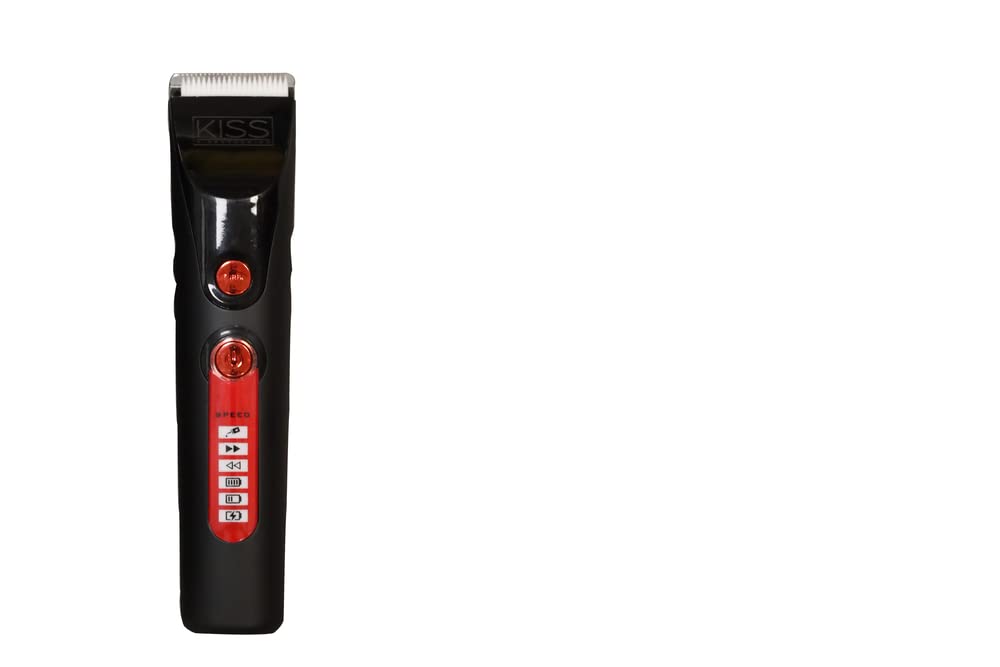
Image: Detailed view of the trimmer's control panel and LED display.
5. Setup
5.1 Charging the Trimmer
- Ensure the trimmer is turned off.
- Connect the mini-USB charging cable to the trimmer's charging port.
- Plug the USB adapter into a standard AC 100V-240V wall outlet.
- The battery status indicator LEDs will illuminate to show charging progress. A full charge takes approximately 3 hours.
- Once fully charged, the trimmer provides approximately 4 hours of operating time.
5.2 Attaching and Detaching Combs
- Select the desired attachment comb (3.0mm, 4.0mm, 5.0mm, or 6.0mm).
- Align the comb with the trimmer blade and slide it firmly into place until it clicks.
- To remove, gently push the comb upwards and away from the blade.
6. Operating Instructions
6.1 Powering On/Off
- Press the Power Switch button to turn the trimmer on.
- Press the Power Switch button again to turn the trimmer off.
6.2 Adjusting Speed
- When the trimmer is on, press the Speed button to toggle between low speed (6000 rpm) and high speed (7000 rpm).
- The corresponding LED indicator (High Speed or Low Speed) will light up.
- For thicker hair or faster trimming, select high speed. For delicate areas or finer hair, use low speed.
6.3 Trimming Techniques
The Aeolus MC-220 is ideal for intricate grooming tasks:
- Ears, Faces, Paws, and Sanitary Areas: Use the trimmer without an attachment comb for a close cut (0.4mm) or with the appropriate comb for desired length.
- Creative Carving: The T-liner blade is suitable for detailed work and creative styling.
- Always trim in the direction of hair growth for a smoother finish and to prevent irritation.
- Hold the skin taut to ensure an even cut and to avoid nicks.
7. Maintenance
Regular maintenance ensures optimal performance and extends the lifespan of your trimmer.
7.1 Cleaning the Blades
- Turn off the trimmer and disconnect it from any power source.
- Remove any attachment combs.
- Use the provided cleaning brush to remove hair and debris from the blades and the trimmer head.
- For thorough cleaning, the blade can be carefully detached (refer to product diagram for blade removal if applicable, otherwise clean in place).
7.2 Oiling the Blades
Apply blade oil regularly to keep the blades sharp and moving smoothly. The trimmer features a lubrication reminder LED.
- After cleaning, apply 1-2 drops of the provided blade oil evenly across the blade teeth.
- Turn the trimmer on for a few seconds to distribute the oil.
- Wipe off any excess oil with a soft cloth.
7.3 Storage
- Store the trimmer in its original packaging or a protective case when not in use.
- Keep it in a dry, cool place, away from direct sunlight and moisture.
8. Troubleshooting
If you encounter issues with your Aeolus MC-220 trimmer, refer to the following common problems and solutions:
| Problem | Possible Cause | Solution |
|---|---|---|
| Trimmer does not turn on. | Battery is depleted. | Charge the trimmer for approximately 3 hours. |
| Poor cutting performance or pulling hair. | Blades are dull, dirty, or not oiled. | Clean the blades thoroughly and apply blade oil. If blades are dull, consider replacement. |
| Battery not charging. | Charger not properly connected or faulty. | Ensure the USB cable and adapter are securely connected. Try a different USB socket or adapter. |
| Trimmer gets hot during use. | Blades are not lubricated or excessive friction. | Clean and oil the blades. Allow the trimmer to cool down before resuming use. |
9. Specifications
- Model Number: MC-220
- Motor Operating Voltage: 3.2V
- Rotation Speed: Low: 6000 ± 500 rpm, High: 7000 rpm
- Battery: 3.7V, 1500mA high-performance environment-friendly battery
- Charging Time: Approximately 3 hours
- Operating Time (Full Charge): Approximately 4 hours
- Adapter Input: AC 100V – 240V 50/60Hz
- Adapter Output: DC 4.2V --- 1000mA
- Cut Length (with combs): 0.4mm (without comb), 3.0mm, 4.0mm, 5.0mm, 6.0mm
- Item Weight: 170 g
- Included Components: Clipper with T-type blade, 2 attachment combs, Blade oil, Blade cleaning brush, Universal voltage charger
10. Warranty and Support
For warranty information, product registration, or customer support, please refer to the documentation included with your purchase or contact Aeolus customer service directly. Keep your proof of purchase for warranty claims.