
1. Introduction
The NOYAFA NF-8209 is a versatile multi-function network cable tester designed for professionals and DIY enthusiasts. It integrates various testing capabilities including network cable continuity, cable length measurement, tone tracing, Power over Ethernet (PoE) information detection, hub flashing, and Non-Contact Voltage (NCV) detection. This manual provides detailed instructions for setting up, operating, maintaining, and troubleshooting your NF-8209 tester to ensure optimal performance and accurate results.

Figure 1: Overview of the NOYAFA NF-8209 Network Cable Tester and its components.
2. Package Contents
Upon opening the package, please verify that all the following items are included:
- NF-8209 Host (Emitter)
- NF-8209 Receiver
- NF-8209 Remote (Wiremap)
- USB-C Charging Cable (for Emitter)
- RJ45 Patch Cable
- RJ11 Patch Cable
- Alligator Clip Cable
- Earphones
- Carrying Pouch
- User Manual
Note: The NF-8209 Transmitter is USB-C rechargeable. The receiver requires a 9V battery, which is not included in the package due to logistics reasons. Please ensure you have a 9V battery for the receiver before use.
3. Setup
- Powering On: Press and hold the power button on both the Emitter and Receiver units to turn them on.
- Charging the Emitter: Connect the provided USB-C cable to the Emitter's charging port and a suitable USB power source. The battery indicator on the screen will show charging status.
- Installing Receiver Battery: Open the battery compartment on the back of the Receiver unit and insert a 9V battery, observing the correct polarity. Close the compartment securely.
- Connecting Cables: Depending on the test function, connect the network cables to the appropriate RJ45 or RJ11 ports on the Emitter, Receiver, or Wiremap remote.
4. Operating Modes
The NF-8209 offers multiple testing modes to diagnose various network cable issues. Navigate through the modes using the arrow keys and confirm selections with the 'OK' button on the Emitter.
Video 1: A comprehensive demonstration of the NOYAFA NF-8209's various testing functions, including tone tracing, PoE testing, and cable length measurement.
4.1. Cable Continuity Testing (Wiremap)
This function checks for open circuits, short circuits, crossed wires, and other wiring faults in RJ45 (CAT5/5E/CAT6/6A) and RJ11 cables. It provides a visual wiremap on the Emitter's screen.
- Connect one end of the network cable to the 'CONT' port on the Emitter.
- Connect the other end of the cable to the 'RJ45 WIREMAP' remote unit.
- On the Emitter, select the 'CONT' mode from the main menu and press 'OK'.
- The screen will display the continuity status for each wire pair, indicating any faults.

Figure 2: Example of cable continuity test results displayed on the NF-8209 Emitter, showing different fault types.
4.2. Cable Length Measurement
The NF-8209 can accurately measure the length of network cables (2.5m-200m) and identify the distance to a fault if one exists.
- Ensure the cable to be measured is de-energized and disconnected from all devices.
- Connect one end of the cable to the 'Length/Flash' port on the Emitter. The other end should be open (not connected to anything).
- On the Emitter, select the 'Length' mode and press 'OK'.
- The screen will display the cable length in meters. If a fault is detected, it will show the distance to the fault.

Figure 3: Cable length measurement in progress on the NF-8209 Emitter.
4.3. Tone Trace Cable (Digital, Analog, PoE Modes)
This feature helps locate and identify network cables among bundles of cables using an audible tone emitted by the Emitter and detected by the Receiver.
- Connect the network cable to the 'SCAN' port on the Emitter.
- On the Emitter, select the 'SCAN' mode. You can choose between three sub-modes:
- Digital Mode: Suitable for tracing cables that are in good order and distance, providing a clear digital signal.
- Analog Mode: Ideal for tracing cables among bundles of disorganized cables, offering a more robust signal for cluttered environments.
- PoE Mode: Specifically designed for tracing cables connected to PoE devices.
- Activate the Receiver unit and adjust its sensitivity ('SEN' switch) as needed.
- Move the Receiver's probe along the suspected cables. The Receiver will emit an audible tone when it detects the signal from the Emitter, indicating the correct cable.
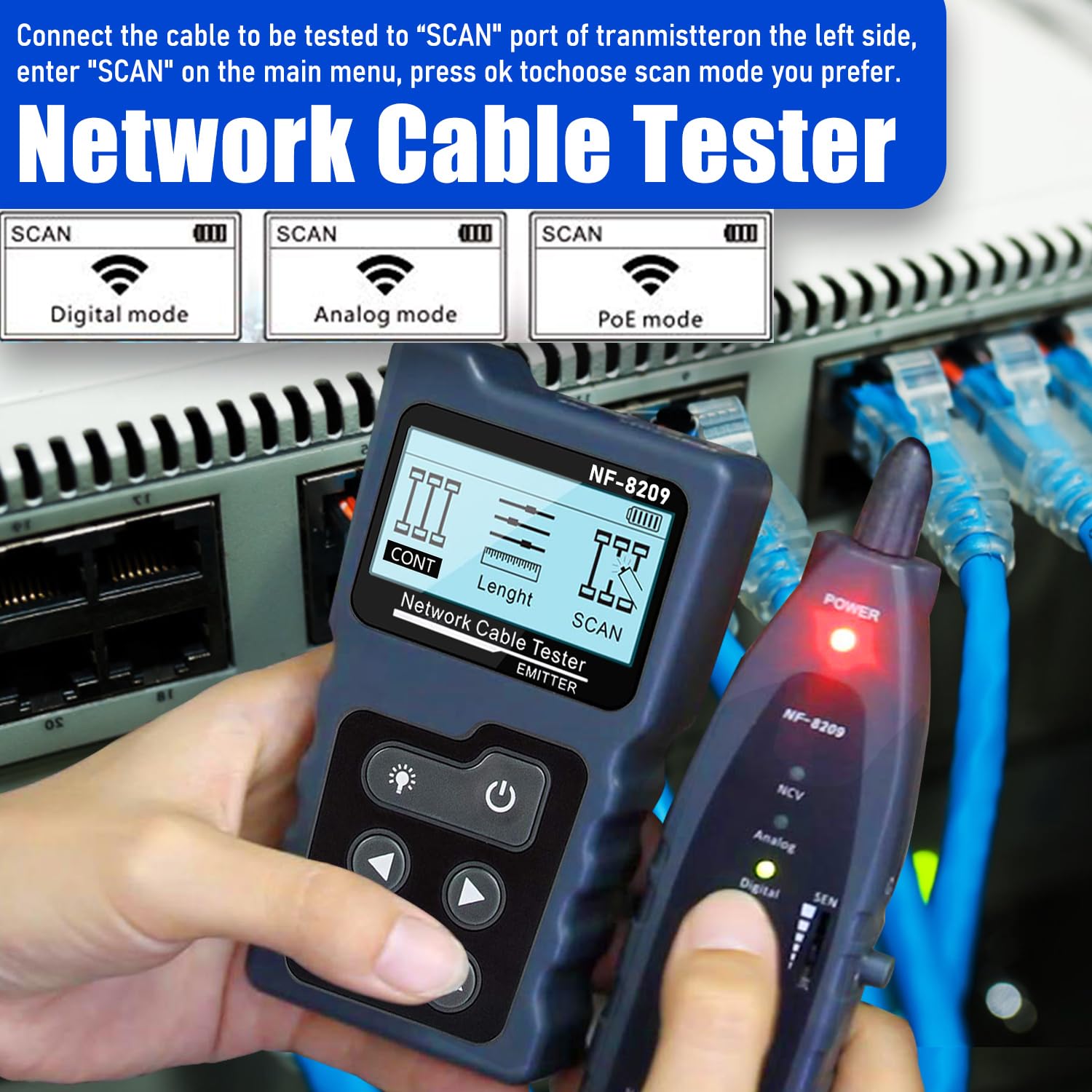
Figure 4: Selecting a tone trace mode on the NF-8209 Emitter.
4.4. PoE Information Testing
This function allows you to test standard PoE devices and gather information such as PoE voltage, power polarity, power mode, and the type of Power Sourcing Equipment (PSE) (AF or AT standard).
- Connect the network cable from the PoE source (e.g., PoE switch) to the 'PoE' port on the Emitter.
- On the Emitter, select the 'PoE' mode and press 'OK'.
- The screen will display detailed PoE information, including voltage, pinout, and PSE type.
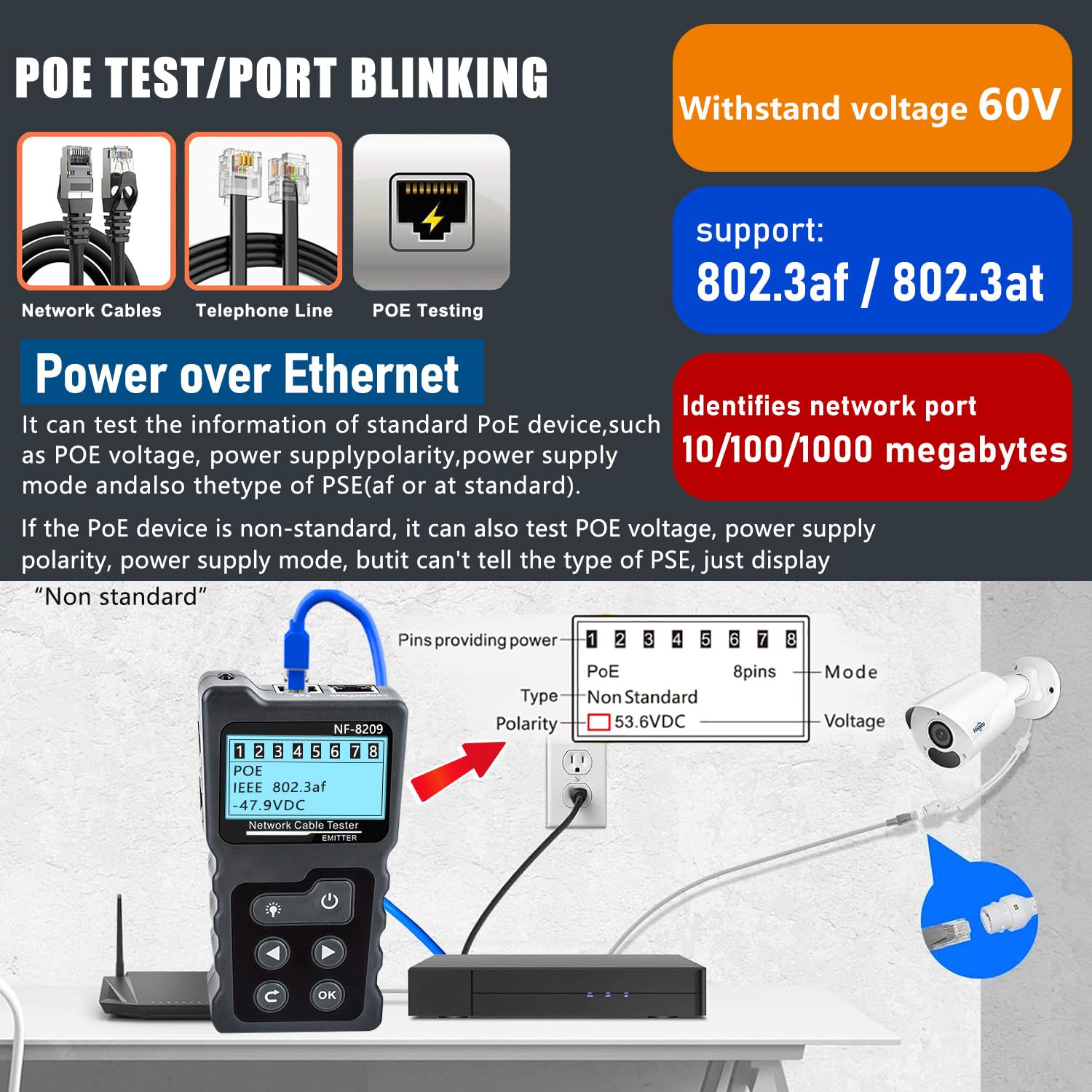
Figure 5: PoE information testing with the NF-8209 Emitter.
4.5. Hub Flashing
The Hub Flashing function helps quickly identify the network port on a hub or switch by causing its indicator light to blink. This is useful for 10M/100M/1000M hubs/switches.
- Connect one end of the network cable to the 'Length/Flash' port on the Emitter.
- Connect the other end of the cable to the desired port on the hub/switch.
- On the Emitter, select the 'Flash' mode and press 'OK'.
- The corresponding port indicator light on the connected hub/switch will begin to blink, allowing for easy identification.

Figure 6: Using the Hub Flashing function to identify a network port.
4.6. NCV Voltage Detection
The Receiver unit features a Non-Contact Voltage (NCV) detector, allowing for safe and quick detection of AC voltage (50V-1000V) without direct contact.
- Slide the 'NCV' switch on the side of the Receiver unit to the 'ON' position.
- Place the tip of the Receiver near an AC voltage source (e.g., power outlet, live wire).
- If AC voltage is detected, the Receiver's LED indicator will light up and an audible alarm will sound, with the frequency of beeps increasing as it gets closer to the voltage source.

Figure 7: NCV voltage detection in action with the NF-8209 Receiver.
5. Maintenance
- Cleaning: Use a soft, dry cloth to clean the device. Do not use abrasive cleaners or solvents.
- Battery Replacement (Receiver): When the low battery indicator appears on the Receiver, replace the 9V battery promptly to ensure accurate operation.
- Charging (Emitter): Recharge the Emitter unit when the battery level is low to maintain optimal performance. Avoid overcharging.
- Storage: Store the device in its carrying pouch in a cool, dry place away from direct sunlight and extreme temperatures when not in use.
6. Troubleshooting
| Problem | Possible Cause | Solution |
|---|---|---|
| Device does not power on. | Low or dead battery. | Charge the Emitter or replace the 9V battery in the Receiver. |
| Inaccurate cable length measurement. | Cable not fully disconnected; cable too short or too long for range. | Ensure cable is completely isolated. Verify cable length is within 2.5m-200m. |
| No tone detected during tracing. | Low battery; incorrect mode selected; high interference. | Check batteries. Ensure Emitter is in 'SCAN' mode (Digital/Analog/PoE). Adjust Receiver sensitivity. Try Analog mode in noisy environments. |
| PoE test shows 'Non Standard'. | Connected to a non-standard PoE device. | This is an informational message indicating the PSE is not IEEE 802.3af/at compliant. No action required unless standard PoE is expected. |
7. Specifications
- Model Number: NF-8209
- Package Dimensions: 10.55 x 6.61 x 1.85 inches
- Item Weight: 14.88 Ounces
- Power Source: Battery Powered (Emitter: USB-C rechargeable; Receiver: 9V battery)
- Cable Types Tested: RJ45 (CAT5/5E/CAT6/6A), RJ11
- Cable Length Measurement Range: 2.5m - 200m (Accuracy: ±1.6m)
- PoE Test: Detects PoE voltage, power polarity, power mode, PSE type (AF/AT)
- NCV Detection Range: 50V - 1000V AC
- Hub Flashing: Supports 10M/100M/1000M hubs/switches
8. Warranty and Support
NOYAFA products are designed for reliability and performance. For warranty information, technical support, or service inquiries, please refer to the contact details provided on the official NOYAFA website or the product packaging. Keep your purchase receipt as proof of purchase for warranty claims.


