
1. Introduction
This manual provides detailed instructions for the installation, operation, and maintenance of your CAMECHO 1 Din MP5 Car Radio. Please read this manual thoroughly before using the product to ensure proper function and to prevent damage. Keep this manual for future reference.
2. Safety Information
- Ensure proper wiring and insulation to prevent short circuits or electrical hazards.
- Do not operate the device in conditions that may distract you from driving.
- Avoid exposing the unit to extreme temperatures, direct sunlight, or moisture.
- Only use accessories specified by the manufacturer.
- Professional installation is recommended for optimal performance and safety.
3. Package Contents
Verify that all items are present in the package:
- 1 x CAMECHO Car MP5 Player
- 1 x Power Cable
- 1 x Speaker Cable
- 1 x Steering Wheel Control Remote
- 1 x Remote Control
- 1 x User Manual
- 1 x External Microphone
- 1 x Rear Camera
4. Product Overview
The CAMECHO 1 Din MP5 Car Radio features a 5.1-inch HD capacitive touch screen and customizable 7-color backlight buttons. It supports various multimedia functions and connectivity options for an enhanced in-car experience.


5. Setup and Installation
5.1 Dimensions and Wiring
The main screen dimensions are 18.8 cm (L) x 5.8 cm (H). The installation dimensions are 17.8 cm (L) x 11.8 cm (D) x 5 cm (H). Refer to the wiring diagram for correct connections.

5.2 Rear Camera Installation
Connect the included rear camera to the designated input on the car radio. Ensure the camera is mounted securely at the rear of your vehicle for optimal visibility. The system automatically displays the camera feed when reversing.
6. Operating Instructions
6.1 Basic Operation
- Power On/Off: Press the power button on the front panel.
- Volume Control: Use the rotary knob or touch screen controls to adjust volume.
- Menu Navigation: Tap the icons on the touch screen to access different functions like Radio, Bluetooth, USB, AUX, Settings, etc.
6.2 CarPlay and Android Auto
Connect your smartphone via a data cable to enable CarPlay or Android Auto. This allows access to phone contacts, emails, notifications, navigation maps, music, and videos directly on the car radio screen. For Android Auto, ensure the app is installed on your mobile phone (Huawei phones are not supported).

6.3 Bluetooth Hands-Free and Music
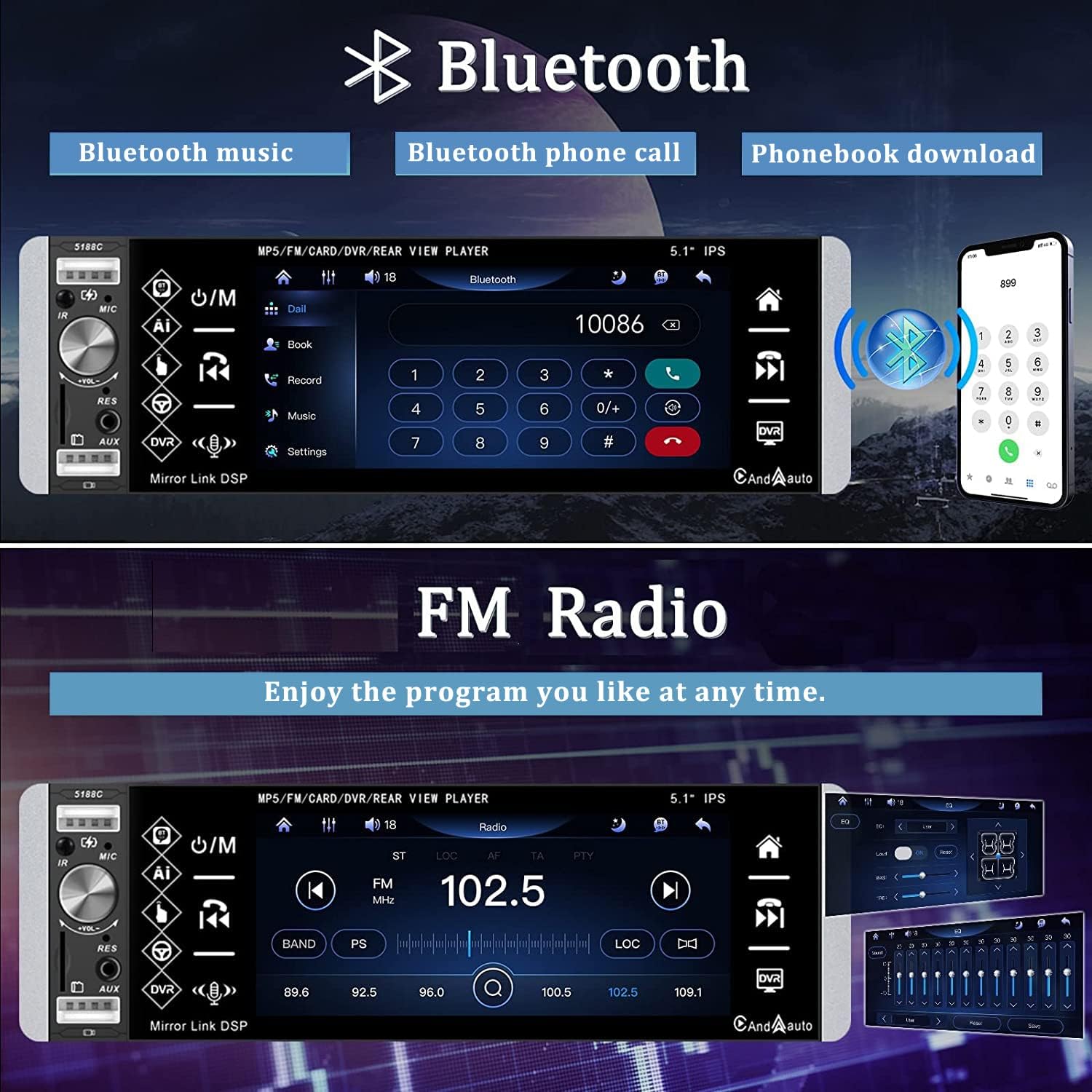
Pair your mobile phone with the car radio via Bluetooth 4.0 for hands-free calling and music streaming. The unit supports automatic phonebook download and music playlist synchronization.
6.4 FM Radio
Access the FM radio function to listen to your favorite stations. The unit supports high-quality stereo search, including fully automatic, semi-automatic, and manual tuning. Frequency range: 87.5 ~ 108.0 MHz. AM frequency range: 522 kHz ~ 1620 kHz.
6.5 Intelligent Voice Assistant
After connecting your phone via Bluetooth, press the voice button on the unit to activate your phone's voice assistant. This allows for voice commands to make calls, play music, navigate, and control various phone applications.

6.6 Mirror Link Function
The dual mirror link system is compatible with iOS (5s-7s under iOS 13.4) and Android (4.0-10.1) devices. It allows you to display your phone's screen on the car radio. iOS supports one-way projection, while Android supports two-way control from the car radio screen.
6.7 USB, SD, and AUX Playback
The unit features 3 USB ports (two for charging, one for data playback), a TF/SD card slot (supports 4-32GB external memory), and an AUX input. These allow for playback of various audio and video formats.

6.8 Rear Camera Display
When reverse gear is engaged, the screen automatically switches to display the rear camera feed. The included 170-degree wide-angle night vision camera provides clear visibility and includes auxiliary reversing lines for safe parking. The camera is waterproof and anti-fog.

6.9 Steering Wheel Control
The unit supports learning for steering wheel controls (does not support CanBus systems). Follow the on-screen instructions in the settings menu to configure your vehicle's steering wheel buttons.
7. Maintenance
- Clean the screen with a soft, dry cloth. Avoid abrasive cleaners.
- Keep the unit free from dust and debris.
- Ensure all connections are secure and free from corrosion.
8. Troubleshooting
| Problem | Possible Cause | Solution |
|---|---|---|
| Unit does not power on. | Incorrect power wiring; blown fuse. | Check power cable connections; inspect and replace fuse if necessary. |
| No sound. | Speaker wires disconnected; volume too low; incorrect audio source. | Check speaker connections; increase volume; select correct audio input. |
| Bluetooth not connecting. | Bluetooth not enabled on phone/unit; incorrect pairing process. | Ensure Bluetooth is active on both devices; re-attempt pairing. |
| CarPlay/Android Auto not working. | Faulty USB cable; app not installed/updated; phone incompatibility. | Use a high-quality data cable; ensure app is installed and updated; check phone compatibility. |
| Settings are lost after turning off the car. | Incorrect power wiring (ACC and B+ wires swapped or not connected). | Verify that the yellow (B+) wire is connected to constant 12V power and the red (ACC) wire is connected to switched 12V power. Consult a professional if unsure. |
9. Specifications
| Feature | Specification |
|---|---|
| Product Size | 188 x 58 x 118 mm (L x H x D) |
| Installation Size | 178 x 50 x 118 mm (L x H x D) |
| System | WINCE |
| Voltage | DC 12V |
| Max Output Power | 4*45W (180 Watts total) |
| Radio Frequency Band | FM: 87.5 ~ 108.0 MHz, AM: 522 kHz ~ 1620 kHz |
| Bluetooth Version | 4.0 |
| USB Ports | 3 (2 for charging, 1 for data) |
| USB Interface | 2.0 |
| Card Slot | TF/SD card (supports 4-32GB external) |
| Audio Formats | MP3 / WMA / WAV / MKV / FLAC / OGG / APE |
| Video Formats | FLV / RMVB / 3GP / SWF / AVI / ASF / MJPEG / MP4, etc. |
| Supported Languages | English, Chinese, Portuguese, Spanish, Russian, German, Italian, Polish, French, Japanese, Turkish, Czech |
| Special Features | RDS, Touch Screen, Rear Camera Input, Voice Control, CarPlay, Android Auto, Mirror Link |
10. Warranty and Support
10.1 Warranty Information
This CAMECHO product comes with a 1 YEAR WARRANTY from the date of purchase. Please retain your proof of purchase for warranty claims. The warranty covers manufacturing defects but does not cover damage caused by misuse, improper installation, or unauthorized repairs.
10.2 Customer Support
For technical assistance, troubleshooting, or warranty inquiries, please contact CAMECHO customer support:
Email: CAMECHOVIP@126.com


