
1. Introduction
Thank you for choosing the ALIEN PRO PAR 60X3 RGB LED Light Cannon. This professional PAR light is designed for various small to medium-sized applications, offering versatile and powerful illumination. This manual provides essential information for the safe and efficient operation of your device. Please read it thoroughly before use and retain it for future reference.
2. Safety Information
Always observe the following safety precautions to prevent electric shock, fire, or injury.
- Power Supply: Ensure the power supply voltage matches the device's requirements (127V 60Hz).
- Grounding: Always connect the device to a grounded power outlet.
- Indoor Use Only: This product has an IP20 protection rating, meaning it is not water-resistant. Do not expose it to rain, moisture, or high humidity.
- Ventilation: Ensure adequate ventilation around the unit. Do not block ventilation openings.
- Temperature: Operate the device within a suitable temperature range. Avoid extreme heat or cold.
- Handling: Do not drop or subject the device to severe impact.
- Servicing: Refer all servicing to qualified personnel. Do not attempt to repair the unit yourself.
- Eye Safety: Avoid direct eye exposure to the light source, as it can be harmful.
3. Product Overview
The ALIEN PRO PAR 60X3 is a compact and robust LED PAR light featuring a durable die-cast aluminum housing. It is equipped with 60 x 3W RGB 3-in-1 LEDs, providing a wide range of color mixing capabilities.
Features:
- Light Source: 60 x 3W RGB 3-in-1 LEDs
- Beam Angle: 25° WASH effect
- Power Consumption: 200W
- Input Voltage: 127V 60Hz
- Protection Rating: IP20
Components:

Figure 1: Front View. This image displays the front of the PAR 60X3, highlighting the circular arrangement of 60 individual 3W RGB LEDs.

Figure 2: Side View. This image shows the side profile of the light cannon, illustrating the robust, adjustable mounting bracket for positioning.
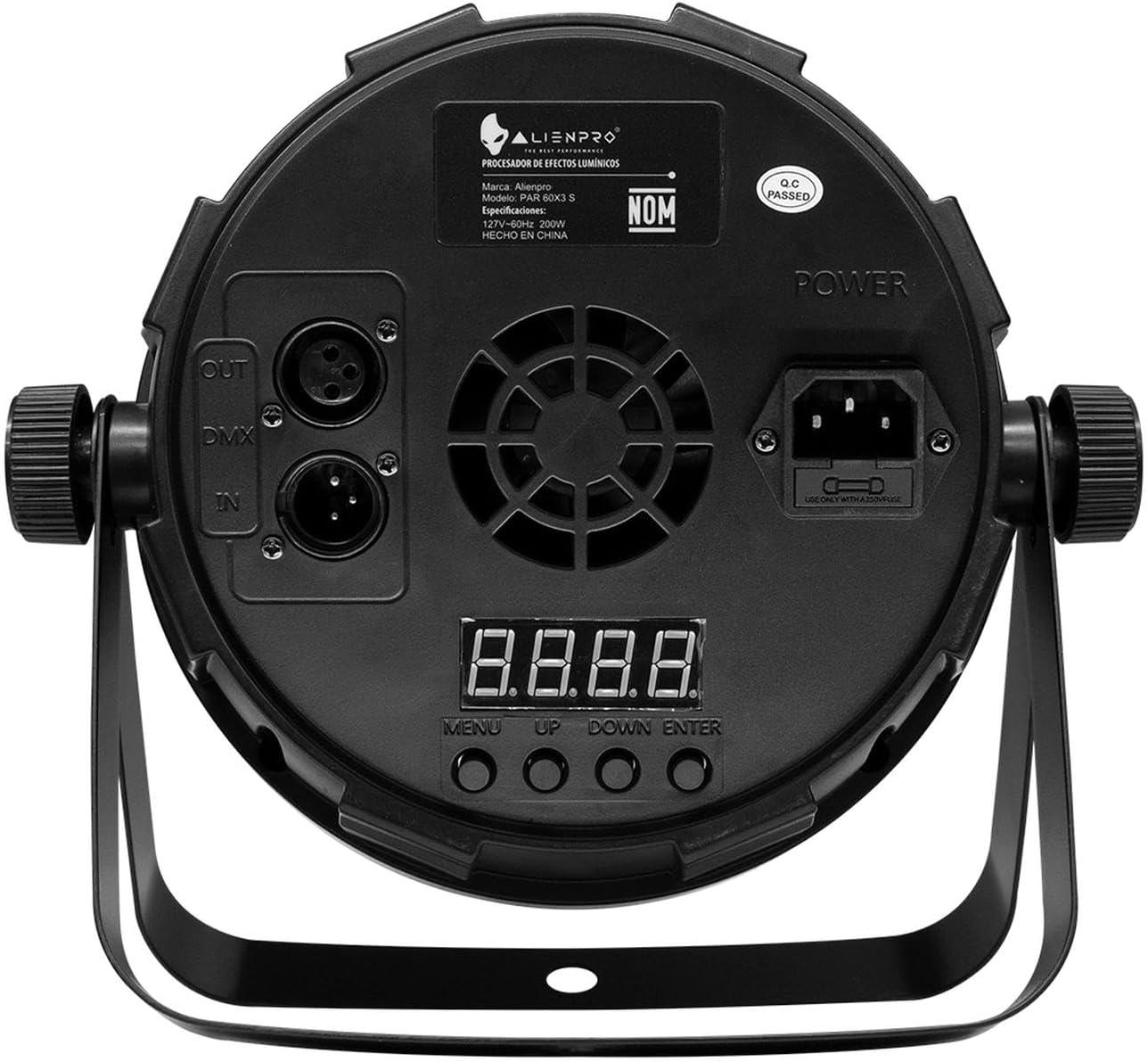
Figure 3: Rear View. This image details the back panel, including the digital display, Menu, Up, Down, and Enter buttons, power input, and DMX IN/OUT connectors.
4. Setup
Follow these steps to set up your ALIEN PRO PAR 60X3 LED Light Cannon:
- Unpacking: Carefully remove the unit from its packaging. Inspect for any damage during transit. Report any damage to your supplier immediately.
- Mounting: Use the integrated mounting bracket to securely attach the fixture to a truss, stand, or other suitable structure. Ensure all clamps and bolts are tightened properly. The fixture should be mounted in a location that allows for proper ventilation and is away from flammable materials.
- Power Connection: Connect the power cable to the power input on the rear of the unit (refer to Figure 3). Plug the other end into a grounded 127V 60Hz power outlet.
- DMX Connection (Optional): If controlling the unit via DMX, connect a DMX cable from your DMX controller's output to the DMX IN port on the PAR 60X3. For multiple units, daisy-chain them by connecting the DMX OUT of the first unit to the DMX IN of the next.
5. Operating Instructions
The ALIEN PRO PAR 60X3 can be operated in various modes using the control panel on the rear of the unit or via an external DMX controller.
Control Panel:
The control panel (Figure 3) consists of a digital display and four buttons: MENU, UP, DOWN, and ENTER.
- MENU: Press to cycle through the main menu options (e.g., DMX Address, Sound Active, Auto Programs, Static Color).
- UP/DOWN: Use these buttons to navigate through options within a menu or to adjust parameter values.
- ENTER: Press to confirm a selection or save a setting.
Operating Modes (Typical):
While specific menu options may vary, common operating modes for this type of fixture include:
- DMX Mode: Allows external control of the fixture's functions (color, dimming, strobe, etc.) via a DMX controller. Set the DMX address using the control panel.
- Auto Programs: Pre-programmed light shows that run automatically. Use the UP/DOWN buttons to select different auto programs.
- Sound Active Mode: The fixture reacts to sound or music picked up by an internal microphone. Sensitivity may be adjustable.
- Static Color Mode: Select a fixed color or mix custom RGB values to achieve a desired hue.
- Master/Slave Mode: Link multiple units together. One unit acts as the 'Master' (running an auto program or sound active mode), and the others act as 'Slaves', mirroring the Master's actions.
Refer to the on-screen display and use the UP/DOWN buttons to explore and select the desired mode and settings.
6. Maintenance
Regular maintenance ensures optimal performance and extends the lifespan of your ALIEN PRO PAR 60X3.
- Cleaning: Periodically clean the exterior casing and especially the LED lenses with a soft, lint-free cloth. For stubborn dirt, use a mild glass cleaner. Ensure the unit is unplugged before cleaning.
- Inspection: Regularly check power cables, DMX cables, and mounting hardware for any signs of wear, damage, or loose connections. Replace damaged components immediately.
- Ventilation: Ensure the ventilation openings are free from dust and debris to prevent overheating.
- Storage: When not in use, store the fixture in a dry, dust-free environment, preferably in its original packaging or a protective case.
7. Troubleshooting
If you encounter issues with your ALIEN PRO PAR 60X3, refer to the following common problems and solutions:
| Problem | Possible Cause | Solution |
|---|---|---|
| No power / Unit does not turn on |
|
|
| No light output |
|
|
| Incorrect colors / Flickering |
|
|
| Unit overheating |
|
|
If the problem persists after attempting these solutions, please contact ALIENPRO customer support or a qualified technician.
8. Specifications
| Feature | Specification |
|---|---|
| Brand | ALIENPRO |
| Model Name | PAR60X3 |
| Manufacturer | ALIEN PRO |
| Light Source | 60 x 3W RGB 3-in-1 LEDs |
| Beam Angle | 25° |
| Effect Type | WASH |
| Input Voltage | 127V 60Hz |
| Power Consumption | 200W |
| IP Protection Rating | IP20 (Indoor use only) |
| Control Modes | DMX, Auto, Sound Active, Static Color, Master/Slave |
| Housing Material | Die-cast aluminum |
9. Warranty and Support
ALIENPRO products are manufactured to high-quality standards. For warranty information, please refer to the warranty card included with your purchase or contact your local ALIENPRO dealer or customer support. Keep your proof of purchase for any warranty claims.
For technical support or service inquiries, please visit the official ALIENPRO website or contact their customer service department.

