1. Product Overview
The TYPE S Dynamic Light DL10 is a portable car battery jump starter and power bank designed to provide emergency vehicle starting assistance and charge electronic devices. It features a 1000A peak current for jump starting 12V vehicles with up to 6.0L gas or 3.0L diesel engines, an 8000mAh power bank capacity, an integrated LCD screen with JumpGuide instructions, and multiple lighting functions.

Image 1.1: The TYPE S Dynamic Light DL10 Jump Starter unit with its smart jumper cables.
2. Safety Information
WARNING: Read all safety information before using this product. Failure to follow these instructions may result in electric shock, fire, or serious injury.
- Keep the device away from children.
- Do not expose the device to water, moisture, or extreme temperatures.
- Ensure proper ventilation during use and charging.
- Avoid short-circuiting the jumper clamps.
- Do not attempt to jump start a frozen battery.
- This product is UL-Listed, indicating compliance with safety standards.
- Always wear eye protection when working with vehicle batteries.
3. Package Contents
Verify that all items are present in the package:
- TYPE S Dynamic Light DL10 Jump Starter Unit
- Smart Jumper Cables
- USB-C Charging Cable
- 12V Car Charger
- Storage Case

Image 3.1: All components included with the TYPE S Dynamic Light DL10 Jump Starter.
4. Product Features
- 1000A Peak Current: Capable of jump starting 12V vehicles with up to 6.0L gas and 3.0L diesel engines.
- 8000mAh Power Bank: Provides portable power for charging mobile devices and laptops.
- Integrated LCD with JumpGuide: Offers step-by-step instructions for safe and effective jump starting.
- Multi-mode LED Flashlight: Includes standard illumination, strobe, and S.O.S. emergency patterns.
- Emergency Hazard LEDs: Two red LEDs for enhanced visibility and safety during roadside emergencies.
- USB-C Input/Output: High-speed charging for the unit and connected devices.
- Wireless Charging: Conveniently charge compatible smartphones.
- Patented Safe and Smart Jumper Cables: Features spark-proof clamps and overheat protection.
5. Setup and Charging
5.1 Initial Charging
Before first use, fully charge the TYPE S Dynamic Light DL10. Connect the included USB-C cable to the unit's USB-C port and the other end to a USB power adapter (not included) or the 12V car charger. The LCD screen will indicate charging status. A full charge typically takes several hours.
5.2 Recharging the Unit
Recharge the unit after each use or every 3-6 months to maintain optimal battery health, even if not used. The unit can be recharged via the USB-C port using a wall adapter or the provided 12V car charger.
6. Operating Instructions
6.1 Jump Starting a Vehicle
The integrated JumpGuide LCD provides real-time, step-by-step instructions. Follow these general steps:
- Ensure the jump starter is fully charged.
- Turn off the vehicle's ignition and all accessories.
- Connect the smart jumper cables to the jump starter unit.
- Attach the red (+) clamp to the positive terminal of the vehicle battery.
- Attach the black (-) clamp to the negative terminal of the vehicle battery or a solid, unpainted metal part of the engine block.
- Follow the instructions displayed on the JumpGuide LCD screen.
- Once instructed, start the vehicle.
- After the vehicle starts, disconnect the black (-) clamp first, then the red (+) clamp from the battery.
- Disconnect the smart jumper cables from the jump starter unit.

Image 6.1: The jump starter connected to a car battery, ready for operation.

Image 6.2: The LCD screen providing clear instructions during the jump start process.
6.2 Using as a Power Bank
The DL10 can charge various electronic devices:
- USB-A/USB-C Charging: Connect your device's charging cable to the appropriate USB port on the jump starter. The unit will automatically begin charging.
- Wireless Charging: Place your Qi-compatible smartphone on the designated wireless charging pad on the jump starter. Ensure the phone is centered for optimal charging.

Image 6.3: The jump starter functioning as a portable power bank, charging a laptop.
6.3 Using the Flashlight and Emergency Lights
Press the power button to activate the flashlight. Subsequent presses will cycle through different modes:
- Standard Flashlight
- Strobe Light
- S.O.S. Signal
- Red Emergency Hazard Lights (flashing/strobe)
Press and hold the power button to turn off the lights.
7. Maintenance
- Cleaning: Wipe the unit with a soft, dry cloth. Do not use harsh chemicals or abrasive cleaners.
- Storage: Store the jump starter in its carrying case in a cool, dry place, away from direct sunlight and extreme temperatures.
- Battery Care: Recharge the unit every 3-6 months to prolong battery life, even if not in use.
8. Troubleshooting
| Problem | Possible Cause | Solution |
|---|---|---|
| Unit does not turn on. | Battery is depleted. | Charge the unit fully. |
| Vehicle does not start. | Incorrect cable connection; battery too deeply discharged; vehicle issue. | Verify cable connections as per JumpGuide; ensure vehicle is compatible; consult a mechanic if vehicle still won't start. |
| Devices not charging from power bank. | Unit battery low; incorrect cable; device not compatible with wireless charging. | Recharge the unit; use a different cable; ensure device supports Qi wireless charging. |
| LCD displays an error message. | Safety protection activated (e.g., reverse polarity, overheat). | Follow the on-screen instructions to resolve the error. Disconnect and reconnect cables if necessary. |
9. Specifications
| Feature | Specification |
|---|---|
| Model | Dynamic Light DL10 (AC532632) |
| Peak Amperage | 1000 Amps |
| Battery Capacity | 8000mAh |
| Engine Compatibility | 12V, up to 6.0L Gas, 3.0L Diesel |
| Product Dimensions | 6.2"D x 3.6"W x 1.2"H (15.8 cm x 9.1 cm x 3.3 cm) |
| Item Weight | 14.5 ounces (410 Grams) |
| Certifications | UL-Listed |
| Battery Type | Lithium Ion (included) |
| UPC | 840005326329 |
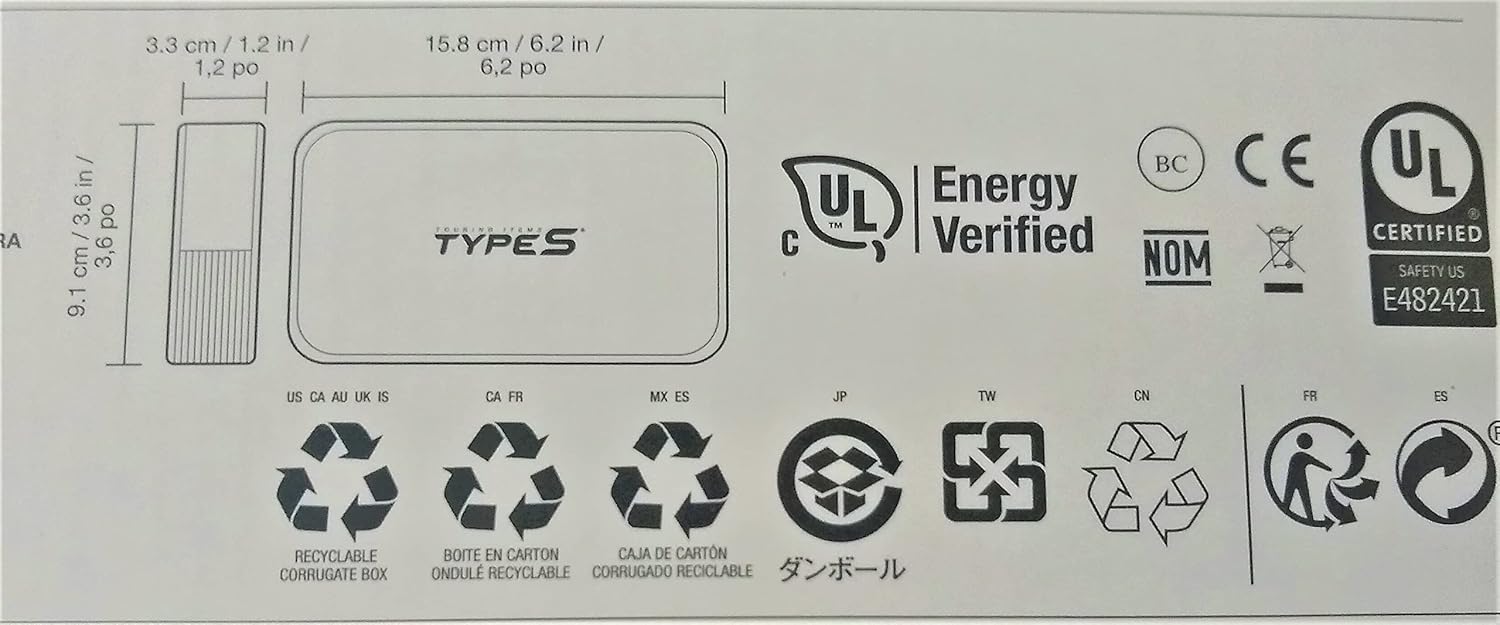
Image 9.1: Product packaging displaying dimensions and certifications.
10. Warranty and Support
For warranty information and customer support, please contact TYPE S TOURING ITEMS directly. Refer to the product packaging or the official TYPE S website for the most current contact details and warranty terms.


