
Tefal GC7508
Tefal OptiGrill Elite GC7508 Contact Grill User Manual
Model: GC7508 | Brand: Tefal
1. Introduction
This user manual provides essential information for the safe and efficient operation, maintenance, and troubleshooting of your Tefal OptiGrill Elite GC7508 Contact Grill. Please read this manual thoroughly before first use and keep it for future reference. The OptiGrill Elite is designed for indoor use, offering precise cooking results for various food types through its intelligent automatic programs.
2. Safety Information
Always observe the following safety precautions to prevent personal injury or damage to the appliance.
- Electrical Requirements: This appliance operates at 230 volts and 2000 watts. Ensure your electrical outlet matches these specifications. Do not use with incompatible voltage or adapters not rated for the appliance's power.
- Do not immerse the appliance body, cord, or plug in water or any other liquid.
- Always unplug the grill from the power outlet when not in use, before cleaning, or in case of malfunction.
- Keep the appliance out of reach of children. Close supervision is necessary when the appliance is used by or near children.
- Do not operate the appliance if the cord or plug is damaged, or if the appliance malfunctions or has been damaged in any manner.
- Ensure the grill plates are properly installed before use.
- The surfaces of the grill become hot during operation. Use oven mitts or handles when touching hot parts.
- Only use accessories recommended by the manufacturer.
3. Product Overview and Components
Familiarize yourself with the main parts of your OptiGrill Elite.


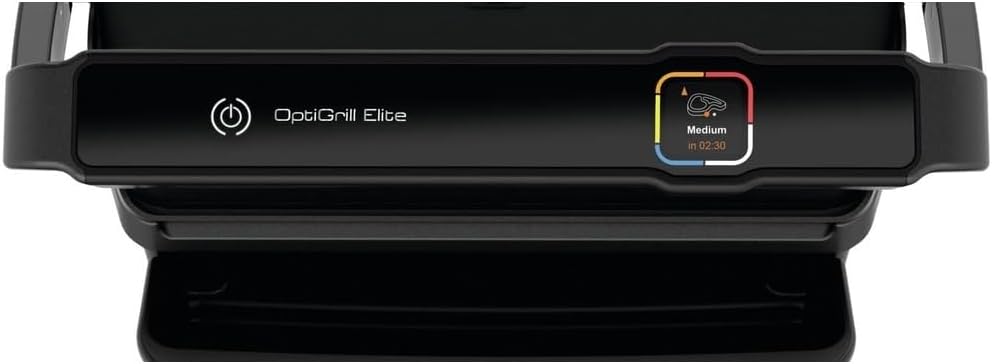

The grill consists of:
- Grill Plates: Two removable, non-stick, die-cast aluminum plates for cooking.
- Drip Tray: Collects excess fat and juices during cooking.
- Control Panel: Features a digital display, program selection buttons, and a cooking level indicator.
- Handle: For opening and closing the grill.
4. Setup and First Use
Before using your OptiGrill Elite for the first time, follow these steps:
- Unpack the grill and all its components. Remove any packaging materials, stickers, or protective films.
- Wash the grill plates and the drip tray with warm, soapy water. Rinse thoroughly and dry completely. Alternatively, the plates and drip tray are dishwasher safe.
- Insert the clean, dry grill plates into the appliance until they click into place. Ensure the drip tray is correctly positioned under the front of the grill.
- Place the grill on a stable, flat, heat-resistant surface, away from water sources.
- Plug the power cord into a suitable 230V electrical outlet. The grill will emit a beep, and the display will illuminate.
5. Operating Instructions
The OptiGrill Elite features automatic cooking programs and a manual mode.
5.1. Automatic Cooking Programs
The grill automatically adapts cooking time and temperature based on the thickness of the food and the selected program.
- Ensure the grill is plugged in and the plates are clean.
- Press the power button.
- Use the program selection buttons (left/right arrows) to scroll through the available programs (e.g., Beef, Chicken, Fish, Sausage, Burger, Pork, Bacon, Seafood, Potato, Vegetables, Sandwich, Frozen Food).
- Press the 'OK' button to confirm your selection.
- The grill will begin preheating. The cooking indicator will flash purple.
- Once preheating is complete (the grill beeps and the indicator turns solid purple), place your food on the grill plates. Close the lid.
- The grill will automatically detect the food thickness and begin cooking. The cooking indicator will change color to show the cooking progress:
- Blue: Start of cooking / Preheating
- Green: Start of cooking
- Yellow: Rare / Lightly cooked
- Orange: Medium
- Red: Well-done
- Remove food when the desired doneness is reached. The grill will beep at each stage.
5.2. Manual Mode
For custom cooking, you can use the manual mode.
- After turning on the grill, select the manual mode option using the program selection buttons.
- Press 'OK'. You can then adjust the temperature manually.
- Preheat the grill until the indicator turns solid purple.
- Place your food on the grill and monitor cooking progress manually.
6. Cooking Guide
The OptiGrill Elite is versatile for various ingredients.


- Meat (Beef, Pork, Lamb): For best results, allow meat to come to room temperature before grilling. Use the specific meat programs for optimal doneness.
- Poultry (Chicken, Turkey): Ensure poultry is cooked through to the red stage for food safety.
- Fish and Seafood: These cook quickly. Monitor closely to avoid overcooking.
- Vegetables: Cut vegetables into uniform pieces for even cooking.
- Frozen Food: Use the 'Frozen Food' program for direct grilling from frozen.
7. Cleaning and Maintenance
Regular cleaning ensures the longevity and performance of your grill.
- Always unplug the grill and allow it to cool completely before cleaning.
- Grill Plates and Drip Tray: These are removable and dishwasher safe. For hand washing, use warm, soapy water and a non-abrasive sponge. Do not use metal scouring pads or harsh detergents.
- Appliance Body: Wipe the exterior with a damp cloth. Do not use abrasive cleaners or immerse the main unit in water.
- Storage: Store the clean, dry grill in a cool, dry place.
8. Troubleshooting
If you encounter issues with your OptiGrill Elite, refer to the following common problems and solutions:
| Problem | Possible Cause | Solution |
|---|---|---|
| Grill does not turn on. | Not plugged in; power outlet issue. | Ensure the power cord is securely plugged into a working 230V outlet. |
| Grill not preheating. | Plates not correctly installed; program not selected. | Check that grill plates are clicked into place. Select a cooking program and press 'OK'. |
| Food not cooking evenly. | Uneven food thickness; grill not fully preheated. | Ensure food items are of similar thickness. Always wait for the grill to complete preheating (solid purple light) before adding food. |
| Excessive smoke. | Accumulated grease/food residue; very fatty food. | Clean grill plates and drip tray thoroughly after each use. Trim excess fat from food. |
If the problem persists after attempting these solutions, please contact customer support.
9. Specifications
Technical details of the Tefal OptiGrill Elite GC7508 Contact Grill.
- Brand: Tefal
- Model Name: Tefal GC7508
- Product Dimensions (L x W x H): 13.43 x 14.29 x 7.09 inches
- Item Weight: 8.8 pounds (4 Kilograms)
- Material: Stainless Steel
- Fuel Type: Electric
- Voltage: 230 Volts
- Wattage: 2000 watts
- Finish Type: Powder Coated
- Included Components: User Manual, Cooking Grate, Drip Tray
- Installation Type: Free Standing
- Cooking System: Contact Grill
10. Warranty and Support
For information regarding warranty coverage, product registration, or technical support, please refer to the official Tefal website or contact their customer service department. Keep your purchase receipt as proof of purchase for any warranty claims.
Related documentsGC7508


Ask a question about this manual
Ask about setup, troubleshooting, compatibility, parts, safety, or missing instructions. Manuals+ will review the question and use this page’s manual context to help answer it.