1. Product Overview
The WEP 605D-III is a high-precision DC variable power supply designed for laboratory and benchtop applications. It offers adjustable voltage up to 60.00V and current up to 5.000A, with a maximum power output of 300W. This unit features precise digital readouts for voltage, current, and power, along with digital rotary encoders for fine adjustments. It incorporates essential safety features including short-circuit, overload, and overheat protection.

Figure 1: Front view of the WEP 605D-III DC Variable Power Supply.
2. Key Features
- Precision Digital Readouts: Displays voltage up to 0.01V (10mV), current up to 0.001A (1mA), and power up to 0.1W.
- Digital Rotary Encoders: Allows for precise and smooth adjustment of voltage and current, enhancing lifespan with frequent use.
- Constant Voltage (CV) & Constant Current (CC) Modes: Automatically switches between modes based on load properties.
- Compact Design: Space-saving form factor, approximately 7.68 x 2.76 x 6.18 inches.
- Comprehensive Safety: Includes short-circuit protection (ScP), overload protection (OVER), and automatic overheat protection with a cooling fan.
- Included Accessories: Comes with U-shape terminal to alligator clip test leads.

Figure 2: Precision digital readouts for voltage, current, and power.

Figure 3: The compact design of the WEP 605D-III, ideal for saving workspace.
3. Setup Instructions
3.1 Unpacking and Initial Inspection
Carefully remove the power supply from its packaging. Inspect the unit for any signs of physical damage. Ensure all accessories, including the power cord and test leads, are present.
3.2 Power Connection
- Ensure the power supply is switched OFF.
- Connect the provided power cord to the AC input on the rear of the unit.
- Plug the power cord into a standard 110-127V AC outlet. Do not connect to a 220V power socket.
3.3 Connecting the Load
- Identify the red (positive) and black (negative) output terminals on the front panel.
- Connect the red alligator clip lead to the red output terminal and the black alligator clip lead to the black output terminal.
- Connect the other end of the alligator clips to your device or circuit, ensuring correct polarity.

Figure 4: Included U-shape terminal to alligator clip test leads for easy connection.
4. Operating Instructions
4.1 Powering On/Off
Press the main power switch located on the front panel to turn the unit ON or OFF. The digital displays will illuminate upon power-on.
4.2 Adjusting Voltage and Current
The WEP 605D-III uses digital rotary encoders for precise adjustments:
- Voltage Adjustment: Use the left rotary knob (labeled "VOLTAGE"). Turn quickly for larger increments, or turn slowly for 1 unit per click for fine tuning.
- Current Adjustment: Use the right rotary knob (labeled "CURRENT"). Similar to voltage, turn quickly for larger increments or slowly for fine tuning.
You do not need to short-circuit the terminals to set the adjustable power supply's parameters.

Figure 5: Digital encoder knobs allow for precise voltage and current adjustments.
4.3 Constant Voltage (CV) and Constant Current (CC) Modes
The power supply automatically operates in either Constant Voltage (CV) or Constant Current (CC) mode depending on the load. The corresponding indicator light (CV or CC) will illuminate.
- Constant Voltage (CV): When the load resistance is high, the output voltage remains constant at the set value, and the current varies.
- Constant Current (CC): When the load resistance is low, the output current remains constant at the set value, and the voltage varies.

Figure 6: Illustration of automatic Constant Voltage and Constant Current mode operation.
4.4 Output ON/OFF Function
The output can be toggled ON or OFF by pressing the voltage adjustment knob. This allows you to set parameters before applying power to your circuit.

Figure 7: Press the voltage knob to toggle the output power ON or OFF.
4.5 Buzzer Sound ON/OFF
To turn the buzzer sound ON or OFF, press and hold the current adjustment knob (right-side) for a few seconds.

Figure 8: Press and hold the current knob to enable or disable the buzzer sound.
4.6 Application Examples
The WEP 605D-III is suitable for various applications, including:
- Anodizing kits
- Electroplating
- Powering Arduino and breadboard circuits
- Reviving old batteries
- General lab and prototyping work

Figure 9: The power supply can be used for charging batteries.
5. Safety Features and Precautions
The WEP 605D-III includes several safety mechanisms to protect both the user and connected equipment.
5.1 Short-Circuit Protection (ScP)
If a short circuit is detected, the power supply will automatically cut power, emit a warning beep, and display the code "ScP" on the screen. This protects the load from damage.

Figure 10: The 'ScP' display indicates active short-circuit protection.
5.2 Overload Protection (OVER)
In case of an overload (exceeding the set current limit in CV mode or voltage limit in CC mode), the unit will enter protection mode, cutting power and displaying "OVER".
5.3 Overheat Protection
The integrated cooling fan activates automatically to maintain optimal operating temperature. If overheating is detected, the power supply will cut power and enter protection mode.
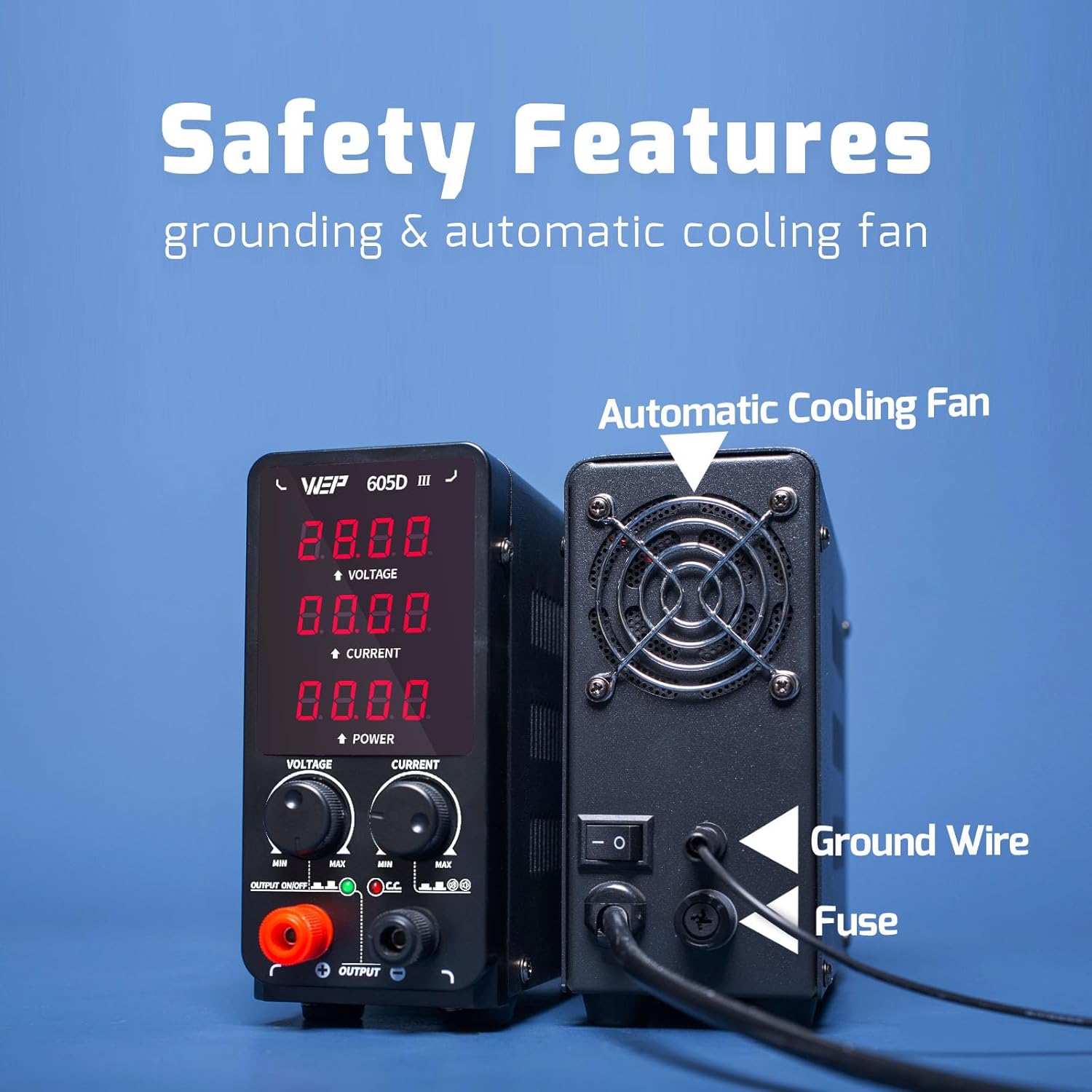
Figure 11: Rear view showing the automatic cooling fan and grounding point.
5.4 Grounding
The unit is equipped with a ground wire for enhanced safety. Ensure proper grounding during operation.
5.5 Voltage Compatibility
This product is rated for 110-127V USA specifications. Do not connect this unit to a 220V power socket.
6. Maintenance
6.1 Cleaning
To clean the unit, disconnect it from the power source. Use a soft, dry cloth to wipe the exterior. Do not use abrasive cleaners or solvents.
6.2 Storage
Store the power supply in a cool, dry place away from direct sunlight and excessive dust when not in use.
7. Troubleshooting
This section addresses common issues you might encounter with your WEP 605D-III power supply.
| Problem | Possible Cause | Solution |
|---|---|---|
| Unit does not power on. | No power from outlet; loose power cord; blown fuse. | Check power outlet; ensure power cord is securely connected; inspect and replace fuse if necessary. |
| "ScP" error displayed. | Short circuit detected in the connected load. | Disconnect the load, identify and resolve the short circuit, then reconnect. |
| "OVER" error displayed. | Overload condition (current or voltage exceeded limits). | Reduce the load or adjust voltage/current settings to be within the unit's capacity. |
| Cooling fan not running. | Normal operation (fan only activates when needed). | The fan is temperature-controlled. It will activate automatically when the internal temperature rises. |
| Voltage/Current adjustment is erratic. | Rapid turning of the digital encoder. | Turn the digital encoder slowly for precise, single-unit adjustments. |
8. Specifications
| Feature | Specification |
|---|---|
| Model Number | WEP 605D-III |
| Output Voltage | 0.00V - 60.00V (Adjustable) |
| Output Current | 0.000A - 5.000A (Adjustable) |
| Output Wattage | 300 Watts (Max) |
| Voltage Reading Accuracy | 0.01V (10mV) |
| Current Reading Accuracy | 0.001A (1mA) |
| Power Reading Accuracy | 0.1W |
| Input Voltage | 110-127V AC |
| Product Dimensions (L x W x H) | 7.68 x 2.76 x 6.18 inches |
| Item Weight | 3.91 pounds |
| Cooling Method | Air (Automatic Fan) |
| Manufacturer | Guangzhou Yihua Electronic Equipment Co., Ltd. |
9. Official Product Video
Video 1: An overview of the WEP 605D-III DC Variable Power Supply, demonstrating its precision readouts, compact design, adjustable voltage and current, ease of use with alligator clips, constant voltage/current modes, and various safety features including short-circuit, overload, and overheat protection.
10. Warranty and Support
The WEP 605D-III DC Variable Power Supply is covered by a 1-year USA technical support warranty. Our dedicated team provides 24-hour assistance for any technical inquiries or support needs.
For assistance, please refer to the contact information provided with your product packaging or visit the official WEP TOOLS website.


