
1. Product Overview
The Oladance OWS1 Open Ear Headphones offer a unique open-ear design for comfort and situational awareness. These wireless Bluetooth 5.2 headphones feature dual 16.5mm drivers for high-quality sound and extended battery life, making them suitable for various activities.
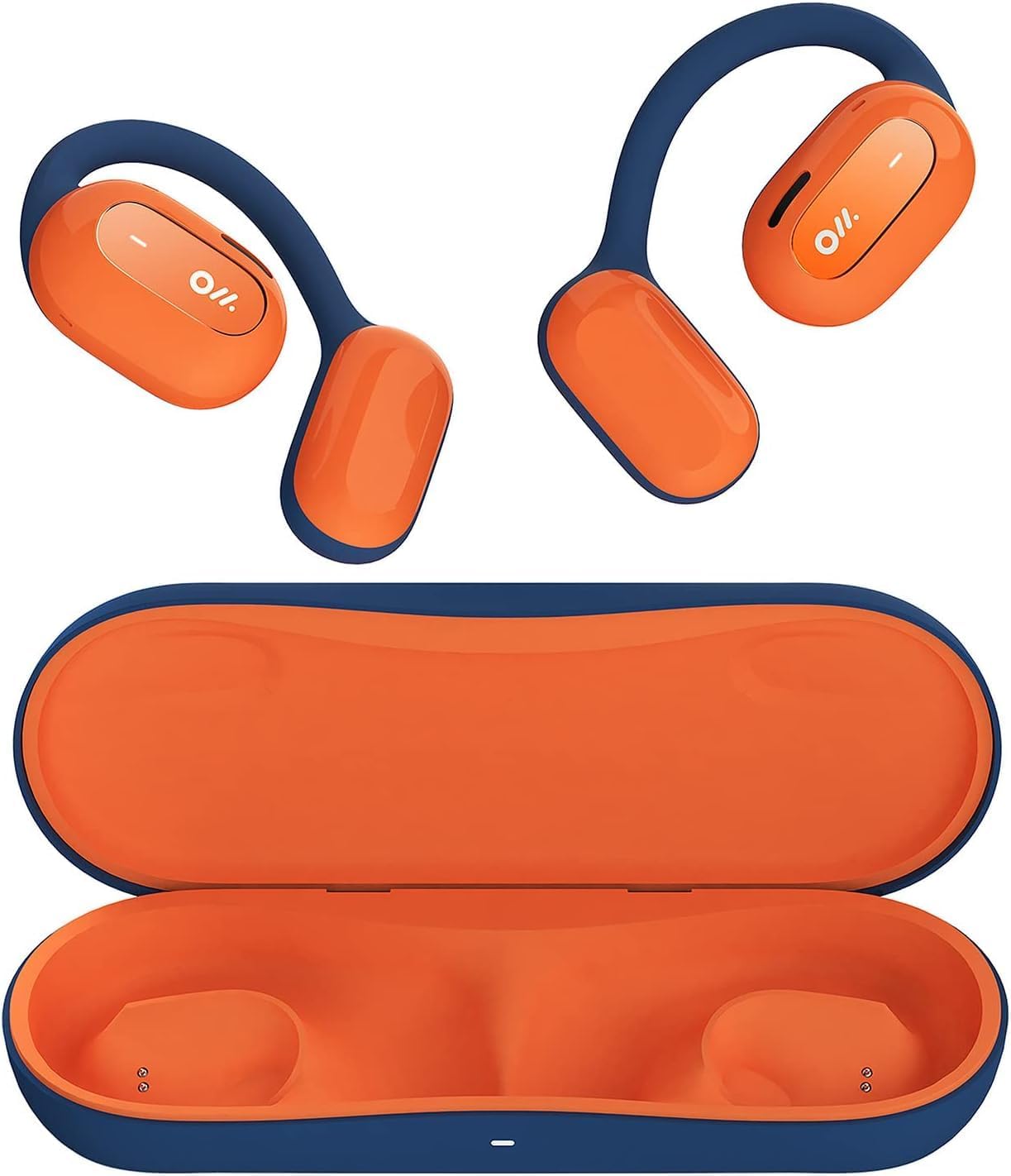
Image 1: Oladance OWS1 Open Ear Headphones and their carry case.
2. What's in the Box
- 1 × Oladance Wearable Stereo (Pair of Open Ear Headphones)
- 1 × Non-charging Carry Case
- 1 × Type-C Cable
- 1 × User Manual
3. Key Features
- True Open Ear Design: Earbuds rest gently on top of the ear, avoiding insertion into the ear canal for enhanced comfort and situational awareness.
- 360° Superior Sound: Equipped with dual powerful 16.5mm dynamic drivers and bio-diaphragm technology for rich, clear audio across all volume levels.
- Anti-Hearing Loss Focus: Designed to prevent common health issues associated with traditional earbuds by not blocking the ear canal, reducing pressure and potential hearing damage.
- Extended 16-Hour Playtime: Features a built-in 160mAh battery and low-consumption algorithms, providing up to 16 hours of continuous playback on a single charge. Note: A separate charging case is required for extended playtime beyond the included carry case.
- Secure and Comfortable Fit: Multi-point support system distributes weight evenly across the ear, ensuring a stable and comfortable fit for various activities.

Image 2: The Oladance OWS1 headphones are designed for a secure and comfortable fit, ideal for activities like yoga.
4. Setup Guide
4.1 Initial Charging
Before first use, fully charge your Oladance OWS1 headphones. Connect the provided Type-C cable to the charging port on the headphones and a compatible USB power source. The LED indicator will show charging status.
4.2 Powering On/Off
- To Power On: Press and hold the power button (location typically on one of the earbud units) for approximately 2-3 seconds until you hear an audible prompt or see an LED indicator light up.
- To Power Off: Press and hold the power button for approximately 3-5 seconds until you hear an audible prompt or the LED indicator turns off.
4.3 Bluetooth Pairing
- Ensure the headphones are powered off.
- Press and hold the power button for approximately 5-7 seconds until the LED indicator flashes red and blue alternately. This indicates the headphones are in pairing mode.
- On your device (smartphone, tablet, computer), go to the Bluetooth settings.
- Search for "Oladance OWS1" in the list of available devices.
- Select "Oladance OWS1" to connect. Once connected, the LED indicator will typically flash blue slowly or turn off, and you will hear a confirmation tone.

Image 3: The Oladance OWS1 headphones are designed for an ergonomic and stable fit during various activities.
5. Operating Instructions
5.1 Basic Controls
| Function | Action |
|---|---|
| Play/Pause Music | Single press the Multi-function button. |
| Next Track | Double press the Multi-function button. |
| Previous Track | Triple press the Multi-function button. |
| Volume Up | Single press the Volume + button. |
| Volume Down | Single press the Volume - button. |
| Answer/End Call | Single press the Multi-function button during an incoming call or active call. |
| Reject Call | Press and hold the Multi-function button for 2 seconds during an incoming call. |
| Activate Voice Assistant | Press and hold the Multi-function button for 2 seconds. |
5.2 Multi-Point Connection
The Oladance OWS1 headphones support multi-point connection, allowing them to be connected to two Bluetooth devices simultaneously. This enables seamless switching between devices without re-pairing.
- Ensure the headphones are paired with the first device.
- Put the headphones into pairing mode again (usually by holding the power button until the LED flashes red and blue).
- On the second device, search for "Oladance OWS1" in the Bluetooth settings and connect.
- The headphones should now be connected to both devices. Audio will automatically switch to the device playing content or receiving a call.

Image 4: The open-ear design allows for comfortable extended wear, even during work or calls.
6. Care and Maintenance
- Cleaning: Use a soft, dry cloth to wipe the headphones. Avoid using harsh chemicals or abrasive materials.
- Storage: Store the headphones in their provided non-charging carry case when not in use to protect them from dust and damage.
- Water Resistance: The headphones are water-resistant (IPX4 rated). Avoid submerging them in water or exposing them to high-pressure water jets. Dry thoroughly if they get wet.
- Temperature: Avoid exposing the headphones to extreme temperatures (hot or cold) or high humidity.

Image 5: The included carry case protects your Oladance OWS1 headphones during transport and storage.
7. Troubleshooting
- Cannot Power On
- Ensure the headphones are fully charged. Connect them to a power source using the Type-C cable.
- Cannot Pair with Device
- Ensure the headphones are in pairing mode (LED flashing red and blue).
- Turn off and on your device's Bluetooth.
- Clear previous Bluetooth connections on your device.
- Move the headphones closer to your device.
- No Sound or Low Volume
- Check the volume levels on both the headphones and your connected device.
- Ensure the headphones are properly connected to your device.
- Try playing audio from a different application or source.
- Intermittent Connection
- Ensure there are no obstructions between the headphones and your device.
- Avoid strong electromagnetic interference.
- Keep the headphones within the effective Bluetooth range (typically 10 meters).
8. Product Specifications
| Feature | Detail |
|---|---|
| Model Number | OLA02 |
| Brand | Oladance |
| Connectivity Technology | Wireless (Bluetooth 5.2) |
| Ear Placement | Open Ear |
| Form Factor | Open Ear |
| Driver Size | Dual 16.5mm Dynamic Drivers |
| Battery Life (Average) | Up to 16 Hours |
| Charging Time | Approximately 2 Hours |
| Water Resistance Level | Water Resistant (IPX4) |
| Microphone Format | Built-In |
| Control Type | Media Control (Buttons) |
| Material | Plastic |
| Product Dimensions | 13 x 11 x 457.2 cm |
| Item Weight | 260 g |

Image 6: A close-up of the Oladance OWS1 headphones, highlighting their design and color.
9. Warranty and Support
Oladance products are covered by a limited warranty. For detailed warranty information, product support, or service inquiries, please refer to the official Oladance website or contact their customer service directly. Keep your proof of purchase for warranty claims.
For further assistance, please visit: www.oladance.com


