
1. Introduction
Thank you for choosing the Clean Air Optima CA-509Pro SMART HEPA UV-C Air Purifier. This device is designed to significantly improve your indoor air quality by effectively removing pollutants and allergens. Please read this manual thoroughly before use to ensure proper operation and maintenance.

Image 1.1: The Clean Air Optima CA-509Pro SMART Air Purifier.
2. Safety Instructions
- Always place the air purifier on a firm, level surface.
- Do not block air inlets or outlets. Maintain at least 20 cm clearance from walls or furniture.
- Unplug the device before cleaning or performing any maintenance.
- Do not use the device in wet or high-humidity environments.
- Keep out of reach of children and pets.
- Only use original Clean Air Optima replacement filters.
- Do not attempt to repair the device yourself. Contact qualified service personnel.
3. Package Contents
Verify that all items are present in the package:
- Clean Air Optima CA-509Pro SMART Air Purifier Unit
- Pre-filters (2x, pre-installed)
- HEPA H13 Filters (2x, pre-installed)
- Activated Carbon Filters (2x, pre-installed)
- UV-C Lamps (2x, pre-installed)
- Remote Control
- Power Cord
- User Manual (this document)

Image 3.1: Product packaging showing the air purifier and remote control.
4. Product Components and Filtration System
The CA-509Pro SMART utilizes an advanced 8-step filtration system to ensure comprehensive air purification:
- Air Intake: Polluted indoor air is drawn in by the silent fan.
- Smart Particle Sensor: Measures and automatically regulates air quality.
- Pre-filters (2x): Capture larger dust particles, hair, and pet dander.
- HEPA H13 Filters (2x): Filter 99.97% of all suspended particles down to 0.3 microns, including fine dust, pollen, allergens, and mold spores.
- Activated Carbon Filters (2x): Effectively remove gases, chemicals, cigarette smoke, VOCs, and odors.
- UV-C Lamps (2x): Ultraviolet light (254 nm) kills harmful microorganisms such as germs, bacteria, fungi, and deactivates viruses.
- Ozone-Free Ionizer (2x): Distributes over 4,000,000 negative ions/cm³ to neutralize harmful substances and odors.
- Purified Air Output: Clean, fresh air is released into the room.

Image 4.1: Exploded view illustrating the dual airflow and 8-step filtration system components.
5. Setup
5.1 Initial Filter Installation
The filters are typically pre-installed but may have protective packaging. Follow these steps:
- Unpack the air purifier and place it on a stable surface.
- Gently remove the front and back covers of the unit.
- Remove any plastic packaging from the pre-filters, HEPA filters, and activated carbon filters.
- Insert the filters back into their respective slots, ensuring correct orientation.
- Reattach the front and back covers securely.
5.2 Placement
For optimal performance, place the air purifier in a central location within the room, away from obstacles that might block airflow. Ensure adequate space around the unit for proper air circulation.
6. Operating Instructions
6.1 Control Panel
The top panel of the air purifier features touch controls and a digital display. The display shows PM2.5 levels, temperature, and humidity.

Image 6.1: Front view of the air purifier showing the digital display.
6.2 Modes and Settings
- Power Button: Turns the unit on or off.
- Fan Speed: Adjusts fan speed (e.g., Low, Medium, High).
- Auto Mode: The device automatically adjusts fan speed based on detected air quality (PM2.5 levels).
- Sleep Mode: Operates at the lowest fan speed with minimal noise (<10 dB(A)) and dims the display for undisturbed sleep.
- Timer: Sets an operating duration (e.g., 1, 2, 4, 8 hours).
- UV-C/Ionizer: Activates or deactivates the UV-C lamps and ionizer function.
6.3 App Control (SMART Functionality)
The CA-509Pro SMART can be controlled via the Clean Air Optima app on your smartphone. This allows for remote control and monitoring of air quality.
- Download the 'Clean Air Optima' app from the Google Play Store or Apple App Store.
- Ensure your air purifier is connected to a Wi-Fi network.
- Follow the in-app instructions to pair your device.

Image 6.2: Screenshots of the Clean Air Optima mobile application for smart control.
7. Maintenance
7.1 Filter Replacement
The device will indicate when filters need replacement. Filter lifespan varies based on usage and air quality. Always replace both sets of filters (HEPA and Activated Carbon) simultaneously for optimal performance.
- Unplug the air purifier.
- Remove the front and back covers.
- Carefully remove the old filters and dispose of them according to local regulations.
- Install new Clean Air Optima replacement filters, ensuring proper fit.
- Reattach the covers.
- Reset the filter replacement indicator (refer to the app or control panel instructions).
7.2 Cleaning
- Exterior: Wipe the exterior with a soft, damp cloth. Do not use abrasive cleaners or solvents.
- Pre-filters: The pre-filters can be gently vacuumed to remove accumulated dust. They are not washable.
- Sensors: Periodically clean the particle sensor opening with a soft brush or cotton swab to ensure accurate readings.
8. Troubleshooting
| Problem | Possible Cause | Solution |
|---|---|---|
| Unit does not turn on | No power supply | Check power cord connection and wall outlet. |
| Weak airflow | Blocked air inlets/outlets or dirty filters | Ensure clear path for airflow. Clean or replace filters. |
| Unusual noise | Foreign object inside or improper filter installation | Unplug, check for obstructions, re-install filters correctly. |
| Poor air purification | Filters need replacement | Replace HEPA and Activated Carbon filters. |
| App connection issues | Wi-Fi signal weak or incorrect pairing | Ensure strong Wi-Fi signal. Re-attempt pairing via app instructions. |
9. Specifications
| Feature | Specification |
|---|---|
| Model Number | CA-509Pro Smart |
| Dimensions (L x W x H) | 21 x 32 x 56 cm |
| Weight | 7.5 Kilograms |
| Power Source | Wired |
| Rated Power | 15 Watts |
| Filter Type | HEPA H13, Activated Carbon, Pre-filter |
| Control Method | App, Touch Screen, Remote Control |
| Noise Level | <10 Decibels (in Sleep Mode) |
| Recommended Floor Area | Up to 90 Square Meters |
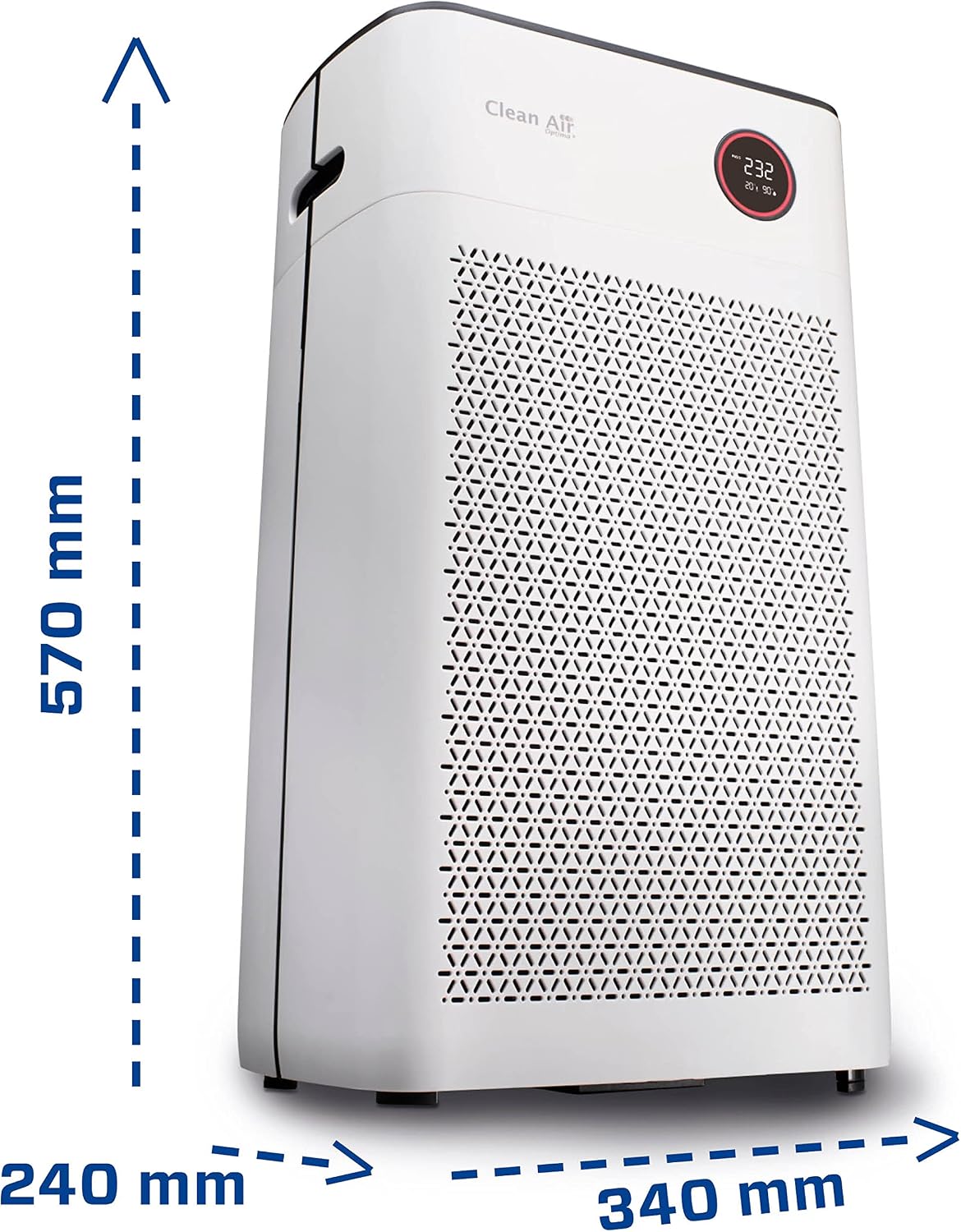
Image 9.1: Product dimensions of the Clean Air Optima CA-509Pro.
10. Warranty and Support
Clean Air Optima products are manufactured to high-quality standards. For warranty information, technical support, or to purchase replacement parts and filters, please visit the official Clean Air Optima store or contact customer service.
Official Brand Store: Clean Air Optima Store on Amazon


