
Introduction
Thank you for choosing the Dripex L-Shaped Electric Adjustable Height Standing Desk. This manual provides essential information for the safe assembly, operation, and maintenance of your new desk. This desk features a robust dual-motor system and a stable 4-leg design, offering a versatile and ergonomic workspace for your home office.
Safety Information
- Ensure all components are securely fastened before use.
- Keep children and pets away from the desk during operation to prevent injury.
- Do not overload the desk beyond its maximum weight capacity of 80 kg (176 lbs).
- Avoid placing liquids directly on the control panel or near electrical components.
- Do not attempt to disassemble or repair the motor or control system yourself. Contact qualified personnel for service.
- Ensure there are no obstructions above or below the desk when adjusting its height to prevent damage or injury. The anti-collision technology is designed to help prevent this, but manual vigilance is always recommended.
Package Contents
Please verify that all parts are present before beginning assembly. The desk is designed with mostly pre-assembled parts for easier setup. Depending on the desk size, it may arrive in one or two boxes.
- Desktop sections (L-shaped)
- Leg frames (4 legs)
- Control box and power adapter
- Intelligent control panel
- Hardware kit (screws, tools)
- Cable management accessories
- Cup holder (included component)
- Instruction manual
Setup and Assembly
Assembly of your Dripex L-Shaped Standing Desk is designed to be straightforward due to its mostly pre-assembled components. Follow the detailed instructions provided in the separate assembly guide for step-by-step visual assistance.
- Unpack Components: Carefully remove all parts from the packaging and lay them out on a clean, soft surface to prevent scratches.
- Assemble Leg Frames: Attach the foot pads to the bottom of each leg. Connect the leg columns to the crossbars as per the assembly guide.
- Attach Desktop: Securely fasten the L-shaped desktop sections to the assembled leg frames using the provided screws. Ensure proper alignment.
- Install Control Panel: Mount the intelligent control panel to the underside of the desk in a convenient location.
- Connect Wiring: Connect the motor cables and control panel cable to the control box. Plug the power adapter into the control box and then into a wall outlet.
- Cable Management: Use the included cable ties or clips to organize and secure all cables, preventing them from dangling or getting caught during height adjustments.

Image: General dimensions of a desk segment and frame. Note that the L-shaped desk will have a larger overall footprint.
Operating Instructions
Your Dripex L-Shaped Standing Desk features an intelligent control panel for effortless height adjustments and personalized settings.

Image: Detailed view of the intelligent control panel, showing various functions.
Control Panel Functions:
- UP/DOWN Arrows: Press and hold to smoothly adjust the desk height upwards or downwards. Release the button to stop at your desired height.
- RESET Button: If the desk encounters an error or needs recalibration, press and hold the RESET button until the desk moves to its lowest position and then slightly rises, indicating a successful reset.
- Memory Presets (1, 2, 3, 4):
- Adjust the desk to your desired height using the UP/DOWN arrows.
- Press the 'M' or 'SET' button (if available, otherwise follow specific model instructions) followed by one of the numbered memory buttons (e.g., '1'). The display will show 'S-1' or similar, confirming the height is saved.
- To recall a saved height, simply press the corresponding numbered memory button. The desk will automatically move to that position.
- Sedentary Reminder: This feature can be set to remind you to change positions. Refer to the specific control panel instructions for setting the timer.
- Anti-Collision Technology: The desk is equipped with a sensor that detects obstacles during height adjustment. If an obstruction is detected, the desk will stop and reverse slightly to prevent damage.
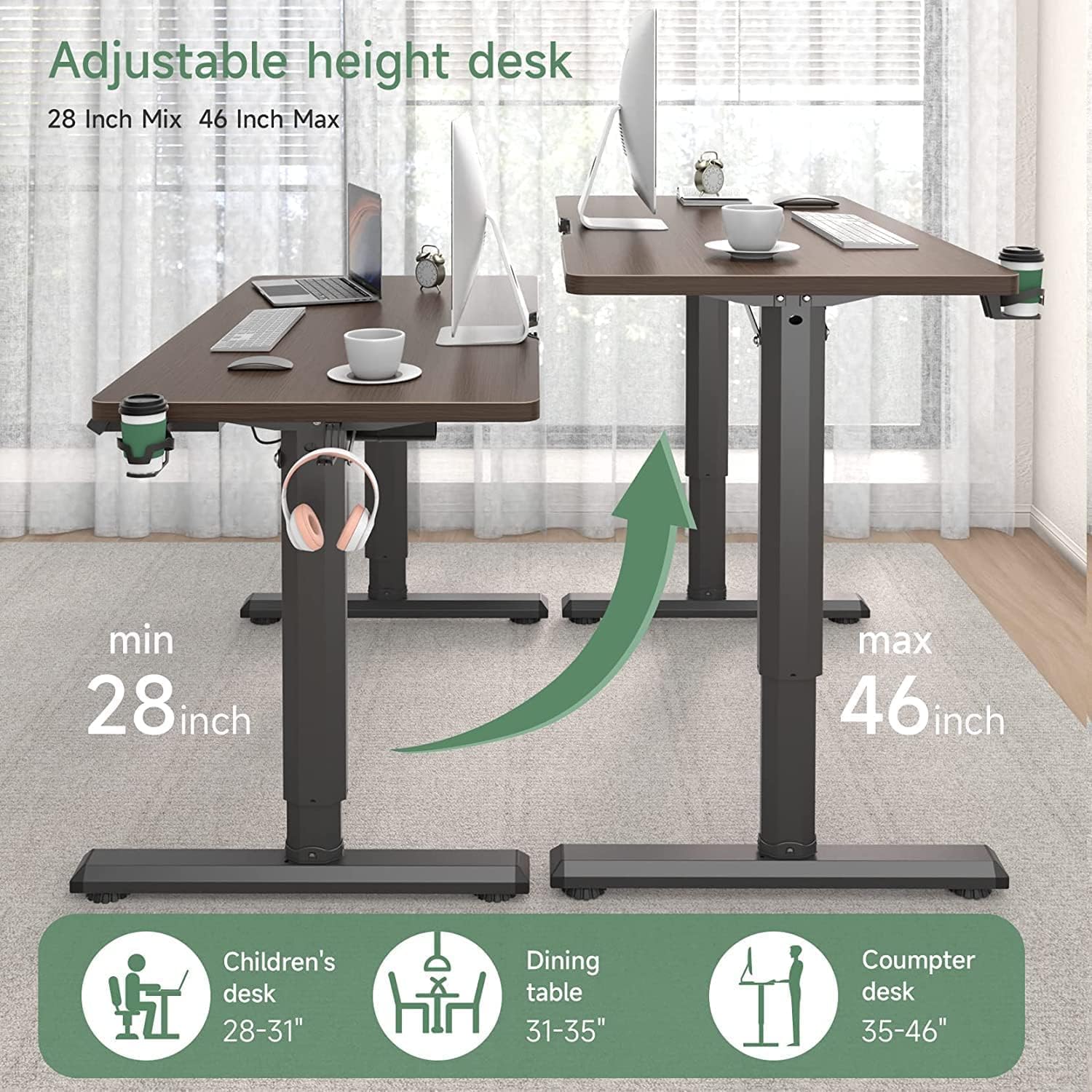
Image: Illustration of the adjustable height range from 28 inches (min) to 46 inches (max).

Image: Ergonomic benefits of using a height-adjustable desk to maintain proper posture and reduce discomfort.
Maintenance
Proper maintenance ensures the longevity and optimal performance of your Dripex standing desk.
- Cleaning: Wipe the desk surface and frame with a soft, damp cloth. Avoid harsh chemicals or abrasive cleaners that could damage the finish.
- Cable Management: Periodically check all cables to ensure they are securely routed and not pinched or damaged.
- Fasteners: Occasionally check all screws and bolts to ensure they remain tight. Retighten if necessary.
- Motor Care: The dual motors are designed for maintenance-free operation. Do not lubricate or attempt to open the motor housing.
Troubleshooting
If you encounter issues with your desk, refer to the following common solutions before contacting customer support.
| Problem | Possible Cause | Solution |
|---|---|---|
| Desk does not move. | Power cable disconnected, control box error, motor cable loose. | Check power connection. Ensure all motor cables are securely plugged into the control box. Perform a RESET operation. |
| Desk moves unevenly or makes unusual noise. | Uneven load, loose fasteners, obstruction. | Distribute weight evenly on the desktop. Check and tighten all assembly screws. Ensure no obstructions are interfering with the legs. Perform a RESET. |
| Display shows an error code (e.g., E01, E02). | Overload, motor overheating, sensor issue. | Reduce weight on the desk. Unplug the desk for 20 minutes to allow motors to cool. Perform a RESET. If the issue persists, contact customer support. |
| Anti-collision feature activates too frequently. | Sensitive setting, minor obstruction. | Ensure no items are near the desk's path. Refer to the control panel manual for adjusting anti-collision sensitivity if available. |
Specifications
Key technical specifications for the Dripex L-Shaped Standing Desk (Model FEL-V2-18):
- Model Number: FEL-V2-18
- Desk Shape: L-Shape
- Product Dimensions (Overall): 43"D x 71"W x 46"H (Depth x Width x Max Height)
- Adjustable Height Range: 28 inches (71 cm) to 46 inches (118 cm)
- Desktop Material: Engineered Wood (Walnut finish)
- Frame Material: Alloy Steel
- Motor Type: Dual Motor
- Legs: 4-leg design for enhanced stability
- Maximum Weight Capacity: 80 kg (176 lbs)
- Special Features: Electric height adjustment, Memory presets, Anti-collision technology, Sedentary reminder
- Assembly Required: Yes (mostly pre-assembled parts)
- Included Components: Cup Holder

Image: Demonstration of the desk's 80 kg (176 lbs) load capacity.
Warranty Information
Dripex products are manufactured to high-quality standards. For specific warranty terms and conditions applicable to your L-Shaped Standing Desk, please refer to the warranty card included in your product packaging or visit the official Dripex website. Keep your purchase receipt as proof of purchase for any warranty claims.
Customer Support
Should you have any questions, require assistance with assembly, or need troubleshooting support, please do not hesitate to contact Dripex customer service. You can typically find contact information on the product packaging, the official Dripex website, or through your retailer.
Online Support: Visit the Dripex Store on Amazon for product information and support resources.