
Kastar BA-2B-F970PRO-K
Kastar NP-F970 PRO Battery 2-Pack User Manual
Model: BA-2B-F970PRO-K
1. Introduction
This user manual provides essential information for the safe and effective use of your Kastar NP-F970 PRO Battery 2-Pack. These high-capacity lithium-ion batteries are designed as reliable replacements for a wide range of compatible cameras and LED lights, ensuring extended power for your devices.

Image: Two Kastar NP-F970 PRO batteries. These batteries feature a sleek black design with clear labeling, including "Kastar" branding and "Lithium ion BATTERY PACK" text. Each battery has four small LED lights and a "CHECK" button to indicate charge status. They are rectangular with connection terminals on one end.
2. Product Features
- High Capacity: Each battery offers a super high capacity of 8700mAh at 7.2V, providing extended operational time for your camera or LED light.
- LED Power Indicator: Equipped with 4 LED lights, allowing you to easily monitor the battery's charge status at any time.
- Enhanced Safety: Kastar lithium-ion battery cells meet UL1642 & CE safety standards. They include built-in protection circuits against over-charge, over-discharge, over-voltage, over-current, and over-heating.
- Durability: Designed for a longer cycle life, ensuring reliable performance over time.
- Convenient Packaging: This package includes two (2) NP-F970 PRO batteries.
3. Compatibility
The Kastar NP-F970 PRO batteries are compatible with a wide range of devices that use NP-F series batteries. This includes, but is not limited to, the following battery models, LED lights, and camera models:
Compatible Battery Models:
- F550, F570, NP-F750, NP-F770, NP-F930, F950, NP-F960, NP-F970, NP-F980, NP-F990
Compatible LED Lights:
- CN-126, CN-160, CN-216, CN-304, VL600, YN300
- GVM LED480, LED520, LED672, LED896
Compatible Camera Models:
These batteries are compatible with numerous Sony CCD, DCR, DSR, EVO, HDR, HVR, HXR, MVC, PBD, PLM, UPX, NEX series cameras, as well as Z Cam E2 series, Kinefinity KineKIT Edge Camera Cage, and Blackmagic Design Pocket Cinema Camera 6K Pro. For a comprehensive and up-to-date list of all compatible camera models, please refer to the official product listing or the manufacturer's website.
4. Setup and Charging
Initial Charging:
Before first use, it is recommended to fully charge your Kastar NP-F970 PRO battery. Use a compatible charger designed for NP-F series batteries. The charging time will vary depending on the charger's output and the battery's initial charge level.
Battery Installation:
- Ensure your device (camera, LED light, etc.) is powered off before installing or removing the battery.
- Align the battery's terminals with the corresponding contacts in your device's battery compartment.
- Gently slide the battery into the compartment until it clicks securely into place. Do not force the battery.
- Close the battery compartment door, if applicable.
5. Operating the Battery
Checking Battery Status:
Each Kastar NP-F970 PRO battery is equipped with a "CHECK" button and four LED indicators. Press the "CHECK" button to illuminate the LEDs, which will display the approximate remaining charge:
- 4 LEDs: 75-100% charge remaining
- 3 LEDs: 50-75% charge remaining
- 2 LEDs: 25-50% charge remaining
- 1 LED: Below 25% charge remaining (recharge soon)
- No LEDs: Battery is depleted or very low.
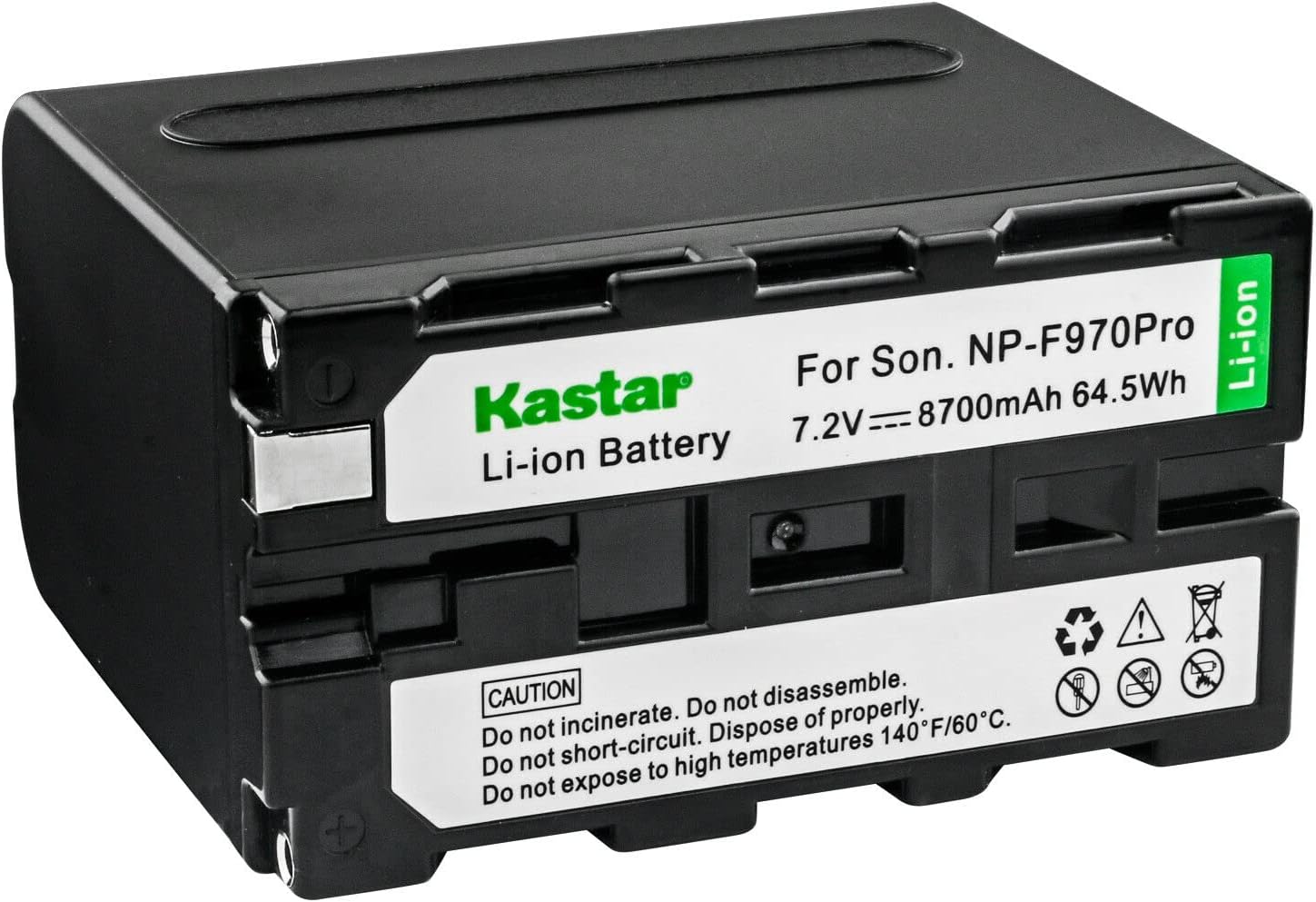
Image: A detailed view of the Kastar NP-F970 PRO battery's label. The label clearly states "Kastar Li-ion Battery" and "For Son. NP-F970Pro 7.2V === 8700mAh 64.5Wh". Below this, there are caution warnings: "Do not incinerate. Do not disassemble. Do not short-circuit. Dispose of properly. Do not expose to high temperatures 140°F/60°C." Several international safety symbols are also visible.
6. Maintenance and Storage
General Care:
- Keep battery contacts clean. Use a dry, soft cloth to wipe them if necessary.
- Avoid exposing the battery to extreme temperatures, direct sunlight, or high humidity.
- Do not drop, puncture, or disassemble the battery.
Charging Practices:
- Always use a charger compatible with NP-F series lithium-ion batteries.
- Avoid overcharging the battery. While the battery has built-in protection, prolonged charging beyond full capacity can reduce its lifespan.
- Do not allow the battery to completely discharge repeatedly, as this can also shorten its lifespan.
Storage:
- For long-term storage, store the battery in a cool, dry place, ideally at room temperature (20-25°C or 68-77°F).
- Store batteries with approximately 50-70% charge. This helps maintain battery health and prevents deep discharge or stress from full charge.
- If storing for extended periods, periodically check the charge level and recharge to 50-70% if necessary.
7. Troubleshooting
| Problem | Possible Cause | Solution |
|---|---|---|
| Battery not charging. |
|
|
| Battery not powering device. |
|
|
| Shortened battery life. |
|
|
8. Specifications
| Attribute | Detail |
|---|---|
| Battery Type | Lithium-ion |
| Battery Voltage | 7.2V |
| Battery Capacity | 8700mAh |
| Product Dimensions (L x W x H) | 1.51 x 2.5 x 2.79 inches |
| Item Weight | 1.38 pounds |
| Model Number | BA-2B-F970PRO-K |
| Manufacturer | Kastar |
| Country of Origin | China |
9. Warranty and Support
Kastar products are manufactured to high-quality standards. The Kastar NP-F970 PRO Battery 2-Pack typically comes with an 18-month warranty from the date of purchase, covering manufacturing defects. Please retain your proof of purchase for warranty claims.
For technical support, warranty inquiries, or any questions regarding your Kastar battery, please contact Kastar customer service through the retailer where you purchased the product or visit the official Kastar website for contact information.

Image: The retail packaging for Kastar batteries. The white box features the "Kastar" logo and "Convenience of Life" slogan. Graphics on the box highlight key features such as "HIGH CAPACITY", "NO MEMORY EFFECT", "100% Compatible", "HIGH STABILITY", and an "18 Months warranty" icon. A stylized image of a camera and battery is also present.
Related Documents - BA-2B-F970PRO-K
 |
Popular Electronics Magazine - January 1975 Issue Explore the January 1975 issue of Popular Electronics magazine, featuring the groundbreaking Altair 8800 minicomputer kit, high-fidelity Pioneer stereo receivers, scientific calculator projects, and in-depth test reports on cutting-edge electronics. |
 |
ComfortBridge™ Communicating Technology: Technical Training Module TRC-8 for HVAC Professionals This technical training module introduces ComfortBridge™ Communicating Technology, an HVAC system algorithm by Daikin Comfort Technologies North America, Inc. It covers its features, installation, the CoolCloud™ HVAC App, and specific furnace models. Designed for trained HVAC-R installers and technicians. |
 |
Automatic Upper Arm Blood Pressure Monitor User Manual - DONGGUAN E-TEST TECHNOLOGY CO., LTD. Comprehensive user manual for the DONGGUAN E-TEST TECHNOLOGY CO., LTD. Automatic Upper Arm Blood Pressure Monitor (Models BA-831X to BA-856). Covers safety, operation, specifications, troubleshooting, maintenance, and regulatory information. |
 |
American Buildings Skylight Product Manual and Installation Details Comprehensive product manual detailing installation, side views, and specific connection details for American Buildings' Long Span III Roof Skylights, including UL90 approved models. Covers various SK series skylights and their assembly. |
 |
Fujikura 2023 Goods Catalog: Portable Power Stations & Solar Solutions Explore the Fujikura 2023 Goods Catalog featuring a wide range of portable power stations, solar panels, and accessories for outdoor, emergency, and everyday use. Discover models like ULTORA POWER and BIG POWER. |
 |
WY Hormmar NP-BX1 Battery Charger User Manual User manual for the WY Hormmar NP-BX1 battery charger, including charging indicator details, usage instructions, safety cautions, and warranty information. |
Ask a question about this manual
Ask about setup, troubleshooting, compatibility, parts, safety, or missing instructions. Manuals+ will review the question and use this page’s manual context to help answer it.