Introduction
Welcome to the user manual for your new Xiaomi Watch S1. This guide provides essential information on setting up, operating, maintaining, and troubleshooting your smartwatch. The Xiaomi Watch S1 features a 1.43" AMOLED HD display with sapphire glass, a stainless steel frame, and offers a comprehensive suite of features including 117 workout modes, advanced health monitoring, dual-band GPS, Bluetooth calling, and NFC payments.
1. Setup
1.1 What's in the Box
Upon unboxing your Xiaomi Watch S1, please verify that all components are present:
- Xiaomi Watch S1 Smartwatch x1
- Wireless charging base x1
- USB cable x1
- User manual (including warranty notice) x1
- Black fluororubber strap x1
- Leather strap x1

Image: The Xiaomi Watch S1, showcasing its elegant design with a black leather strap and a vibrant display.
1.2 Initial Charging
Before first use, fully charge your Xiaomi Watch S1.
- Connect the USB cable to the wireless charging base.
- Plug the USB cable into a compatible USB power adapter (not included).
- Place the back of the watch onto the charging base. The watch will magnetically align and begin charging.
- The watch display will indicate charging status. A full charge typically takes approximately 2.5 hours.
A fully charged battery provides up to 12 days of typical usage.
1.3 Pairing with Your Smartphone
To unlock the full potential of your Xiaomi Watch S1, pair it with your smartphone using the Mi Fitness app.
- Download the Mi Fitness app from your smartphone's app store (compatible with Android 6.0 or iOS 10.0 and later).
- Open the Mi Fitness app and log in or create a Xiaomi account.
- Turn on your Xiaomi Watch S1.
- In the Mi Fitness app, navigate to "Devices" and select "Add device" or scan for your watch.
- Follow the on-screen prompts on both your phone and watch to complete the pairing process. Ensure Bluetooth is enabled on your smartphone.

Image: A direct front view of the Xiaomi Watch S1, highlighting its circular AMOLED display and watch face.
2. Operating Your Xiaomi Watch S1
2.1 Display and Navigation
The Xiaomi Watch S1 features a 1.43-inch AMOLED HD display with a resolution of 466 x 466 pixels, offering clear visuals and smooth interactions.
- Touchscreen: Swipe up, down, left, or right to navigate through menus, notifications, and widgets. Tap to select items.
- Side Buttons: The watch has two side buttons. The top button typically serves as a home/app list button, while the bottom button can be customized for quick access to specific functions or workout modes.

Image: A close-up view of the Xiaomi Watch S1's display, showing a detailed watch face with health metrics.
2.2 Key Features and Functions
Workout Modes
The watch supports 117 workout modes, including 19 professional modes such as basketball, tennis, swimming, and High-Intensity Interval Training (HIIT).
- To start a workout: Swipe to the workout menu, select your desired activity, and tap to begin.
- The watch will track metrics relevant to your chosen activity.
Health Monitoring
The Xiaomi Watch S1 provides comprehensive health monitoring features:
- 24-hour Heart Rate Monitoring: Continuously tracks your heart rate.
- Continuous Blood Oxygen Monitoring (SpO2): Measures your blood oxygen saturation levels.
- Sleep Monitoring: Analyzes your sleep patterns and quality.
- Stress Detection: Monitors your stress levels throughout the day.
- Breathing Exercises: Guides you through exercises to help manage stress.
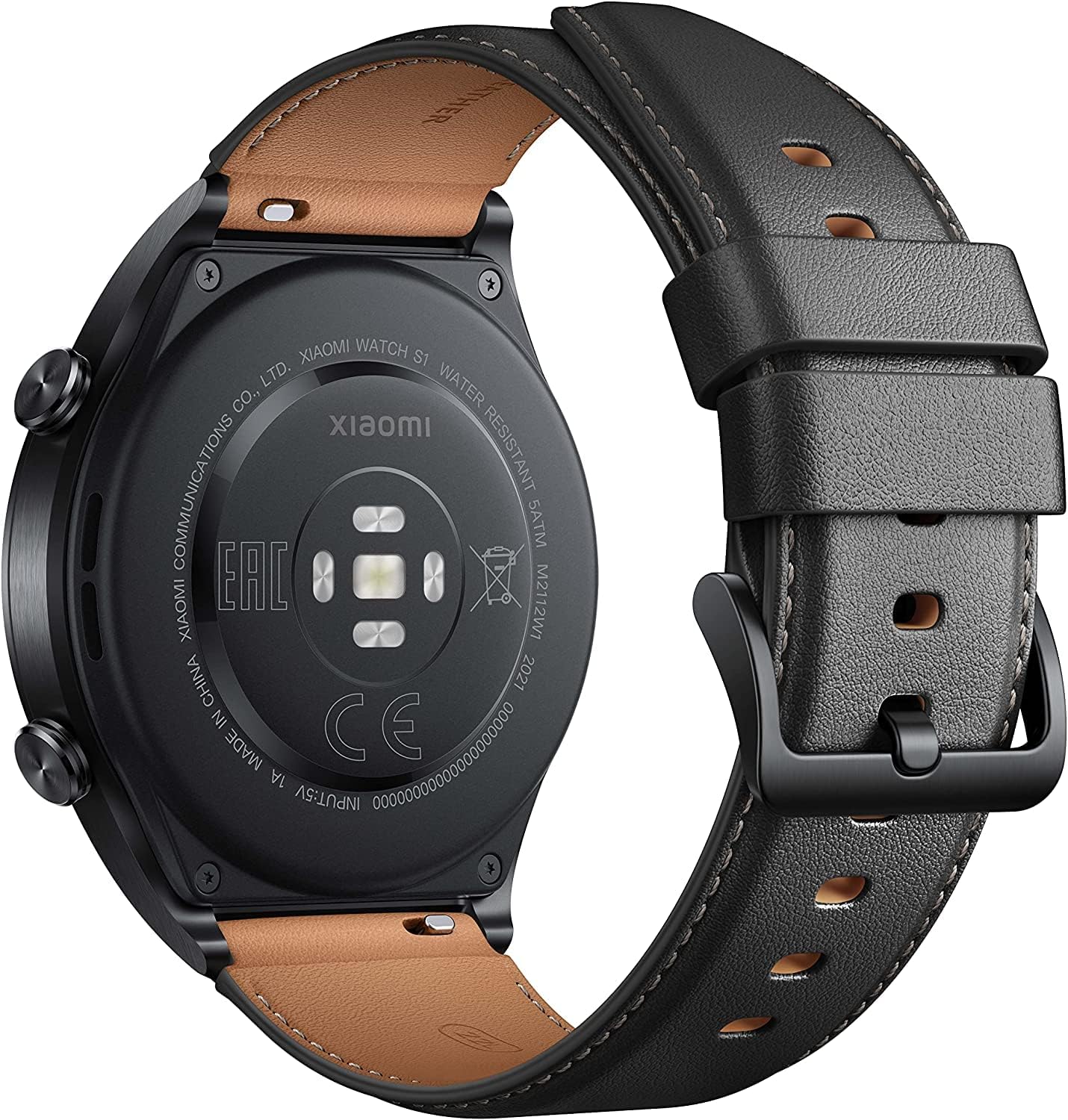
Image: The rear side of the Xiaomi Watch S1, showing the optical heart rate and SpO2 sensors.
Dual-Band GPS
The integrated dual-band GNSS chip supports five major satellite positioning systems (GPS, BeiDou, GLONASS, Galileo, and QZSS) for fast and accurate positioning during outdoor activities.
Bluetooth Calls
Answer calls directly from your wrist when connected to your smartphone via Bluetooth.

Image: A person wearing the Xiaomi Watch S1, with the display showing an incoming call notification, demonstrating the Bluetooth call feature.
NFC Payments
The watch supports contactless payments with MasterCard. Set up your payment card through the Mi Fitness app.

Image: A close-up of the Xiaomi Watch S1 being used to make a contactless payment at a terminal.
Water Resistance
The Xiaomi Watch S1 has a water resistance rating of 5 ATM, meaning it can withstand pressures equivalent to a depth of 50 meters. It is suitable for swimming in pools or open water, but not for hot showers, saunas, or diving.
Amazon Alexa Voice Assistant
Utilize the integrated Amazon Alexa voice assistant for quick commands and information.
3. Maintenance
3.1 Cleaning Your Watch
To maintain the appearance and functionality of your Xiaomi Watch S1:
- Wipe the watch body and straps regularly with a soft, damp cloth.
- For stubborn stains, use a mild soap solution and rinse thoroughly with clean water.
- Ensure the watch is completely dry before charging or prolonged storage.
- Avoid using harsh chemicals, abrasive cleaners, or solvents, as these can damage the watch's finish and components.
3.2 Battery Care
Proper battery care can extend the lifespan of your watch's battery:
- Avoid extreme temperatures, both hot and cold, as they can degrade battery performance.
- Do not leave the watch fully discharged for extended periods.
- Charge the watch using only the provided wireless charging base and USB cable.
3.3 Strap Replacement
The Xiaomi Watch S1 comes with interchangeable straps. To replace a strap:
- Locate the quick-release pins on the underside of the strap where it connects to the watch body.
- Slide the pin inwards to detach the strap.
- Align the new strap with the watch lugs and slide the pin back into place until it clicks securely.


Image: The Xiaomi Watch S1 shown with both its leather strap (left) and fluororubber strap (right), demonstrating strap interchangeability.
4. Troubleshooting
If you encounter issues with your Xiaomi Watch S1, try the following solutions:
| Problem | Possible Solution |
|---|---|
| Watch does not turn on | Ensure the watch is fully charged. Connect it to the charging base and check if the charging indicator appears. |
| Cannot pair with smartphone |
|
| Inaccurate health data |
|
| Short battery life |
|
| NFC payment not working |
|
4.1 Factory Reset
If issues persist, a factory reset may resolve them. Note: This will erase all data on your watch.
- On your watch, go to Settings.
- Navigate to System or General.
- Select "Factory Reset" or "Reset".
- Confirm your choice. The watch will restart and return to its factory settings.
5. Specifications
| Feature | Detail |
|---|---|
| Brand | XIAOMI |
| Model Name | Xiaomi Watch S1 |
| Model Number | M2112W1 |
| Display Size | 1.43 Inches |
| Display Type | AMOLED |
| Display Resolution | 466 x 466 |
| Battery Life (Typical Usage) | Up to 12 Days |
| Battery Capacity | 470 mAh |
| Water Resistance | 5 ATM |
| GPS | Integrated Dual-Band GPS (GPS, BeiDou, GLONASS, Galileo, QZSS) |
| Connectivity | Bluetooth, 2.4 GHz Radio Frequency, 802.11bgn |
| Compatible Devices | Android 6.0 or iOS 10.0 and later |
| Material | Stainless Steel, Leather, Glass (Sapphire) |
| Weight | 50.9 g |
| Memory Capacity | 1 GB |
6. Warranty and Support
6.1 Warranty Information
Your Xiaomi Watch S1 comes with a standard manufacturer's warranty. Please refer to the warranty notice included in your product packaging for detailed terms and conditions, including warranty period and coverage. Keep your proof of purchase for warranty claims.
6.2 Customer Support
For further assistance, technical support, or service inquiries, please contact Xiaomi customer support through their official website or the contact information provided in your warranty documentation.
You can also visit the official Xiaomi website for FAQs, software updates, and additional resources: www.mi.com


