
Introduction
This manual provides detailed instructions for the installation, operation, and maintenance of your WEFFORT Motorized Roller Shade. Designed for convenience and energy efficiency, these shades offer 100% blackout capability and seamless integration with various smart home systems. Please read this manual thoroughly before installation and use to ensure proper function and longevity of your product.

The WEFFORT motorized shades feature a triple-layer fabric construction, certified by CE and RoHS, ensuring durability and ease of cleaning. This design effectively blocks light, reduces UV exposure, and provides maximum privacy, creating an optimal dark environment for various rooms. The shades are available in multiple materials and colors to suit diverse interior designs.

Setup
1. Measuring Your Window
Accurate measurements are crucial for proper installation. Determine whether you will use an inside mount or an outside mount.
- Inside Mount: Measure the exact width of the window opening at the top, middle, and bottom. Use the smallest measurement for the product width. Measure the exact height from the top of the opening to the window sill. The valance will extend beyond the window frame if the window depth is less than 2.45 inches.
- Outside Mount: Measure the window width and add 4-5 inches to each side for optimal light blocking. Measure the window height and add 4-5 inches to the top and bottom.

2. Installation
The shades are designed for hassle-free setup and support inside, outside, or side mounting. The package includes all necessary mounting hardware.
- Unpack: Carefully unbox the shade and components. Ensure all parts listed in the package contents are present.
- Mark Bracket Locations: Position the shade assembly in its desired final location. Mark the drilling points for the mounting brackets. For side mount, an extended bracket is provided if noted in your order.
- Drill Holes: Drill two holes at the marked locations.
- Attach Brackets: Securely attach the mounting brackets using the provided screws.
- Mount Shade: Snap the shade assembly into the installed brackets. Ensure it is securely seated.
- Remove Shipping Lock: Locate and remove the small soft horseshoe-shaped foam shipping cover from the motor assembly to expose the ON/OFF button and charge port.
3. Charging the Motor
The motorized shades are equipped with a rechargeable battery. It is recommended to fully charge the battery before initial use.
- The battery lasts approximately 4-6 months per charge with typical use.
- Charging options include USB, power bank, or an optional solar panel.
- To charge via USB, connect the provided USB cable to the motor's charging port and a power source.

4. Smart Home Integration & Pairing
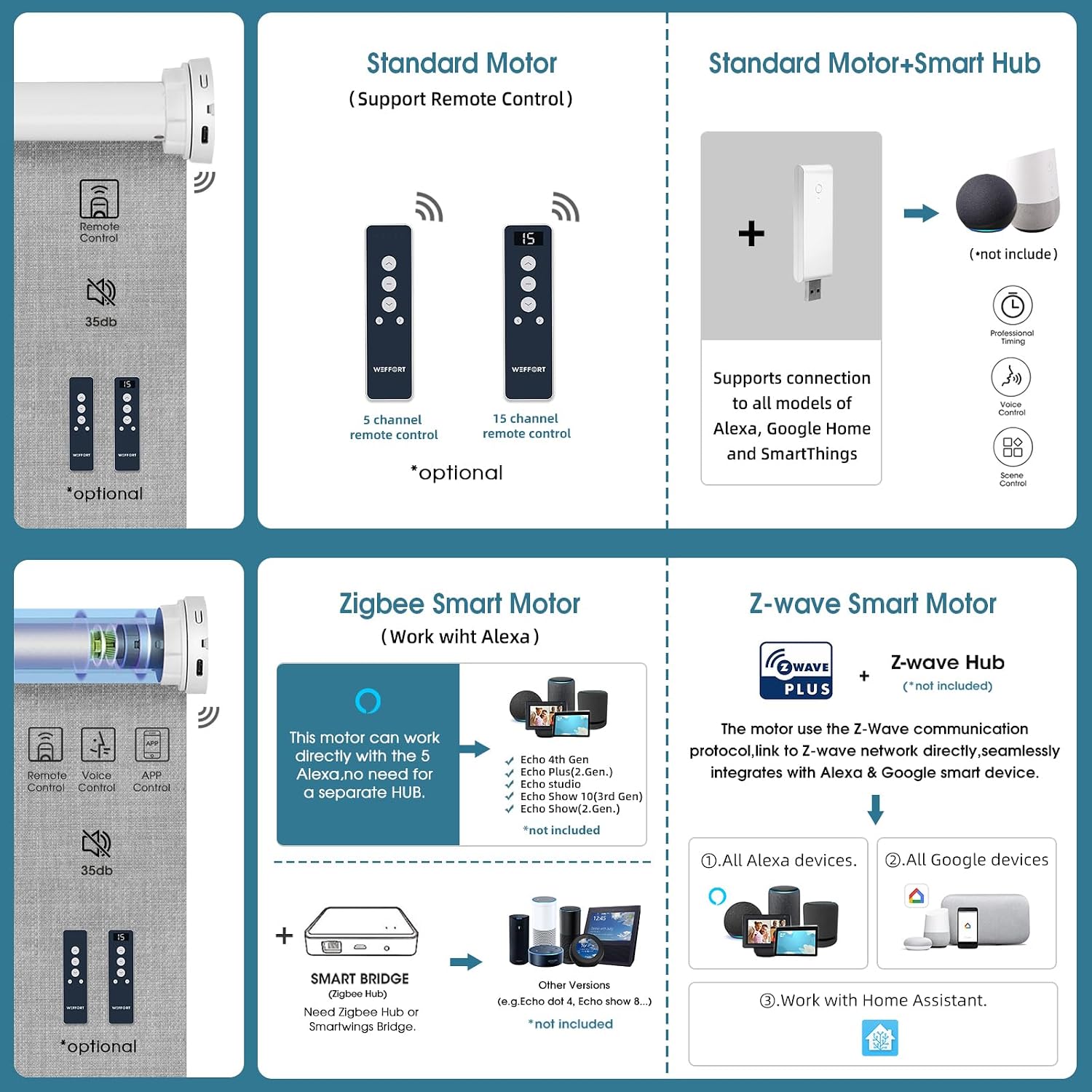
WEFFORT motorized shades offer various motor types for seamless smart home integration.
- Standard Motors: Support remote control. Can be paired with a Smart Hub (sold separately) for integration with Alexa or Google Assistant.
- Matter over Thread Motors: Provide native integration with HomeKit, Alexa, Google, and other major smart ecosystems without an additional hub.
- Zigbee and Z-wave Systems: Motors compatible with these systems are available, offering flexible options for a wide range of smart home needs. A Zigbee Hub or Z-wave Hub (sold separately) is required for these systems.
Note: The first purchase requires at least one remote control for initial programming.

Operating Instructions
1. Remote Control
The remote control allows for individual, group, or favorite position control of your shades.
- Individual Control: Select the specific channel corresponding to the shade you wish to operate.
- Group Control: Some remotes allow for a 'phantom' channel where all paired shades can be controlled simultaneously.
- Favorite Position: Program a preferred open/closed position for quick access. Refer to the remote's specific instructions for programming.

2. App Control
For shades connected via a Smart Hub or Matter/Zigbee/Z-wave systems, you can control them using a compatible smartphone application.
- Download App: Install the relevant smart home app (e.g., Apple Home, Alexa app, Google Home app, SmartThings app) on your smartphone or tablet.
- Connect: Follow the app's instructions to connect to your Smart Hub or directly to your Matter/Zigbee/Z-wave motor.
- Features: App control typically offers location-based control, sunrise/sunset automation, offsite control, and timing schedules.
3. Voice Control
Integrate your shades with voice assistants like Alexa or Google Assistant for hands-free operation.
- Enable Skill/Service: In your Alexa or Google Home app, enable the WEFFORT skill or link the appropriate service.
- Discover Devices: Allow the voice assistant to discover your shades.
- Voice Commands: Use commands such as "Alexa, open the shades" or "Hey Google, close the living room blinds."

Maintenance
1. Cleaning
The shade fabric is designed for easy maintenance.
- Spot Clean Only: For minor marks or dust, gently spot clean the fabric with a damp cloth.
- Avoid harsh chemicals or abrasive cleaners, as these can damage the fabric and coating.
2. Battery Care
To ensure optimal performance and battery life:
- Recharge the battery when the motor's performance noticeably decreases or when indicated by the system.
- If using a solar panel, ensure it is clean and positioned to receive adequate sunlight.
- Avoid fully depleting the battery frequently, as this can reduce its overall lifespan.
Troubleshooting
If you encounter issues with your WEFFORT Motorized Roller Shade, please refer to the following common troubleshooting steps:
- Shade Not Responding to Remote:
- Check if the remote control batteries are depleted and replace if necessary.
- Ensure the remote is on the correct channel for the shade.
- Verify the motor is not in shipping mode (press and hold the program button to wake it up).
- Confirm the shade's motor battery is charged.
- Shade Not Responding to App/Voice Control:
- Ensure your Smart Hub (if applicable) is powered on and connected to your home network.
- Check your Wi-Fi connection (2.4 GHz is often required for smart home devices).
- Verify that the shade is correctly paired with your smart home system (Alexa, Google Home, HomeKit, etc.).
- Restart your Smart Hub or router if connectivity issues persist.
- Shade Stops Mid-Way or Does Not Reach Limits:
- The motor battery may be low; recharge the shade.
- The upper or lower limits may need to be reset. Refer to the specific motor programming instructions for your model.
- Motor Noise:
- The motor operates below 35 dB, which is considered quiet. If unusual or excessive noise occurs, ensure the shade is properly installed and not obstructed.
If these steps do not resolve the issue, please contact WEFFORT customer support for further assistance.
Specifications
Below are the key specifications for the WEFFORT Motorized Roller Shade, Model 718687586150:
| Feature | Detail |
|---|---|
| Brand | WEFFORT |
| Model Number | 718687586150 |
| Material | 100% Polyester |
| Opacity | Blackout |
| Operation Mode | Automatic (Motorized), Manual |
| Control Type | Remote, App, Voice (via Smart Hub/Matter/Zigbee/Z-wave) |
| Special Features | Heat insulation, Thermal Insulation, Quiet Operation (<35 dB) |
| Charging Options | USB, Power Bank, Solar Panel (optional) |
| Battery Life | 4-6 months per charge (typical use) |
| Mounting Type | Inside Mount, Outside Mount, Side Mount |
| Product Care | Spot Clean Only |
| Recommended Use | Indoor (Bedroom, Living Room) |


Warranty and Support
WEFFORT is committed to providing high-quality products and excellent customer service. For any questions, concerns, or issues regarding your motorized roller shade, please contact WEFFORT customer support.
While specific warranty details are not provided in this manual, please refer to your purchase documentation or the WEFFORT official website for the most current warranty information. Our support team is available to assist with installation, programming, troubleshooting, and any other product-related inquiries.
You can often find contact information on the product packaging or by visiting the WEFFORT Store on Amazon.
