
Introduction
This manual provides detailed instructions for the setup, operation, and maintenance of your Nady D-450-HT-LT Quad Receiver Digital Wireless Microphone System. Please read this manual thoroughly before using the system to ensure optimal performance and longevity.
Safety Information
- Do not expose the unit to rain or moisture.
- Do not remove the cover. Refer servicing to qualified personnel only.
- Ensure proper ventilation to prevent overheating.
- Use only the power adapter supplied with the unit.
- Dispose of batteries according to local regulations.
Package Contents
The Nady D-450-HT-LT system includes the following components:
- 1 x D-450 Quad Receiver
- 2 x HT-450 Handheld Microphones
- 2 x LT-450 Bodypack Transmitters
- 2 x OML-4 Lapel Microphones
- 4 x Receiver Antennas
- 1 x Power Adapter
- 1 x 1/4-inch Audio Cable
- User Manual
System Overview
D-450 Quad Receiver
The D-450 receiver is an all-metal, rack-mountable unit featuring four independent receiver channels. It provides 200 selectable frequencies (50 per channel) in the 500 MHz band, ensuring interference-free operation. The front panel includes LCD displays for each channel, showing frequency, battery status, and RF signal indicators. The rear panel offers individual balanced XLR microphone level outputs for each channel and a single 1/4-inch line level sum output for all four receivers.

Image: The Nady D-450 Quad Receiver, a black rack-mountable unit with four front-mounted antennas and LCD displays for each channel.

Image: Rear panel of the D-450 receiver, highlighting the four balanced XLR microphone level outputs and the single 1/4-inch line level sum output.
HT-450 Handheld Microphone Transmitters
The HT-450 handheld microphones feature a rugged metal casing and a unidirectional dynamic microphone cartridge for clear audio. Each microphone has a backlit LCD display indicating frequency, battery level, and RF signal. They are powered by two AA batteries (not included).

Image: A Nady HT-450 handheld microphone, black with a digital display on the body.
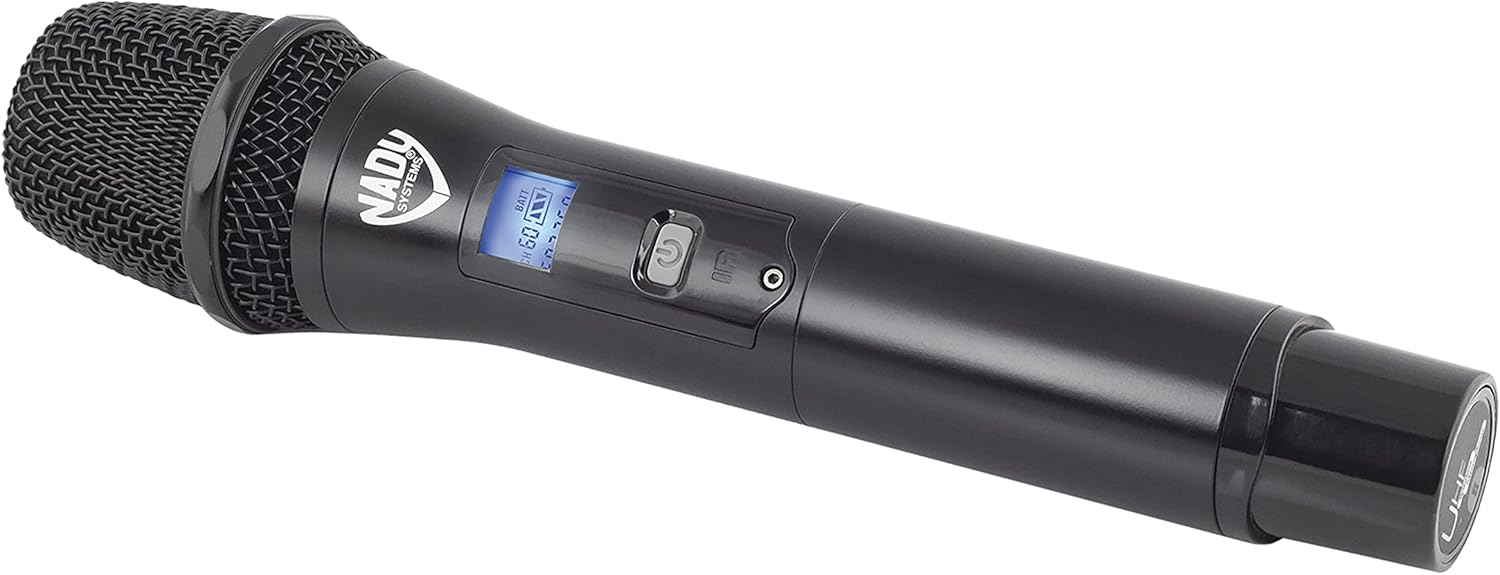
Image: The Nady HT-450 handheld microphone with its lower section unscrewed, revealing the battery compartment.
LT-450 Bodypack Transmitters & OML-4 Lapel Microphones
The LT-450 bodypack transmitters are durable, metal units with a belt clip and a detachable external antenna. They feature a backlit LCD display for frequency, battery level, RF signal, mute status, and volume. A 3.5mm locking jack securely connects the OML-4 lapel microphones. The bodypacks are powered by two AA batteries (not included).

Image: A Nady LT-450 bodypack transmitter connected to an OML-4 lapel microphone, showing the belt clip and antenna.
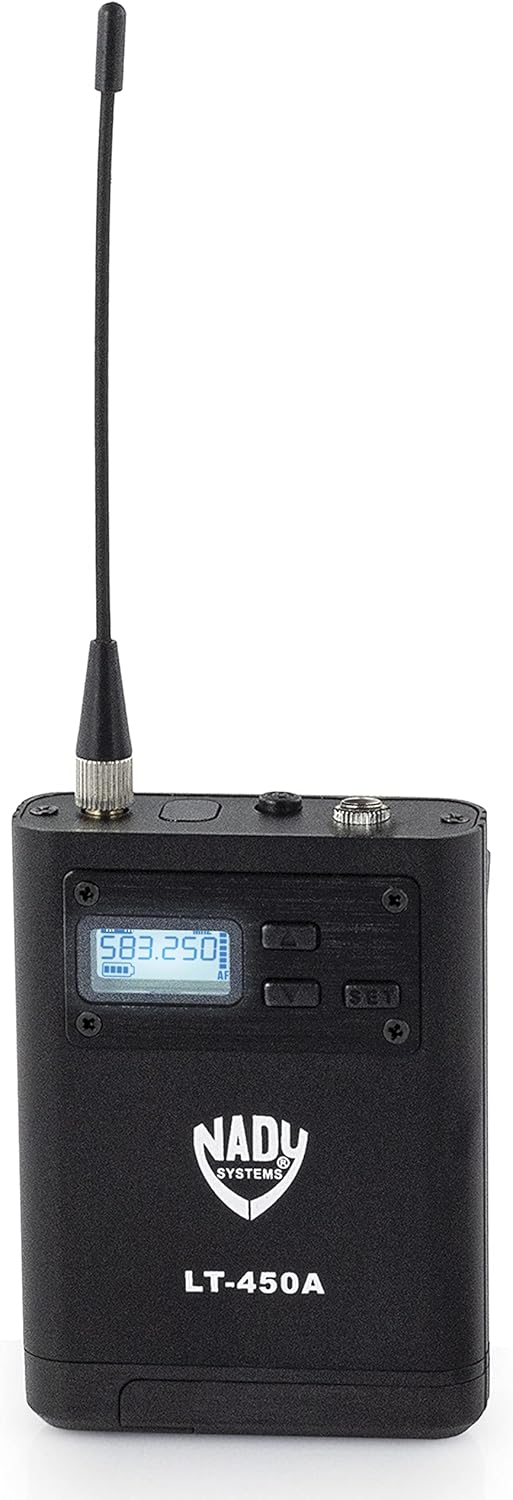
Image: The Nady LT-450 bodypack transmitter with its battery compartment open, revealing slots for two AA batteries.
Setup
1. Receiver Setup
- Placement: Position the D-450 receiver in a stable location, preferably within line-of-sight of the intended operating area for the transmitters. Ensure adequate ventilation.
- Antennas: Screw the four supplied antennas onto the corresponding connectors on the front panel of the receiver. Adjust them vertically for optimal reception.
- Power: Connect the supplied power adapter to the DC input jack on the rear of the receiver and plug it into an AC outlet.
- Audio Output: Connect the receiver to your mixer or amplifier using either the individual balanced XLR outputs (for separate control of each microphone) or the 1/4-inch line level sum output.
2. Transmitter Setup
- Handheld Microphones (HT-450): Unscrew the bottom cap of the HT-450 microphone and insert two fresh AA batteries, observing polarity. Screw the cap back on.
- Bodypack Transmitters (LT-450): Open the battery compartment on the LT-450 bodypack and insert two fresh AA batteries, observing polarity. Close the compartment.
- Lapel Microphones (OML-4): Connect the 3.5mm plug of the OML-4 lapel microphone to the locking jack on the LT-450 bodypack. Secure the lapel microphone to clothing, approximately 6-8 inches from the mouth.
3. Pairing Transmitters with Receiver
The D-450 system features auto-scan and infrared (IR) sync for easy pairing.
- Power On: Power on the D-450 receiver.
- Auto-Scan: For each receiver channel you wish to use, press the 'MODE' button to initiate an auto-scan. The receiver will search for an available, interference-free frequency.
- IR Sync: Once a frequency is selected on the receiver, power on the corresponding transmitter (handheld or bodypack). Open the IR window on the transmitter and align it with the IR sensor on the receiver's front panel. Press the 'SET' button on the receiver. The frequency will be automatically transferred to the transmitter.
- Verification: Confirm that the RF indicator on the receiver illuminates, indicating a successful connection with the transmitter.
Operation
Power On/Off
- Receiver: Press the 'POWER' button on the front panel.
- Transmitters: Press and hold the power button on the handheld microphone or bodypack until the display illuminates.
Channel Selection
While the auto-scan feature is recommended for initial setup, you can manually select frequencies if needed. Use the 'UP' and 'DOWN' buttons next to each channel's display on the receiver to cycle through available frequencies. Remember to re-sync the corresponding transmitter via IR after changing a frequency on the receiver.
Volume Control
Each receiver channel on the D-450 has an independent volume control knob. Adjust these to achieve the desired audio level before sending the signal to your mixer or amplifier. Further level adjustments can be made on your external audio equipment.
Range Considerations
The Nady D-450 system offers a reliable operating range of over 300 feet line-of-sight. Obstacles such as walls, metal structures, and other wireless devices can reduce this range. Maintain line-of-sight between transmitters and the receiver whenever possible for optimal performance.
Maintenance
Battery Replacement
Replace batteries in transmitters when the low battery indicator appears on their LCD display or on the receiver's display. Always use fresh, high-quality AA batteries. Remove batteries if the system will not be used for an extended period to prevent leakage.
Cleaning
Clean the units with a soft, dry cloth. Do not use liquid cleaners or solvents, as they may damage the finish or internal components.
Storage
Store the system in a cool, dry place away from direct sunlight and extreme temperatures. When transporting, use appropriate cases to protect the components from physical damage.
Troubleshooting
- No Sound:
- Ensure all units are powered on.
- Check battery levels in transmitters.
- Verify that transmitters are correctly paired with the receiver (RF indicator on receiver should be lit).
- Check all audio cable connections.
- Ensure volume controls on the receiver and connected audio equipment are not set to minimum.
- Interference/Static:
- Perform an auto-scan on the receiver to find a clear frequency and re-sync the transmitter.
- Ensure no other wireless devices are operating on the same or nearby frequencies.
- Maintain line-of-sight between transmitters and receiver.
- Move the receiver away from potential sources of interference (e.g., computers, Wi-Fi routers, large metal objects).
- Short Range:
- Check transmitter battery levels.
- Ensure receiver antennas are properly connected and positioned.
- Minimize obstructions between transmitters and receiver.
- Avoid operating in areas with high RF traffic.
Specifications
| Feature | Specification |
|---|---|
| Model Number | D-450-HT-LT |
| Frequency Band | 500 MHz |
| Channels | 200 (50x4 selectable) |
| Digital Conversion | 48 kHz/24 bit |
| Transmission Technology | DQPSK Digital |
| Operating Range | Greater than 300 feet (line-of-sight) |
| Receiver Outputs | 4 x Balanced XLR (mic level), 1 x 1/4" (line level sum) |
| Transmitter Power | 2 x AA batteries (not included) |
| Material Type | Metal (Transmitters & Receiver) |
| Item Weight | 8.36 pounds |
| Package Dimensions | 20.39 x 11.73 x 4.72 inches |
Official Product Video
Video: An official showcase video for the Nady D-450 Series Wireless Systems, demonstrating its features and various configurations. This video provides a visual overview of the product's capabilities and components.
Warranty and Support
Nady Systems provides a limited warranty for its products. For specific warranty details, registration, and technical support, please refer to the warranty card included with your product or visit the official Nady Systems website. Keep your purchase receipt as proof of purchase for warranty claims.
For further assistance, contact Nady Systems customer support.


