
Headwolf D500

Headwolf D500 Portable Power Station
User Manual
1. Introduction
Thank you for choosing the Headwolf D500 Portable Power Station. This manual provides essential information for the safe and efficient operation, maintenance, and troubleshooting of your device. Please read this manual thoroughly before use and retain it for future reference.
The Headwolf D500 is a versatile power solution designed for various applications, including outdoor activities, emergency backup, and mobile power needs. It features a 518Wh LiFePO4 battery, 110V/500W AC outlets, and multiple DC and USB ports.
2. Safety Instructions
- Do not disassemble, repair, or modify the unit.
- Do not expose the unit to fire or high temperatures.
- Avoid contact with water or other liquids.
- Store the unit in a cool, dry place away from direct sunlight.
- Keep out of reach of children and pets.
- Ensure proper ventilation during use to prevent overheating.
- Use only original or certified charging cables and adapters.
- In case of abnormal behavior, discontinue use and contact customer support.
3. Product Overview

Figure 3.1: Front view of the Headwolf D500 Portable Power Station, showing the display, AC outlets, DC ports, and USB ports.

Figure 3.2: Dimensions of the Headwolf D500 Portable Power Station (9.3"L x 6.9"W x 11.1"H).
Key Features:
- 518Wh LiFePO4 Battery: Provides reliable and long-lasting power.
- 110V/500W AC Outlets: Two standard AC outlets for household appliances.
- 9-Ports Output: Includes AC, DC, USB-A, and PD100W USB-C ports.
- Multiple Charging Options: Can be charged via AC outlet, car charger, solar panel, or PD100W USB-C.
- Advanced Battery Management System (BMS): Offers protection against short circuit, overcharge, overcurrent, overdischarge, overvoltage, and overheat.
- Large LCD Display: Shows real-time input/output wattage, battery level, and status indicators.
- Integrated LED Light: Features a 4-mode LED light for illumination.
4. Setup and Charging
4.1 Initial Charging
Before first use, fully charge your Headwolf D500. This ensures optimal battery performance and longevity. The unit comes partially charged, but a full charge is recommended.
4.2 Charging Methods
The Headwolf D500 supports multiple charging methods:
- AC Wall Outlet (90W): Connect the provided AC charging cable to the input port and a standard wall outlet. Charging time is approximately 5.5 hours.
- Car Charging Cigar Socket: Use the car charger cable to charge from your vehicle's 12V/24V outlet. Charging time is approximately 9-10 hours.
- Solar Panel (100W): Connect a compatible 100W solar panel (sold separately) to the DC input port. Charging time is approximately 6 hours, depending on sunlight intensity.
- PD 100W USB-C Charge: Utilize a PD100W USB-C charger for faster charging. Charging time is approximately 5 hours.
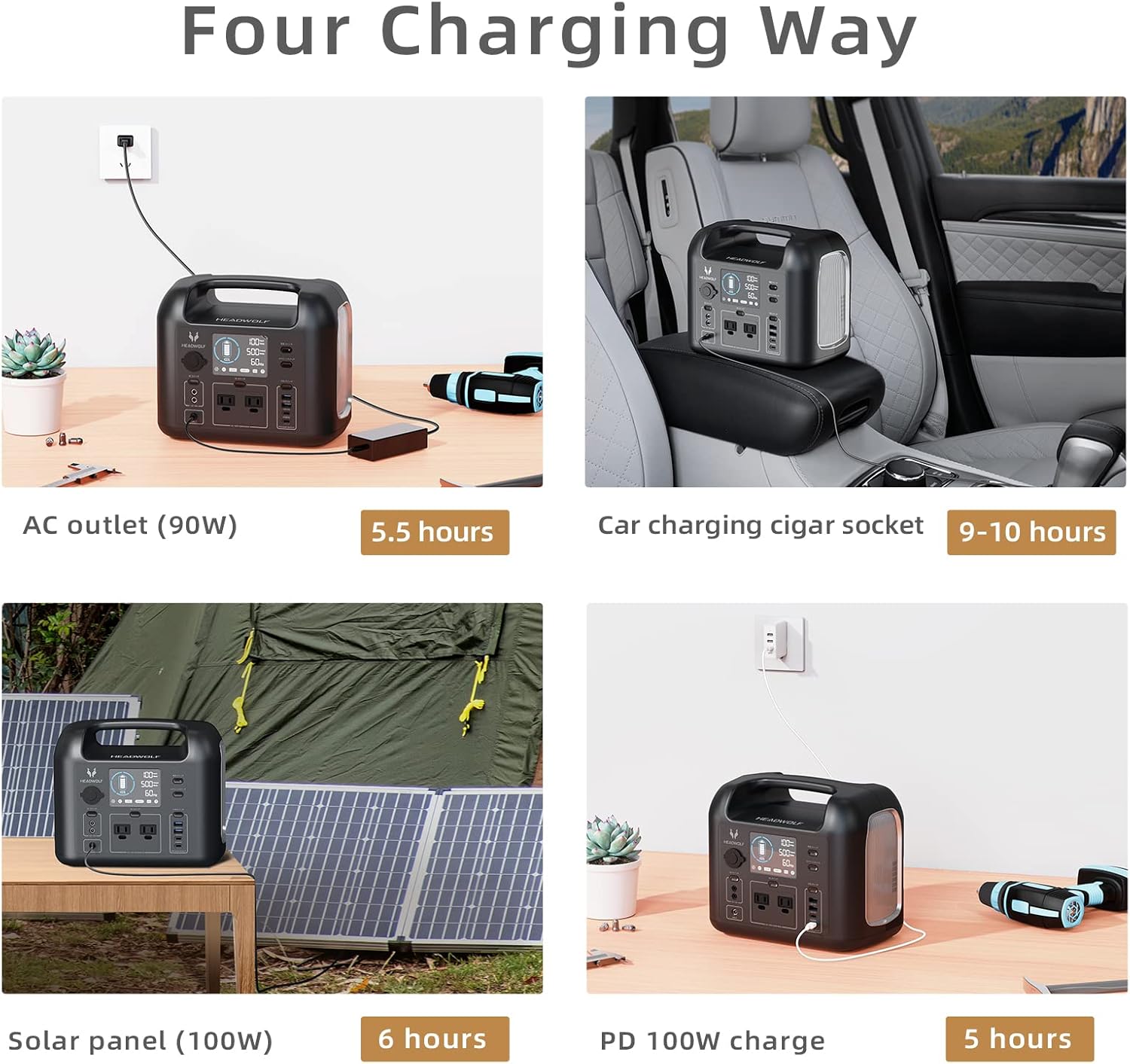
Figure 4.1: Illustration of the four charging methods: AC outlet, car charger, solar panel, and PD 100W USB-C.
5. Operating Instructions
5.1 Turning On/Off
- To turn on the unit, press and hold the 'POWER ON/OFF' button for a few seconds until the display illuminates.
- To turn off the unit, press and hold the 'POWER ON/OFF' button again until the display turns off.
5.2 Using Output Ports
The Headwolf D500 offers various output ports:
- AC Outlets: Press the 'AC ON/OFF' button to activate the 110V AC outlets. Connect your devices (up to 500W total).
- DC Outlets: Press the 'DC ON/OFF' button to activate the 12V DC ports.
- USB Ports: Press the 'USB ON/OFF' button to activate the USB-A and USB-C ports. The PD100W USB-C port supports fast charging for compatible devices.

Figure 5.1: The Headwolf D500 providing power to multiple devices simultaneously.
5.3 Understanding the LCD Display
The LCD display provides crucial information:
- Battery Level: Shows the current charge percentage of the battery.
- Input/Output Wattage: Displays the real-time power input (charging) and output (discharging) in watts.
- Frequency: Indicates the AC output frequency (60 Hz).
- Status Indicators: Icons for DC, USB, USB-C, and AC output active.

Figure 5.2: Detailed view of the D500's LCD display showing battery status and power metrics.
6. Maintenance
- Storage: Store the power station in a cool, dry place (0°C to 40°C / 32°F to 104°F) away from direct sunlight and moisture.
- Battery Care: For optimal battery life, fully charge the unit every 3-6 months, even if not in use. Avoid completely draining the battery for extended periods.
- Cleaning: Use a soft, dry cloth to clean the exterior of the unit. Do not use abrasive cleaners or solvents.
- Ventilation: Ensure the ventilation vents are clear of obstructions during use and storage to prevent overheating.
7. Troubleshooting
- Unit Not Turning On: Ensure the battery is charged. If the battery is completely depleted, connect it to a power source for a few minutes before attempting to turn it on.
- No Output from Ports: Check if the respective output buttons (AC, DC, USB) are turned on. Ensure the connected device's power consumption does not exceed the D500's rated output (500W AC).
- Fan Running Frequently: The internal cooling fan activates automatically when the unit's temperature rises due to high power output or charging. This is normal operation. If the fan runs excessively without a load, ensure proper ventilation and check for obstructions around the vents.
- Charging Issues: Verify that the charging cable and adapter are securely connected and functioning correctly. Try a different charging method if one is not working.
- Display Not Working: Press the 'DISPLAY ON/OFF' button to ensure it's not just turned off. If the issue persists, try restarting the unit.
8. Specifications
| Specification | Value |
|---|---|
| Brand | Headwolf |
| Model | D500 |
| Battery Type | LiFePO4 |
| Battery Capacity | 518Wh |
| AC Output | 110V/500W (Pure Sine Wave) |
| USB-C Input/Output | PD100W |
| Product Dimensions | 9.3"L x 6.9"W x 11.1"H |
| Frequency | 60 Hz |
9. Warranty and Support
The Headwolf D500 Portable Power Station comes with a manufacturer's warranty. For detailed warranty information, please refer to the warranty card included with your product or visit the official Headwolf website. If you encounter any issues or require technical assistance, please contact Headwolf customer support through the contact information provided on the product packaging or website.
For additional resources, you may refer to the official PDF user manual: User Manual (PDF)
Related documentsD500

Ask a question about this manual
Ask about setup, troubleshooting, compatibility, parts, safety, or missing instructions. Manuals+ will review the question and use this page’s manual context to help answer it.