
1. Important Safety Instructions
Please read all instructions carefully before using the shredder. Keep this manual for future reference.
- Keep children and pets away from the shredder.
- Keep loose clothing, jewelry, hair, and hands away from the paper entry slot.
- Do not spray any flammable products onto the shredder or use near flammable materials.
- Do not shred metal objects, wet paper, or adhesive materials.
- Unplug the shredder when not in use or before cleaning.
- Do not attempt to repair the shredder yourself. Contact qualified service personnel.
This shredder is equipped with overheat and overload protection features to prevent damage. Refer to the 'Operation' section for details.
2. Product Overview
The Bonsaii C243-A is a cross-cut paper shredder designed for home and small office use. It efficiently shreds confidential documents, credit cards, CDs/DVDs, staples, and paper clips into small, unreadable particles.

Image 2.1: The Bonsaii C243-A cross-cut paper shredder, showing its compact design and the included lubricant sheets.
3. Setup
- Unpacking: Carefully remove the shredder from its packaging. Retain packaging materials for future transport or storage.
- Placement: Place the shredder on a flat, stable surface. Ensure there is adequate space around the unit for ventilation.
- Connect Power: Plug the power cord into a standard electrical outlet.
- Waste Bin: Ensure the waste bin is correctly inserted into the shredder unit. The shredder will not operate if the bin is not properly seated.
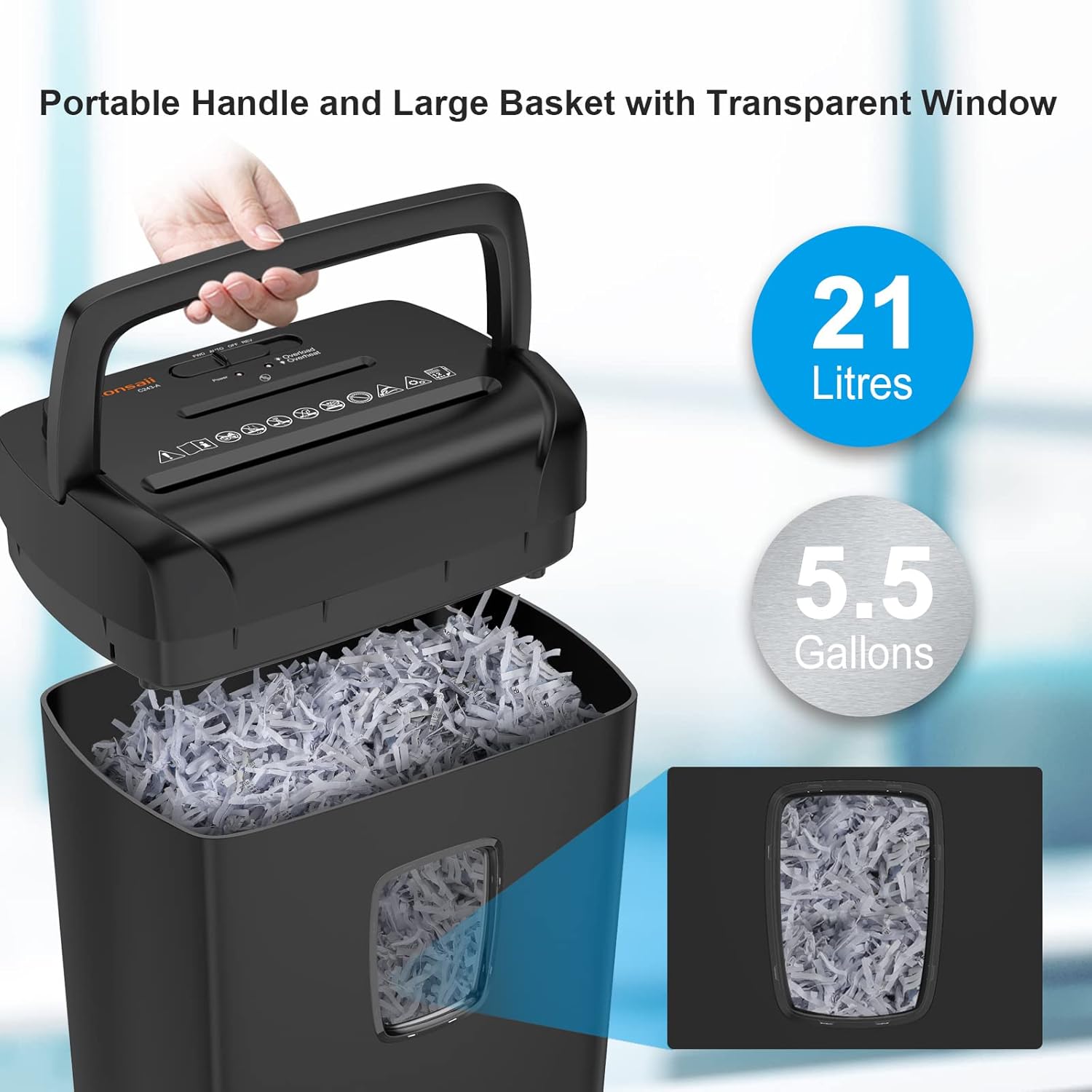
Image 3.1: The shredder's top unit being lifted from the 21-liter waste bin, highlighting the portable handle and transparent window.
4. Operation
4.1 Control Switches
The shredder features a 3-mode control switch located on the top of the unit:
- AUTO: The shredder will automatically start when paper is inserted and stop when shredding is complete.
- OFF: The shredder is powered off.
- REV (Reverse): This function is used to clear paper jams by reversing the shredder blades.
4.2 Shredding Paper
- Ensure the control switch is set to 'AUTO'.
- Insert up to 12 sheets of paper (A4 size) into the paper entry slot. The shredder will automatically begin shredding.
- Remove your hands from the slot once shredding begins.

Image 4.1: Demonstrating the shredder's capability to shred up to 12 sheets of A4 paper per pass.
4.3 Shredding Other Materials
The Bonsaii C243-A can also shred credit cards and CDs/DVDs. Use the dedicated slots for these materials.
- Credit Cards: Insert one credit card at a time into the credit card slot.
- CDs/DVDs: Insert one CD or DVD at a time into the CD/DVD slot.

Image 4.2: The shredder's versatility in handling various materials including CDs, credit cards, paper, clips, and staples.
4.4 Overheat and Overload Protection
The shredder is designed with safety features:
- Overheat Protection: If the shredder operates continuously for more than 5 minutes, it will automatically shut off to prevent overheating. Allow the unit to cool down for approximately 40 minutes before resuming operation. An LED indicator will signal this state.
- Overload Protection: If too many sheets are inserted, the shredder will detect an overload. A red LED light will flash, and the machine will automatically eject the paper. Reduce the number of sheets and re-insert.
5. Maintenance
5.1 Emptying the Waste Bin
The transparent window on the waste bin allows you to monitor its fullness. When the bin is full, lift the shredder head using the handle and empty the shredded material. Re-insert the bin securely before operating the shredder.
5.2 Lubrication
Regular lubrication is essential for maintaining optimal shredder performance and extending its lifespan. Use Bonsaii lubricant sheets (Model: LS12) for best results.

Image 5.1: A 12-pack of Bonsaii shredder lubricant sheets, designed to clean and lubricate shredder blades.
- Ensure the shredder is in 'AUTO' mode.
- Feed one lubricant sheet directly into the paper entry slot, just like a piece of paper.
- Once the sheet has been completely shredded, switch the control to 'REV' (Reverse) for approximately 10 seconds to distribute the lubricant evenly across the blades.
- Return the switch to 'OFF' or 'AUTO' as desired.

Image 5.2: Detailed view of the Bonsaii Shredder Lubricant Sheet packaging, showing usage instructions.
6. Troubleshooting
| Problem | Possible Cause | Solution |
|---|---|---|
| Shredder does not operate. | Power cord unplugged; waste bin not properly inserted; shredder overheated. | Check power connection; ensure bin is seated correctly; allow 40 minutes for cool-down. |
| Paper jam. | Too much paper inserted; paper not fed straight. | Switch to 'REV' to clear the jam. If unsuccessful, unplug, remove shredder head, and carefully clear paper. Reduce paper quantity for next shredding. |
| Shredder stops during operation. | Overheat protection activated; waste bin full. | Allow 40 minutes for cool-down; empty the waste bin. |
| Shredder is noisy or performance decreases. | Blades require lubrication. | Use a Bonsaii lubricant sheet as described in the 'Maintenance' section. |
7. Specifications
| Feature | Specification |
|---|---|
| Model | C243-A |
| Brand | Bonsaii |
| Cut Type | Cross Cut |
| Shred Size | 13/64 x 1-37/64 inches (5x40mm) |
| Standard Sheet Capacity | 12 sheets (A4, 75g/m²) |
| Continuous Run Time | 5 minutes |
| Cool-down Time | 40 minutes |
| Waste Bin Capacity | 21 Liters / 5.5 Gallons |
| Special Feature | LED Indicator (Overheat/Overload) |
8. Warranty and Support
Bonsaii products are manufactured to high-quality standards. For warranty information or technical support, please refer to the warranty card included with your product or visit the official Bonsaii website. Please have your model number (C243-A) and purchase date available when contacting support.


