
Smartby SMTB-DYNEX-Universal
Universal Dynex TV Remote Instruction Manual
Model: SMTB-DYNEX-Universal
Brand: Smartby
Introduction
This manual provides comprehensive instructions for the Smartby Universal Dynex TV Remote. This remote is designed to be a direct replacement for various original Dynex TV remote controls, offering immediate functionality without the need for programming or pairing. Simply install the batteries, and it is ready for use.
Setup
Installing Batteries
- Locate the battery compartment on the back of the remote control.
- Slide the battery compartment cover downwards and lift it off.
- Insert two (2) 1.5V AAA Alkaline batteries, ensuring the positive (+) and negative (-) terminals align correctly with the markings inside the compartment.
- Replace the battery compartment cover by sliding it back into place until it clicks securely.
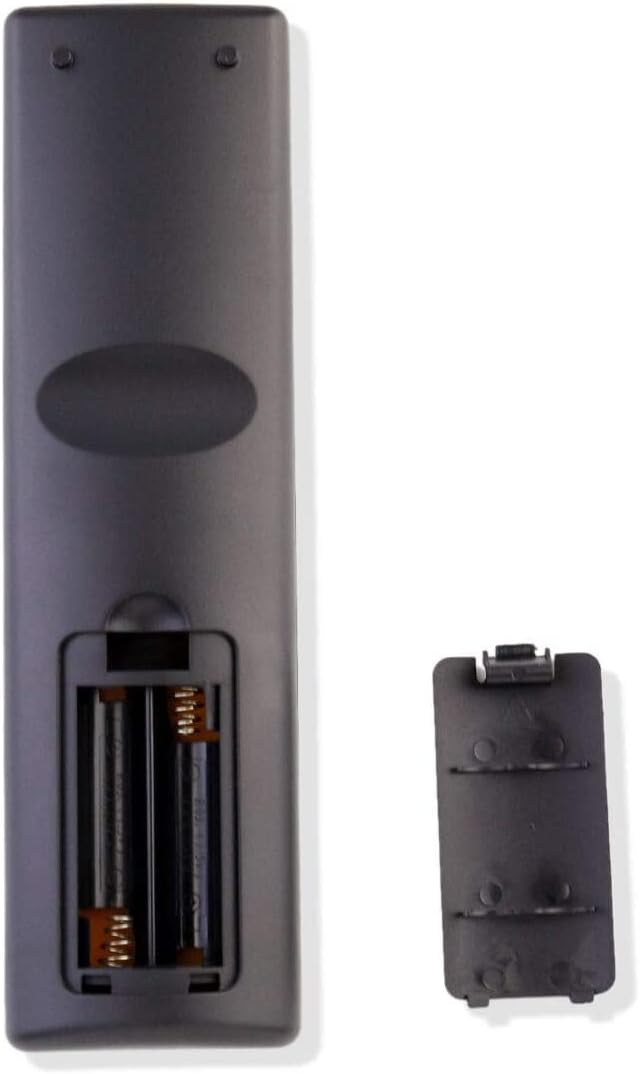
Image: Rear view of the remote control with the battery cover removed, illustrating the correct orientation for inserting AAA batteries.
The remote is now ready for use with your compatible Dynex TV.
Operating Instructions
The Smartby Universal Dynex TV Remote is designed for intuitive use, mirroring the functions of your original Dynex TV remote. Below are the primary functions:

Image: Front view of the remote control, displaying all buttons including Power, Input, Number Pad, Navigation, Volume, Channel, and various function buttons.
- POWER: Press to turn the TV on or off.
- INPUT: Select different video input sources (e.g., HDMI, Video, TV).
- Number Buttons (0-9): Directly enter channel numbers.
- VOL +/-: Adjust the volume level.
- CH +/-: Change channels up or down.
- MUTE: Mute or unmute the TV sound.
- MENU: Access the TV's on-screen menu.
- Navigation Buttons (Up, Down, Left, Right): Navigate through menu options.
- ENTER: Confirm selections within the menu.
- EXIT: Exit the current menu or on-screen display.
- GUIDE: Display the program guide (if supported by your TV and service).
- INFO: Display information about the current program or input.
- RECALL: Switch between the current and previously viewed channel.
- VIDEO, HDMI, TV, COMP, MTS/SAP, VGA, ZOOM, SLEEP, CH-LIST, PICTURE, AUDIO, CCD: Dedicated buttons for specific functions or input types. Refer to your TV's manual for detailed use of these functions.
Compatibility
This universal remote is compatible with a wide range of Dynex TV models, including but not limited to:
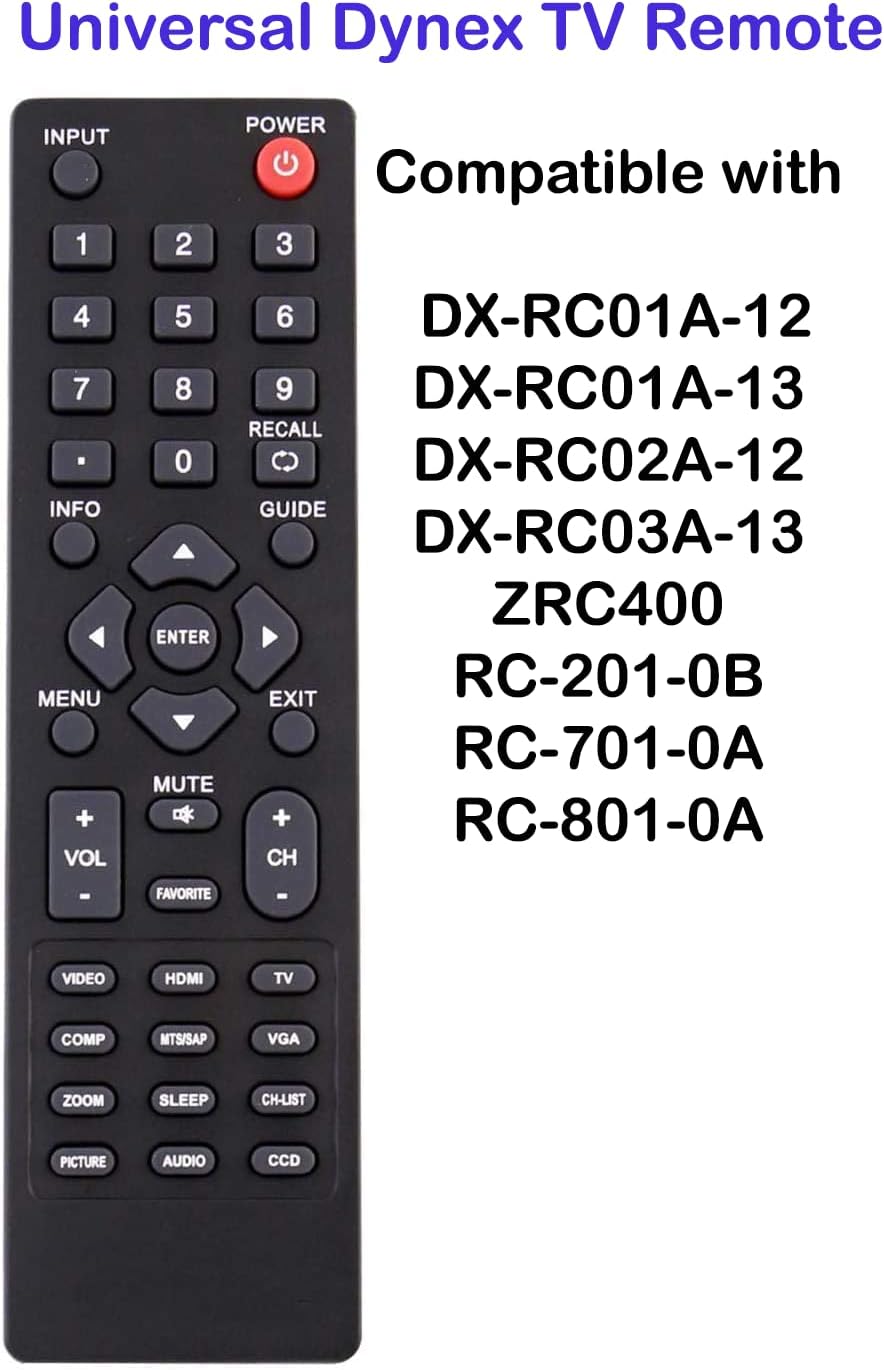
Image: The remote control displayed alongside a list of compatible Dynex remote model numbers, highlighting its broad compatibility.
- DX-RC02A-12
- DX-RC01A-12
- DX-RC01A-13
- DX-RC03A-13
- RC-201-0B
- RC-701-0A
- RC-801-0A
- ZRC400
- DX-26L100A13
- DX-32L100A13
- DX-37L130A11
- DX-40L130A11
- DX-15L150A11
- DX-19L150A11
- DX-22L150A11
- DX-24L150A11
- DX-26L150A11
- DX-32L150A11
- DX-37L150A11
- DX-40L150A11
- DX-46L150A11
- DX-55L150A1Z
- DX-32L151A11
- DX-32L152A11
- DX-19L200A12
- DX-24L200A12
- DX-32L200A12
- DX-37L200A12
- DX15L150A11
- DX-LDVD1910A
- RC-401-0A
- ZRC102
- DXLCD1909
- DXLCD2609
- E198MZNKWBBDNN
- E198SZNKWBBBNN
- E268MZNKWBBDNN
- X55L150A11
- DX-24LD230A12A
If your original remote model number is not listed, please compare its appearance and button layout to the images provided. This remote is designed to replace most standard Dynex TV remotes.
Maintenance
- Battery Replacement: Replace batteries when the remote's response becomes sluggish or stops working. Always replace both batteries at the same time with new 1.5V AAA Alkaline batteries. Do not mix old and new batteries, or different types of batteries.
- Cleaning: To clean the remote, wipe it with a soft, dry cloth. Do not use liquid cleaners or abrasive materials, as these can damage the remote's surface or internal components.
- Storage: Store the remote in a cool, dry place away from direct sunlight and extreme temperatures. If the remote will not be used for an extended period, it is recommended to remove the batteries to prevent leakage.
Troubleshooting
| Problem | Solution |
|---|---|
| Remote is not working. |
|
| Some buttons are not responding. |
|
| TV is not responding to any remote commands. |
|
Specifications
- Model: SMTB-DYNEX-Universal
- Brand: Smartby
- Dimensions: 6 x 1.8 x 0.6 inches (approximately)
- Weight: 2.39 ounces (approximately)
- Power Source: 2 x 1.5V AAA Alkaline Batteries (not included)
- Color: Black
- Special Feature: Universal compatibility for Dynex TVs
Warranty and Support
Specific warranty information for this product is not provided in this manual. For details regarding warranty coverage, returns, or technical support, please refer to the product listing on the retailer's website or contact the seller directly.
For additional assistance, you may also visit the Smartby Store on Amazon: Smartby Store
Related documentsSMTB-DYNEX-Universal

Ask a question about this manual
Ask about setup, troubleshooting, compatibility, parts, safety, or missing instructions. Manuals+ will review the question and use this page’s manual context to help answer it.