1. Introduction
The ASUS ExpertCenter D700SC is a powerful and compact Small Form Factor (SFF) desktop PC designed for business and personal use. Engineered for durability and security, it features cutting-edge components and advanced security solutions to meet diverse computing needs.

Figure 1.1: ASUS ExpertCenter D700SC Desktop PC, front and side view.
This image displays the sleek black chassis of the ASUS ExpertCenter D700SC, highlighting its compact design and front panel ports.
Key features include:
- 11th Gen Intel Core i7-11700 Octa-Core Processor for high performance.
- Windows 11 Pro operating system for enhanced productivity and security.
- 512GB PCIe NVMe M.2 SSD and 16GB DDR4 RAM, expandable up to 128GB.
- TPM 2.0 Security for secure data encryption.
- Compact Small Form Factor design, weighing approximately 11.02 lbs.
- Seamless connectivity with Wi-Fi 5 (802.11ac) and Dual-Band Bluetooth 5.0.
- Meets MIL-STD-810G US military standards for durability.

Figure 1.2: Military Grade Durability of ASUS ExpertCenter D700SC.
This image illustrates the rigorous testing the ASUS ExpertCenter D700SC undergoes, including package drop, shock, thermal shock, and vibration tests, ensuring its robust build quality.
2. Safety Information
Please read the following safety guidelines carefully before operating your ASUS ExpertCenter D700SC. Failure to follow these instructions may result in injury or damage to the device.
- Power Source: Use only the power adapter supplied with your device or a compatible replacement. Ensure the power outlet is properly grounded.
- Ventilation: Do not block ventilation openings. Ensure adequate airflow around the PC to prevent overheating.
- Liquid Exposure: Keep the device away from liquids. Do not expose it to rain or moisture.
- Cleaning: Disconnect the power cord before cleaning. Use a soft, dry cloth. Do not use liquid or aerosol cleaners.
- Servicing: Do not attempt to service the device yourself. Refer all servicing to qualified service personnel.
- Placement: Place the PC on a stable, flat surface. Avoid placing it near heat sources or in direct sunlight.
3. Package Contents
Verify that all items are present in your package. If any item is missing or damaged, contact your retailer.
- ASUS ExpertCenter D700SC Desktop PC (Model: D700SC-XH704)
- Wired Keyboard
- Wired Mouse
- Power Cord
- Documentation (Quick Start Guide, Warranty Card)
4. Product Overview
4.1 Front and Rear I/O Ports
Familiarize yourself with the input/output ports on your ASUS ExpertCenter D700SC for connecting peripherals and accessories.

Figure 4.1: Front and Rear I/O Ports.
This diagram provides a detailed view of all available ports on the front and rear panels of the desktop PC, including USB, audio, video, and network connections.
Front I/O Ports:
- 1x Headphone jack
- 1x 3.5mm combo audio jack
- 2x USB 2.0 Type-A ports
- 1x USB 3.2 Gen 2 Type-C port
- 2x USB 3.2 Gen 1 Type-A ports
- 2x USB 3.2 Gen 2 Type-A ports
- 1x 2-in-1 Card Reader (SD/MMC)
- 1x Smart Card Reader (optional)
Rear I/O Ports:
- 1x RJ45 Gigabit Ethernet port
- 1x HDMI 1.4 port
- 1x VGA Port
- 1x DisplayPort 1.2
- 2x PS/2 ports (for mouse and keyboard)
- 3x Audio jacks (Line in, Line out, Microphone)
- 4x USB 2.0 Type-A ports
4.2 Internal Components and Expansion
The ASUS ExpertCenter D700SC offers various expansion slots for future upgrades and customization.
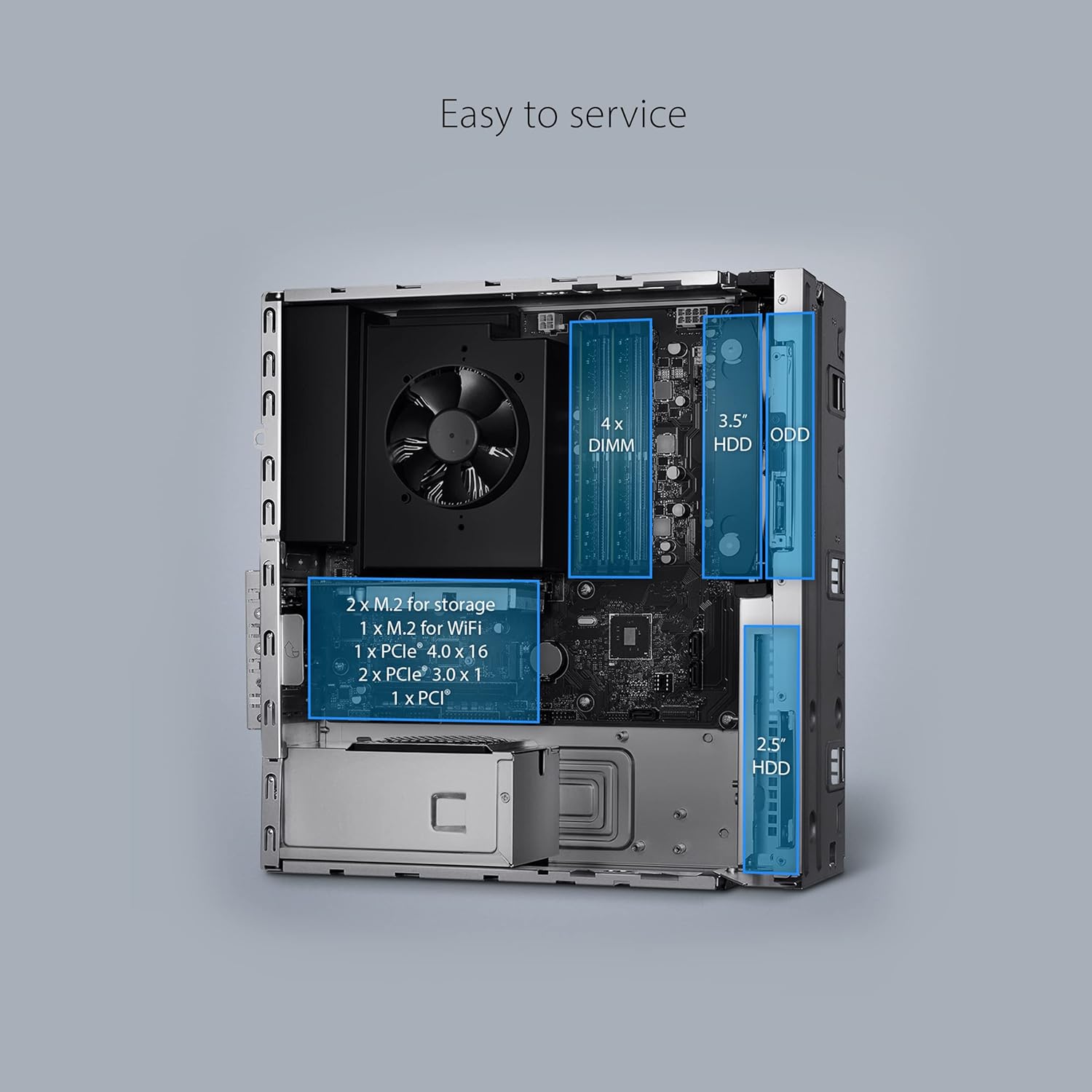
Figure 4.2: Internal Layout and Expansion Slots.
This image shows the internal layout of the desktop PC, highlighting the locations of RAM slots, M.2 slots, PCIe slots, and drive bays for easy servicing and upgrades.
Expansion Slots:
- 1x PCIe 3.0 x16 slot
- 2x PCIe 3.0 x1 slots
- 1x M.2 connector for WiFi
- 2x M.2 connectors for storage
- 4x DDR4 U-DIMM slots (expandable up to 128GB RAM)
Drive Bays:
- 3.5" HDD bay
- 2.5" HDD bay
- Optical Disk Drive (ODD) bay (if applicable)
5. Setup Guide
Follow these steps to set up your ASUS ExpertCenter D700SC for the first time.
- Unpack the PC: Carefully remove the desktop PC, keyboard, mouse, and power cord from the packaging.
- Connect Peripherals:
- Connect your monitor to one of the video output ports (HDMI, VGA, or DisplayPort) on the rear of the PC.
- Connect the wired keyboard and mouse to the available USB ports (or PS/2 ports if using older peripherals).
- Connect any other peripherals such as speakers, external drives, or network cables.
- Connect Power: Insert the power cord into the power input on the rear of the PC, then plug the other end into a grounded electrical outlet.
- Power On: Press the power button located on the front panel of the PC.
- Initial Setup: Follow the on-screen instructions to complete the Windows 11 Pro setup, including language, region, network connection, and user account creation.

Figure 5.1: Connecting the ASUS ExpertCenter D700SC to a monitor, keyboard, and mouse.
This image demonstrates a typical setup of the desktop PC with a monitor, keyboard, and mouse, ready for use in an office or home environment.
6. Operating Instructions
Your ASUS ExpertCenter D700SC comes pre-installed with Windows 11 Pro, offering a secure and efficient computing experience.
6.1 Basic Operation
- Power On/Off: Press the power button to turn on. To shut down, click the Start button in Windows, then Power > Shut down.
- Restart: From the Power menu, select Restart to reboot the system.
- Sleep Mode: From the Power menu, select Sleep to put the PC into a low-power state.
- Connecting to Network: Use the Ethernet port for a wired connection or connect to a Wi-Fi network via Windows settings.
- Bluetooth Devices: Pair Bluetooth devices (e.g., headphones, speakers) through Windows Bluetooth settings.

Figure 6.1: ASUS ExpertCenter D700SC running Windows 11.
This image shows the desktop PC alongside a monitor displaying the Windows 11 logo, indicating the pre-installed operating system.
6.2 Using Windows 11 Pro
Windows 11 Pro provides advanced features for business and productivity:
- Enhanced Security: Features like BitLocker device encryption and Windows Information Protection help secure your data.
- Remote Desktop: Connect to your PC from another device.
- Domain Join: Easily connect to your company's network domain.
- Virtualization: Utilize Hyper-V for running virtual machines.
7. Maintenance
Regular maintenance helps ensure the longevity and optimal performance of your ASUS ExpertCenter D700SC.
- Cleaning:
- Use a soft, lint-free cloth to wipe the exterior.
- For dust, use compressed air to clean ventilation grilles and ports.
- Do not use harsh chemicals or abrasive cleaners.
- Software Updates: Regularly check for and install Windows updates and driver updates from the ASUS support website to ensure system stability and security.
- Data Backup: Periodically back up your important data to an external drive or cloud storage to prevent data loss.
- System Optimization: Run disk cleanup and defragmentation (for HDDs) or TRIM (for SSDs) utilities periodically.
8. Troubleshooting
This section provides solutions to common issues you might encounter with your ASUS ExpertCenter D700SC.
| Problem | Possible Solution |
|---|---|
| PC does not power on. |
|
| No display on monitor. |
|
| Keyboard/Mouse not responding. |
|
| Slow performance. |
|
If the problem persists, please refer to the ASUS support website or contact customer service.
9. Specifications
Detailed technical specifications for the ASUS ExpertCenter D700SC (Model: D700SC-XH704).
| Feature | Detail |
|---|---|
| Processor | Intel Core i7-11700 (11th Gen), Octa-Core, up to 4.9 GHz |
| Operating System | Windows 11 Pro |
| RAM | 16GB DDR4 2933 MHz (expandable up to 128GB) |
| Storage | 512GB PCIe NVMe M.2 SSD |
| Graphics | Integrated Intel UHD Graphics 11th Gen |
| Wireless Connectivity | Wi-Fi 5 (802.11ac), Dual-Band Bluetooth 5.0 |
| Front I/O | 1x Headphone, 1x 3.5mm combo audio jack, 2x USB 2.0 Type-A, 1x USB 3.2 Gen 2 Type-C, 2x USB 3.2 Gen 1 Type-A, 2x USB 3.2 Gen 2 Type-A, 1x 2-in-1 Card Reader (SD/MMC), 1x Smart Card Reader (optional) |
| Rear I/O | 1x RJ45 Gigabit Ethernet, 1x HDMI 1.4, 1x VGA Port, 1x DisplayPort 1.2, 2x PS/2, 3x Audio jacks, 4x USB 2.0 Type-A |
| Expansion Slots | 1x PCIe 3.0 x16, 2x PCIe 3.0 x1, 1x M.2 for WiFi, 2x M.2 for storage, 4x DDR4 U-DIMM |
| Security | TPM 2.0 |
| Form Factor | Small Form Factor (SFF) |
| Dimensions (LxWxH) | 3.72 x 11.52 x 13.37 inches |
| Weight | 14.04 pounds |
| Included Peripherals | Wired keyboard and mouse |
10. Warranty and Support
ASUS provides a limited warranty for the ExpertCenter D700SC. Please refer to the warranty card included in your package for specific terms and conditions.
For technical support, driver downloads, FAQs, and more information, please visit the official ASUS support website:
You can also find additional resources and contact information on the ASUS brand store on Amazon:


