
Introduction
Thank you for choosing the NPET Automatic Pet Feeder AF020. This device is designed to provide scheduled and portion-controlled meals for your pets, ensuring they maintain a healthy diet even when you are away. Please read this manual thoroughly before operating the feeder to ensure proper use and maintenance.
Safety Instructions
- Do not immerse the main unit in water. Only the food bowl and food container are washable.
- Ensure the feeder is placed on a stable, level surface to prevent tipping.
- Keep out of reach of children and pets when not in use or during cleaning.
- Use only dry pet food with a pellet size between 0.2-0.6 inches (5-15mm) to prevent jamming.
- Do not use wet, canned, or moist pet food.
- If using batteries, ensure they are inserted correctly and replaced when low to maintain functionality during power outages.
- Unplug the feeder from the power outlet before cleaning or if it will not be used for an extended period.
Package Contents
- NPET Automatic Pet Feeder Main Unit
- Detachable Food Bowl
- USB Power Cable
- Power Adapter (Brick)
- Instruction Manual
Product Overview
Components
The NPET Automatic Pet Feeder consists of a main unit with a food hopper, a control panel, and a detachable food bowl.
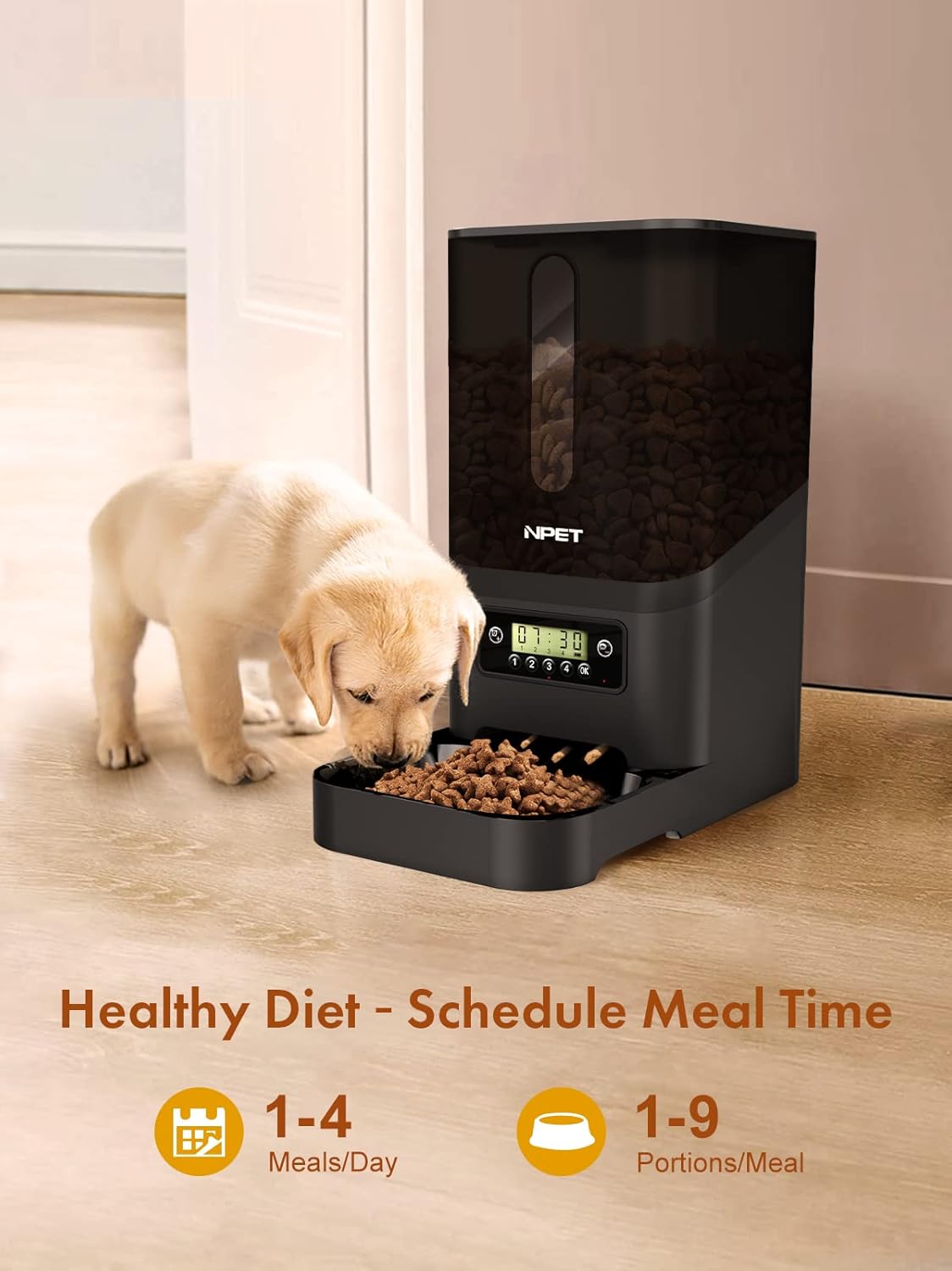
Figure 1: NPET Automatic Pet Feeder in use, demonstrating scheduled meal times.
Control Panel
The control panel allows you to set the time, program feeding schedules, and initiate manual feeds. Familiarize yourself with the buttons and display for easy operation.

Figure 2: Detailed view of the straightforward control panel.
Setup
Assembly
- Place the main feeder unit on a flat, stable surface.
- Slide the detachable food bowl into the designated grooves at the base of the main unit until it clicks securely into place.
Power Supply
The feeder can be powered by an AC adapter or backup batteries.
- AC Power: Connect the USB power cable to the feeder's port on the back and plug the adapter into a standard wall outlet.
- Battery Backup: For power outage protection, insert three (3) D-size batteries (not included) into the battery compartment located at the bottom of the feeder. Ensure correct polarity.
Filling the Food Hopper
- Open the press-lock lid on top of the feeder.
- Pour dry pet food into the 6-liter capacity hopper. The transparent window allows you to monitor the food level.
- Close the lid securely, ensuring it is locked to maintain food freshness and prevent pets from accessing the food directly.

Figure 3: The press-lock lid helps keep food fresh and secure.
Operating Instructions
Setting Current Time
- Press the 'Time Setting' button (often represented by a clock icon).
- Use the '+' and '-' buttons to adjust the hour and minute.
- Press 'OK' to confirm each setting.
Programming Feeding Schedule
The feeder supports up to 4 meals per day, with up to 9 portions per meal.
- Press the 'Meal Setting' button (often represented by a food bowl icon).
- Select the meal number (1, 2, 3, or 4) you wish to program.
- Use the '+' and '-' buttons to set the desired feeding time for that meal. Press 'OK' to confirm.
- Next, use the '+' and '-' buttons to set the number of portions (1-9) for that meal. Press 'OK' to confirm.
- Repeat for additional meals as needed.
Manual Feeding
To dispense food instantly outside of the programmed schedule:
- Press and hold the 'Manual Feed' button (often the 'OK' button or a dedicated button) for a few seconds.
- The feeder will dispense one portion of food. Repeat as necessary.
Voice Recording (Feature may vary by model)
Some models allow you to record a short voice message to call your pet at meal times. If your model supports this:
- Locate the 'Record' button (often indicated by a microphone icon).
- Press and hold the 'Record' button, speak your message, and release the button when finished.
- The recorded message will play automatically at each scheduled feeding time.
Maintenance
Cleaning
Regular cleaning ensures hygiene and proper functioning of the feeder.
- Unplug the feeder and remove any remaining food from the hopper.
- Detach the food bowl and the food container (hopper). These parts can be washed with mild soap and water. Rinse thoroughly and dry completely before reassembly.
- Wipe the main unit (containing electronics) with a soft, damp cloth. Do not submerge the main unit in water.
- Ensure all parts are completely dry before reassembling and refilling with food.
Food Storage
To keep pet food fresh, the feeder may include a compartment for a desiccant bag. Replace the desiccant bag periodically according to its instructions to maintain optimal freshness.

Figure 4: Desiccant bag for food freshness.
Troubleshooting
- Feeder not dispensing food: Check if the food hopper is empty. Ensure the power adapter is securely plugged in or that batteries are correctly installed and charged. Verify that the food pellet size is within the recommended range (0.2-0.6 inches). Check for any food blockages in the dispenser mechanism.
- Display not working: Ensure the feeder is powered on. Check power connections or replace batteries.
- Incorrect feeding times/portions: Re-program the feeding schedule following the operating instructions.
- Food jamming: Ensure only dry food is used and that the pellet size is appropriate. Clean the dispenser mechanism if necessary. The anti-clog design (Figure 5) helps prevent this, but regular checks are recommended.

Figure 5: Anti-clog design components.
Specifications
| Feature | Detail |
|---|---|
| Model Number | AF020 |
| Capacity | 6 Liters (approx. 204 ounces) |
| Material | Acrylonitrile Butadiene Styrene (ABS) |
| Power Supply | AC Adapter (included), 3 x D-size batteries (not included) for backup |
| Feeding Schedule | Up to 4 meals/day, 1-9 portions/meal |
| Food Type | Dry food only |
| Food Pellet Size | 0.2-0.6 inches (5-15mm) |
| Product Dimensions | 33.98 x 19.02 x 4.02 inches; 0.35 ounces (Note: Weight seems incorrect, likely product weight not shipping weight) |

Figure 6: Product dimensions.
Warranty and Support
NPET offers a 1-year warranty for this product. If you encounter any issues or have questions regarding your NPET Automatic Pet Feeder AF020, please do not hesitate to contact NPET customer support. Refer to the contact information provided on the product packaging or the official NPET website for assistance.

