
JESLED SWL-108LED-CW
JESLED Solar Motion Sensor Outdoor Lights User Manual
Model: SWL-108LED-CW
Introduction
Thank you for choosing the JESLED Solar Motion Sensor Outdoor Light. This product is designed to provide efficient and reliable outdoor illumination using solar power, featuring motion sensing capabilities and multiple lighting modes. Please read this manual thoroughly before installation and use to ensure optimal performance and safety.
Safety Information
- Always handle the product with care.
- Do not disassemble or modify the product. This may cause damage and void the warranty.
- Ensure the installation surface is stable and can support the weight of the light.
- Keep the solar panel clean to ensure efficient charging.
- Do not immerse the product in water, despite its IP67 waterproof rating, prolonged submersion is not recommended.
- Keep away from fire or high temperatures.
- Dispose of batteries according to local regulations.
Package Contents
Please check the package to ensure all items are present:
- JESLED Solar Motion Sensor Outdoor Light (1 unit)
- Mounting Screws and Wall Plugs
- User Manual
Product Overview
Familiarize yourself with the components of your JESLED Solar Motion Sensor Outdoor Light:

This image illustrates the key components of the JESLED solar light, including the USB connector for Type-C charging, the motion sensor, the main switch button for mode selection, and the indicator lights that show the current mode and charging status. A replaceable battery compartment is also highlighted.
- Solar Panel: Collects sunlight to charge the internal battery. It is rotatable for optimal sun exposure.
- LED Lights: 108 super bright LEDs provide illumination.
- Motion Sensor: Detects movement to activate lighting modes.
- Switch Button: Used to cycle through lighting modes and turn the unit on/off.
- USB-C Charging Port: For alternative charging when solar power is insufficient.
- Indicator Lights: Display current mode and charging status.
- Adjustable Base: Allows for flexible mounting and light direction.
Setup and Installation
Follow these steps for proper installation:
- Choose a Location: Select a location that receives direct sunlight for at least 4-5 hours daily to ensure optimal solar charging. Avoid areas under eaves, trees, or other obstructions that might block sunlight or motion detection.
- Mounting:
- Mark the desired drilling points on the wall or surface using the light's mounting holes as a template.
- Drill holes and insert wall plugs if necessary.
- Secure the light to the surface using the provided screws.
- Adjust Solar Panel: Adjust the rotatable solar panel to face the direction of the most direct sunlight. The panel can be adjusted 180 degrees horizontally and 45 degrees vertically.
- Initial Charge: Before first use, it is recommended to charge the light for at least 6-8 hours in direct sunlight or via the Type-C port for 1.5 hours to ensure the battery is fully charged.
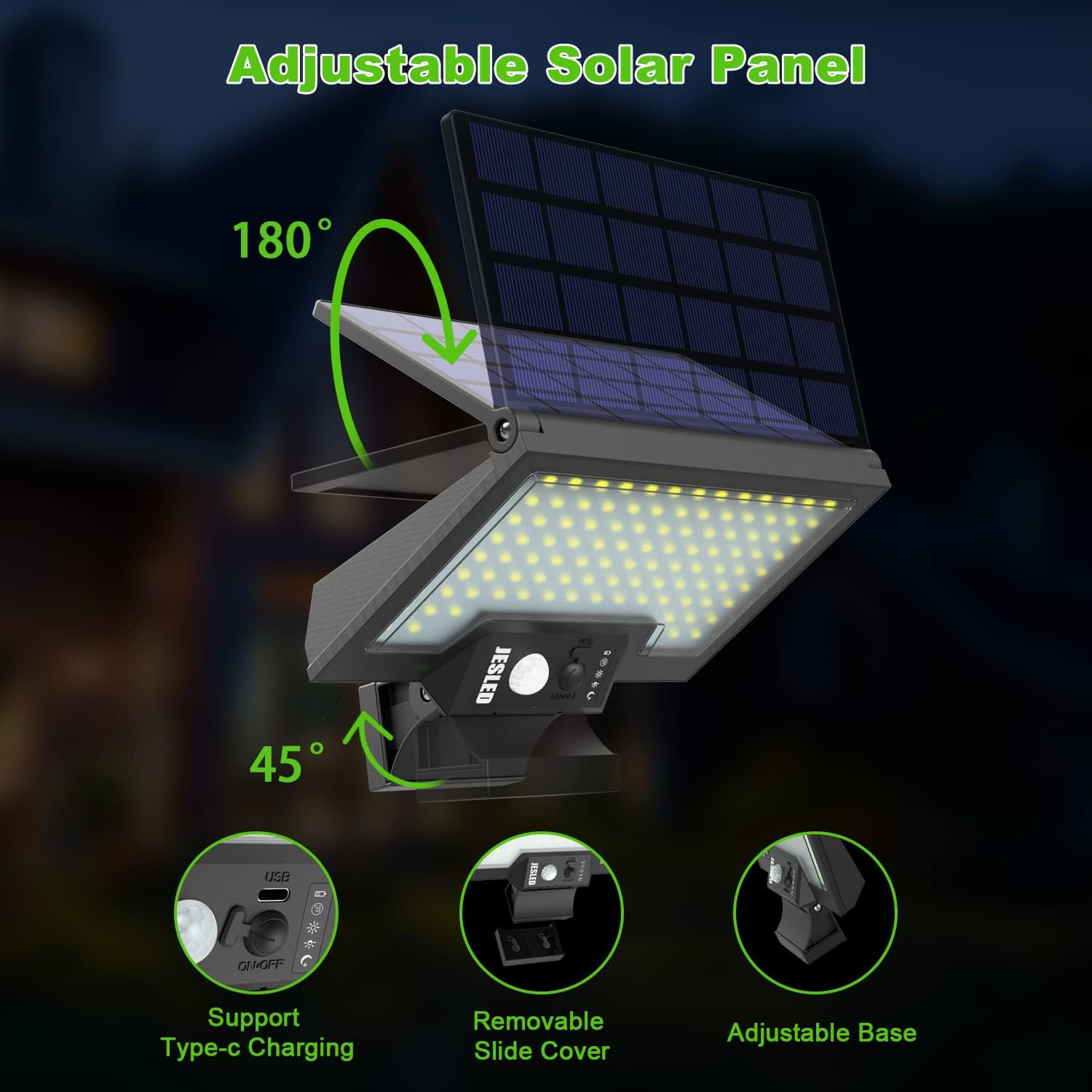
This image demonstrates the flexibility of the JESLED solar light's design, highlighting its adjustable solar panel for optimal sun exposure and its adjustable base for directing light. It also points out the Type-C charging port and the removable slide cover.

This image provides visual examples of suitable installation locations for the JESLED solar light, such as above a front door, along a pathway, or in a backyard, showcasing its adaptability for various outdoor lighting needs and its waterproof capability in rainy conditions.
Operating Modes
The JESLED Solar Motion Sensor Outdoor Light features four distinct operating modes. Press the switch button repeatedly to cycle through the modes:

This diagram visually explains the four operational modes of the JESLED solar light, detailing how each mode functions in response to motion detection and ambient light conditions, from staying off until motion is detected to providing continuous dim lighting.
- Sensor Mode: The light remains off until motion is detected. Upon detection, it turns on at full brightness for approximately 20 seconds, then turns off again if no further motion is detected.
- Sensor & Dim Mode: The light stays on at a dim brightness. When motion is detected, it switches to full brightness for approximately 20 seconds, then returns to dim mode.
- Dim Mode: The light stays on at a continuous dim brightness throughout the night. It automatically turns on at dusk and off at dawn.
- Emergency Mode (Highlight Mode): Press the power button for 5 seconds to activate this mode. The light will turn on at high brightness and remain on for over 3 hours, regardless of motion or ambient light. Press again for 5 seconds to turn off.
To turn the unit OFF from any mode, continue pressing the switch button until all indicator lights are off.
Charging
Your JESLED solar light is primarily charged by its integrated solar panel. For situations with insufficient sunlight, a Type-C charging option is available.

This image visually represents the core functionality of the JESLED solar light: efficiently charging its battery during daylight hours and automatically illuminating at night, providing reliable outdoor lighting.
- Solar Charging: Place the solar panel in direct sunlight. Charging time is approximately 4-5 hours for a full charge. The charging indicator light will illuminate during charging.
- Type-C Charging: Connect a standard USB-C cable to the charging port on the unit. This method provides a faster charge, approximately 1.5 hours for a full charge.
Maintenance
- Cleaning: Regularly wipe the solar panel with a soft, damp cloth to remove dust, dirt, or debris. A clean panel ensures maximum charging efficiency.
- Battery Replacement: The unit uses a replaceable 18650 battery (3.7V 2600MAH). If the light's performance diminishes significantly over time, the battery may need replacement. Refer to the product overview image for the battery compartment location. Use only compatible 18650 rechargeable batteries.
- Seasonal Adjustments: In winter or cloudy seasons, adjust the solar panel angle to maximize sun exposure.
Troubleshooting
| Problem | Possible Cause | Solution |
|---|---|---|
| Light does not turn on at night. | Insufficient solar charge. | Ensure the solar panel is in direct sunlight for 4-5 hours daily. Clean the solar panel. Consider Type-C charging for a full charge. |
| Motion sensor is not working. | Sensor obstructed or incorrect mode. | Ensure the motion sensor is clear of obstructions. Check if the light is in Sensor Mode or Sensor & Dim Mode. |
| Light duration is shorter than expected. | Low battery charge or aging battery. | Ensure adequate solar charging. If the issue persists, the internal 18650 battery may need replacement. |
| Light flickers or is dim. | Low battery or faulty connection. | Charge the light fully. Check battery connection if replaced. |
Specifications
| Feature | Detail |
|---|---|
| Model Number | SWL-108LED-CW |
| LED Quantity | 108 Pcs Super Bright LEDs |
| Solar Panel | 3W Polysilicon Solar Panel |
| Battery | 3.7V 2600MAH (18650) |
| Max Brightness | 2500 Lumens |
| Solar Charging Time | 4-5 hours (direct sunlight) |
| Type-C Charging Time | 1.5 hours |
| Working Time | 6-8 Nights (depending on mode and charge) |
| Working Modes | Sensor Mode, Sensor & Dim Mode, Dim Mode, Emergency Mode |
| Motion Detect Distance | 15-26 Feet |
| Motion Detect Angle | 160 Degree |
| Waterproof Rating | IP67 |
| Material | Acrylonitrile Butadiene Styrene, Plastic |
| Product Dimensions | 7.65"L x 4.4"W x 2.5"H |
| Item Weight | 1.06 pounds |
Warranty and Support
JESLED products are designed for durability and performance. For warranty information or technical support, please refer to the contact details provided on the product packaging or visit the official JESLED website. Please have your model number (SWL-108LED-CW) and purchase information ready when contacting support.
For customer service inquiries, you may also contact the seller directly through the platform where the product was purchased. They typically respond within 24 hours.
Related documentsSWL-108LED-CW


Ask a question about this manual
Ask about setup, troubleshooting, compatibility, parts, safety, or missing instructions. Manuals+ will review the question and use this page’s manual context to help answer it.