
1. Introduction and Overview
Welcome to the Metro Mobility 4-Wheel Electric Scooter user manual. This scooter is designed to provide enhanced mobility and independence for adults and seniors, allowing for easy navigation in various environments. With its robust 300 lbs capacity, 10-mile range, and foldable lightweight design, it offers convenience and reliability for daily use and travel.

This manual provides essential information for the safe and efficient operation, maintenance, and care of your new scooter. Please read it thoroughly before first use.
2. Safety Information
Your safety is paramount. Always adhere to the following guidelines:
- Weight Capacity: Do not exceed the maximum load capacity of 300 lbs (136 kg).
- Terrain: Operate the scooter on stable, level surfaces. Avoid steep inclines (maximum climbing angle is -8 degrees), uneven terrain, or slippery conditions.
- Lighting: The scooter is equipped with brake lights and headlamps for enhanced visibility, especially at night. Ensure they are functional before operating in low-light conditions.
- Braking: The automatic braking mechanism uses friction-induced wheels to prevent slipping. Always allow sufficient stopping distance.
- Stability: Anti-tipping wheels provide additional stability. However, always exercise caution when turning or navigating slopes.
- Children and Pets: Keep children and pets away from the scooter during operation and charging.
- Maintenance: Regularly inspect the scooter for any signs of wear or damage. Do not operate if any components are compromised.
3. Components and Features
Familiarize yourself with the key components and features of your Metro Mobility scooter.
3.1. Intuitive Controls

The control panel features a battery level indicator, speed control dial, headlight switch, power switch, and a horn button. The integral speed control lever allows for one-hand forward and reverse operation.
3.2. Adjustable Comfort

The scooter's seat is height-adjustable and swivels for easy entry and exit. The upholstered armrests can also be adjusted and flipped up. The tiller is tilt-adjustable to suit your preferred riding position.
3.3. Storage Solutions
The Metro Mobility scooter provides multiple storage options for your convenience.

A multi-pocket bag offers a back compartment for magazines, one middle pocket, three front pockets, and stable side pockets with cinch-lock cords.

A dedicated storage box on the front panel includes a cup holder and a USB socket for charging your phone.

A large rear basket is included for carrying groceries or other items, enhancing the scooter's utility.
3.4. Advanced Safety and Comfort Features

The scooter features an automatic braking mechanism with friction-induced wheels to prevent slipping, especially on inclines. It also includes spring suspension for a smoother and more comfortable riding experience over varied terrains.
4. Setup and Assembly
The Metro Mobility scooter is designed for quick and efficient assembly and disassembly without the need for tools, making it highly portable.
Video 1: Demonstration of the scooter's assembly and disassembly process, including battery installation and folding for transport.
The scooter can be disassembled into individual parts, including the seat, battery pack, and main body, allowing it to fit easily into the trunk of a full-size vehicle.
- Unpacking: Carefully remove all components from the packaging.
- Battery Installation: Place the battery pack securely into its designated compartment. Ensure it clicks into place.
- Tiller Assembly: Raise the tiller and secure it in the upright position.
- Seat Installation: Place the seat onto the seat post, ensuring it is firmly seated. Adjust height and armrests as desired.
- Basket Attachment: Attach the front and/or rear baskets if desired.
5. Operating Instructions
Follow these steps for safe and effective operation of your scooter.
- Power On: Insert the key into the ignition and turn it to the "ON" position. The battery indicator will light up.
- Speed Adjustment: Use the speed control dial to set your desired maximum speed. The scooter can reach speeds up to 4.9 mph.
- Driving: Gently push the speed control lever forward for forward motion or pull it backward for reverse. Release the lever to engage the automatic brake.
- Steering: Use the tiller to steer the scooter.
- Headlights: Press the headlight switch to turn the front headlight and rear brake lights on or off.
- Horn: Press the horn button to alert others.
- Power Off: When finished, turn the key to the "OFF" position and remove it.
6. Maintenance
Regular maintenance ensures the longevity and optimal performance of your scooter.
- Battery Charging: Charge the battery fully after each use. A single battery charge can provide up to 10 miles of range. Use only the charger provided by Metro Mobility.
- Cleaning: Wipe down the scooter with a damp cloth. Avoid using harsh chemicals or abrasive cleaners. Do not spray water directly onto electrical components.
- Tire Pressure: Check tire pressure regularly and inflate to the recommended PSI (refer to tire sidewall for details).
- General Inspection: Periodically check all nuts, bolts, and fasteners for tightness. Inspect the wiring and connections for any signs of wear or damage.
- Storage: Store the scooter in a dry, cool place when not in use. If storing for an extended period, ensure the battery is fully charged and disconnect it if possible.
7. Troubleshooting
If you encounter issues with your scooter, refer to the following common problems and solutions.
| Problem | Possible Cause | Solution |
|---|---|---|
| Scooter does not power on. | Battery not charged, key not fully inserted, power switch off. | Ensure battery is charged, key is fully inserted and turned to ON, and power switch is engaged. |
| Reduced range or power. | Low battery charge, old battery, operating on inclines. | Fully charge battery. Consider battery replacement if old. Avoid continuous operation on steep inclines. |
| Unusual noises during operation. | Loose components, motor issue, wheel obstruction. | Check for loose parts. Inspect wheels for obstructions. If noise persists, contact customer support. |
For problems not listed here or if solutions do not resolve the issue, please contact Metro Mobility customer support.
8. Specifications
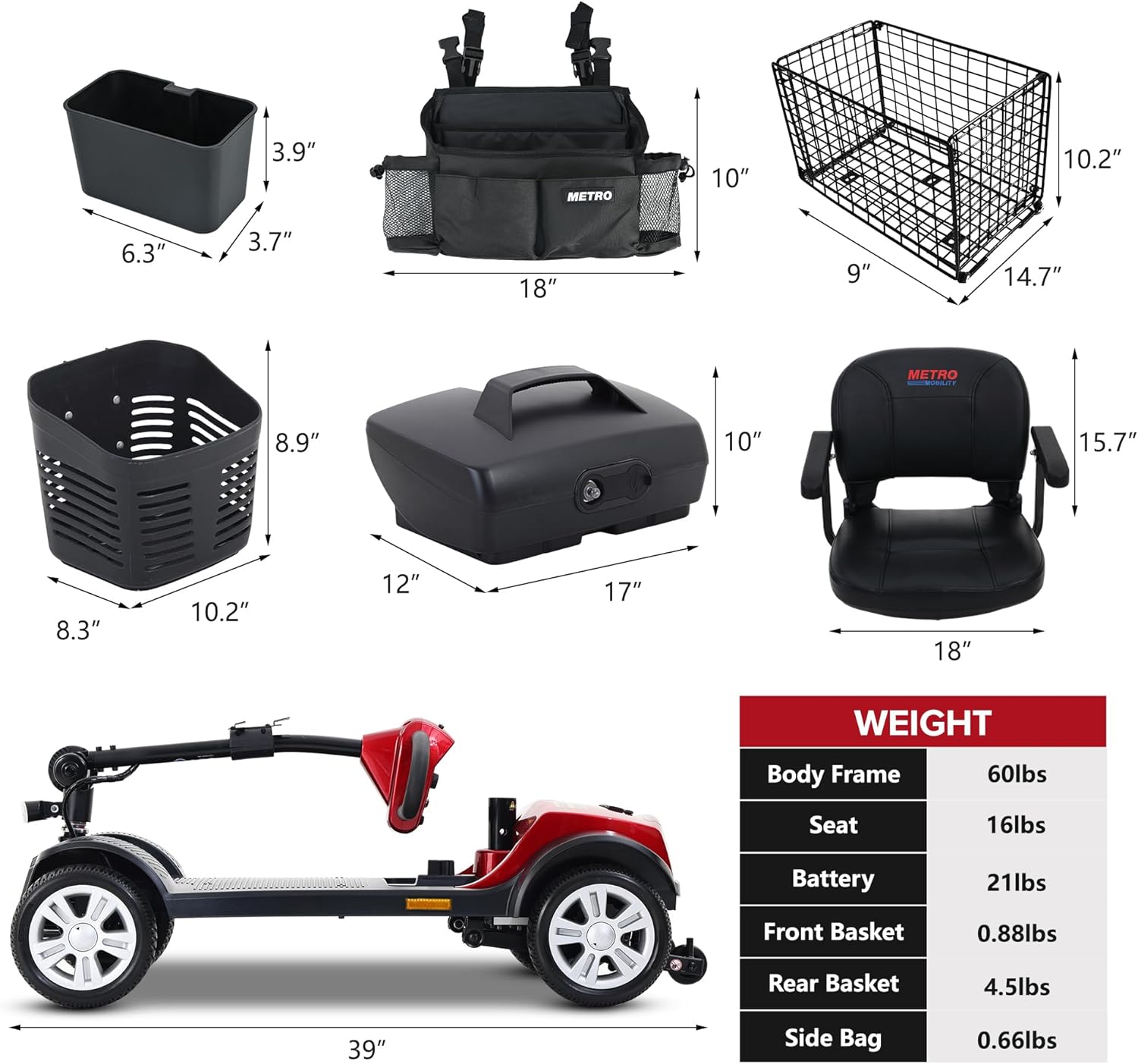
| Specification | Value |
|---|---|
| Model Number | M1 |
| Brand | Metro Mobility |
| Manufacturer | Metro Mobility USA LLC |
| Color | Red |
| Style | Electric |
| Material | Metal |
| Maximum Weight Capacity | 300 lbs (136 kg) |
| Maximum Speed | Up to 4.9 mph |
| Range per Charge | Up to 10 miles (single battery) |
| Battery Capacity | 12AH |
| Ground Clearance | 4.7 inches |
| Climbing Angle | -8 degrees |
| Seat Height | 350 Millimeters |
| Overall Dimensions (Approx.) | 39 inches (Length) x 19.7 inches (Width) x 36.6 inches (Height) |
| Body Frame Weight | 60 lbs |
| Seat Weight | 16 lbs |
| Battery Weight | 21 lbs |
9. Warranty and Support
The Metro Mobility 4-Wheel Electric Scooter is manufactured by Metro Mobility USA LLC. For specific warranty information, technical support, or service inquiries, please contact the manufacturer directly. Keep your purchase receipt as proof of purchase for any warranty claims.
Legal Disclaimer: Statements regarding dietary supplements have not been evaluated by the FDA and are not intended to diagnose, treat, cure, or prevent any disease or health condition.