
Introduction
The Arrow ET501F Corded 5-in-1 Electric Pro Staple Gun is a versatile tool designed for both professionals and DIY enthusiasts. It is capable of firing five different types of fasteners, including flat crown T50 staples, JT21 thin wire staples, round crown T25 staples, and 5/8" gauge brad nails. Its powerful motor with a built-in fan prevents overheating during continuous use, and the bottom-load mechanism ensures fast and efficient fastener loading. This manual provides detailed instructions for safe and effective use of your ET501F tool.
Safety Information
Always prioritize safety when operating power tools. Read and understand all instructions before use.
- Always wear appropriate eye protection (safety glasses) when operating the tool.
- Ensure the tool is unplugged from the power source before loading, unloading, or performing any maintenance.
- Keep hands and body parts clear of the firing area.
- Do not point the tool at yourself or others.
- Use the tool only for its intended purpose and with compatible fasteners.
- Store the tool in a dry, secure place, out of reach of children.
Product Overview
The Arrow ET501F is engineered for efficiency and durability. Key features include:
- 5-in-1 Fastening Capability: Supports T50 staples, JT21 thin wire staples, T25 round crown staples, and 5/8" brad nails.
- Auto Adjust Feed: Ensures smooth and consistent fastener delivery.
- Compact Ergonomic Design: Reduces user fatigue during extended use.
- Durable Cooling Fan: Prevents overheating for continuous operation.
- Power ON/OFF Switch: For safe and easy control.
- High Firing Rate: Fires up to 60 shots per minute.
- Bottom-Load Mechanism: Allows for quick and efficient reloading of fasteners.

Image: The Arrow ET501F Corded 5-in-1 Electric Staple and Nail Gun, showcasing its compact red and black design.
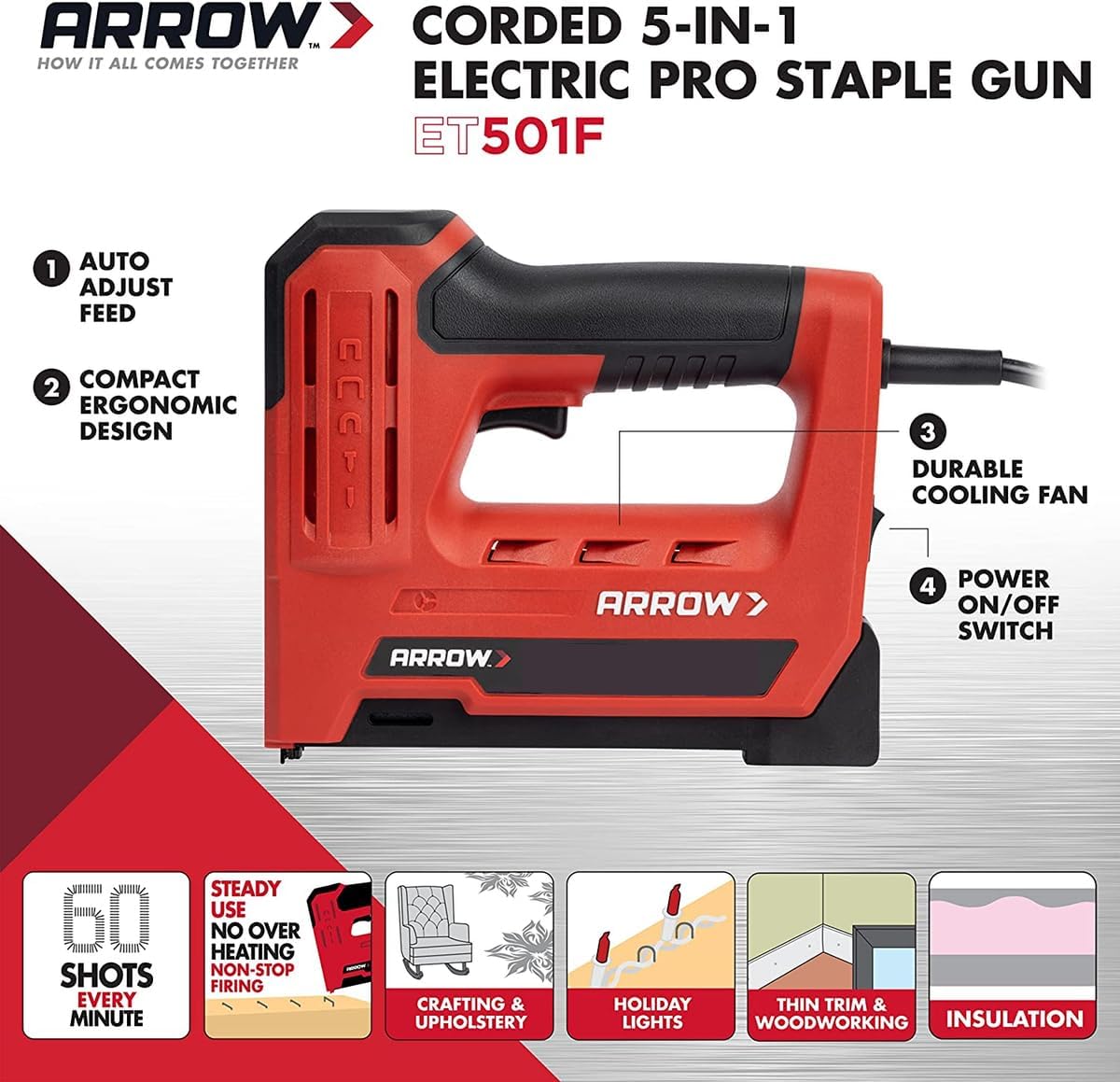
Image: Diagram of the Arrow ET501F highlighting key features such as auto adjust feed, ergonomic design, durable cooling fan, and power switch.
Setup
Loading Fasteners
The ET501F features a convenient bottom-load mechanism for quick and easy fastener installation.
- Ensure the tool is unplugged from the power source.
- Locate the bottom-load magazine release latch.
- Pull the magazine open.
- Insert the strip of compatible staples or nails into the magazine, ensuring they are oriented correctly.
- Push the magazine closed until it securely latches.

Image: A user's hands demonstrating the process of loading a strip of staples into the bottom-load magazine of the staple gun.

Image: A detailed view of the open magazine of the Arrow ET501F, showing the internal mechanism for holding fasteners.

Image: A close-up of the staple gun with a strip of staples correctly loaded into its magazine, ready for use.
Compatible Fasteners
The ET501F is designed to work with a variety of Arrow fasteners. Choosing the correct fastener type and length is crucial for optimal performance and to prevent damage to the tool or workpiece.

Image: A chart detailing the various sizes of T50 Heavy Duty Staples (1/4" to 9/16") and their recommended applications, including paper, fabric, plastics, house wrap, and insulation.

Image: A chart illustrating the different sizes of JT21 Light Duty Staples (1/4" to 3/8") and their suitable uses, such as light fabrics, cardboard, posters, and craft projects.
Power Connection
Connect the tool's power cord to a standard AC/DC electrical outlet. Ensure the power switch on the tool is in the 'OFF' position before plugging it in.
Operating Instructions
General Operation
To operate the Arrow ET501F, follow these steps:
- Ensure fasteners are properly loaded and the tool is plugged into a power source.
- Turn the power ON/OFF switch to the 'ON' position.
- For best performance and to prevent kickback, use two hands for better support and penetration. Place one hand firmly on top of the nailer while the other hand presses the trigger.
- Position the tool firmly against the workpiece where the fastener is to be driven.
- Press the trigger to fire a fastener. The tool automatically switches between fastener types as needed.
- Release the trigger after each shot.

Image: A line drawing demonstrating the correct two-hand grip and positioning for firing the staple gun to ensure stability and proper fastener insertion.
Switching Fastener Types
The ET501F is designed to automatically switch between compatible fastener types (staples and brad nails) based on what is loaded in the magazine. No manual adjustment is required to change between staple and nail modes, simplifying operation for multi-project use.
Maintenance
Regular maintenance ensures the longevity and optimal performance of your Arrow ET501F.
- Cleaning: Periodically wipe down the tool with a clean, dry cloth. Do not use harsh chemicals or abrasive cleaners. Ensure the tool is unplugged before cleaning.
- Fastener Path: Keep the fastener path clear of debris and dust. A built-in fan helps prevent overheating, but regular cleaning of vents is recommended.
- Storage: When not in use, store the tool in a dry environment, away from extreme temperatures and moisture. Unload any remaining fasteners from the magazine before storage.
- Cord Inspection: Regularly inspect the power cord for any signs of damage, fraying, or cuts. If damaged, have it repaired by a qualified professional.
Troubleshooting
If you encounter issues with your ET501F, refer to the common problems and solutions below:
- Tool Not Firing:
- Check if the tool is properly plugged into a live electrical outlet.
- Ensure the power switch is in the 'ON' position.
- Verify that fasteners are loaded correctly and the magazine is fully closed.
- Make sure the tool is pressed firmly against the workpiece.
- Fasteners Not Setting Properly (e.g., staple stands away from surface):
- The fastener length might be too long for the material. Try a shorter leg length.
- Ensure sufficient pressure is applied to the tool against the workpiece during firing.
- Jams:
- Unplug the tool immediately.
- Open the magazine and carefully remove any jammed fasteners. Do not force them.
- Ensure you are using genuine Arrow fasteners of the correct type and size.

Image: An illustration demonstrating a common issue where a staple is not fully driven into the material, indicating a need to check fastener length or application pressure.
Specifications
| Specification | Detail |
|---|---|
| Manufacturer | Arrow |
| Part Number | ET501F |
| Item Weight | 3.32 pounds |
| Product Dimensions | 7.25 x 5.75 x 0.1 inches |
| Item Model Number | ET501F |
| Color | Black/Red |
| Style | Automatically,Compact,Built-in |
| Material | Metal |
| Power Source | AC/DC |
| Item Package Quantity | 1 |
| Capacity Description | Full Strip |
| Included Components | Staple and Nail Gun |
Warranty and Support
For detailed warranty information and customer support, please refer to the official user manual provided with your product or visit the Arrow Fastener website. Protection plans are also available for extended coverage.
You can download the complete User Manual in PDF format here: Arrow ET501F User Manual (PDF)
For further assistance, please contact Arrow Fastener customer service.
