
1. Introduction
This manual provides detailed instructions for the safe and efficient operation of your HANMATEK HM305T Programmable DC Power Supply. The HM305T is a high-precision, adjustable DC power supply designed for laboratory, research, and repair applications, offering stable and reliable power output.
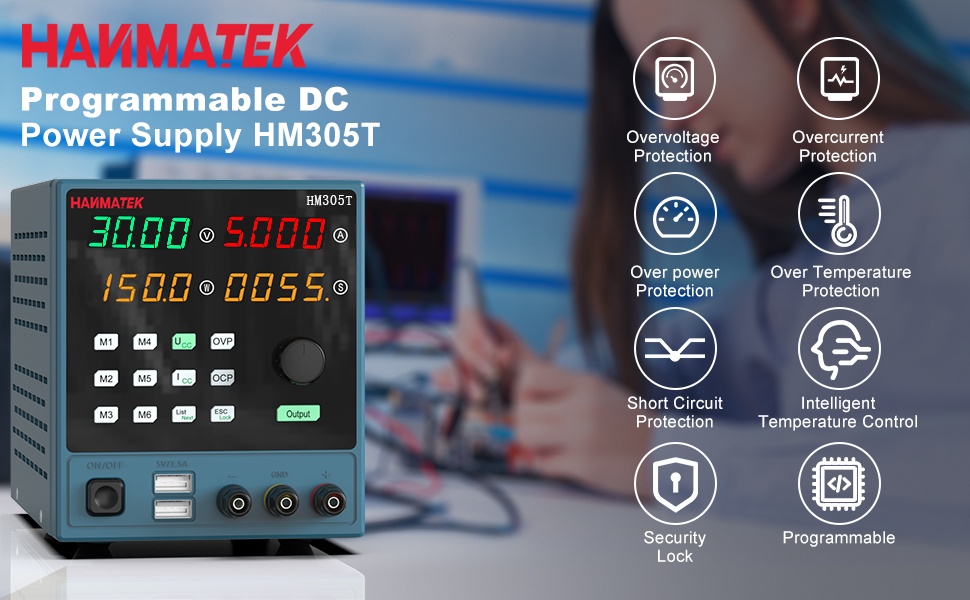
Figure 1: HANMATEK HM305T Programmable DC Power Supply overview, highlighting key features such as overvoltage protection, overcurrent protection, and intelligent temperature control.
2. Key Features
The HANMATEK HM305T is equipped with advanced features to ensure precision, safety, and versatility:
- High Precision Output: Provides adjustable voltage from 0-30V and current from 0-5A, with a resolution of 10mV and 1mA.
- Four-Digit Display: Simultaneously displays output voltage, current, power, and time with high accuracy.
- Multiple Protection Functions: Includes Over Voltage Protection (OVP), Over Current Protection (OCP), Over Power Protection (OPP), Over Temperature Protection (OTP), and Short-Circuit Protection.
- Programmable Control: Connects to a PC via USB for software control and programming functions.
- Dual USB Charging Ports: Front-panel 5V 1.5A USB ports for convenient device charging.
- Memory Storage: Six groups of parameter shortcut keys (M1-M6) for quick recall of frequently used settings.
- Intelligent Cooling Fan: Automatically adjusts fan speed based on temperature to maintain optimal operating conditions.
- Output ON/OFF Switch: One-key control for output, allowing pre-setting of values before activation.
- Keyboard Lock: Prevents accidental changes to settings during operation.

Figure 2: The HM305T features a high-precision four-digit display for voltage, current, and power, shown alongside other measurement devices for comparison.
3. Package Contents
Verify that all items are present in the package upon unboxing:
- HANMATEK HM305T Programmable DC Power Supply
- Power Cable
- USB Communication Cable
- Test Leads (Alligator clips)
- Instruction Manual
- Software CD (for PC control)

Figure 3: All items included in the HANMATEK HM305T package, neatly arranged.
4. Product Overview and Controls
Familiarize yourself with the front and rear panels of the power supply.

Figure 4: Detailed diagram of the HM305T's front and rear panels, indicating the location and function of all controls and ports.
Front Panel Controls:
- Voltage Display: Shows the output voltage.
- Current Display: Shows the output current.
- Power/Menu/Status Display: Shows output power, menu options, or status.
- Time/Status Display: Shows output time or status.
- Voltage Setting Key (UCV): Press to adjust voltage.
- Current Setting Key (ICC): Press to adjust current.
- Rotating Jog Wheel: Used to adjust values when setting voltage or current.
- Over Voltage Setting Key (OVP): Sets the overvoltage protection limit.
- Over Current Setting Key (OCP): Sets the overcurrent protection limit.
- Output On/Off Switch: Toggles the power output.
- Memory Shortcut Keys (M1-M6): Store and recall up to six sets of voltage and current parameters.
- List Next/Mode Key: Navigates through lists or changes modes.
- ESC/Keyboard Lock Key: Exits menu or locks/unlocks the keyboard.
- Dual USB Output Charging Key (5V/1.5A): Activates the front USB charging ports.
- Output Terminals: Positive (+), Negative (-), and Ground (GND) connections for load.
Rear Panel Components:
- Cooling Fan: Dissipates heat from the unit.
- USB Communication Interface: Connects to a PC for software control.
- AC Power Input: Connects the power supply to the mains electricity.
- Fuse Holder: Contains the protective fuse.
5. Setup
- Placement: Place the power supply on a stable, level surface with adequate ventilation. Ensure the cooling fan at the rear is not obstructed.
- Power Connection: Connect the provided AC power cable to the AC Power Input on the rear panel and then to a suitable mains power outlet.
- USB Connection (Optional): For PC control, connect the provided USB communication cable from the USB Communication Interface on the rear panel to your computer. Install the software from the included CD or download the latest version from the HANMATEK website.
- Initial Power On: Press the Power Button on the front panel to turn on the unit. The display will illuminate.
6. Operating Instructions
6.1 Setting Voltage and Current
- Ensure the output is OFF (Output button LED is off).
- Press the UCV (Voltage Setting) key. The voltage display will start blinking.
- Rotate the Rotating Jog Wheel to adjust the desired voltage. Press the jog wheel to move between digits for fine adjustment.
- Press the ICC (Current Setting) key. The current display will start blinking.
- Rotate the Rotating Jog Wheel to adjust the desired current limit. Press the jog wheel to move between digits.
- Once settings are complete, press the Output button to enable the power output. The Output button LED will illuminate.
6.2 Using Memory Functions (M1-M6)

Figure 5: The memory buttons (M1-M6) allow for quick storage and recall of frequently used voltage and current settings.
- To Save Settings: Set the desired voltage and current. Press and hold one of the memory keys (M1-M6) for approximately 3 seconds until a confirmation beep or display change indicates the settings are saved.
- To Recall Settings: Briefly press the desired memory key (M1-M6). The stored voltage and current values will be loaded.
6.3 Over Voltage Protection (OVP) and Over Current Protection (OCP)
These functions protect your connected load from excessive voltage or current.
- Setting OVP: Press the OVP key. The OVP value will blink. Use the Rotating Jog Wheel to set the maximum allowable output voltage. Press OVP again to confirm.
- Setting OCP: Press the OCP key. The OCP value will blink. Use the Rotating Jog Wheel to set the maximum allowable output current. Press OCP again to confirm.
6.4 Keyboard Lock
To prevent accidental changes to settings, press and hold the ESC/Lock key for 3 seconds to lock the keyboard. Repeat to unlock.
6.5 Using Dual USB Charging Ports

Figure 6: The front panel features two 5V 1.5A USB ports for convenient charging of external devices.
Connect your USB-powered devices to the 5V/1.5A USB ports on the front panel. These ports provide a fixed 5V output at up to 1.5A for charging or powering compatible devices.
6.6 PC Software Control
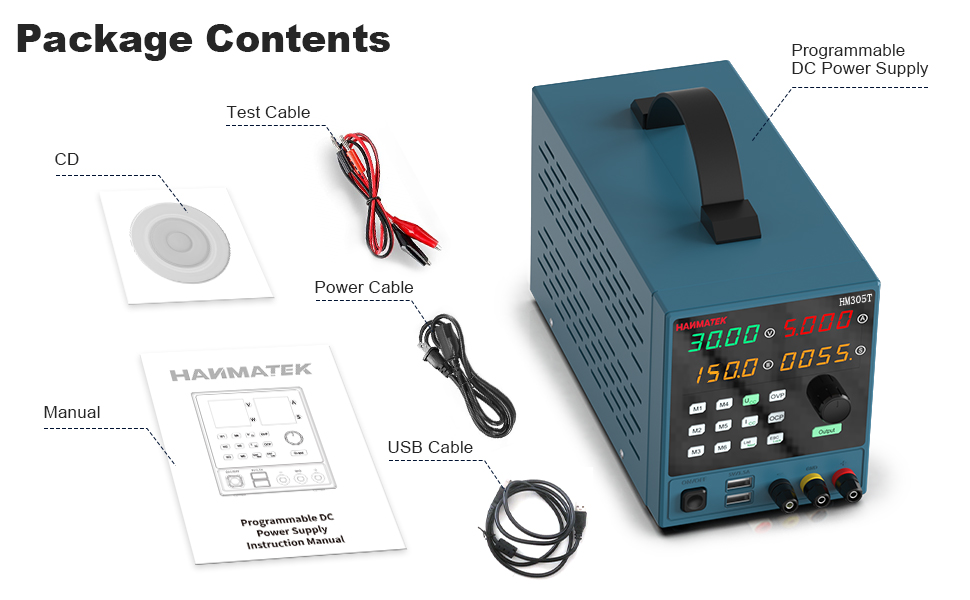
Figure 7: The PC software interface allows for remote control, data logging, and advanced programming of the HM305T power supply.
Install the provided software on your computer. Connect the power supply to your PC using the USB communication cable. The software allows for remote control of voltage and current, data logging, and advanced programming functions. Refer to the software's dedicated help documentation for detailed usage instructions.
7. Maintenance
7.1 Cleaning
Regularly clean the exterior of the power supply with a soft, dry cloth. Do not use abrasive cleaners or solvents. Ensure the unit is powered off and disconnected from the mains before cleaning.
7.2 Cooling Fan

Figure 8: The rear cooling fan ensures proper heat dissipation for stable operation.
Periodically check the cooling fan and its vents for dust accumulation. Use compressed air to gently clear any dust to ensure proper airflow and prevent overheating. Do not attempt to disassemble the unit to clean the fan.
7.3 Fuse Replacement

Figure 9: The fuse holder is located on the rear panel, integrated with the AC power input.
If the unit fails to power on, the fuse may need replacement. Ensure the power supply is disconnected from the mains. Carefully remove the fuse holder from the AC power input socket using a small flat-head screwdriver. Replace the fuse with one of the same type and rating (refer to specifications for details). Reinsert the fuse holder securely.
8. Troubleshooting
- No Power:
- Check if the power cable is securely connected to both the unit and the mains outlet.
- Verify the mains outlet is functional.
- Check and replace the fuse if necessary (refer to Section 7.3).
- No Output Voltage/Current:
- Ensure the Output button is pressed and its LED is illuminated.
- Check if OVP or OCP limits have been triggered. Adjust limits or reset the unit if protection is active.
- Verify that the load is correctly connected to the output terminals.
- Ensure the set voltage and current values are not zero.
- Incorrect Readings:
- Ensure proper connection of test leads to the load.
- Compare readings with a calibrated multimeter to verify accuracy. If significant discrepancies exist, contact support.
- Memory Settings Not Saving (M1-M6):
- Ensure you are pressing and holding the memory key for approximately 3 seconds to save. A brief press will recall.
- If issues persist, try a factory reset (refer to manual for specific procedure, if available, or contact support).
- PC Software Connection Issues:
- Verify the USB cable is securely connected.
- Ensure the correct drivers are installed on your PC.
- Check the software settings for the correct COM port selection.
9. Safety Information
Observe the following safety precautions to prevent electric shock, injury, or damage to the unit:
- Always connect the power supply to a grounded outlet.
- Do not operate the unit in wet or damp conditions.
- Do not open the casing of the power supply. There are no user-serviceable parts inside, and doing so voids the warranty and poses a risk of electric shock.
- Ensure proper ventilation around the unit to prevent overheating.
- Do not exceed the maximum voltage and current ratings of the power supply or the connected load.
- Utilize the Over Voltage Protection (OVP) and Over Current Protection (OCP) features to safeguard your circuits.
- Disconnect the power supply from the mains before performing any maintenance or connecting/disconnecting loads.
- Keep children away from the device.

Figure 10: The internal components of the HM305T are designed with multiple protection features including overvoltage, overcurrent, overpower, overtemperature, and short-circuit protection.
10. Specifications
| Parameter | Value |
|---|---|
| Model | HM305T |
| Output Voltage Range | 0-30V |
| Output Current Range | 0-5A |
| Output Power | 150 Watts |
| Voltage Resolution | 10mV |
| Current Resolution | 1mA |
| Display | 4-digit LED (Voltage, Current, Power, Time) |
| Protection Features | OVP, OCP, OPP, OTP, Short-Circuit |
| USB Charging Ports | 2 x 5V/1.5A |
| Communication Interface | USB |
| Material | PC (Polycarbonate) |
| Dimensions (L x W x H) | 35.61 x 21.49 x 17.81 cm (approx. 14 x 8.5 x 7 inches) |
| Weight | 2.42 kg (approx. 5.34 lbs) |

Figure 11: Approximate dimensions of the HM305T power supply.
11. Warranty and Support
The HANMATEK HM305T Programmable DC Power Supply comes with a standard manufacturer's warranty. For specific warranty terms, please refer to the warranty card included in your package or visit the official HANMATEK website.
For technical support, troubleshooting assistance beyond this manual, or warranty claims, please contact HANMATEK customer service through their official channels. Provide your model number (HM305T) and purchase details when contacting support.


