
Futaba UBT3369
Futaba T10PX Medium Drop Down Instruction Manual
Model: UBT3369
Introduction
This manual provides essential information for the installation and proper use of the Futaba T10PX Medium Drop Down. This component is designed as a direct replacement part for the Futaba 10PX radio system, enhancing ergonomics and control. Please read this manual thoroughly before installation to ensure correct assembly and optimal performance.
Product Overview
The Futaba T10PX Medium Drop Down is an accessory designed to reposition the steering wheel on your Futaba 10PX transmitter, providing a more comfortable and ergonomic grip for extended use. It consists of a main mounting plate, a perforated ring, and a curved ergonomic piece.
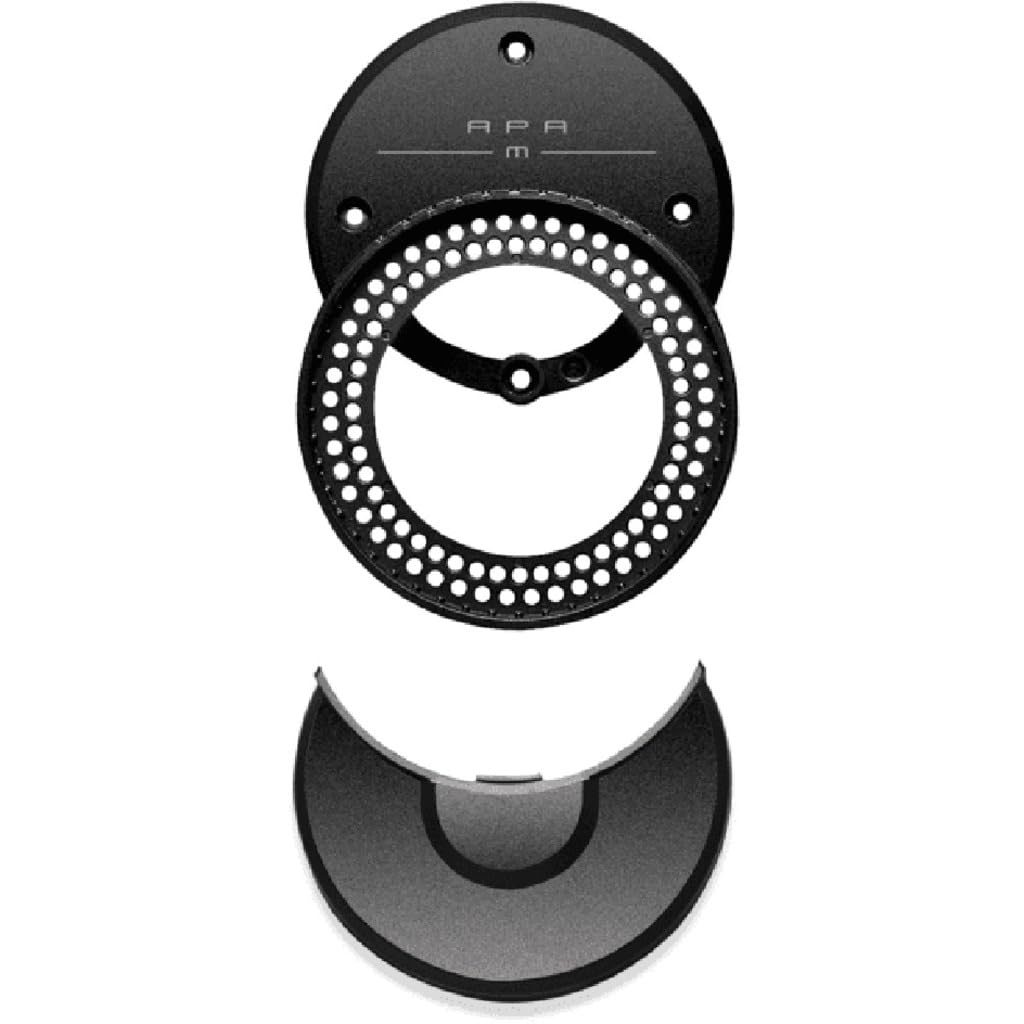
Figure 1: Components of the Futaba T10PX Medium Drop Down. The image displays three distinct parts: a circular top plate with "APA M" inscribed, a circular perforated ring, and a curved, ergonomic bottom piece.
Package Contents:
- One (1) Futaba T10PX Medium Drop Down assembly (as shown in Figure 1)
Setup and Installation
Installation of the Futaba T10PX Medium Drop Down requires careful handling of your Futaba 10PX transmitter. It is recommended to consult the original Futaba 10PX transmitter manual for specific disassembly instructions if you are unfamiliar with the process.
Required Tools (Not Included):
- Small Phillips head screwdriver
- Possibly a small flathead screwdriver or plastic pry tool (for careful separation of components)
Installation Steps:
- Power Off: Ensure your Futaba 10PX transmitter is powered off and disconnected from any power source.
- Remove Existing Components: Carefully remove the existing steering wheel and any associated drop-down or adapter components from your Futaba 10PX transmitter. Refer to your transmitter's manual for precise instructions on removing these parts.
- Assemble Drop Down: If the Futaba T10PX Medium Drop Down components are separate (as shown in Figure 1), assemble them according to the design. The perforated ring typically sits between the main mounting plate and the transmitter body, with the curved ergonomic piece attaching to the steering wheel mechanism.
- Mount New Drop Down: Align the Futaba T10PX Medium Drop Down with the mounting points on your Futaba 10PX transmitter.
- Secure with Screws: Use the appropriate screws (usually from the original transmitter assembly, or provided with the drop down if applicable) to secure the new drop down firmly in place. Do not overtighten screws.
- Reattach Steering Wheel: Reattach your steering wheel to the newly installed drop down mechanism. Ensure it is securely fastened and rotates freely without obstruction.
- Functionality Check: Power on your transmitter and perform a basic check to ensure the steering wheel operates correctly and the drop down is stable.
Operating Considerations
Once installed, the Futaba T10PX Medium Drop Down integrates seamlessly with your Futaba 10PX transmitter. No special operational procedures are required beyond the standard use of your radio system. The primary benefit is improved ergonomics during operation.
- Ensure the steering wheel's range of motion is not impeded by the new drop down.
- Verify that all connections are secure before operating your RC vehicle.
Maintenance
The Futaba T10PX Medium Drop Down requires minimal maintenance. Regular inspection is recommended to ensure its longevity and proper function.
- Cleaning: Wipe the surface with a soft, dry cloth. Avoid using harsh chemicals or abrasive cleaners.
- Inspection: Periodically check all mounting screws for tightness. If any screws feel loose, gently tighten them.
- Damage: If the drop down shows signs of cracking, bending, or other damage, replace it immediately to prevent potential issues during operation.
Troubleshooting
Most issues related to the Futaba T10PX Medium Drop Down are installation-related.
| Problem | Possible Cause | Solution |
|---|---|---|
| Steering wheel feels loose after installation. | Screws not tightened sufficiently. | Gently tighten all mounting screws. Do not overtighten. |
| Steering wheel binds or does not move smoothly. | Incorrect alignment during installation; debris. | Disassemble and reassemble, ensuring proper alignment. Check for any foreign objects obstructing movement. |
| Drop down appears damaged. | Physical impact; manufacturing defect. | Replace the damaged component. |
Specifications
| Feature | Detail |
|---|---|
| Product Model | UBT3369 |
| Compatibility | Futaba 10PX Transmitter |
| Product Dimensions | 4.45 x 3.5 x 0.65 inches (11.3 x 8.9 x 1.65 cm) |
| Item Weight | 0.8 ounces (22.7 grams) |
| Manufacturer | Futaba |
| Country of Origin | USA |
| Date First Available | March 3, 2022 |
Warranty and Support
For specific warranty information and technical support regarding your Futaba T10PX Medium Drop Down, please refer to the official Futaba website or contact Futaba customer service directly. Warranty terms may vary based on region and retailer.
Online Resources: www.futabarc.com
Ask a question about this manual
Ask about setup, troubleshooting, compatibility, parts, safety, or missing instructions. Manuals+ will review the question and use this page’s manual context to help answer it.