
1. Introduction
Thank you for choosing the erjigo GK G1 HiFi In-Ear Headphones. These headphones are designed to deliver an immersive audio experience with a focus on detailed low-frequency reproduction and balanced sound. This manual provides essential information for the proper setup, operation, maintenance, and troubleshooting of your GK G1 headphones.

Image 1.1: erjigo GK G1 HiFi In-Ear Headphones with detachable cable.
2. Product Components
The erjigo GK G1 headphones consist of the following main components:
- Earbud Units: The main housing containing the 10mm dynamic drivers.
- Detachable Cable: An oxygen-free copper flat cable for audio transmission and connectivity.
- Ear Tips: Various sizes of silicone ear tips for a comfortable and secure fit.
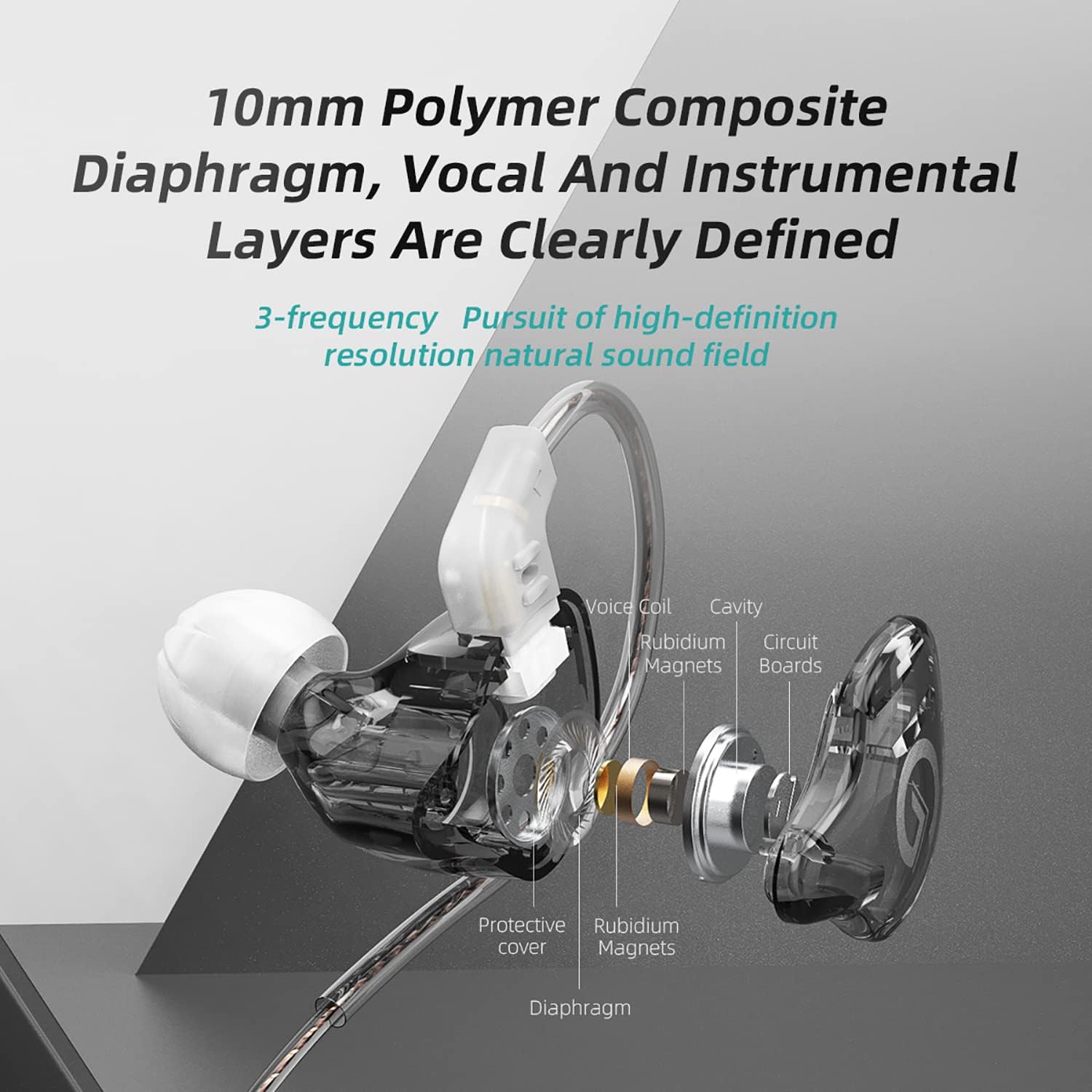
Image 2.1: Exploded view illustrating the internal components of the GK G1 earbud, including the 10mm polymer composite diaphragm, voice coil, rubidium magnets, and circuit boards.
3. Setup Instructions
3.1 Connecting the Detachable Cable
- Identify the left (L) and right (R) earbud units and the corresponding connectors on the detachable cable. The cable connectors are typically marked.
- Align the cable connector with the port on the earbud unit. Ensure the pins are correctly oriented.
- Gently push the cable connector into the earbud port until it is securely seated. Do not force the connection.
- Repeat for the other earbud.
3.2 Wearing the Earphones
Proper fit is crucial for optimal sound quality and comfort.
- Select the appropriate ear tip size. Experiment with different sizes to find the one that creates a good seal in your ear canal.
- Insert the earbud into your ear, ensuring the cable loops over the top of your ear for a secure fit. The ergonomic design is intended to conform to the shape of your ear.
- Adjust the earbud until it feels comfortable and forms a good seal. A proper seal will enhance bass response and passive noise isolation.

Image 3.1: Example of the ergonomic fit of the GK G1 in-ear headphones, with the cable looping over the ear.
3.3 Initial Use and Acoustic Adjustment
The GK G1 headphones feature innovative acoustic adjustment technology. To achieve optimal sound quality, it is recommended to play music at a low volume for approximately 10 minutes during the initial use. This process helps the drivers settle and deliver their intended performance.

Image 3.2: GK G1 headphones connected to a smartphone, illustrating the recommended initial low-volume playback for acoustic adjustment.
4. Operating Instructions
4.1 Connecting to an Audio Source
Connect the 3.5mm jack of the headphone cable to the audio output port of your device (e.g., smartphone, digital audio player, computer).
4.2 In-line Control Functions (if applicable)
If your GK G1 model includes an in-line microphone and control button, you can perform the following functions:
- Play/Pause: Press the button once.
- Next Song: Press the button two times.
- Previous Song: Press the button three times.
- Answer/Hang up Call: Short press the button once during an incoming call or an active call.
- Reject Call: Keep pressing the button during an incoming call.

Image 4.1: Visual guide to the in-line control button functions for music playback and call management.
5. Maintenance and Care
To ensure the longevity and optimal performance of your GK G1 headphones, follow these care guidelines:
- Cleaning: Regularly clean the earbuds and ear tips with a soft, dry cloth. For ear tips, you may gently wash them with mild soap and water, ensuring they are completely dry before reattaching. Do not use harsh chemicals or abrasive materials.
- Storage: When not in use, store the headphones in a clean, dry place, preferably in a protective case, to prevent tangling and damage.
- Cable Care: Avoid sharply bending or pulling the cable. When detaching the cable, always grip the connector housing, not the cable itself.
- Moisture: While the product description mentions "Waterproof" as a specification, it is generally advisable to avoid prolonged exposure to water or high humidity to prevent potential damage to internal components. Dry immediately if exposed to moisture.
- Temperature: Avoid exposing the headphones to extreme temperatures, both hot and cold.
6. Troubleshooting
If you encounter issues with your GK G1 headphones, refer to the following common troubleshooting steps:
- No Sound from One or Both Earbuds:
- Ensure the cable is securely connected to both the earbuds and the audio source.
- Check the volume level on your audio source.
- Test the headphones with a different audio source to rule out device issues.
- Inspect the cable and connectors for any visible damage.
- Poor Sound Quality (e.g., distorted, weak bass):
- Ensure the ear tips create a proper seal in your ear canal. Try different ear tip sizes.
- Check the audio source's equalizer settings, if any.
- Clean any debris from the earbud nozzles.
- Earbuds Falling Out or Uncomfortable Fit:
- Experiment with all provided ear tip sizes to find the best fit.
- Ensure the cable is correctly looped over your ear.
- Adjust the angle of the earbud in your ear for a more secure placement.
7. Specifications
| Feature | Specification |
|---|---|
| Model | GK G1 |
| Impedance | 34Ω |
| Sensitivity | 103dB |
| Frequency Response Range | 20-20000Hz |
| Cable Length | 120±3cm |
| Cable Type | Oxygen-free copper flat cable |
| Wearing Method | In-Ear |
| Connectivity Technology | Wired |
| Headphones Jack | 3.5 mm Jack |
| Material | Copper (cable), Resin (earbud housing) |
| Product Dimensions | 7.6 x 7.6 x 2.8 cm; 50 g |
| Special Features | Microphone Included (on some models), Detachable Cable |
| Water Resistance Level | Waterproof |
8. Warranty and Support
8.1 Warranty Information
The erjigo GK G1 HiFi In-Ear Headphones come with a one-year warranty from the date of purchase. This warranty covers manufacturing defects and issues arising from normal use. Please retain your proof of purchase for warranty claims.
8.2 Customer Support
For any questions, concerns, or technical assistance not covered in this manual, please contact erjigo customer service. Refer to the contact information provided with your purchase or visit the official erjigo website for support details.


