
1. Introduction
This manual provides detailed instructions for the installation, operation, and maintenance of your DEKCO Solar Security Camera and Wireless Doorbell Camera system. Please read this manual thoroughly before using the product to ensure proper function and safety. Keep this manual for future reference.
2. Package Contents
Verify that all components are present and in good condition upon unpacking.
- DEKCO Solar Security Camera
- Wireless Doorbell Camera
- Indoor Chime Unit
- Solar Panel (integrated with camera)
- Mounting Brackets and Screws
- USB Charging Cable
- User Manual (this document)
3. Product Overview
The DEKCO security system combines a solar-powered outdoor camera with a wireless doorbell camera to provide comprehensive home surveillance.
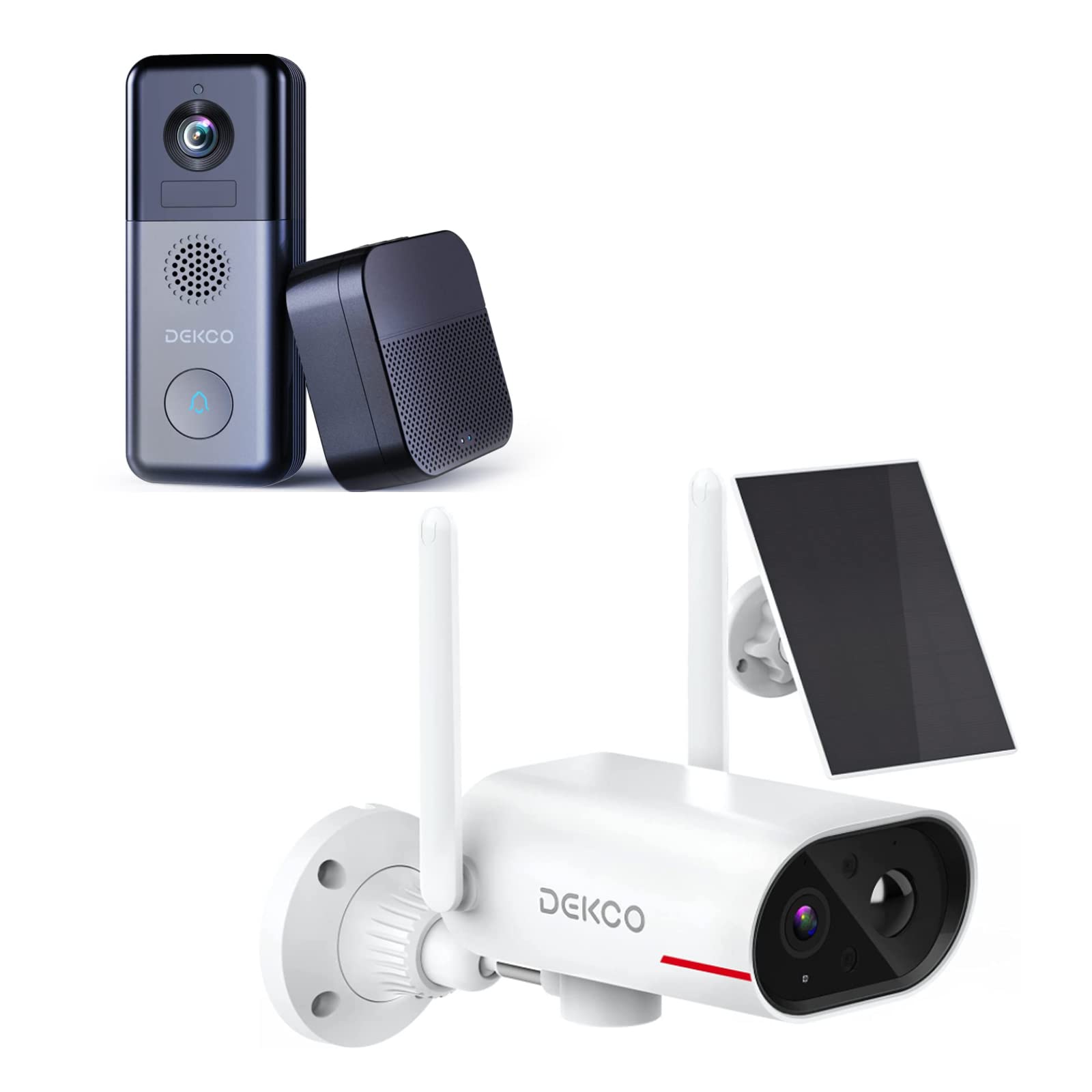
An image showing the DEKCO solar-powered security camera, the wireless doorbell camera, and its indoor chime unit. The security camera is white with two antennas and a solar panel, while the doorbell is dark grey with a camera lens and a call button. The chime is a compact black box.
3.1 Solar Security Camera Features
- 260° Viewing Range: Achieved through a 170° rotating design.
- 100% Wire-Free: Flexible installation without power cables.
- Solar Powered: Integrated solar panel for continuous power with adequate sunlight.
- Night Vision: Features color night vision for clear images in low light.
- Storage: Supports Micro SD card and cloud storage (no monthly fees).
- Waterproof Rating: IP65 for outdoor use.
3.2 Wireless Doorbell Camera Features
- 180-Day Battery Life: Built-in 10000mAh rechargeable battery for extended use.
- Two-Way Audio: Communicate with visitors remotely.
- Motion Detection: Receive alerts for activity at your door.
- Wireless Chime: Connects to an indoor chime unit.
- Waterproof Rating: IP65 for outdoor use.
4. Setup Guide
Follow these steps to set up your DEKCO security system.
4.1 App Installation
- Download the DEKCO app from your smartphone's app store (available for Android and iOS).
- Register for a new account or log in if you already have one.
4.2 Solar Security Camera Setup
- Initial Charge: Before installation, fully charge the camera using the provided USB cable.
- Mounting: Choose a location with good Wi-Fi signal and direct sunlight exposure for the solar panel. Use the mounting bracket and screws to securely attach the camera to a wall. Ensure the camera has a clear view of the desired monitoring area.
- Pairing: Open the DEKCO app, select 'Add Device', and follow the on-screen instructions to connect the camera to your Wi-Fi network.
4.3 Wireless Doorbell Camera Setup
- Initial Charge: Fully charge the doorbell camera using the provided USB cable.
- Mounting: Install the doorbell camera at your desired location near your front door using the provided mounting hardware. Ensure it has a clear view and good Wi-Fi signal.
- Pairing: In the DEKCO app, select 'Add Device' and follow the instructions to connect the doorbell camera to your Wi-Fi network.
- Chime Setup: Plug the indoor chime unit into a power outlet. Follow the app's instructions to pair the chime with the doorbell camera. You can select different chime tones and adjust the volume through the app.
5. Operating Instructions
Learn how to use the features of your DEKCO security system.
5.1 Solar Security Camera Operation
- Live View: Open the DEKCO app and select your camera to view live footage. You can manually pan/tilt the camera within its 260° range.
- Motion Detection: The camera is configured for motion-only alerts. Adjust sensitivity settings in the app to optimize detection and minimize false alarms.
- Recording: Motion-triggered events are recorded and stored on the Micro SD card (if installed) or in the cloud. Access recordings via the app's playback feature.
- Night Vision: The camera automatically switches to color night vision in low-light conditions.
5.2 Wireless Doorbell Camera Operation
- Answering Calls: When a visitor presses the doorbell button, your smartphone will receive a notification. Tap the notification to answer and engage in two-way audio communication.
- Motion Detection: The doorbell camera detects motion and sends alerts to your phone. Review motion events in the app.
- Live View: You can initiate a live view of your front door at any time through the DEKCO app.
- Chime Function: The indoor chime will sound when the doorbell button is pressed. Adjust settings in the app.
6. Maintenance
Regular maintenance ensures optimal performance and longevity of your devices.
- Cleaning Lenses: Periodically wipe the camera lenses and solar panel with a soft, damp cloth to remove dust and dirt. Avoid abrasive cleaners.
- Solar Panel Efficiency: Ensure the solar panel is free from obstructions (leaves, snow, etc.) to maximize charging efficiency.
- Battery Health: While solar-powered, ensure the security camera receives sufficient sunlight. For the doorbell, monitor battery levels via the app and recharge when necessary.
- Firmware Updates: Check the DEKCO app regularly for firmware updates. Install updates to ensure your devices have the latest features and security enhancements.
7. Troubleshooting
Refer to this section for solutions to common issues.
- Device Not Connecting to Wi-Fi:
- Ensure your Wi-Fi network is 2.4GHz (5GHz is not supported).
- Check Wi-Fi password accuracy.
- Move the device closer to your Wi-Fi router.
- Restart your router and the device.
- No Motion Detection Alerts:
- Verify motion detection is enabled in the app settings.
- Adjust motion sensitivity.
- Ensure the device has a clear view and is not obstructed.
- Poor Video Quality:
- Check your Wi-Fi signal strength.
- Clean the camera lens.
- Doorbell Battery Drains Quickly:
- Reduce motion detection sensitivity or frequency.
- Ensure the device is fully charged before use.
- Solar Camera Not Charging:
- Ensure the solar panel receives at least 1 hour of direct sunlight daily.
- Clean the solar panel surface.
8. Specifications
| Feature | Specification |
|---|---|
| Brand | DEKCO |
| Model Number | B09TF8K2W8 |
| Connectivity Technology | Wireless (Wi-Fi) |
| Power Source | Solar Powered (Camera), Battery (Doorbell) |
| Doorbell Battery Capacity | 10000 mAh |
| Viewing Angle (Camera) | 260° (170° rotating design) |
| Night Vision | Color Night Vision |
| Waterproof Rating | IP65 |
| Compatible Devices | Smartphone (Android) |
| Alert Type | Motion Only |
| Mount Type | Wall Mount |
| Video Capture Format | MPEG-4 |
9. Warranty and Support
For warranty information, technical support, or further assistance, please refer to the DEKCO official website or contact DEKCO customer service directly. Keep your purchase receipt as proof of purchase.


