
DESIGNA B09T98HK3L
DESIGNA Reversible L Shaped Desk 59" User Manual
Model: B09T98HK3L
1. Product Overview
The DESIGNA Reversible L Shaped Desk is designed for versatility and functionality, serving as an ideal workstation for home offices, gaming setups, or collaborative two-person environments. Its robust construction ensures stability and durability for long-term use.
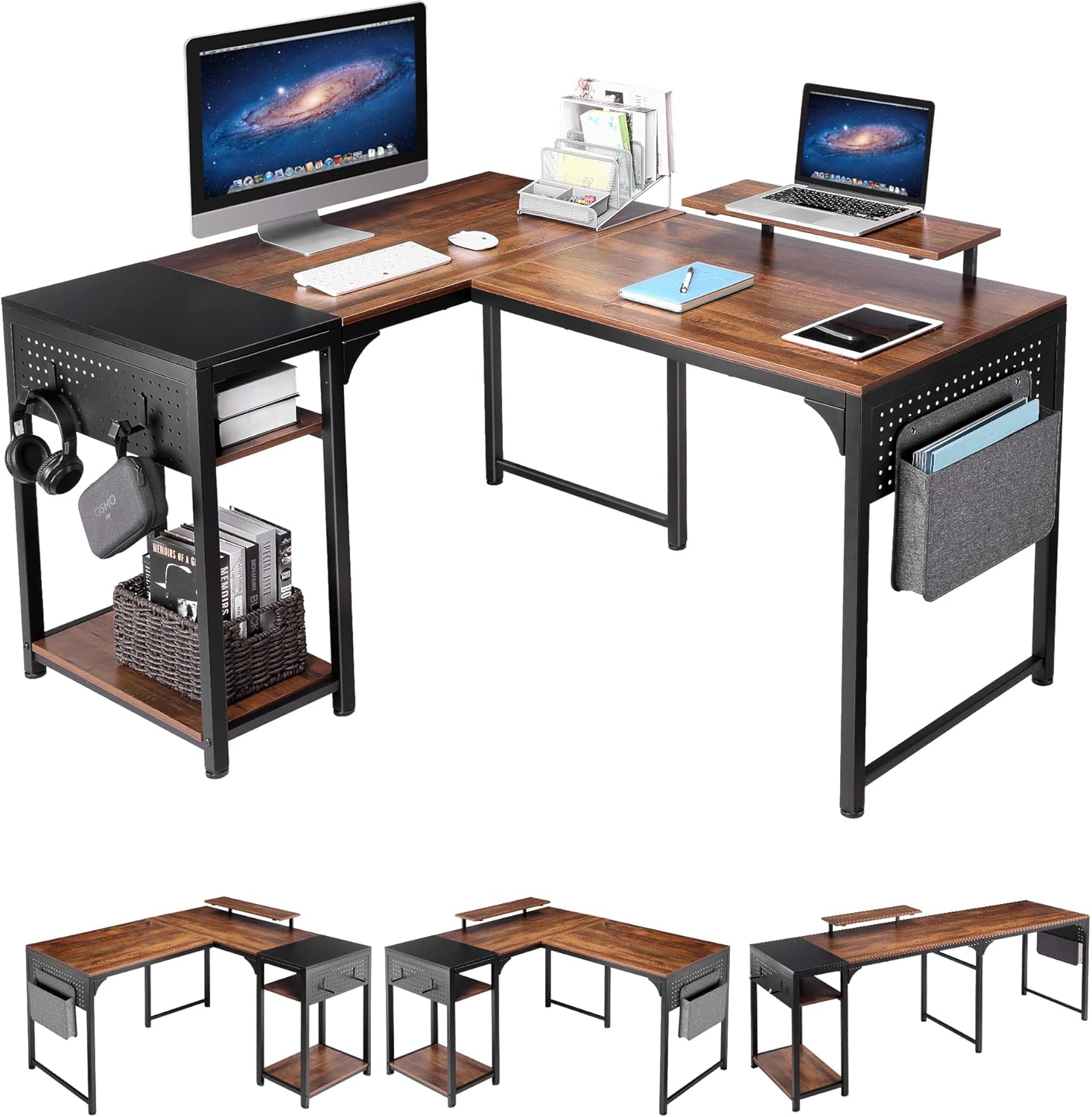
Figure 1.1: The DESIGNA L Shaped Desk, showcasing its spacious design and integrated storage solutions.
2. Setup and Assembly
This desk requires assembly. It is recommended to have two people for the assembly process to ensure ease and safety. All necessary tools and numbered parts are included in the package.
2.1 Configuration Options
The DESIGNA L Shaped Desk offers two primary configurations:
- L-Shaped Desk: Dimensions 59.06"L x 47.24"W x 30"H. The shelf can be installed on either the left or right side.
- Two-Person Desk: Dimensions 82.68"L x 23.62"W x 30"H. This configuration provides an extended linear workspace.

Figure 2.1: Desk configuration options: L-shaped (left or right shelf) or 2-person linear desk.
2.2 Assembly Steps
- Unpack all components and verify against the parts list provided in the instruction manual.
- Follow the numbered steps in the included assembly guide. Ensure all screws and fasteners are tightened securely.
- Decide on your preferred desk configuration (L-shaped or 2-person) before beginning assembly, as this will dictate certain connection points.
- Attach the monitor stand and storage shelves as indicated in the instructions.

Figure 2.2: Product dimensions for both L-shaped and 2-person configurations.
3. Operating and Features
The DESIGNA desk is designed to enhance your workspace with practical features.
3.1 Workspace Utilization
The large L-shaped desktop provides ample space for multiple monitors, laptops, and other office essentials, promoting an organized and efficient work environment.

Figure 3.1: Spacious L-shaped desktop for enhanced productivity.
3.2 Integrated Monitor Stand
An extra monitor stand is included to elevate your screen, promoting a better ergonomic posture and freeing up valuable desk space below.

Figure 3.2: Monitor stand for improved ergonomics and space management.
3.3 Storage Solutions
The desk features two-tier shelves for convenient storage of books, files, and other equipment. Additionally, a storage bag and hooks are provided for hanging items like headphones, bags, or keys, keeping your workspace tidy.

Figure 3.3: Flexible storage space with two height options for PC towers or shelves.

Figure 3.4: Side storage bag and hooks for accessories.
4. Maintenance
To ensure the longevity and appearance of your DESIGNA desk, follow these maintenance guidelines:
- Cleaning: Wipe surfaces with a soft, damp cloth. Avoid harsh chemicals or abrasive cleaners that may damage the laminated finish.
- Spills: Clean up spills immediately to prevent staining or damage to the wood and metal components.
- Stability: Periodically check all screws and connections to ensure they remain tight. Re-tighten if necessary to maintain desk stability.
- Weight Capacity: Do not overload the desk beyond its recommended weight capacity. The working surface diagonal length is 73.69 inches.
5. Troubleshooting
5.1 Desk Wobbles
If the desk feels unstable or wobbles after assembly:
- Ensure all assembly screws are fully tightened.
- Verify that the desk is placed on a level surface. Adjust the leveling feet if present.
- Check that all parts are correctly aligned according to the assembly instructions.
5.2 Missing Parts or Damaged Components
If you find any missing parts or damaged components upon unboxing, please contact customer service immediately for assistance.
6. Specifications
| Feature | Detail |
|---|---|
| Brand | DESIGNA |
| Product Dimensions (L-Shape) | 59.06"D x 47.24"W x 30"H |
| Product Dimensions (2-Person) | 82.68"D x 23.62"W x 30"H |
| Color | Rustic Brown / Black |
| Top Material Type | Laminated Wood |
| Base Material | Metal |
| Special Feature | Reversible, Monitor Stand, 2 Tier Shelves |
| Assembly Required | Yes (Tools Included) |
| Working Surface Diagonal Length | 73.69 Inches |
7. Warranty and Support
7.1 Warranty Information
This product comes with a standard return policy allowing for refunds or replacements within 30 days. For extended protection, 2-Year and 3-Year Protection Plans are available for purchase.
7.2 Customer Service
For any questions or concerns regarding your DESIGNA desk, before or after purchase, our domestic customer service team is available 24/7 and aims to reply within 24 hours.
Please refer to your purchase documentation for specific contact details or visit the official DESIGNA store on Amazon.
Ask a question about this manual
Ask about setup, troubleshooting, compatibility, parts, safety, or missing instructions. Manuals+ will review the question and use this page’s manual context to help answer it.