
Introduction
This manual provides detailed instructions for the safe and efficient operation, maintenance, and troubleshooting of your SHARP YC-PS234AE-S microwave oven. Please read it thoroughly before use and keep it for future reference.
Important Safety Instructions
Always follow basic safety precautions when using electrical appliances to reduce the risk of fire, electric shock, injury to persons, or exposure to excessive microwave energy.
- Do not attempt to operate this oven with the door open as this can result in harmful exposure to microwave energy.
- Do not place any object between the oven front face and the door or allow soil or cleaner residue to accumulate on sealing surfaces.
- Do not operate the oven if it is damaged. It is particularly important that the oven door closes properly and that there is no damage to the: (1) door (bent), (2) hinges and latches (broken or loosened), (3) door seals and sealing surfaces.
- The oven should not be adjusted or repaired by anyone except properly qualified service personnel.
- Ensure the appliance is properly grounded.
- Do not use the microwave for drying clothes, paper, or other non-food items.
- Liquids or other foods must not be heated in sealed containers since they are liable to explode.
- Only use utensils suitable for microwave ovens.
- Clean the oven regularly and remove any food deposits.
- Keep the appliance out of reach of children.
Setup and Installation
Proper installation is crucial for the safe and efficient operation of your microwave oven.
Unpacking
Carefully remove all packaging materials. Check the oven for any damage, such as dents or a misaligned door. Do not operate the oven if it is damaged.
Placement
Place the microwave oven on a flat, stable surface that can support its weight and the heaviest food item likely to be cooked in it. Ensure adequate ventilation around the unit. Maintain a minimum clearance of 10 cm at the rear, 20 cm at the sides, and 30 cm above the oven.
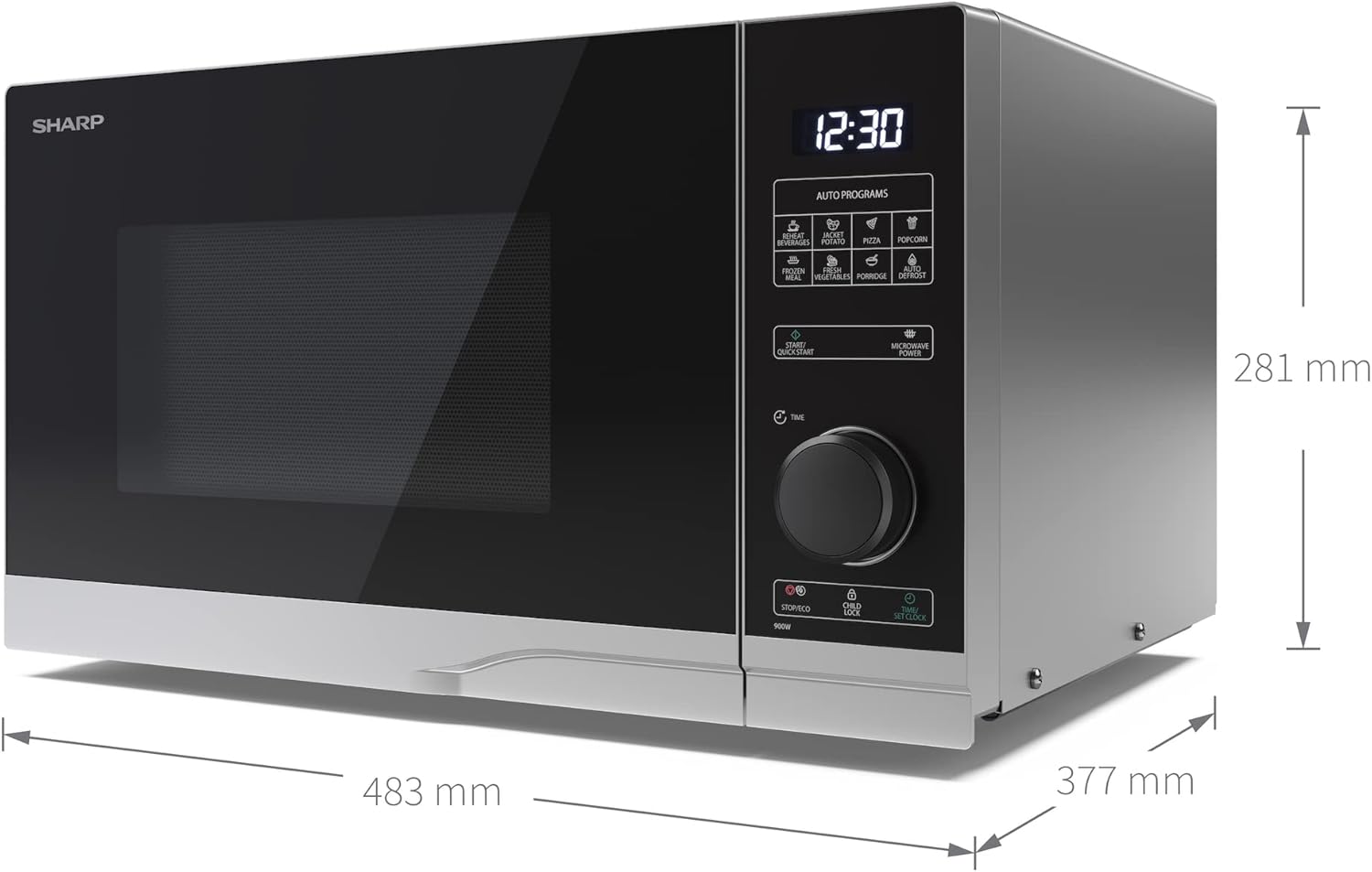
Image: Dimensions of the SHARP YC-PS234AE-S microwave oven, illustrating its width, height, and depth for proper placement.
Power Connection
Plug the power cord into a standard grounded electrical outlet. Ensure the voltage matches the rating label on the oven. Do not use extension cords.
Initial Setup
Place the glass turntable and turntable support ring inside the oven cavity.

Image: The interior of the microwave oven, displaying the glass turntable and its support ring correctly positioned.
Operating Instructions
Your SHARP YC-PS234AE-S microwave oven features a semi-digital control panel for easy operation.

Image: The control panel of the microwave, highlighting the digital display, rotary dial, and function buttons for setting cooking modes and times.
Setting the Clock
- Press the "Clock" button.
- Turn the rotary knob to set the hour.
- Press "Clock" again.
- Turn the rotary knob to set the minutes.
- Press "Clock" to confirm.
Microwave Cooking
- Place food in a microwave-safe container on the turntable.
- Close the door securely.
- Turn the rotary knob to select the desired cooking time.
- Press the "Microwave Power" button repeatedly to select the power level (e.g., 900W for full power). There are 10 power levels available.
- Press "Start/Quick Start" to begin cooking.
Quick Start Function
For quick heating, press the "Start/Quick Start" button. Each press adds 30 seconds of cooking time at full power (900W).
Auto Programs
The oven includes 8 automatic programs for common food items.
- Press the "Auto Programs" button.
- Turn the rotary knob to select the desired program (e.g., Vegetables, Pizza, Popcorn).
- Press "Start/Quick Start" to begin. The oven will automatically set the cooking time and power level.
Defrost Function
The defrost function allows for thawing food by weight or time.
- Press the "Defrost" button.
- Turn the rotary knob to select the defrost mode (by weight or time).
- Adjust the weight or time using the rotary knob.
- Press "Start/Quick Start" to begin defrosting.
ECO Function
Activate the ECO function to save energy. This mode reduces power consumption when the oven is idle. Refer to the display for ECO mode indication.
Child Safety Lock
To prevent unintended operation, especially by children, activate the child lock.
- To activate: Press and hold the "Stop/Clear" button for 3 seconds until a lock indicator appears on the display.
- To deactivate: Press and hold the "Stop/Clear" button for 3 seconds until the lock indicator disappears.
Maintenance and Cleaning
Regular cleaning ensures optimal performance and extends the lifespan of your microwave oven.
Exterior Cleaning
Wipe the exterior surfaces with a soft, damp cloth. Do not use abrasive cleaners or harsh chemicals.
Interior Cleaning
After each use, wipe the interior cavity with a damp cloth to remove food splatters. For stubborn stains, a mild detergent can be used. Ensure the interior is dry before closing the door.
Turntable and Support Ring
The glass turntable and its support ring can be removed for cleaning. Wash them in warm, soapy water or in a dishwasher. Ensure they are completely dry before placing them back in the oven.
Door Seals
Regularly clean the door seals and adjacent parts with a damp cloth to ensure proper sealing and prevent microwave energy leakage.
Troubleshooting
If you encounter issues with your microwave oven, refer to the following common problems and solutions before contacting service personnel.
| Problem | Possible Cause | Solution |
|---|---|---|
| Oven does not start | Power cord not plugged in; Door not closed properly; Fuse blown or circuit breaker tripped. | Ensure power cord is securely plugged in; Close the door firmly; Check household fuse or reset circuit breaker. |
| Food not heating | Incorrect cooking time or power level set; Door not closed properly. | Adjust cooking time and power level; Ensure door is fully closed. |
| Turntable not rotating | Turntable not properly placed; Debris under turntable. | Ensure turntable and support ring are correctly positioned; Clean under the turntable. |
| Unusual noise during operation | Food container touching oven walls; Turntable not centered. | Ensure food container is not touching walls; Reposition turntable. |
Specifications
| Feature | Detail |
|---|---|
| Brand | Sharp |
| Model Number | YC-PS234AE-S |
| Color | Silver / Black |
| Product Dimensions (D x W x H) | 37.7 x 48.3 x 28.1 cm |
| Weight | 12.9 kg |
| Capacity | 23 Liters |
| Microwave Power | 900 Watts |
| Voltage | 230 Volts |
| Material | Stainless Steel |
| Automatic Shutoff | Yes |
| Special Features | 10 Power Levels, Semi-Digital Control, LED Cavity Light, Easy Clean, Child Lock, ECO Function, Glass Turntable |
| Included Components | Glass Turntable, Instruction Manual |
Disposal Information
Do not dispose of this product with general household waste. Please dispose of it responsibly at a designated collection point for the recycling of electrical and electronic equipment. This helps protect the environment and human health.


