
Altec Lansing MZX5400-CGRY
Altec Lansing Nanophones ANC Headphones User Manual
Model: MZX5400-CGRY
Product Overview
The Altec Lansing Nanophones ANC are wireless on-ear headphones designed for comfort and superior audio experience with active noise cancelling technology. They feature a detachable microphone for clear communication, long battery life, and voice assistant compatibility, making them ideal for both entertainment and productivity.

Figure 1: Altec Lansing Nanophones ANC Headphones (Grey)
What's in the Box
- Altec Lansing Nanophones ANC Headphones
- Removable Boom Microphone
- USB-C Charging Cable
- User Manual (this document)
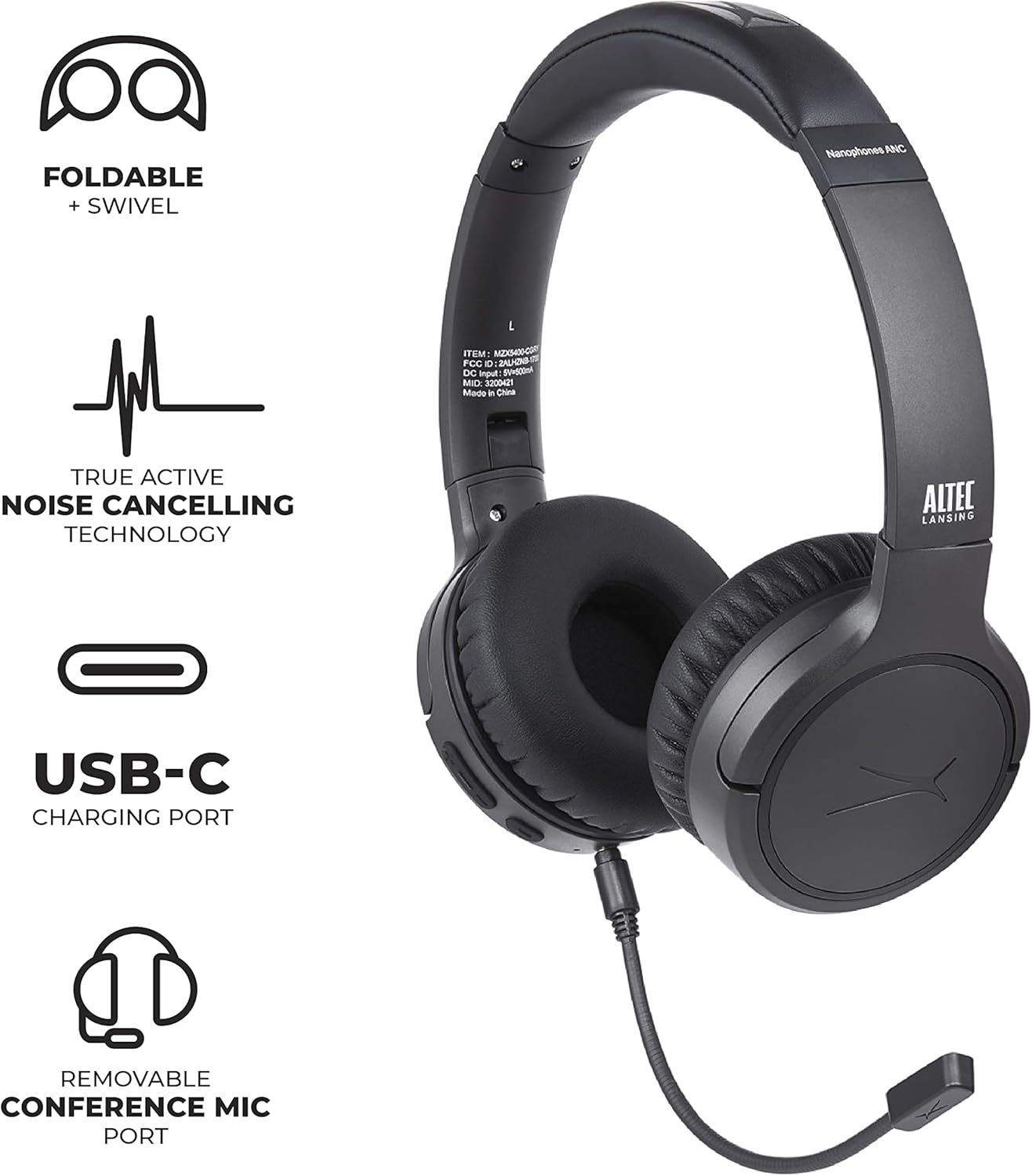
Figure 2: Headphones showing removable microphone and USB-C charging port.
Setup Guide
1. Charging the Headphones
Before first use, fully charge your Nanophones. Connect the provided USB-C cable to the charging port on the headphone earcup and plug the other end into a compatible USB power source. A full charge takes approximately 3 hours.

Figure 3: Headphones highlighting 12-hour battery life and USB-C charging.
2. Powering On/Off
- To Power On: Press and hold the Power button until the indicator light illuminates.
- To Power Off: Press and hold the Power button until the indicator light turns off.
3. Bluetooth Pairing
- Ensure the headphones are powered off.
- Press and hold the Power button until the indicator light flashes blue and red, indicating pairing mode.
- On your device (smartphone, tablet, computer), enable Bluetooth and search for "Altec Lansing Nanophones ANC".
- Select the headphones from the list to connect. Once paired, the indicator light will turn solid blue.

Figure 4: Headphones demonstrating Bluetooth connectivity with a range of up to 50 feet.
Operating Instructions
Active Noise Cancelling (ANC)
To activate or deactivate Active Noise Cancelling, press the dedicated ANC button located on the earcup. The ANC feature helps reduce ambient noise for a more immersive listening experience.

Figure 5: User enjoying music with Active Noise Cancelling enabled.
Using the Detachable Microphone
The Nanophones come with a removable boom microphone for enhanced voice clarity during calls and online meetings. Simply plug the microphone into the 3.5mm jack on the left earcup. Remove it when not needed for a more streamlined look.
Voice Assistant Access
Press the Voice Assistant button (usually the multi-function button) to activate your device's voice assistant (Siri, Alexa, Google Assistant, etc.).
Music and Call Controls
| Function | Action |
|---|---|
| Play/Pause | Press the Multi-function button once. |
| Next Track | Press and hold Volume Up button. |
| Previous Track | Press and hold Volume Down button. |
| Volume Up | Press Volume Up button briefly. |
| Volume Down | Press Volume Down button briefly. |
| Answer/End Call | Press the Multi-function button once. |
| Reject Call | Press and hold the Multi-function button. |
Maintenance and Care
- Clean the headphones with a soft, dry cloth. Do not use harsh chemicals or abrasive materials.
- Store the headphones in a cool, dry place away from extreme temperatures and direct sunlight.
- The foldable design allows for compact storage, protecting the earcups and headband.
- Avoid exposing the headphones to water or excessive moisture.

Figure 6: Headphones folded for easy storage and portability.
Troubleshooting
- No Power: Ensure the headphones are fully charged.
- Cannot Pair:
- Make sure Bluetooth is enabled on your device.
- Ensure the headphones are in pairing mode (flashing blue/red light).
- Move the headphones closer to your device.
- Forget the device from your Bluetooth list and try pairing again.
- Poor Audio Quality:
- Check the volume levels on both the headphones and your connected device.
- Ensure there are no obstructions between the headphones and your device.
- Move away from other wireless devices that might cause interference.
- ANC Not Effective: Active Noise Cancelling is most effective against low-frequency ambient noise. It may not completely eliminate all sounds.
Specifications
| Feature | Detail |
|---|---|
| Model Number | MZX5400-CGRY |
| Connectivity | Bluetooth 5.0 |
| Noise Control | Active Noise Cancellation (ANC) |
| Battery Life | Up to 12 hours |
| Charging Port | USB-C |
| Charging Time | Approx. 3 hours |
| Bluetooth Range | Up to 30 feet (10 meters) |
| Microphone | Detachable Boom Mic |
| Form Factor | On-Ear, Foldable |
| Weight | 14.6 ounces |
| Dimensions (Package) | 9.65 x 8.15 x 2.6 inches |
Official Product Video
Video 1: Official Altec Lansing Nanophones ANC Headphones overview. This video highlights key features and design aspects of the headphones.
Warranty and Support
For warranty information and customer support, please refer to the official Altec Lansing website or contact their customer service directly. Keep your proof of purchase for warranty claims.
For further assistance, visit the Altec Lansing Store on Amazon.
Ask a question about this manual
Ask about setup, troubleshooting, compatibility, parts, safety, or missing instructions. Manuals+ will review the question and use this page’s manual context to help answer it.