
1. Product Overview
The SINOTIMER TM624 is a digital programmable time switch designed for automatic control of bell systems in schools, factories, and other institutions. It features 40 programmable ON/OFF groups and an adjustable bell ringing interval from 1 to 99 seconds. This device is suitable for DIN rail mounting and provides precise time control for various applications.

Figure 1: Front view of the SINOTIMER TM624 Automatic Bell Timer Controller, showing the LCD display, control buttons, and terminal connections.
2. Setup and Installation
2.1 Mounting
The TM624 timer is designed for standard 35mm DIN rail mounting. Ensure the mounting location is dry, well-ventilated, and free from excessive vibration or extreme temperatures.

Figure 2: Dimensions of the TM624 timer, indicating its compact size for DIN rail installation.
2.2 Wiring
Before wiring, ensure the main power supply is disconnected to prevent electric shock. Refer to the wiring diagram on the side of the unit for correct connections. The terminals are typically labeled as follows:
- A1, A2: Power supply input (AC 220V, 50/60Hz).
- 15, 16, 18: Output contacts (15: Common, 16: Normally Closed, 18: Normally Open).
Connect the bell system or controlled device to the appropriate output contacts (e.g., 15 and 18 for normally open operation).
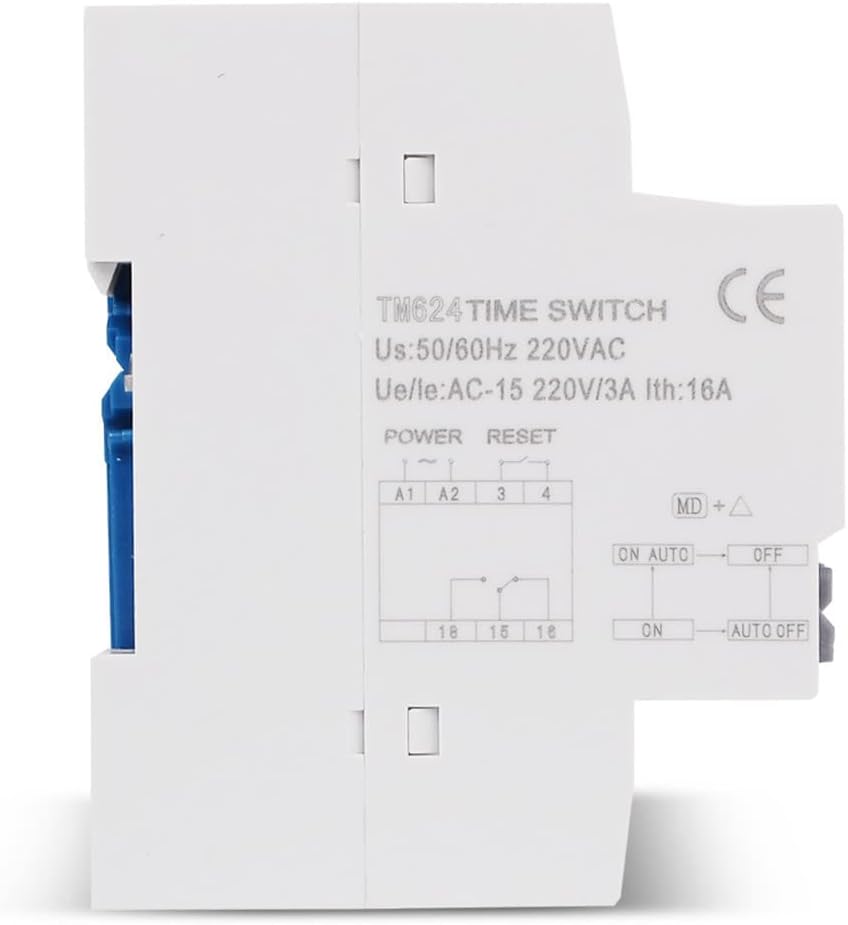
Figure 3: Side view of the TM624, displaying the wiring diagram for power input and output connections.
2.3 Initial Power-On and Reset
Upon first power-on or after a prolonged power outage, the display may be blank. Press the 'R' (Reset) button to initialize the unit. The internal battery will maintain settings during short power interruptions.
3. Operating Instructions
The TM624 features an LCD display and five control buttons: 'MD' (Mode/Menu/Set), 'R' (Reset), and four arrow keys (likely for navigation and adjustment).
3.1 Setting Current Time
- Press the 'MD' button repeatedly until the time setting mode is displayed (e.g., flashing hour/minute).
- Use the arrow keys to adjust the hour, minute, and day of the week.
- Press 'MD' again to confirm and exit the time setting mode.
3.2 Programming ON/OFF Times (40 Groups)
The TM624 supports up to 40 ON/OFF programming groups. Each group consists of an ON time and an OFF time.
- Press 'MD' to enter programming mode. The display will show '1 ON'.
- Use the arrow keys to set the desired ON time (hour and minute) for the first program.
- Press 'MD' to proceed to '1 OFF'. Set the desired OFF time.
- Press 'MD' to move to the next program ('2 ON') or to exit programming if no more programs are needed.
- Repeat for all desired ON/OFF programs.
- To select specific days of the week for a program, use the arrow keys while setting the ON/OFF time. Options typically include everyday, weekdays, weekends, or specific days.
3.3 Setting Bell Ringing Interval (1-99 Seconds)
This feature allows you to define the duration of the bell ring when activated by a programmed event.
- Locate the bell interval setting mode (refer to the specific icon or text on the display, often accessed via 'MD' button).
- Use the arrow keys to adjust the interval from 1 to 99 seconds.
- Confirm the setting.
3.4 Manual Override
The timer typically has a manual override function to temporarily switch the output ON or OFF, regardless of the programmed schedule. This is often indicated by 'ON AUTO OFF' on the display.
- Press the appropriate button (often one of the arrow keys or a dedicated 'Manual' button) to cycle through 'ON', 'AUTO', and 'OFF' modes.
- ON: Output is continuously ON.
- OFF: Output is continuously OFF.
- AUTO: Output follows the programmed schedule.
4. Maintenance
The SINOTIMER TM624 requires minimal maintenance.
- Cleaning: Use a soft, dry cloth to clean the exterior of the unit. Do not use abrasive cleaners or solvents.
- Battery: The unit contains an internal rechargeable battery to maintain time and program settings during power outages. This battery is typically long-lasting and not user-replaceable. If the display consistently goes blank or loses settings after short power interruptions, the unit may require professional service.
5. Troubleshooting
| Problem | Possible Cause | Solution |
|---|---|---|
| Display is blank. | No power supply; Unit needs reset. | Check power connections (A1, A2). Press the 'R' (Reset) button. |
| Timer not switching ON/OFF as programmed. | Incorrect programming; Manual override set to ON/OFF; Wiring issue. | Verify programmed times. Ensure unit is in 'AUTO' mode. Check output wiring (15, 18). |
| Bell ringing duration is incorrect. | Bell interval setting is wrong. | Adjust the bell ringing interval in the settings. |
| Time or settings are lost after power outage. | Internal battery issue. | Contact customer support for assistance. |
6. Specifications
| Feature | Specification |
|---|---|
| Model Number | TM624 |
| Power Supply | AC 220V, 50/60Hz |
| Output Capacity | 16A (Resistive Load) |
| Programmable Groups | 40 ON/OFF groups |
| Bell Interval | 1-99 seconds |
| Time Error | Less than 1 second/day |
| Mounting | 35mm DIN Rail |
| Material | Plastic |
| Dimensions | Approx. 8.99 x 8 x 5.08 cm |
| Weight | Approx. 122 g |
7. Warranty and Support
This product comes with a standard manufacturer's warranty. For warranty claims, technical support, or service inquiries, please contact your retailer or the SINOTIMER customer service department. Keep your purchase receipt as proof of purchase.
