
Introduction
This manual provides instructions for the WTTHAI 06-510W37-E000X Remote Control, designed for use with HKPRO televisions. Please read this manual thoroughly before using the remote control to ensure proper operation and to understand its features.
Product Overview
The WTTHAI 06-510W37-E000X Remote Control offers direct access to all necessary functions for your HKPRO TV. It is designed for ease of use without requiring complex setup or programming.
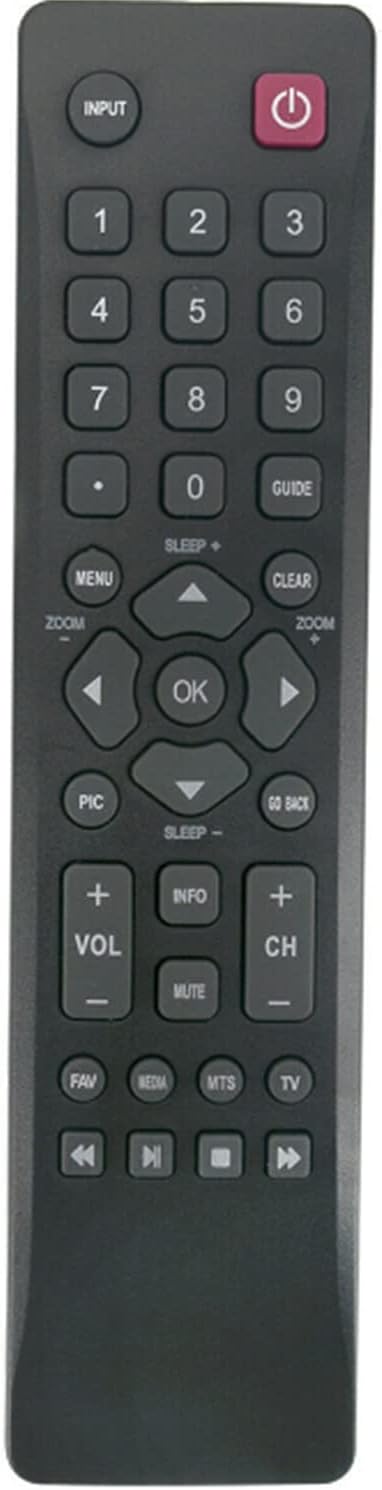
Figure 1: Front view of the WTTHAI 06-510W37-E000X Remote Control, showing all buttons including power, number keys, navigation, volume, and channel controls.
Setup: Battery Installation
The remote control requires two (2) AAA alkaline batteries (not included). Follow these steps to install the batteries:
- Locate the battery compartment on the back of the remote control.
- Press down on the latch and slide the battery cover downwards to open it.
- Insert two new 1.5V AAA alkaline batteries, ensuring the positive (+) and negative (-) terminals match the diagrams inside the compartment.
- Slide the battery cover back into place until it clicks securely.
Once batteries are installed, the remote control is ready for use. No programming or pairing is required.

Figure 2: Back view of the remote control with the battery compartment open, showing the correct orientation for AAA battery insertion.
Operating Instructions
This remote control is pre-programmed for compatible HKPRO TV models. Simply install the batteries as described in the "Setup" section, and the remote will function immediately.
- Power Button: Press to turn the TV on or off.
- Number Buttons (0-9): Use to directly select channels.
- Volume Up/Down (+/- VOL): Adjusts the television's volume level.
- Channel Up/Down (+/- CH): Changes the television channel.
- Mute Button: Silences the television audio.
- Navigation Buttons (Up, Down, Left, Right, OK): Used to navigate menus and confirm selections on the TV screen.
- Input Button: Selects the input source (e.g., HDMI 1, AV).
- Menu Button: Accesses the TV's main menu.
- Guide Button: Displays the electronic program guide (if supported by TV).
- Go Back Button: Returns to the previous screen or menu.
- Media Control Buttons (Play, Pause, Stop, Rewind, Fast Forward): Controls media playback on compatible devices or TV functions.
For specific functions of your HKPRO TV, refer to your television's user manual.
Troubleshooting
If the remote control is not functioning as expected, consider the following:
- Check Batteries: Ensure batteries are inserted correctly with the correct polarity (+/-) and are not depleted. Replace with new AAA alkaline batteries if necessary.
- Line of Sight: Make sure there is a clear line of sight between the remote control and the TV's infrared receiver. Obstructions can block the signal.
- Remote Control Model: Confirm that the remote control model 06-510W37-E000X is compatible with your specific HKPRO TV model.
- TV Power: Ensure the television is powered on and not in standby mode.
If problems persist after checking these points, please refer to the Support section for further assistance.
Specifications
| Feature | Detail |
|---|---|
| Model Number | 06-510W37-E000X |
| Brand | WTTHAI |
| Compatible Devices | HKPRO Televisions |
| Power Supply | 2 x 1.5V AAA Alkaline Batteries (not included) |
| Special Feature | Ergonomic design |
| Color | Black |
| Item Weight | 1.81 ounces |
| Max Number of Supported Devices | 1 |
Maintenance
To ensure the longevity and proper functioning of your remote control, follow these maintenance guidelines:
- Cleaning: Wipe the remote control with a soft, dry cloth. Do not use liquid cleaners or abrasive materials, as they may damage the surface or internal components.
- Battery Replacement: Replace batteries promptly when the remote's performance degrades. Remove batteries if the remote will not be used for an extended period to prevent leakage.
- Storage: Store the remote control in a cool, dry place away from direct sunlight and extreme temperatures.
- Avoid Drops: Protect the remote from physical impact, as drops can damage internal circuitry.
Support
If you encounter any issues with your WTTHAI 06-510W37-E000X Remote Control that cannot be resolved using the troubleshooting steps provided, please contact the seller or manufacturer for assistance. Providing details about your specific HKPRO TV model and the nature of the problem will help expedite support.
Note: The product package includes one 06-510W37-E000X Remote Control. User manuals are typically provided digitally or through product listings.