1. Introduction
This manual provides detailed instructions for the installation, operation, and maintenance of the Dayton Audio KAB-215v2 2 x 15W Class D Audio Amplifier Board with Bluetooth 5.0. Please read this manual thoroughly before using the product to ensure proper functionality and safety.
2. Safety Information
- Power Supply: Ensure the power supply voltage and current ratings are compatible with the KAB-215v2 board. Refer to the specifications section for details.
- Battery Use: When using rechargeable batteries, be aware that the KAB-215v2 board does not provide under/over charge protection. Use a separate interconnect board like the Dayton Audio KAB-BE for enhanced battery management.
- Ventilation: Ensure adequate ventilation around the amplifier board to prevent overheating.
- Static Electricity: Handle the board with care to avoid damage from static electricity.
- Moisture: Keep the board away from moisture and liquids.
3. Package Contents
Verify that all items are present in your package:
- One Dayton Audio KAB-215v2 Bluetooth Amplifier Board
- One 2-conductor power cable (approximately 20 inches)
- One 4-conductor speaker cable (approximately 20 inches)
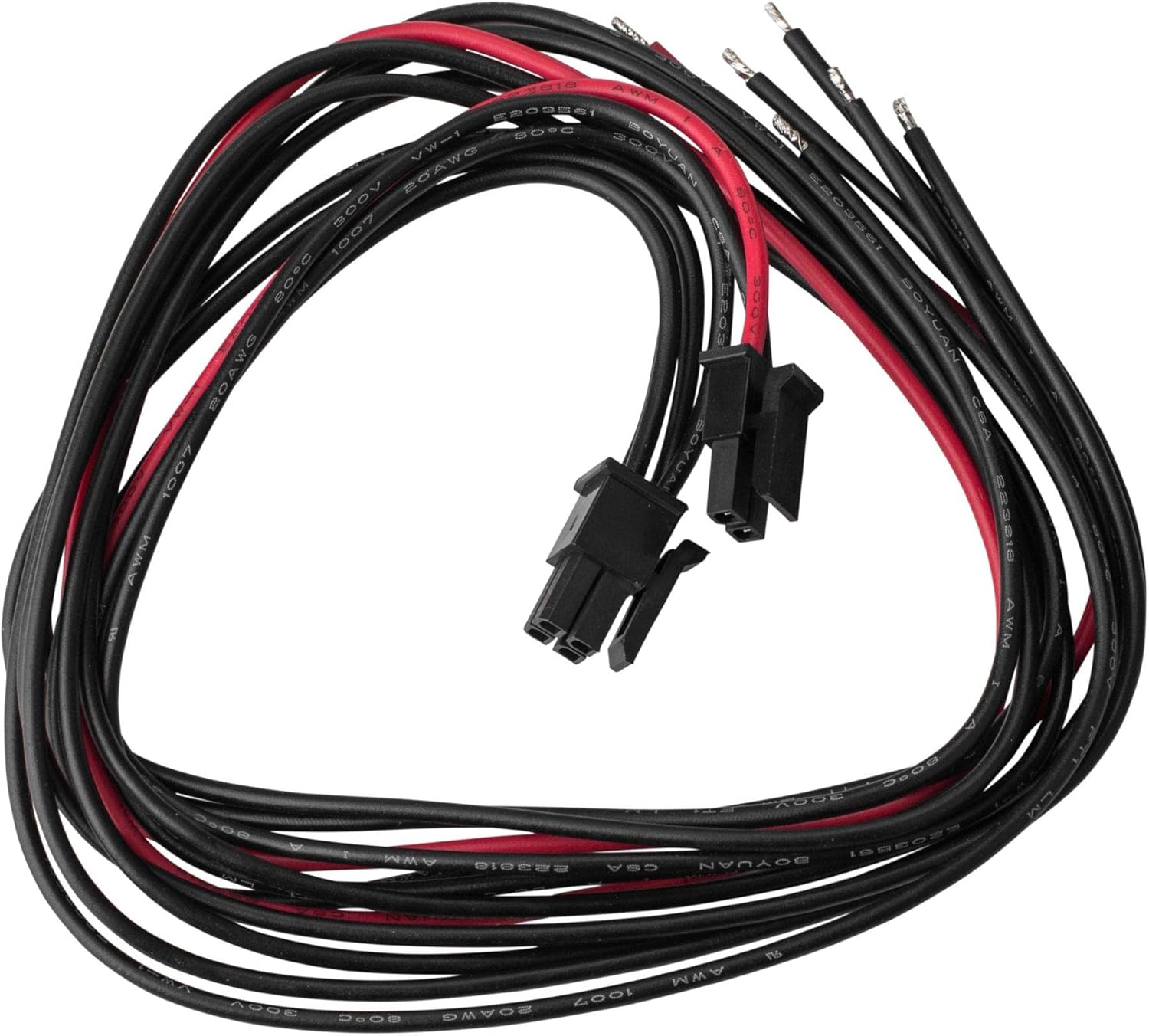
Image: Included 2-conductor power cable and 4-conductor speaker cable.
4. Product Overview
The Dayton Audio KAB-215v2 is a compact 2 x 15W Class D audio amplifier board featuring integrated Bluetooth 5.0. It is designed for various audio projects requiring efficient amplification and wireless connectivity.

Image: Top view of the KAB-215v2 amplifier board, showing various components and connectors.
4.1 Board Components and Connections
The board features clearly labeled connectors for power input, speaker outputs, and optional control interfaces.
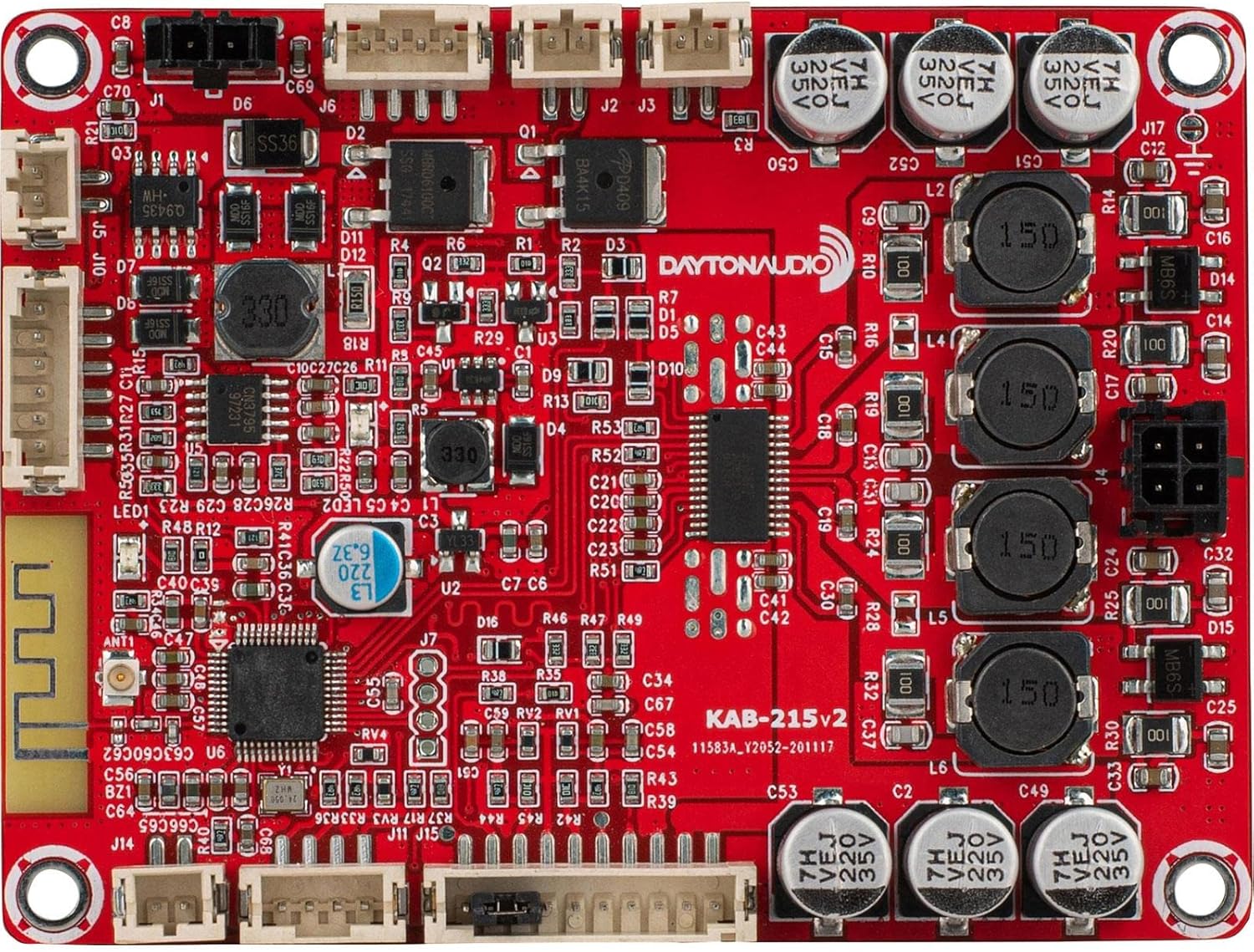
Image: Detailed top view highlighting component placement and connection points.

Image: Bottom view of the KAB-215v2 board, showing pinout labels for various connections including power, battery, speaker, and volume control.
5. Setup and Installation
The KAB-215v2 board is designed for quick and simple installation with wire harnesses, requiring no soldering for basic setup.
5.1 Connecting Speakers
- Identify the 4-conductor speaker cable.
- Connect the speaker cable to the designated speaker output connector on the KAB-215v2 board.
- Connect the other end of the speaker cable to your passive speakers. Ensure correct polarity (positive to positive, negative to negative). The board supports two channels (left and right).
5.2 Powering the Board
The KAB-215v2 offers multiple power options:
- DC Power Adapter: Use the included 2-conductor power cable to connect a compatible DC power adapter to the board's DC input port. The recommended input voltage is 15-24 VDC.
- Rechargeable Batteries (with KAB-FC): An optional function cable kit (KAB-FC) allows connection of NiMH, lead acid, or NiCad batteries. These batteries can be recharged directly from the board using a 15-24 VDC, 1A power supply. Caution: The KAB-215v2 board does not provide under/over charge protection for these battery types. The connected power adapter's output must not exceed 30 watts.
- Solar Charging: For solar applications, use solar batteries with a float (open) voltage of 16.5 - 21.5 VDC and a 20 - 100 watt panel.
- Alkaline Batteries: Eight AA alkaline batteries can power the board. Do not attempt to recharge alkaline batteries through the board.
- Recommended Battery Solution (KAB-BE): For optimal portable power, use the Dayton Audio KAB-BE interconnect board, which holds three 18650 Li-Ion batteries and provides under/over voltage protection. A 19 VDC, 1-5A power supply is recommended for charging the KAB-BE.
5.3 Bluetooth Pairing
- Power on the KAB-215v2 board.
- The board will automatically enter Bluetooth pairing mode. A blue LED indicator may flash to indicate pairing readiness.
- On your Bluetooth-enabled device (e.g., smartphone, tablet), search for available Bluetooth devices.
- Select "Dayton Audio KAB-215v2" (or similar name) from the list to pair.
- Once paired, the LED indicator will typically show a solid blue light.
5.4 Volume Control
The KAB-215v2 board includes a dedicated port for external volume control. Refer to the bottom view image for the 'VOLUME CONTROL' pinout. This allows integration with external potentiometers or control modules for adjusting audio output.
6. Operation
After successful setup and pairing, you can begin playing audio through the KAB-215v2 board.
- Power On/Off: The board powers on automatically when connected to a power source. Disconnect the power source to turn it off.
- Audio Playback: Play audio from your paired Bluetooth device. The sound will be amplified and output through the connected speakers.
- Standby Mode: The KAB-215v2 features an efficient standby mode, allowing it to remain powered for up to 7 days with Bluetooth enabled, thanks to its micro controller-based Power Management Unit (PMU).
7. Maintenance
The Dayton Audio KAB-215v2 requires minimal maintenance.
- Cleaning: Use a dry, soft cloth to gently clean the board. Do not use liquids or abrasive cleaners.
- Storage: Store the board in a cool, dry place away from direct sunlight and extreme temperatures.
- Inspection: Periodically inspect connections for any signs of wear or damage.
8. Troubleshooting
- No Power:
- Check power supply connections and ensure the power source is active and within the specified voltage range.
- If using batteries, ensure they are charged and correctly connected.
- No Sound:
- Verify speaker connections and polarity.
- Ensure the Bluetooth device is successfully paired and audio is playing.
- Check the volume level on both the source device and any external volume control connected to the board.
- Bluetooth Disconnection/Pairing Issues:
- Ensure the board is powered on and within range of the Bluetooth device.
- Try unpairing and re-pairing the device.
- Restart both the KAB-215v2 board and the Bluetooth source device.
- Distorted Audio:
- Reduce the volume level on the source device or the amplifier.
- Ensure speaker impedance is compatible with the amplifier.
- Check for loose connections.
9. Specifications
| Feature | Specification |
|---|---|
| Model Number | KAB-215v2 |
| Output Power | 2 x 15 Watts |
| Amplifier Chip | AD82110 |
| Bluetooth Version | 5.0 |
| Number of Channels | 2 |
| Dimensions (L x W x H) | 5 x 3.5 x 1.5 inches |
| Item Weight | 4 ounces |
| Mounting Type | Surface Mount |
| Compliance | FCC |
| UPC | 848791007835 |
10. Warranty and Support
For warranty information and technical support, please refer to the official Dayton Audio website or contact their customer service directly. Keep your purchase receipt for warranty claims.
Dayton Audio Website: www.daytonaudio.com


