
1. Introduction
Thank you for choosing the YOKEKON Warm & Cool Mist Humidifier. This manual provides essential information for the safe and efficient operation, maintenance, and troubleshooting of your new appliance. Please read it thoroughly before use and retain it for future reference.

Figure 1: YOKEKON Humidifier in operation.
2. Important Safety Instructions
- Always place the humidifier on a firm, flat, water-resistant surface.
- Do not immerse the base of the humidifier in water or any other liquid.
- Keep the appliance out of reach of children and pets.
- Unplug the humidifier before filling, cleaning, or moving it.
- Do not block the mist outlet or air intake vents.
- Use only clean, cool tap water. Distilled water is recommended to prevent mineral buildup.
- Do not add essential oils directly into the water tank; use the designated aroma box.
3. Setup
3.1 Unpacking
Carefully remove all packaging materials from the humidifier. Ensure all components are present: humidifier base, water tank, top cover, remote control, and user manual.
Video 1: Demonstrates the correct installation of the filter and silencer components into the YOKEKON Humidifier's atomizer before initial use.
3.2 Filter and Silencer Installation
- Locate the atomizer on the humidifier base.
- Place the filter and silencer components onto the atomizer as shown in the video.

Figure 2: Installing the filter component.
3.3 Filling the Water Tank
The YOKEKON Humidifier features a convenient top-fill design.
- Remove the top cover of the humidifier.
- Pour clean, cool tap water directly into the water tank, ensuring not to exceed the 'MAX' fill line.
- Replace the top cover securely.
Important: Do not immerse the humidifier base in water when filling or cleaning.

Figure 3: Filling the water tank from the top.
4. Operating Instructions
4.1 Power On/Off
Plug the power cord into a suitable electrical outlet. Press the power button on the control panel or the remote control to turn the humidifier on or off.
4.2 Mist Mode Selection (Warm/Cool Mist)
This humidifier offers both warm and cool mist options. Use the dedicated button on the control panel or remote to switch between modes.
- Cool Mist: Ideal for reducing dust and static electricity.
- Warm Mist: Beneficial for relieving stuffiness and cold symptoms.

Figure 4: Warm and Cool Mist functionality.
Video 2: An overview of the YOKEKON Warm and Cool Mist Humidifier, showcasing its features including remote control operation, mist settings, and easy cleaning.
4.3 Mist Output and Humidity Settings
Adjust the mist output with three available speed options. You can also set your desired humidity level between 40-90% using the control panel or remote. The humidifier will automatically maintain the set humidity.
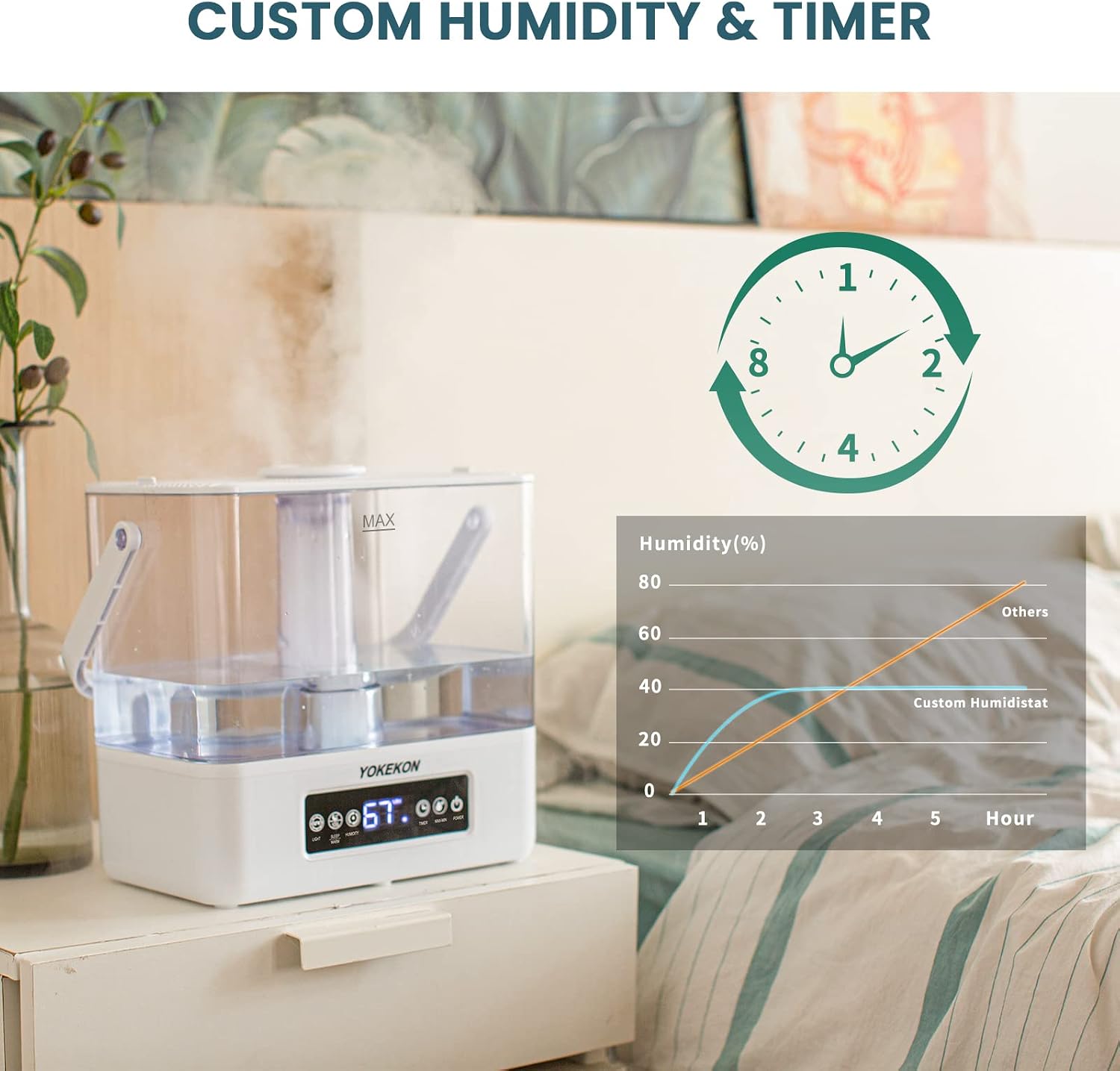
Figure 5: Setting custom humidity and timer.
4.4 Timer Function
Set the humidifier to operate for a specific duration using the timer function. Refer to the control panel or remote for available timer intervals.
4.5 Aroma Box Usage
To enjoy aromatherapy, add a few drops of your favorite essential oil to the aroma box located on the humidifier. Do not add oils directly into the water tank.

Figure 6: Using the aroma box.
Video 3: Illustrates the dual mist functionality of the YOKEKON Humidifier, demonstrating both warm and cool mist output.
5. Maintenance
5.1 Regular Cleaning
Regular cleaning is crucial for optimal performance and hygiene. Unplug the unit before any cleaning.
- Water Tank: Empty and rinse the water tank daily. Clean with a soft cloth or sponge.
- Base: Gently wipe the base with a damp cloth. Do not immerse the base in water.
- Atomizer: Use a soft brush or cotton swab to clean the atomizer gently.
- Aroma Box: Clean the aroma box as needed to prevent oil residue buildup.
5.2 Filter Replacement
The humidifier includes a filter. Check the filter periodically and replace it when necessary to maintain mist quality. Refer to the manufacturer's guidelines for replacement frequency.
6. Troubleshooting
| Problem | Possible Cause | Solution |
|---|---|---|
| No Mist Output | Water tank empty; unit not powered on; mist outlet blocked. | Refill water tank; ensure power is on; clear any obstructions. |
| Unit Shuts Off Automatically | Water shortage protection activated; desired humidity reached. | Refill water tank; this is normal operation if target humidity is met. |
| Unusual Odor | Stagnant water; mineral buildup; new unit odor. | Clean tank and base thoroughly; use distilled water; odor should dissipate after initial uses. |
| Excessive Noise | Unit not on a flat surface; water level too low. | Place on a stable surface; ensure adequate water level. |
7. Specifications
- Brand: YOKEKON
- Model Name: KC-H-1912 (Cool Mist Humidifiers)
- Special Features: Quiet, Remote Control, Timer
- Color: Transparent
- Floor Area Coverage: Up to 753 Square Feet
- Operation Mode: Ultrasonic
- Product Dimensions: 11"D x 13.7"W x 8.8"H
- Room Type: Baby, Bedroom, Office, Room
- Included Components: Filter, Instructions Manual
- Item Weight: 4.99 pounds
- Date First Available: August 4, 2021
8. Warranty & Support
The YOKEKON Humidifier comes with a 1-year warranty from the date of purchase. This warranty covers manufacturing defects and malfunctions under normal use.
For product assistance, technical support, or warranty claims, please contact our customer service team:
- Email: service@yokekon.com
Our dedicated after-sales service team is committed to providing you with the best support.


